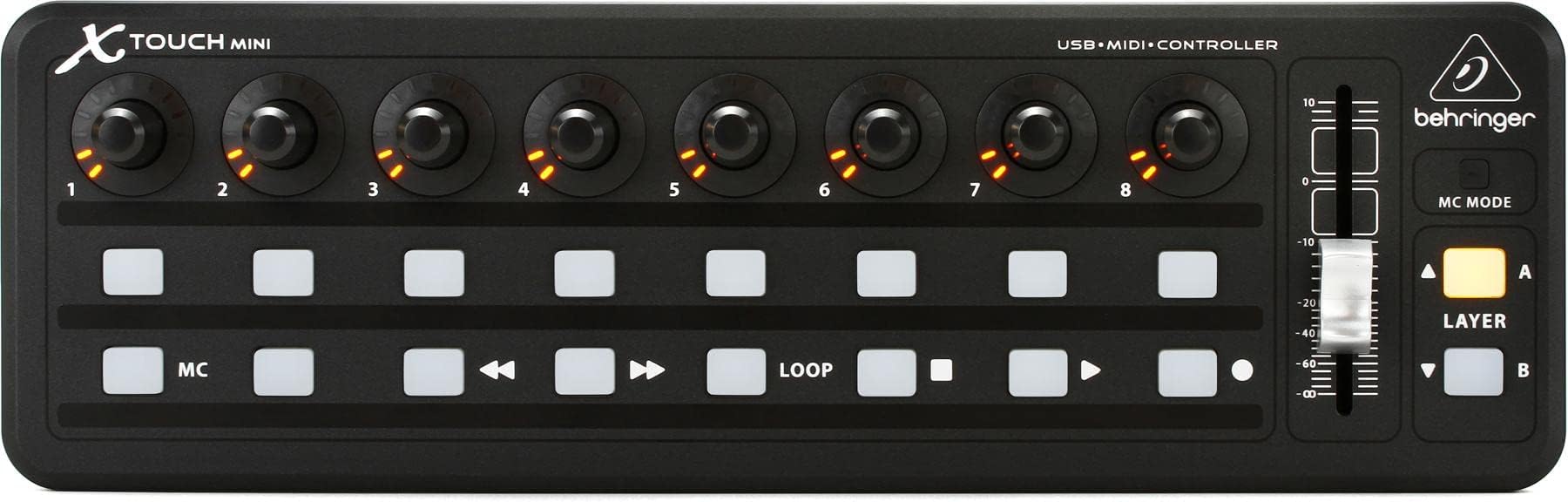

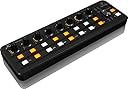
Belinger X-TOUCH MINI USB Controller
Product ID: 733379384
Details
- ブランド
- 付属コンポーネントUSBケーブル
- 商品の寸法10.2奥行き x x cm
- 接続技術USB
- 特徴コンパクト
🔄Dual-layer quick switching
🔌Plug & play USB 2.0
🎚️60mm master fader precision
🎛️ Elevate your studio game with the ultimate compact MIDI controller!
The Behringer X-TOUCH MINI is a compact USB MIDI controller designed for professional music producers and performers. Featuring a 60mm master fader, dual-layer mode for quick switching between DAW and instrument control, and Mackie Control emulation, it offers seamless integration with major music software. Its plug-and-play USB 2.0 connectivity and pre-configured setup make it ready to use immediately, while its durable build ensures long-lasting performance.


| Additional Features | Compact |
| Amazon Bestseller | #30,151 in Musical Instruments (See Top 100 in Musical Instruments) #142 in Computer Recording MIDI Controllers |
| Asin | B012CSKTYY |
| Brand Name | Behringer |
| Color | Black |
| Compatible Devices | desktop, laptop |
| Connectivity Technology | USB |
| Connector Type | USB |
| Control Method | Touch |
| Control Type | Mobile Controller |
| Country Of Origin | China |
| Customer Reviews | 4.5 4.5 out of 5 stars (717) 4.5 out of 5 stars |
| Global Trade Identification Number | 00748252139641, 04033653140454 |
| Hardware Interface | USB |
| Hardware Platform | macOS, Windows 10, Windows 7 |
| Human Interface Input | Buttons |
| Included Components | USB Cable |
| Instrument | Digital Audio Workstation |
| Instrument Key | Any |
| Item Dimensions D X W X H | 10.2D x 32.5W x 4.7H cm |
| Item Type Name | MIDI Controller |
| Item Weight | 520 g |
| Manufacturer | MUSIC Tribe |
| Manufacturer Part Number | X-TOUCH MINI |
| Mixer Channel Quantity | 1 |
| Model Number | 000-B3M00-00010 |
| Noise Control | None |
| Platform | Mac, Windows 10, Windows 7 |
| Supported Software | Mackie Controlプロトコルに対応する音楽制作ソフトウェア |
| Total Usb 2 0 Ports | 1 |
| Total Usb Ports | 1 |
| Upc | 748252139641 |
| Warranty Description | Bellinger products sold by Electri, an authorized import distributor are covered by a 1 year warranty from the date of purchase |
User
品質は優秀、だが左手デバイスとしては大きすぎた
Lightroomでの作業効率化を目的に、2018年にX-TOUCH MINIを購入しました。mac環境で、Lightroom ClassicやPhotoshopにBetterTouchToolを使って割り当て、左手デバイスとして約1年ほど使用しました。まず感じたのは、物理的な完成度の高さです。ダイヤルのクリック感や押し込み機能は非常に快適で、たとえば「回転で拡大・縮小、押し込みでリセット」といった直感的な操作ができます。ボタンの押し心地も良く、Photoshopではアクションを割り当てて使っていました。一方で、実際の作業においては割り当てすぎが仇になることも体感しました。こういった左手キーボード系のデバイスは「ここにも、あそこにも機能を割り当てたい」とつい欲張ってしまいがちですが、結局よく使うのはほんの数個。それならもっとコンパクトなデバイスの方が効率的だと気づきました。X-TOUCH MINIはサイズがやや大きく、複数アプリで切り替えて使うには割り当ての記憶やラベルの工夫(私はアプリごとにシートを印刷して載せていました)が必要。これが面倒になり、最終的に使用をやめました。現在はStream DeckとStream Deck Mobileを使っており、アプリごとに動的に表示が変わる液晶ボタンの利便性が、自分には合っていると感じています。また、露出や拡大縮小といった操作も、8ボタンマウスで対応できるようになり、左手を動かす必要性が薄れたのも使用をやめた一因です。
User
必要不可欠な存在
在庫がなく注文から3ヶ月ほど待ちましたが、Lightroomに接続してすごく役に立っています!もう手放せません。
User
Lightroom CCでは使えなかった。
Lightroom CCで使いたく購入しましたが、設定している時にクラシックでしか使えないことが判明しました。数百枚の写真整理の時はクラシックを使う思いでそのまま設定しました。1,2枚試しに使ってみた感じはレタッチが楽になりすごく良い。ボタンに「次の写真」などを割り当てましたが、ボタンは押すのに少し力がいるので、キーボードよりは操作性落ちるかもしれません。ただ、慣れれば大丈夫かと思います。あとは、有線なのが少し邪魔です。左側に入線口があるのですが、パソコンは右側にあるので線が鬱陶しいです。
User
Compact, light and tidy
The small footprint of this product makes it perfect for minimalistic/mobile gig setups.Once the setup on the software side was done (most notably the differences of "Note" versus "CC" data), it gave me total control, which I didn't have before due to the limited functionality of my tiny Bluetooth keyboards.Almost everything could be done inside the VST host applications by "MIDI learn" and a first live gig with this newly integrated part worked flawlessly.
User
Loupedeck plusより良いと思う
Lightroom Classicで使用Loupedeck plusから乗り換えたがこちらの方がコンパクト、かつ操作性も良いので最初からこっちにすればよかった設定方法はネットに転がってるのでできるが少々面倒
User
写真編集ソフトのコントローラとして購入
Windows11のPCに接続して、写真編集ソフトLight room Classicの各種編集用に使っています。LRCで使用するには、MIDI2LRのプラグインを使いカスタマイズが必要です。PC操作に慣れている人向けです。
User
ツマミががたがたです
アピールの通りフェーダーの質はよく、気持ちよい抵抗でなめらかに動くのですが、ツマミがかなり微妙で、軸がグラグラします。押し込みでき、クリックできるツマミになっているので、先端の方に横向きの力を掛けてしまうと中で突っ張って回転しなくなります。下の方を持てば普通に回るのですが、いかんせんツマミの背が高いため素早く操作しようとすると先端部分に力がかかってしまいがちで、非常に回しづらいです。この品質だと、半額以下のnanoKONTROL2と大差ないなという感じがします。見た目のしっかり感はあるんですけどね。
User
ツマミみたいなもんは、いくらあっても困らない
ツマミみたいなもんは、いくらあっても困らない
User
lightning fast video editing! programable midi controller for editing with Premiere Pro...
So, let's talk about the Behringer X-TOUCH MINI MIDI USB Interface and how it's been rocking my Premiere Pro video editing world.First off, the best feature of this controller is the customization. I can assign all my go-to shortcut commands to the buttons and knobs, making my editing process way smoother and SO FAST.But firstly lets get the biggest catch out of the way – programming these shortcuts isn't exactly plug-and-play. You'll need some third-party software to make it happen.Once you're set up, though, it's pretty straightforward, and software and tutorials are easy to find. once that is done, assigning shortcuts is a breeze and the settings can be found in the preferences tab.What's cool is that it doesn't stop there. combined with some simple midi editing software, this allows you to store multiple banks of shortcuts, which is handy for different phases of editing. Whether I'm trimming clips or adding effects, everything's just a button press away.The ergonomic design is another plus. I can edit for hours without feeling like my hand's gonna fall off. It's surprisingly comfy, and I am much less inclined to be hunched over the whole time. the buttons are large, clicky and responsive, and the layout is very easy to remember.O.K, onto the cons. Well, besides needing that extra software, there's not much to complain about. It's not the flashiest tool, but it gets the job done so well.Overall, if you're serious about really speeding up your editing process in Premiere Pro, the MIDI Interface is defiantly worth checking out. it has made a night and day difference to my editing workflow for me, and I'm pretty sure the Behringer X-TOUCH MINI will make your editing life a whole lot easier and faster too.
User
Perfect for MS Flight Sim and a relatively cheap way to add cockpit buttons
I use this with SpadNext software to program it to work with MSFS 2020. It works perfectly, but does require you to program it, which is the tricky part and can take some time (good tutorials in YT). I now have 2 of these as part of my 787 setup.
User
Eccellente controller Midi
Economico ma robusto e molto preciso. Utilizzo con ligthroom per sviluppo file RAW ed il mio flusso di lavoro si è velocizzato a beneficio anche della creatività. Consigliatissimo.
User
Flight sim instruments
Use 2 of these for my flight sim program (XP12). Work well, thanks to Mark's software. Reasonable price, good quality, should have a long life.
User
Werkt niet op Mac
OPGEPAST Werkt NIET op Mac! Je moet dit configureren op Windows om te kunnen gebruiken op Mac.
Trustpilot
4 days ago
3 weeks ago