We remain fully operational. Our teams are working around the clock to ensure your deliveries continue safely.

DOWNLOAD THE APP


Customer Services
Copyright © 2025 Desertcart Holdings Limited
DOWNLOAD THE APP
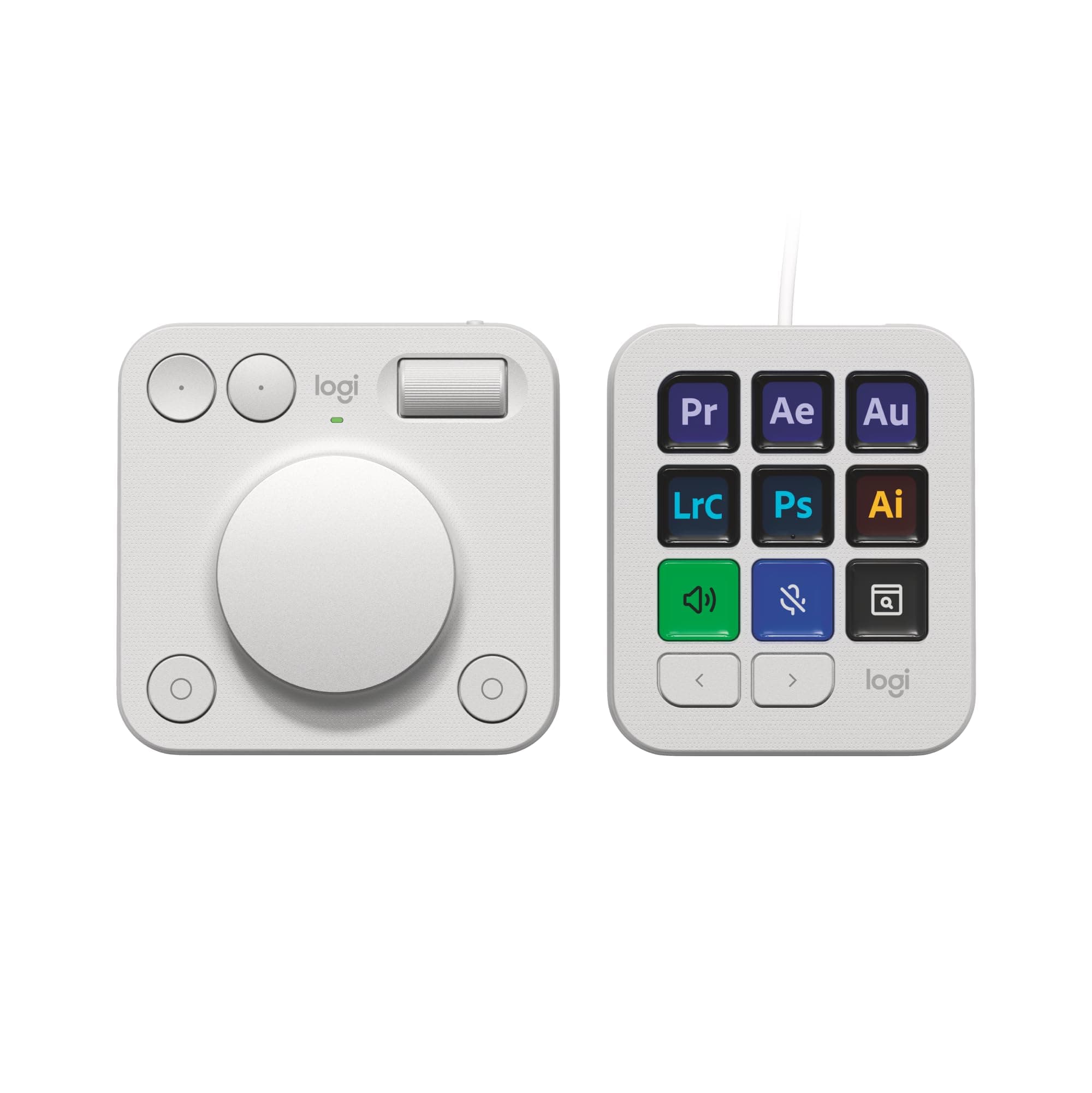
🎨 Elevate your workspace — where creativity meets control.
The Logitech MX Creative Console is a premium, customizable control device featuring 9 LCD keys and a tactile aluminum dial designed to streamline workflows in Adobe Creative Cloud, Zoom, Spotify, and more. It supports up to 15 keypad profiles with icon customization, connects via Bluetooth or USB-C, and offers up to 18 months of battery life. Included is a 3-month Adobe Creative Cloud membership, making it an essential tool for creative professionals seeking precision and efficiency.


| ASIN | B0DB7SRW2G |
| Additional Features | Hotkeys and Media Keys |
| Antenna Location | Office, Creative Work |
| Best Sellers Rank | #147 in Computer Keyboards |
| Brand | Logitech |
| Built-In Media | USB Cable |
| Color | Pale Grey |
| Compatible Devices | Laptop, PC |
| Connectivity Technology | USB-C |
| Customer Reviews | 4.0 4.0 out of 5 stars (387) |
| Enclosure Material | Plastic |
| Hand Orientation | Ambidextrous |
| Item Weight | 1.21 Pounds |
| Keyboard Backlighting Color Support | Single Color |
| Keyboard Description | Standalone |
| Keyboard Layout | QWERTY |
| Language | English |
| Manufacturer | Logitech |
| Model Name | MX Creative Console |
| Model Number | 920-012661 |
| Number of Batteries Required | 2 |
| Number of Keys | 12 |
| Number of Sections | 1 |
| Power Source | Battery Powered |
| Series Number | 920012661 |
| Style Name | Contemporary |
| Switch Type | Tactile |
| Theme | Music |
| UPC | 097855197092 |
| Unit Count | 1.0 Count |
| Warranty Description | 1 Year Limited Hardware Warranty |
L**U
Powerful and versatile tool
I recently got the Logitech MX Creative Console, and it’s been a game-changer for my editing workflow. This two-piece console features a customizable keypad and a dialpad, both easy to set up with the Logi Options+ app. It’s especially useful for Adobe Creative Cloud users, with dedicated integrations for Premiere Pro, Photoshop, and others, plus additional apps coming soon. I am personally not a creative cloud user and still find it very useful. I have created my own profiles for Capcut, Davinci Resolve, Krita, and, for the fun of it, even an old Quake 1 map editor. I fully expect to add more profiles for random and obscure apps in the future. The hardware is sturdy, with an aluminum dial and customizable LCD buttons on the keypad. You can create your own graphics to fully customize all the buttons. My only gripe is the current limited selection of third-party apps in the Options+ marketplace, but I’m optimistic this will grow over time as users and developers contribute. A little surprised Blender wasn't on the list at release. I fully expect that and various cad software support soon. Overall, it’s a fantastic addition to any creative setup. But could see the usefulness in Excel, PowerPoint, and other such productivity applications as well. Color matches with my actual computer, bluetooth connectivity is great. Definitely worth its price, highly recommend!
A**R
Great aid to my workflow
It works great, a little time consuming at first to configurate but once configured it's a great tool. I use it in Photoshop but they still have no Bridge or Adobe Camera Raw support, that means that you'll have to create your own personal profiles. The setup software works really well and it's very intuitive, so the learning curve is not steep and wont require much time to learn how to configure. The bluetooth connection also works really well. Logitech is constantly updating the controller, so I expect it to work even better and have more usability in the future
J**N
My desk just got a new boss, and it is complicated
The MX Creative Console is really two gadgets in one box. One is a bright keypad with nine little LCD faces. The other is a dialpad that looks like it rolled straight off a sci-fi sound board. That split personality makes a single rating tricky, so I will break it apart. Dialpad X2, take a bow The dialpad is wireless, rock solid on the desk, and wakes up the instant the creative juice starts flowing. I park it under my left palm, mouse in my right, and the two behave like they have been partners for years. The dual rotary controls plus the four buttons nail every Figma nudge, zoom, and scrub I throw at them. Options+ lets me carve per-app profiles. If Logitech sold this part on its own I would hand it five stars and probably buy a second one for the snack drawer. Keypad, please see me after class Now the keypad. The screens are crisp even at 20% brightness in a sun-blasted office. Loads of plugins, loads of built-ins, but the clever ideas stop halfway. I can show a clock or a date but not both on the same key. Tap the date and nothing happens. Seconds tick and the digits jump position like jittery popcorn which is oddly distracting during focus time. Figma refuses to auto switch profiles on Windows so I have to babysit it. Worst part is the hardware. A stiff USB-C cable exits straight out the top then drags the thing across the desk every time I poke a key. The plastic pedestal tries to tame the cable but looks like an unrelated accessory I found in a bargain bin with a chonky lip of mismatch plastic and color to hold it in place. Flat on the desk the viewing angle is lousy unless I block prime keyboard real estate, already claimed by the dialpad. Wireless data with a thin, super flexible, clear power cord would have done wonders here with more weight and better feet. Software and integrations Logi Options+ scores better than average. There are canned profiles for Photoshop, Premiere, Lightroom, After Effects, Final Cut, Resolve, Figma, Teams, Zoom, and Spotify. Swapping functions is point and click. Still no scripting layer for real power users. I keep hoping for a simple Lua box or at least a macro recorder. Wish list for version two 1. Sell the dialpad alone. Trust me, people will line up. 2. Give the keypad a braided side-exit cable or, even better, batteries and low-power wireless. 3. Let keys combine data, and pages that stay pinned across profiles. 4. Expose a scripting API so nerds like me can automate wild stuff. Bottom line At roughly two hundred bucks the bundle lands well under Stream Deck plus a Loupedeck knob set. For visual pros deep in Adobe land the keypad may earn its keep, but for code-first makers the dialpad is the real prize. If Logitech splits the pair I'd be first in line. But the Dialpad has a LONG way to go and it's not all fixable in software.
J**I
Absolutely amazing! Made my workflow atleast 3 times faster.
L**G
Elevate your creative workflow with a state-of-the-art device designed for digital artists, graphic designers, and multimedia enthusiasts. The sleek console boasts 9 customizable LCD keys and a control dial that seamlessly integrates with your favorite software, ensuring an efficient and intuitive user experience. Whether you're editing photos, designing graphics, or mixing audio, this tool is engineered to enhance productivity and unleash your creativity. ☑️ 9 Customizable LCD Keys allow for instant access to your most-used functions, simplifying your workflow. ☑️ The Control Dial offers precise, tactile control over various adjustments such as brush size, zoom level, and more, making it an indispensable tool for creators. ☑️ Seamless integration with popular software like Adobe Photoshop, Premiere Pro, and others, enabling a more efficient creative process. ☑️ Robust build quality paired with an elegant design not only ensures durability but also adds a touch of sophistication to your workspace. ☑️ Easy setup and customization through the accompanying software, allowing you to tailor the device to your specific workflow needs. ⭐⭐⭐⭐⭐ Finding the right tool to aid in the creative process can be challenging, yet this device proves to be a game-changer. Its thoughtful design, combined with empowering technology, optimizes your creative endeavors, making every project more enjoyable and less time-consuming. The ability to personalize every aspect of the console ensures it adapts to your workflow, rather than the other way around. For creative professionals and hobbyists alike, this console is not just a tool but a catalyst for unlocking new levels of creativity and efficiency.
Y**U
Ufak tefek yazılımsal geliştirmeler yapılması gerekiyor ama genel itibari ile iyi cihaz.
J**0
The Logitech MX creative console is really good! It helps make precise adjustments to exposure and every other slider in Lightroom, very effectively and efficiently. The control dial is very smooth and you can set it to be however, much a little you have to spin it to make the adjustments. There is a very nice so that you can be as precise or as quick as possible. The programmable keys are really helpful, I put it each button has a different slider in Lightroom so that I could just go through the process and go through exposure and shadows and highlights saturation and just click all of the keys and scroll the dial and I have no need for the mouse except to use mask. They are very well built and nice materials. Highly recommend.
F**Y
Excellent product for an graphic designer and artist. Save so much time by having all your tools and shortcuts for all your favorite artist programs. Hopefully Logitech add many more applications to this great console!
Trustpilot
1 day ago
5 days ago