Buy anything from 5,000+ international stores. One checkout price. No surprise fees. Join 2M+ shoppers on Desertcart.
Desertcart purchases this item on your behalf and handles shipping, customs, and support to Morocco.
🚀 Elevate Your Workspace: Switch Smarter, Work Faster!
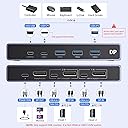
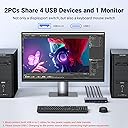
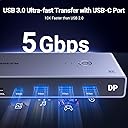
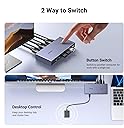
The UGREEN DisplayPort KVM Switch enables two computers to share a single 8K@60Hz monitor and up to four USB devices, including keyboards, mice, and storage. Featuring DisplayPort 1.4 support, 4 USB 3.0 ports with 5Gbps transfer speeds, and a desktop controller for easy switching, this plug-and-play device is compatible with Windows, Mac, and Linux. It comes complete with 2 DisplayPort cables and 2 USB A to C cables, designed to streamline your dual-PC setup and maximize productivity.


| ASIN | B0CFFFHFJT |
| Best Sellers Rank | #23,035 in Computers & Accessories ( See Top 100 in Computers & Accessories ) #50 in KVM Switches |
| Brand | UGREEN |
| Brand Name | UGREEN |
| Cable Type | DisplayPort |
| Color | Black |
| Colour | Black |
| Compatible Devices | Computers (Windows, Mac OS, Linux), Monitors, Keyboards, Mice, Hard Drives, Printers, USB 2.0 devices, USB 3.0 devices, DisplayPort-enabled devices Compatible Devices Computers (Windows, Mac OS, Linux), Monitors, Keyboards, Mice, Hard Drives, Printers, USB 2.0 devices, USB 3.0 devices, DisplayPort-enabled devices See more |
| Connector Type | Usb |
| Connector Type Used on Cable | Usb |
| Country of Origin | China |
| Customer Reviews | 4.2 out of 5 stars 804 Reviews |
| Manufacturer | Ugreen Group Limited, Ugreen Group Limited, Ugreen Building, Longcheng Industrial Park, Longguanxi Road,Longhua,Shenzhen,China |
| Manufacturer Contact Information | Ugreen Group Limited, Ugreen Building, Longcheng Industrial Park, Longguanxi Road,Longhua,Shenzhen,China |
| Manufacturer Part Number | 25962 |
| Model Number | 25962 |
| Number of Ports | 5 |
| Packer Contact Information | Ugreen Group Limited, Ugreen Building, Longcheng Industrial Park, Longguanxi Road,Longhua,Shenzhen,China |
| Power Source | USB |
| Unit Count | 1.0 Count |
| Warranty Description | 24 Months |
V**I
Great product
Brilliant product. works as expected with almost instant switch for the Monitor, keyboard and trackpad . using to switch 34 inch ultra wide 165HZ oled between macbook and macstudio. There is almost nothing in this price range which can do all this. impressive.
K**I
問題なく切り替えできます。
画面を切り替えたいというよりはUSB機器の切り替え機能をメインに購入しました。 画面は液晶側でも変更できますが、ボタン一つで画面やワイヤレス接続のキーボードなどすべて切り替わるので非常に便利です。 遅延や機器の誤作動などもなく、私の環境では完璧に動作しました。 TypeCケーブルやDPケーブルなどもすべて入っていましたので、環境が合う方はおススメです。
A**D
Quality product
Compact, takes less space, easy to use. One push and it switches from one pc to another. High resolution
W**C
Capable little KVM
Can confirm that this KVM works with the following setup: M1 Max MacBook Pro and Lenovo laptop both running usbc to dp 1.4 (ugreen) to the KVM. Mac is connected via an anker thunderbolt 4 cable to the KVM while the Lenovo is using the included usb a to c cable. Juicing it with 18w is sufficient it seems since I get picture and surprisingly, the usb a ports output enough power that my MX Master 3S detects a charge! KVM is connected using a standard DP 1.4 cable to the monitor. I didn’t use the included one because it’s way too short and too thick. The KVM is metal, is surprisingly small compared to my 4 in 1 out HDMI 2.1 switch but is comparable in weight. Looks and feels well made but only time will tell. My monitor is a Lenovo curved ultrawide with 3440 x 1440 pixels and both machines are able to hit the max 144hz via this KVM with DP 1.4 cables. The wired remote is a single button with no indicator so you have to look at the dock itself to see which device you have switched to. The indicator lights on the decide itself is very small and too close together which might be an issue for some. Very pleased with the product so far. Will update if anything else changes. Update: the KVM pulls around 0.027A from the outlet and I was not able to get it to pull anymore by loading up the USB ports with peripherals. It also seems to work just fine with it unplugged. The KVM does get its power from the connected laptops because if I dont connect it to the laptop via USB C, the KVM will not charge my mouse, even if I connect it to the outlet. Since my setup only needs it to drive a 3440 x 1440 @ 144hz monitor, I suspect that higher definition/ refresh rate might result in power draw from the outlet. The product can certainly do with more detailed documentation.
N**T
Excellent KVM Switch
This Display KVM Switch was purchased to share a monitor, keyboard and mouse between my gaming PC and my Mac mini M2 Pro and it is working flawlessly. My monitor is a 3440x1440p 165hz and I am getting the full resolution and refresh rate on both computers. G-Sync and VRR is also working on both Mac and PC. I am using a Logitech wireless keyboard and Corsair wireless mouse and I have both dongles attached to the KVM and they are also switching across both computers along with the DisplayPort signal. I really can't fault this unit at all, it is working perfectly.
W**L
HDR, VRR, Gysnc, 165Hz on Windows, Mac OS (M1), RGB Keyboard 75Hz, All Working!
I use an Apple MacBook Pro M! for music production and as my daily driver. I also have a Windows Rig I built myself for gaming. Running a 4080 super and AMD 7800X3d. My Monitor is an LG UltraGear 38 Ultrawide, running at 3840x1600. It has a refresh rate of 165Hz with overdrive. But I run it at 120Hz as it gives me 10 bit colour. It is GYSNC compatible and so provides variable refresh rates across the full spectrum. It is also HDR 600 Compliant. I am connecting wired Razer BlackWidow Pro V2, and a Razer Mouse. (Don't judge, I love the RGB!). I was looking for a device that could swap between both devices, making my life considerably easier then it was faffing around changing the input on the monitor, swapping over the keyboard, etc. I was dubious about this device, because I was asking for a lot. However, I can safely say, it all works. Working on the PC Side : * GYSNC passthrough works perfectly, I get variable refresh across the range * HDR passthrough works perfectly. I still get HDR compliancy via the switch * 165Hz at 8 bit colour, 120Hz at 10 bit colour, at 3480 x 1600 (native), works flawlessly. * Both Razer Keyboard and Mouse are detected and work flawlessly as though they are connected natively. * Previous Logitech Dongle (MX Keys and Mouse Master 2s) also works perfectly. Working on the Mac Side : * HDR passthrough works perfectly. I still get HDR compliancy via the switch * 75Hz VRR works perfectly. This is the maximum my dock provides via Displayport * Both Razer Keyboard and Mouse are detected and is recognised via openRGB (great software BTW), and colours can be changed. Additional Notes : I did think I would need to supply the device with additional 5v power due to the RGB keyboard and mouse being connected. To my surprise, this was not the case. This may be different if you're using Corsair Devices, or Logitech, or SteelSeries RGB devices. If so, I can't see why they wouldn't work if you provide them enough power given my Razer Devices work without it. You will need you're OWN power cable though if you do require additional power; Contents : 2 x USB A to USB C cables. 2 x Display Port 1.4 to Display Port 1.4 Cables (Backwards compatible) - And yes, they are DP 1.4 compliant! 1 x USB remote control cable The DP cables are very short at about 3 feet. Bizarrely the USB cables are another foot longer. Still, they are excellent quality cables. The unit itself has some weight to it. Is certainly DP 1.4 compliant and is very well made. The remote control is quite long, but isn't up to the standard of the rest of the device. Merely functional and acceptable. There is room for improvement. I may decide to make my own as a fun project. Additional Notes for Mac Users : I see there are quite a few negative complaints from Mac Users saying this device does not work with their device. That might be down to what dock you're using. Or you are using the wrong type of cable. Or you're confusing Display port with Thunderbolt as they are NOT the same. This is a basic DISPLAY PORT switch. A Thunderbolt switch WILL allow Video Passthrough via your USB-C connector. However, you can basically double the price of that device, if not more. You might be better off using the HDMI version of this dock if you're having problems. But if you're expecting to get video passthrough on a basic Display Port switch that isn't Thunderbolt, then you're not going to have much luck I'm afraid. Just an FYI. Blame the USB/Thunderbolt corporate overlords standards committee for not making this clearer. Conclusion : If you have TWO DP compliant devices, want HDR, VRR, Gysnc, and High Refresh rates at high resolutions, then this is a GREAT device for the price. I was very surprised it provided all of the above. I was expecting to pay a LOT more for a more compliant device. (You're looking in the hundreds of pounds to be honest!). I was very surprised at how good the build quality of the unit is, how good quality the cables were, and how competitive the price is. Very pleasantly surprised in every aspect. I recommend.
Trustpilot
1 day ago
3 weeks ago