




Wireless Print Server to Share 3 USB Printers Over Local Network
Product ID: 638805700
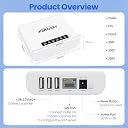
⚡Low-power, compact design
📶Dual Wi-Fi & Ethernet connectivity
🖨️Supports 3 USB printers simultaneously
Desertcart purchases this item on your behalf and handles shipping, customs, and support to Morocco.
🖨️📡 Print smarter, not harder—wireless freedom for your office printers!
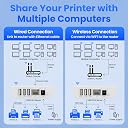
The Xiiaozet Wireless Print Server LK300W enables effortless sharing of up to three USB printers over your local network via Wi-Fi or Ethernet. Compatible with most printers using standard TCP/IP protocols, it eliminates the need for a dedicated host computer, reducing clutter and maintenance. Designed for quick two-step setup and efficient print queue management, this compact, low-power device is ideal for modern offices seeking flexible, secure, and streamlined printing solutions.


| Best Sellers Rank | #4 in Computer Networking Print Servers |
| Customer Reviews | 3.7 out of 5 stars 102 Reviews |
B**S
Working well fir phones and laptops
This was the second brand of print server I tried and it was much easier. Quickly wirelessly hooked up our laptops to older printer. Had trouble getting phones and tablets to hook up but problem seemed to be a bad QR code on device. Email responses from support were quick and with new QR code they sent we quickly got two phones and two tablets hooked up and printing.
C**T
Tech support not the best, but if it detects and configures the printers correctly, it works great.
This installed easily after you downloaded the correct software, and detected the printers. The only issue I had is that it detected my mono laser printer as a color printer and there was no way to change it. I deleted the printer from the device, reinstalled and it still configured it as the incorrect printer. I have a Canon color ink jet printer and it was configured correctly but the lexmark E260D was not. Update to this review. The device lost network connection and will not connect again. UPDATE: Five months into using it has been a disaster. It lost network connection and will not respond to the installation software, nor will it do a factory reset so now it is a piece of worthless junk. Beware!
C**.
It works!
Setup can be unclear but once it’s set, it works perfectly. Buying a second one for another use.
S**O
Not a bad system but didn't work with label printers.
I'd have given it 5 stars if my USB label printer had responded to its signals. The embedded web page configuration is very easy to use and the features are very good otherwise.
O**S
Works great and easy setup
Yay! I have an older laserjet that does not have wireless connections, so now I have one less long USB cord to mess with! I wish that I had bought this years ago. It was super easy to setup and I've not had any issues using it.
M**O
Not a print server
This is not a print server, it’s a usb switch. It doesn’t work with Linux and the virtual usb software is an upsell. It works OK with Windows but it should not be advertised as a print server
S**N
Great unit!
This print server works great in my Windows 11 environment! It brought my old HP Laserjet 1320 USB printer into the modern era of WIFI printing. PS: After I wrote this review, the company was nice enough to advise me how to use this product for MAC computers as well. Although the quick installation tool is not yet available for Macs like it is for Windows, I was able to successfully install this print server on my Mac book Pro using the manual method suggested by the company and which is also shown in the instruction manual.
D**.
Don't waste your money
Don't waste your time, You will have to pay for a license after you install it. It is not a seem less install either
U**3
今となっては貴重な使えるプリントサーバー
今となっては貴重なプリントサーバー。標準でLANポートがあるものが大半だけれど、デフォルトで2ポートあるものとかはまず無いし、オプションで用意されていても古いものだと廃盤になってたりするので、まだ需要はあるかと。 複合機、Ricoh MP C2503がまさにそうで、LANポートは一つあるものの、別なネットワークでもルータ越えせずにそのまま2つのネットワークで使いたくて、レビューとメーカーページを参照した上で入手。 結果、メーカーからDownload した設定アプリではプリントまで行かず(苦笑)。 知らない人ならここで「ダメじゃん」と諦めるところだろうけれど、プリントサーバーにログインしたあと、固定IPを設定。その固定IPを使って昔ながらの方法(TCP/IP)で設定していき、Genericと進めていくと途中からRicoh C2503を見つけてくれて、予め用意していたRicohのドライバーを選択し設定していったら、無事使えるようになりました。 メーカーのアプリでダメでも手動で自身で設定すればOKなのだけれど、それなりのスキルも必要だったりはします。が、Wi-FiでもEthernetでも使えて、いざとなれば固定IPで手動で設定とか汎用性があり、使える可能性が高いと思います。 5ポートのHubぐらいのコンパクトさもいいと思います。 【追記】 安定して使えるのがわかったのと、他メーカーの同様のより安価なモノは(レビュー読んでると)ちょっと不安なのと、これが無くなると困るので、予備でひとつ追加しました。
D**C
Amazing Product
This is amazing product. Allowed my old USB printers to be connected to my network in no time. I am really happy with this product. Installation was easy and user friendly.
S**S
少し分かりづらいかも。
数少ないワイヤレスプリントサーバー。 物理的に遮断している2つのネットワークで使用したく購入。 片方はlan接続。 もう片方はUSBで、このプリントサーバー経由としました。 エプソンのプリンタでは、難なく使用できましたが、マイナーなラベルプリンター(型番は伏せます)では、使用できませんでした。製品はしっかり動いているので、プリンタ側の問題でしょうね。 IPアドレスを固定し、運用しています。 ☆マイナス1としたのは、マニュアルです。 分かりづらいかもしれません。 一般的なraw接続は書かれています。IPP接続、クラウド接続の説明は一切ありません。 どれも分かった前提のようです。 クラウド、IPP接続は不要の為、どちらもデフォルトON→OFFとしました。
N**A
マニュアルダウンロード
有線接続にて使用、単純にランプが点灯USBに接続すれば使えるかと思っていたが、マニュアルダウンロードしてやっと使用出来ました。
H**E
使えますよ
まあ使えましたね 中華でちょっと怪しげではあったものの現状ブラザーのレーザーがWIFIで使用できてます。ただし設定には多少のネットワークの知識が必要かもしれません あくまでポン付けのUSB機器ではないので
Trustpilot
1 week ago
2 months ago