Buy anything from 5,000+ international stores. One checkout price. No surprise fees. Join 2M+ shoppers on Desertcart.
Desertcart purchases this item on your behalf and handles shipping, customs, and support to Morocco.
🎧 Elevate your stream—sound like a pro, look like a legend.
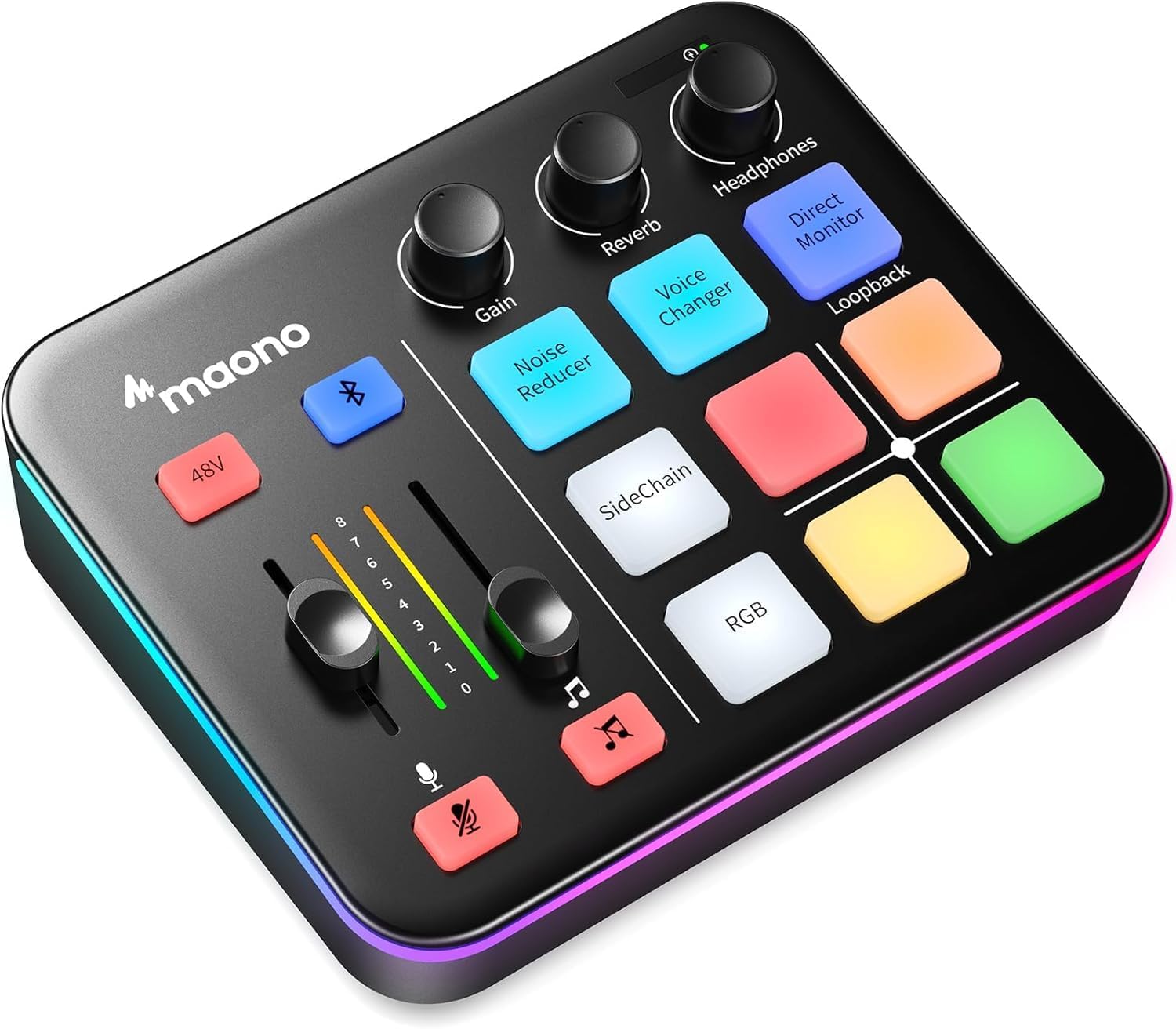
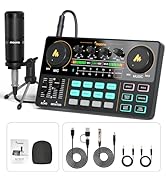
The MAONO MaonoCaster G1 NEO is a compact, versatile 4-channel gaming audio mixer designed for streamers and content creators. Featuring a professional-grade preamp with 48V phantom power, Bluetooth connectivity, customizable RGB lighting, and advanced sound effects including voice changing and reverb, it delivers studio-quality audio and immersive experiences. Compatible with multiple devices and streaming platforms, it streamlines live audio mixing with user-friendly controls, making it an essential tool for elevating your gaming and streaming setup.


| ASIN | B0CZDPKPX5 |
| Audio Input | Microphone, Bluetooth, Computer, Smartphone |
| Best Sellers Rank | #1,459 in Musical Instruments ( See Top 100 in Musical Instruments ) #3 in Unpowered Recording Mixers |
| Brand | MAONO |
| Brand Name | MAONO |
| Connectivity Technology | Auxiliary, Bluetooth, USB |
| Customer Reviews | 4.3 out of 5 stars 1,092 Reviews |
| Frequency | 20 KHz |
| Item Dimensions D x W x H | 6.29"D x 2"W x 5.19"H |
| Item Weight | 1.2 Pounds |
| Manufacturer | MAONO |
| Manufacturer Part Number | G1NEO-BK-VC-EU |
| Model Number | G1 NEO Black VC-EU |
| Number of Channels | 4 |
| Output Connector Type | 3.5MM, USB-C |
| Power Source | Corded Electric |
| Product Dimensions | 6.29"D x 2"W x 5.19"H |
| Unit Count | 1.0 Count |
| Voltage | 5 Volts |
| Warranty Description | 1 year. |
S**L
A QUALITY VERSATILE AUDIO MIXER
The Maono G1 NEO is truly a versatile audio mixer, clean sound with unique features I need to make my audio feed seamless and professional. The overall build is tidy and solid. The connection inputs and build are solid and firm. There are no drops from the line’s inputs. It works off USB power and functions flawlessly. I produce education training videos and I’m constantly making and updating these. This has helped me to improve the audio by adding sound effects and music. I’ve had this for a week and here is the test: pre-recorded voice narration is connected to the iPhone via the G1 NEO Bluetooth and the music/sound effects are connected to a Mac desktop. Monitor headphones are connected to the G1 NEO. The audio is recorded on the MacAir. (I’ll use the audio to overlay a video in iMovie). The audio feed is clean and since I’m inputting two sound sources, each device’s controls the volume level: voice is consistent and music/sound effects are adjusted. Monitor headphones are connected to the G1 NEO. PROS: The versatility of the G1 NEO is perfect for my needs. Bluetooth connects flawlessly. The Reverb is excellent and added just enough depth for the narrative track recorded separately. There is no lag in monitored sound. In fact, the sound quality and depth of tones are crisp and clear. CONS: Not really a con but I don’t have the need for the changing light patterns. It has a “cute factor”, and I turned it off to be less distracting. In the future, I plan to do live voice overs while adding a music/sound effects working on video productions. Although I haven’t had time to test it out, I plan to use an XLR microphone and an external power supply. I’ll update this review when it all happens. In conclusion, the Maono G1 NEO is an excellent device to blend audio sources for a more professional presentation on an instructor’s budget. Have fun!
B**T
Great usb audio mixer
I have usb audio mixers for music production, but having this for gaming is perfect for me. I hooked up my music condenser mic , sounds great, voice changer is fun , and 4 assignable buttons for little voice clips. Works fine. The mic preamp is efficient enough , I can place a condenser mic maybe about 8-10 inches from my face and raise the gain know and it picks up my voice. One caveat, that maybe I didn't research well enough but never got to work. Is the bluetooth. Now I don't know if your going to use a wireless headset just be aware ... I couldn't get my bt headset to work. Idc . Not a big deal, as I prefer wired but damn. Otherwise I'm not replacing it or lookin at others, it works just fine for my needs
T**N
Great product, good deal
Very impressed with this audio mixer. Very easy to use and is compatible with everything I own. All the features and settings are great and is a good addition to my setup. However 2 flaws that stuck out to me are that sometimes the lights for noise reducer/voice change/direct monitor flicker. It seems to be random and not a deal breaker. Another nitpick is that the faders don't fade very smoothly when brining it down below 3, they just abruptly mute which seems quite useless when there are built in mute buttons. It's a very small thing but quite annoying when trying to lower audio precisely and it cuts off. Other than that, everything works as intended and works great with my microphones and computer.
J**.
Simple and Useful Mixer!
I've been using this mixer both through bluetooth for my iphone as well as on my desktop, and I gotta say, it's been pretty great for my streaming setup. To start off, the packaging and unboxing experience is very nice and simple. It comes with the two cables that you would need, and I keep mine plugged into my desktop even when I use it via bluetooth for Tiktok streaming. The voice-changing feature is a blast, but I don’t use it too much to be honest. It advertises custom sound effects, but because you have to set it up through the mixer itself instead of a software on the computer, it’s a bit of a hassle, but still very doable. The most useful one was probably the noise reducer, since it works pretty well actually, I would say almost as good as the discord noise suppression options. I'm not the most crazy about tech aside from streaming, but setting up and using this mixer was very straightforward. The interface is intuitive, and I love the one-click mute and loopback functions since they make managing my audio during live sessions so much easier. The Bluetooth input is a neat addition too; I can easily add background music or other audio sources without a hassle. I used my crinacle zero:reds plugged in with an iem cable that had a microphone and I had no issues with using it. Aesthetically, the mixer fits right into my gaming setup. I have it next to my stream deck, and the Maono is much bigger, but still looks great aside it. I'll have a photo of the size comparison to my small stream deck. The RGB lighting is customizable, adding a nice touch without being too flashy. Despite it being much bigger than the stream deck it still doesn't take up much desk space, and it also feels solid and well-built. The rounded buttons are super cute and they feel squishy yet tactile when pressing down on them. All in all, this is a pretty solid addition to my streaming gear. It’s really simple to set up and relatively cheap! If you're looking to up your streaming game without breaking the bank, I'd definitely recommend giving this mixer a shot.
T**T
Great “bang for your buck” mixer
Great starter mixer for streamers, podcasters, and content creators in general. It’s plug and play and got a solid mix of a lot of features like voice changers, customizable sounds, some different RGB options, being able to connect your via Bluetooth is huge, control knobs and sliders, etc. What stands out for me is that you get all of these features in one device for a very low price compared to some of the competition. Overall, it functions as expected, not a lot to complain about except for a few minor things but in my opinion, not worth knocking it any star ratings for. My only issues: - I think it’s a little bulky, like the buttons could be smaller and maybe less “plush” feeling. Not a big deal for me but I’m interested to see over time if any of it wears out. - As far as I can tell, there’s no desktop or online software to change out sounds or customize RGB lights. All functions can be done through the device but I personally like being able to set things through the computer, especially the sounds. Both are definitely personal preference things and don’t take away from functionality which is why it’s not enough to knock it down a star ratings. It all functions very well together and is great for anyone trying to get into content creation and/or anyone looking for the best bang for your buck mixer.
J**R
Need more improvement.
I once to love it but,Once big problem is the Bluetooth!! i’ll play music on my iPhone to the G1 neo and when I join a party chat room people can hear the music off my phone when I use Bluetooth on the G1 Neo that not good.I wish that it was separate from the gaming room chat and Bluetooth audio. and a mute on the mic it delay by 3sec,no cut right away that a problem too.and one more thing the voice changer got a delay too and only 4 voice to pick from wish is was more option that the Con. Now pro on this product is the Sidechain,the no cancellation is A big hit love the noise cancellation.I’ll playing game and I turn on the noise cancellation when the kids watching TV beside me no background at all that very good. all in all it’s a good product. I gave it a three star.
T**X
Great Starter!
A very decent audio mixer that's perfect for easy setups and simple recordings. The programmable buttons are great along with its presets features. I use a professional Lewitt microphone and the play back is so clear and crisp connected to this mixer. Solid build too for the price
A**I
Possibly the best XLR interface at this price bracket
If you're looking for a clean single XLR interface, for 60 bucks I don't think you can beat it. Nevermind the features that come on top of it, those were just the cherry on top. lets start with the fact that it is DRIVERLESS, unlike many others that are plagued with driver issues. (Tested on Windows 11) - USB C with an adapter for USB-A (the cable seems solid) -Single XLR with phantom power 48v or 3.5mm or even headset jack (TRRS 3.5mm) that plug on the back of the unit, no more cable mess. I tested it with AT2035 and I didn't even have to set the gain beyond 50% (even with Maono recommendation on setting it as 75% Volume in windows) the input was super clean, even with max gain and 100% in windows. I couldn't hear any white noise coming off the device. You can also connect a bluetooth device to it as an mic input (phone or even PC) and have music playing in the background. If you press "Side Chain" button it would automatically lower the bluetooth volume when you speak. Now granted in windows you only see "one device as in one input both xlr and bluetooth" but I wouldn't expect it anything more in this price bracket. - I am really pleased to see a volume meter and phyiscal MUTE buttons. (most interfaces around this price would come with an indication LED only not a meter.) - Hardware background noise reducer, it's especially great if youre using it in games directly. (no more AC or PC fan noise) - Voice changer and 4 soundboard buttons. Do I need to say more? (yes I trolled everyone for days) and of course RGB. Honestly, for the price I don't think you can beat it if you're looking for a single XLR interface thats clean and reasonably priced. I remember just few years ago you couldn't get this level features packed for under 100$. I'd be happy recommending this alone just for the clean input for XLR and having an extra 3.5mm inputs, nevermind the bluetooth input / noise reducer / volume meter / voice changer / sound board and RGB those are just the icing on the cake.
E**S
Maono G1 Gaming Mixer - Funktioniert doch
„Mama ich möchte ein Gaming Youtubevideo machen. Kannst du mir helfen?“ So startete für mich vor ein paar Tagen eine Reise an der ich euch jetzt etwas Teilhaben lassen möchte. Etwas Neues Ausprobieren? Etwas lernen und Erfahrungen sammeln? Dafür! Direkt eine Bank ausrauben müssen, um die in eventuelles Hobby überhaupt mal ausprobieren zu können? Dagegen! Ziel ist es vorhandene Hardware zu verwenden und mit möglichst geringem Kostenaufwand zum Ziel zu kommen. Qualität ist zweitrangig. Es ist gut möglich, das Kind nach eine, Video sagt: „Super das Video hat Spaß gemacht. Hacken auf die Liste, brauche ich nicht mehr.“ Vorhandene Hardware - iPad 10 Generation - Nintendo Switch mit Docking Station - Ugreen Video Capture Card - Kostenlose App Camo Studio Yay, Switchgameplay wird erfolgreich übertragen und aufgenommen. Nicht ganz so yay, das iPad kann nur eine Audioquelle. Es gibt also entweder den Game Sound oder die Mikrofon Aufnahme. Blöd! Bevor jemand sagt, am PC geht das aber, weiß ich. Kind hat aber keinen PC sondern nur das (Schul) iPad. Wie also bekommt man Game Sound und Micro als eine Audioquelle ins iPad? Mit einem Audio Interface oder Mixer. Auf dem Papier hört sich der Maono G1 Gaming Mixer toll an. Headset Port (ein paar EarPods gibt es hier im Haushalt auch noch) und wenn später gewünscht kann auch ein richtiges Mikro angeschlossen werden. Audio in über Bluetooth oder Aux Port. Bietet Sidechain, Soundpads, Noise reducer, Mute Buttons für Musik und Mikrofon, Funktioniert ohne Treiber an iOS, Android, Windows und Mac usw. Egal ob mehr Videos gedreht werden und die Hardware nach und nach aufgerüstet wird, oder ob später einfach andere Sachen Podcast, Hörspielaufnehmen usw getestet werden, auf dem Papier hat man für kleines Geld einen guten Start Punkt zum lernen ausprobieren und Kreativ sein. Ja, alle diese Funktionen funktionieren auch. Aber! Zumindest das Gerät, das ich bekommen habe brummt. Ich habe verschiedene Kabel getestet, verschiedene Mikrofone, habe es an mein iPad, meinen privaten Mac und an meinen Firmen Windows Pc angeschlossen, habe als Audioquelle die Switch, die Stereoanlage, das Handy sowohl über Lightning Adapter, als auch Bluetooth getestet. Ich habe den Mixer über den Powerd Hub, als auch direkt angeschlossen. Mit extra Stromkabel und ohne. Wir haben uns sogar einen Ground Loop Isolator geliehen und es damit getestet, um das Brummen in den Griff zu bekommen. Keine Chance. Das Ergebnis ist immer gleich. Ein Absolut nervtötendes Brummen und Knacken. Ich weiß nicht, ob mein Gerät einfach nur defekt ist, ich zu wenig Ahnung habe um es richtig zu bedienen oder ob es wirklich so schlecht ist. Wir schicken es auf jedenfalls zurück. Update 07.06.2024 Der Maono Support hat sich super schnell mit mir in Verbindung gesetzt. Nachdem wir noch einmal durchgegangen sind, was ich bereits getestet habe, wurde mir ein neues Gerät zur Verfügung gestellt. Und siehe da, angeschlossen und der Ton ist da. Ohne Störgeräusche! Funktionier am iPad und am Mac. Mit Windows konnte ich noch nicht testen. Audio in Bluetooth funktioniert in allen Kombinationen. iPhone und Sterioanlage funktionieren über den Auxport wunderbar. Bei der Switch gibt es über den Auxport ein minimales Rauschen. Den Ground Loop Isolator hatte ich bereits zurück gegeben, ich bin mir aber sicher, das der das Problem in den Griff bekommen würde. Das die Switch bei der Ausgabe über Externe Lautsprecher manchmal Probleme macht, ist allgemein bekannt. Ich hoffe, das ich mir den im laufe der Woche nochmal ausleihen kann. Der Test wird dann ergänzt. Als Micro konnte ich gestern nur unser altes Klinken Headset testen, da ich alle Leihgeräte für den letzten Test bereits zurückgegeben hatte. Der Sprache war für mich klar verständlich. Bei der Funktion Noise Reduktion hatte ich ich dieses Mal deutliche Aussetzer. Das mag aber am Mico liegen. Auch hier würde ich sobald ich nochmal ein andere Micro zum testen habe, die Ergebnisse nachreichen. Ob die Soundqualität für anspruchsvolle Profis dauerhaft reicht, kann ich nicht beurteilen. Mein Ziel bei der Auswahl war es, ohne großen Kostenaufwand zu Starten und nur bei langfristigem Interesse des Kindes nach und nach die Hardware aufzurüsten. Ein Familienausflug in den Zoo oder ins Kino ist teurer, und der Mixer bietet als Sommerferienprojekt jede Menge Möglichkeiten, kreativ zu sein und etwas Neues zu lernen! Und bevor jemand fragt, warum ein Kind schon YouTube Videos machen muß, ich helfe lieber jetzt, wo er fragt, und wir können zusammen Regeln durchgehen und festlegen, als das ich Nein sage und dann wird es heimlich ohne Aufsicht gemacht.
R**Y
Article très bien pour pas cher
Après en avoir commander 1 que jai jamais reçu qu'il a du tomber du camion ou autre jai eu le remboursement du 1er et du coup j en ai commander un autre que jai bien reçu article au top fonctionne extrêmement bien je m amuse bien surtout avec le changeur de voix je recommande ++ et pas cher du tout ps par contre faudrait au moins l emballer psk on voit ceux que c'est et ya des personnes mal intentionner qui peuvent ce servir vu qu'il est pas emballer et qu'on voit c'est quoi mais sinon c'est parfait merci Maono et Amazon pr la livraison rapide
A**L
Compacta, portátil y muy útil para creadores de contenido
Soy creador de contenido en YouTube y necesitaba una mesa de mezcla pequeña, fácil de transportar y que me permitiera grabar en cualquier lugar, ya sea de viaje o visitando a mi familia. Esta interfaz de audio ha cumplido perfectamente con lo que buscaba. Destaca especialmente su función de eliminación de ruido, que ayuda a reducir el eco en habitaciones mal insonorizadas, mejorando notablemente la calidad del audio sin necesidad de equipos adicionales. Además, su tamaño compacto la hace muy práctica para llevarla a cualquier sitio sin complicaciones, manteniendo un buen rendimiento en grabaciones. En general, es una excelente opción si buscas una mesa de mezcla portátil, funcional y pensada para grabar contenido en distintas condiciones.
ا**ل
ممتاز في قراءة القران
M**L
Great little mixer
Great little mixer, fiddly to get the levels right at first but once it is set it works great. I bought it to replace an iRig device that was eating batteries. This runs via usb. I've used it for both Smule karaoke app and live streaming for singing on tiktok - connected two phones one Bluetooth for backing tracks and another as the output for the stream. It was commented how clear it was. I dont use the voice change function (gimmicky) and havent used the programmable buttons. I definitely recommend.
Trustpilot
2 months ago
2 weeks ago