Desertcart purchases this item on your behalf and handles shipping, customs, and support to Morocco.
⌨️ Elevate your workspace with silent power and eco-smart style
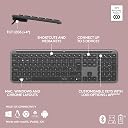
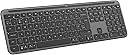
The Logitech Signature Slim K950 Wireless Keyboard is a full-size, Bluetooth-enabled keyboard designed for professionals who juggle multiple devices. Featuring seamless switching between three devices, up to 36 months of battery life, and a premium, quiet typing experience, it’s built with 48% recycled plastic to support sustainable choices. Compatible across Windows, macOS, ChromeOS, Linux, iOS, and Android, it offers customizable keys via the Logi Options+ app and a sleek, modern design that fits perfectly in any workspace.
| ASIN | B0CTKR1941 |
| Antenna Location | Office |
| Best Sellers Rank | 654 in Computers & Accessories ( See Top 100 in Computers & Accessories ) 40 in Keyboards (Computers & Accessories) |
| Box Contents | IID (4’’x4’’), QSG printed on the kbd tray, USB Bolt receiver (outside the devices - in the kbd tray), keyboard with 2 x AAA batteries (pre-installed) |
| Brand | Logitech |
| Brand Name | Logitech |
| Colour | Graphite |
| Compatible Devices | PC, Smartphone, Tablet |
| Compatible Operating System Family | Windows |
| Compatible devices | PC, Smartphone, Tablet |
| Connectivity Technology | Bluetooth, Logi Bolt USB Receiver |
| Connectivity technology | Bluetooth, Logi Bolt USB Receiver |
| Country of Origin | China |
| Customer Reviews | 4.7 out of 5 stars 134 Reviews |
| Enclosure Material | Plastic |
| Hand Orientation | Ambidextrous |
| Is Electric | Yes |
| Item Dimensions L x W x H | 43.4L x 13.5W x 2.3H centimetres |
| Item Highlight | Sleek Design, Switch Typing Between Devices, Quiet, Bluetooth, Multi-OS, Win/Mac/Chrome, QWERTY UK Layout, Graphite |
| Item Weight | 685 Grams |
| Keyboard Description | Standalone |
| Keyboard Layout | QWERTY |
| Keyboard description | Standalone |
| Language | English |
| Manufacturer | Logitech |
| Manufacturer Part Number | 920-012463 |
| Minimum Required Operating System Version | Mac OS X 10.0 Cheetah, Windows 1 |
| Model Name | Slim K950 |
| Model Number | 920-012463 |
| Number of Batteries | 2 |
| Number of Items | 1 |
| Number of Keys | 104 |
| Number of Packs | 1 |
| Power Source | Battery Powered |
| Product Features | Connect Up To 3 Devices, Customisable Keys With Logi Options+ App, Mac, Windows And Chrome Layouts, Shortcuts And Media Keys, Tilt Legs (+4°) |
| Product Warranty | 2 year manufacturer |
| Recommended uses for product | Office |
| Style Name | Modern |
| Switch Type | Tactile or Linear |
| Unit Count | 1.0 count |
S**1
Outstanding Keyboard for work and office if you touch type.
If you touch type and looking for a new keyboard for office or work from home, look no further. I use many types of keyboards, gaming red cherry, my Omen gaming laptop and Microsoft Natural, Dell Alienware. This is the best keyboard I have used for touch typing. I did try out the MX Keys and decided this was the one for me. Like the flat keys, removable batteries. I can type even faster on this keyboard to others I have used. I have large hands and find it perfect for me. As some like Pebbles were too small for me. This feels fast and fluid and will be make my job easier having to type while I listen to my customers. Not good for gaming, this is a exceptional for a work keyboard. I am using the Logi Bolt connection easy to setup and download the Logi software to get the most out of it. Yes the FN is on the right, some complain but you can press it and hit Esc and it will switch your top row to with F keys or Fn keys so you don't need to keep holding it. Mine is in white and looks fantastic as fed up with black. Rear hight adjusters no on MX Keys. Feels premium. I tired it out in a local store and MX Keys and it was this that blew me away. Highly recommended for work and media. Not gaming.
S**R
A cheaper but still good alternative to an MX Keys
I was looking for a replacement for my MX Keys which was gradually wearing out after many years of use and the battery was not holding a charge for long. I Was going to buy a new MX Keys when I saw the K950. Similar look, same size and the flat style keys I prefer over clunky and noisy mechanical. It is definitely not a direct replacement; it feels cheaper but at half the price of an MX Keys that was no surprise. I don't miss the backlight as I barely used that feature. I do miss the slight depression in each key. The typing action is almost identical. I can't say how durable the keyboard is, I haven't had it for long! Using Linux I had to install Solaar to pair the keyboard and Bolt dongle with my PC (my PC doesn't have Bluetooth), but I read you can pair the keyboard with the dongle on a Windows or Apple and it should carry over when you switch OS. Initially, I was considering saving up for a new MX Keys for and use the K950 for work (the crappy keyboard at work is terrible). After using the K950 for a while I have gotten used to the change and will stick with it.
A**R
Logitech products are just great
I had forgotten how good Logitech products were. This is a great keyboard. Good solid construction. Nice keyboard action, and has tilt legs. Easy to connect with Bluetooth and nice to have the easy switch between devices. Excellent software and good configuration options without being too hard to do. Comes with a Bluetooth dongle if you need it.
P**.
Clean and sleak
I should point out that I bought this in the prime sale - for me, under £60 was a lot more reasonable than the RRP. The keyboard was very easy to setup - plug in the usb receiver, pull out the battery tab, and away you go. It can connect up to 3 devices, including over bluetooth...but for me i have it plugged into my monitor so whenever I switch devices, it still works without pressing a button. I got the white - normally I go for black but I'm happy I didn't. It looks clean and crisp and for me makes it easier to see the keys. It is a full size keyboard with additional function keys that work with the optional app. What surprised me is the weight... it's not a keyboard that is going to slide around. It could be quieter though - although not as noisy as mechanical keyboards. Overall I'm very happy with it
K**S
Great keyboard
Very good keyboard the texture nice on the fingers, the battery life last longer then most other keyboard I have used and easy to link up to Mac and window laptops using Bluetooth. The keys are not noisy when your typing great keyboard all round I haven’t had any problems with keys being missed
N**6
Nice keyboard
Good keyboard love the ability to connect to 3 devices. However one annoyance is having the lock key just above the minus and as I use the number pad daily lost count how many times I have hit the lock key but as it’s a slim keyboard that’s the trade off as the keys are closer together. Love the feel but personally would get a bigger one next time.
G**N
Value for Money
I love the keyboard. As someone who have used MX keys before from logitech, this KP50 is very good. Just as description. However note, this one does not have a backlight. It easily connect to devices and can connect 3 different devices with Bluetooth. Hassle free switching between devices. I use 3 laptops so this keyboard comes in handy, using one keyboard for all my devices . Appearance is slim and modern. I will update this review after few weeks of use.
'**O
Good
Sleek and user-friendly. Arrived less than 12 hours since ordered. Very happy with it.
Trustpilot
2 months ago
3 weeks ago