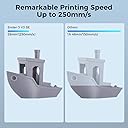
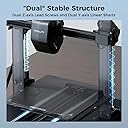
⚙️ Print Fast, Print Smart, Print Like a Pro!
The Creality Ender 3 V3 SE is a beginner-friendly 3D printer boasting a rapid 250mm/s print speed, advanced Sprite Direct Extruder for versatile filament compatibility, and a dual Z-axis with reinforced Y-axis for exceptional print stability. Featuring a CR Touch Strain Sensor for hassle-free auto leveling and an intuitive UI display, it empowers users to create precise, high-quality prints within an 8.6 x 8.6 x 9.8 inch build volume. Ideal for professionals and hobbyists eager to join the 3D printing revolution with confidence and speed.


| ASIN | B09JFR3JJP |
| Best Sellers Rank | 19,791 in Business, Industry & Science ( See Top 100 in Business, Industry & Science ) 34 in 3D Printers |
| Box Contents | 3D Printer |
| Brand | Comgrow |
| Brand Name | Comgrow |
| Colour | Ender 3 V3 SE |
| Compatible Devices | Personal Computer |
| Compatible devices | Personal Computer |
| Country of Origin | China |
| Customer Reviews | 4.3 out of 5 stars 6,021 Reviews |
| Enclosure Material | Steel |
| File Format | STEP |
| Item Dimensions D x W x H | 40D x 40W x 50H centimetres |
| Item Weight | 210 Grams |
| Item height | 12 inches |
| Item weight | 210 Grams |
| Manufacturer | Creality 3D |
| Material | Steel |
| Operating System | Linux |
| Product Warranty | 1 |
| Product dimensions | 40D x 40W x 50H centimetres |
R**T
Brilliant printer for the price
Brought this just as the Covid-19 lockdown started in 2020. First suggestion is to throw away the instructions from Creality as they are worse than none at all. Just utter rubbish, don't waste your time reading them, Head over to YouTube and fine one of the hundreds of videos that show you how to assemble one. The videos are simple and show you how to ensure the supports are aligned. It'll take a few hours to assemble if you are careful and take it slowly. getting it square at the beginning is key. One of the many keys to getting a good print is to get the bed level. Learn how to do it NOW as it will remove frustration and make sure you are getting a good first layer. This is a key element along with the right temperature for nozzle and for the heated bed. It's all related and I'm still learning a few months on. Once assembled and levelled, put some PLA (don't try ABS or PETG yet) and do some small prints to get a feel for what it can do. Don't try and build a full scale WWII tank, small is good. 3d printing is not that fast, so learn slowly. I got the BlTouch as well and never got it to work. I am an expert in the Marlin firmware now, but it's a nightmare to get it working and as with so many far eastern manufacturers, the instructions are worse than rubbish. YouTube is your friend. The first upgrades to print are a little roller and support arm to make sure the filament has a nice smooth path. I have also added a Raspberry Pi 3 and Octoprint to remove the constant changing of the SD Card. I have also upgraded the motherboard to the quieter V1.1.14 as I <ahem> blew the original one up installing the BLTouch. That was my fault. I have some Capricorn bowden tube for when the constant PETG printing melts the standard one. That has a limit of 250C and 245C is pretty hard on it. But so far, it's been fine. The magnetic mat works well for me. Other people have different views, but I like it. So long as the bed is levelled it seems OK. However it's clear the middle of the mat is slightly concave. The printer has been in pretty much constant use since I got it. It now prints face mask frames for the NHS in PETG. So far, so long as you bed level and get the right temperatures, it's a great first 3d printer. Would I buy it again knowing what I know now? No, I'd buy a bigger and faster version, but this is a great first 3d printer and I don't regret buying it at all. Rob
S**R
Fantastic quality prints - bit of a learning curve!
I felt like knocking a star off for what I class as quite bad installation instructions. However, I just can't because ultimately the print quality is fantastic - far, far better than I expected. This is one of the best things I've ever bought! When you're building this machine I suggest you use a variety of information sources. The CD includes an animation of the build process, which shows you roughly what goes where. The instructions provide some clue again, but in my opinion there is no better than watching a YouTube video of someone building this Ender 3 machine from scratch (they're out there - find a good one). Take your time. Don't force anything. Make sure you don't pinch the Z-stop cable when putting the frame up (I did). And don't put the clips for the glass bed within 4cm of the edge of the glass or the extruder will drive in to them! It took me about 6 or 7 hours to build it, and then the only problem was printing on the glass bed. The first layer just wouldn't stick at all. I googled it (I am a complete beginner) and saw a recommendation of using masking tape. I masking taped the bed, then re-levelled the bed (see YouTube videos for how) and then I was rewarded with a fantastic first print, which was the test dog - the .gcode is included already on the MicroSD card, so your printer is all ready to print this without installing any software on your PC. Once you've got it all set up, you can go to places like Thingiverse.com and download STL files. Load them in to software like CURA, alter some settings if desired, and generate the .gcode which you then load on to the 3d printer via the MicroSD. I now use watered down PVA glue on the bed, and a hotter bed temperature (80), along with no fan for the first layer and a slightly bigger first layer. You can set all this in CURA or whatever other software you use. This has improved first layer adhesion, but I didn't have to learn all this stuff on day one, and the machine was good enough "out of the box" to print great - I just sometimes had to restart prints because the first layer went wrong, and I hardly have to do that at all now! I've printed the 'standard' Ender 3 improvements like a fan guard, cable clips and filament guide, as well as a computer SSD holder, ornaments, and multiple different brackets (one of which I managed to design myself, for free, in Tinkercad). The prints are detailed, exact and strong. Such a good thing to have!
A**R
Decent entry level printer
This printer is a decent entry level printer for those that want to get into 3d printing. It comes 90% pre assembled with you only have to bolt the gantry onto the base with 4 hex bolts and route a few wires and plug in a few plugs. The printer comes with all the tools needed to set up the printer and get you printing. It also comes with a small amount of filament to get you started. I suggest you watch a setting up video on youtube as the provided instructions are vague at best. It comes with an sd card with a couple of test prints and a zip file with instructions and videos for set up. I never used these as I just watched a youtube video. Only real issues I've had is where the sd card died after only a few days. When taking the hot end cover off, one of the wires to the hotend fan came away and had to be soldered back on. Be careful with those wires as I've seen on several facebook groups that thos is a common reoccurring issue with these printers. I would suggest that you check the tightness of all screws and bolts, I found a few that was loose, whether it was fro the factory or came loose in shipping I don't know. But make sure you check them as it can affect print quality. Pros: Ease of setting up. Time of set up Supplied tools. Cons: Poor quality sd card. Broken fan wire on hotend fan. Very noisy fans. No dual Z axis lead screws. Bowden tube set up. This printer would benefit from a much quieter fans all round (noctua fans are a popular mod), dual Z axis modification, PEI spring steel bed, and sprite pro extruder. All of which I have added since owning the printer.
P**E
Beginner friendly!
I have been curious about 3d printers for a long time and since I had a voucher and this seller was selling the Ender 3 at a really good price I decided that if I were ever going to get one,now is the perfect time. The package arrived on time and in great shape,with all the necessary components for assembly. The process of assembling it looked a bit daunting at first,but I believe that if I were to do it again now,it wouldn't take anything like the 2 hours I spent putting it together. The instructions were ok and pretty easy to follow but I feel that the aluminum channel pieces could have been more clearly labeled to make steps 1 and 2 of assembly a little less of a head-scratching affair,trying to sort out which goes where. I have never had or used a 3d printer before now but I have watched a lot of videos about 3d printers, so bed-leveling and temperature-setting were simple and easy to do with the provided equipment and software. The machine itself isn't super noisy or bulky, you could easily set something like this up in your dining room or crafts room on a small table,start a project and walk away from it for a few hours and forget that it is running. I am now partway into my first printing project,the test pig,and I was pleased by the fact that with no experience whatsoever I was able to get good bed adhesion and proper leveling going off of tips and hints that I picked up from the internet. I have no idea whether the lamination or layer evenness or any finer details will be poor,adequate,good,or excellent at the end of this print,which is why (and the only reason why) I have given the product 4 stars in these areas. I expect they will be very good based on what I am seeing now. Overall,the main thing that has kept me from getting a 3d printer up until now has been price,accessibility for a new user of this type of product,and fear of getting it out of the box and discovering that I have no idea how to properly set it up or use it even with adequate instruction,and worry about spending a lot of money on a machine I don't use because something about it didn't measure up to my expectations,but the Creality brand and the Ender 3 model are both well-established and have tons of information and support out there to help you with any issue relating to setting up or using the product,and honestly,the instructions and parts included in the box are good enough to get your machine properly assembled. I am so,so pleased with the quality of this 3d printer and feel like a wide-eyed kid watching this little machine conjure a plastic pig seemingly from thin air with its mesmerizing whirring dance. I have not been paid or given anything by Creality or the seller to leave this review or say anything about this product,neither positive or negative. If you have never owned or used a 3d printer and you are reading these reviews and thinking about purchasing one,just do it. Get the Ender 3. You're not going to be disappointed.
N**L
Great product - very happy
Very happy with this. Have had it just over 2months and no issues. Bought this as I’d had 2x other 3D printers Qidi models that simply had to be returned as were faulty. The app is great and really pleased with what I’ve printed - I use this for helping with printing parts for 1:35 diaramas and also have printed a few things for sons school projects and a few Xmas and Halloween decorations.
C**S
A good machine, but needs investment in time and simple parts
This is my third attempt to write this review, the latest Amazon mobile being very unhelpful, so I will keep it brief. I bought the Comgrow Ender 3 non pro version as that was the only machine available back in April 2020, the world had gone nuts for toilet paper and 3d printers. I don't know who Comgrow are and aside from the well reported supply issues when buying direct from Creality I didn't see any value of Comgrow in the purchase and support of my printer, yes Comgrow supplied me a printer probably with less fuss than trying to purchase from Creality or other Creality distributors but then you pay an added premium for the Comgrow association. Anyway back to the printer, out of the box it comes partially assembled, in addition to all the other reviews I too recommend you rebuild from scratch as the printer will neither be square or properly assembled. If lego, meccano or the modern day equivalents were your thing as a child then you'll enjoy this part. Setup, the printer require a fair bit of setup around bed levelling, axis float and calibration of the extruder steps. As of yet I have performed the first two but not the latter. The first two are mandatory to get adherence of the pushed filament onto the bed. Bed levelling - out of the box and everything sorted according to various recommendations of Luke Hadfield YouTube videos(Age of tech) I could not get the bed to level nor would the filament adhere to the bed. Enter Comgrow, nothing from Comgrow although I did later discover 2 messages in my spam folder some weeks asking why did I leave a 2 star review. As I said earlier, no value add by Comgrow, save your money and buy elsewhere. At this point it was either return the printer or sink some more money into it in the hope I could get it functioning. Focusing on the known and reported issues I replaced the 4 standard bed springs (all different lengths) and the plastic/fibre mat. Replacing with the stock springs with yellow items from amazon and putting a creality glass bed on the machine changed it immediately. I could now level the bed and the filament would adhere to the bed. Note to Comgrow, if you want to add some value to the product and improve the customer experience, add the creality glass bed and some proper springs with an A4 sheet of paper covering recommendations of setup and good sources to turn to. Then you can add your fat cut and name to product. In short after investing time and some more money into the printer it now prints very well and with decent springs bed levelling is generally performed monthly. Octoprint and Octoremote are two very useful additions to this device and effectively turn your printer into a wireless device. 3d printing is an exciting and rewarding past time, I am now thoroughly enjoying mine, the ability to print all sorts of useful bits for the printer and projects is very fulfilling, soon I will move onto printing models. There are Creality Facebook groups available to turn to, but in general having joined two I would avoid the Facebook groups, 10% of the posts are useful or interesting with 90% being the production of plastic penises, memes around bed levelling and general everyday hysteria. The groups from the outside are a looking glass into some of triggers of the rioting across the US. It's 2020, roll on 2021.
G**L
Absolutely Brilliant
Far surpassed any expectations I had of a 3D printer, it is quick, efficient and takes 3D printing to another level, whilst looking good and taking up far less space, for the same build volume than any 3D bedslinger. The software is easy to use, and you can be up and running in an hour, even if you have never owned a 3D printer before. I saw various YouTube articled complaining about beds that were not level etc, and my initial worries were not confirmed, the printer has performed flawlessly I am happy to say. I have printed with supports and the piece being 290mm long, just fit on the build plate across corners, the part was printed with supports at a 30⁰ angle, the supports were easy to remove and the part looks amazing. Bed adhesion is very good, I always use the glue provided and have had no issues with adhesion,. The auto bed leveling works well and the standard settings for Hyper PLA work perfectly, the bed heater is quick, the magnetic bed plate with location tabs is a great help to locate the plate in the bed. The unit has a built in camara that is very useful as I print from the another location in my home whilst sat in comfort elsewhere, The app and PC software allow wireless printing straight from the Web, you will find a multitude of 3D printable parts, models etc already waiting to be explored, buy one have fun, this machine is fun to use, but it can churn out seriously good accurate prints from engineering drawings very quickly, I am impressed, very impressed.
M**E
Great value,
Background: I am new to the world of 3D printing. I was looking for a modestly priced, capable printer that would be suitable for a noob. My research led me to the Ender 3. I chose the model with the glass build plate on the basis that the guides I've read which suggest this is one of the first upgrades you will want to make to improve print quality. I was a bit wary of this purchase based on the previous one-star review, but figured other reviews of similar models (without the glass build plate) were uniformly positive so it would be worth a punt. My experience: The printer came well packaged. Admittedly, the build instructions leave a lot to be desired - but this is not really a big deal as there are plenty of online resources to help you through the process. Came with everything you need to make it up and a few spare screws (at least I hope they're spare and I haven't missed something important...). Small sample of filament - I used it to print some basic shapes and this helped me get a grip on 3d modelling software and the workflow for developing 3d models. It also helped me develop an understanding of the importance of getting extruder temperatures right. It took me about 90 mins to build - I took my time and I'm sure others could get it set up a bit faster. The most frustrating part of the process was levelling the print bed. This is an essential step to get decent prints. As soon as I got one corner to the right level, the bed wouldn't have enough movement to level off other corners. A bit of tinkering, adjusting the end-stop for the z axis (I think) and a flurry of muttered obscenities and I got it more or less levelled. The first print was more successful than I had any right to expect. You will need to buy a glue stick (or some painter's tape) to help print adhesion - this would be a good addition to the package and I know some printer manufacturers include some. But as I have children I had a supply of Pritt stick that seemed to do the job just fine. Also invested in decent bulldog clips. The four that came with the printer were on the small side. Sure I'll use them for paperwork, but not for holding the print bed in place. I have already hooked it up to OctoPrint running on a Raspberry Pi - again a painless experience that lets me monitor prints from anywhere in the house (and further afield if I wanted it to). I will be investing in some upgrades - in particular I'll be replacing the springs on the bed for more robust models, investing in some dampers and stepper motor upgrades. An auto-bed leveller is also on my hit list. Summary: A great starter printer. Set up was a mixed bag. Supplied guide could be better but online help got me through without major trauma. A couple of the end stops don't feel to be in *exactly* the right place - but I have been able to workaround this and get some decent prints. Bed levelling was the worst part - but suspect this is the case with many printers that don't have auto-levelling capability. On the basis of value, ability to upgrade and its broad capability I am giving this a five star rating.
Trustpilot
1 week ago
2 months ago