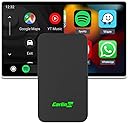
🚗 Cut the cords, not the vibe – wireless CarPlay & Android Auto unleashed!
The Carlinkit 5.0 is a compact, dual-band WiFi adapter that converts wired CarPlay and Android Auto systems into wireless setups. Designed for ultra-fast connectivity and low power consumption, it enhances in-car smartphone integration while preserving battery health. Ideal for professionals seeking a clutter-free, seamless driving experience.
| ASIN | B0CNPHRL1N |
| Bluetooth support? | Yes |
| Brand | Carlinkit |
| Brand Name | Carlinkit |
| Connectivity Technology | Bluetooth, Wi-Fi |
| Customer Reviews | 3.4 out of 5 stars 507 Reviews |
| Hardware Interface | USB 3.0 Type C |
| Human Interface Input | Dial, Touch Pad, Touchscreen |
| Includes Remote | No |
| Item Dimensions L x W x H | 7.6L x 4.3W x 1.2H Centimeters |
| Item Weight | 35 Grams |
| Item Weight Unit of Measure | 35 Grams |
| Manufacturer | china |
| Number of Channels | 2 |
| Number of Ports | 1 |
| Power Source | Adapter |
| Product Dimensions | 7.6L x 4.3W x 1.2H Centimeters |
| Product Features | Dual Connection |
| Rechargeable Battery Included | No |
| Special Feature | Dual Connection |
| UPC | 752815471055 |
| Unit Count | 1.0 Count |
| Voltage | 5 Volts (DC) |
| Wireless Compability | 5 GHz Radio Frequency, 5.8 GHz Radio Frequency, Bluetooth |
A**N
Converts existing AndroidAuto/AppleCarPlay to wireless. Not work if only bluetooth/screen projection
Works well with my Honda City and Kia Seltos. I use an iPhone. Love the fact that I see no wires and my phone connects seamlessly. No need to take my phone out of my pocket when I enter the car. Also, my phone is not constantly charging as was the case with wired CarPlay. Issue with constant charging is that it spoils your phones battery. Hence I don't even recommend wireless chargers in a car. Charge your phone once a day. For this having CarLinkit for those who have Android auto/Carplay wired is an excellent option to convert to wireless
S**K
Title: Extremely Disappointing Experience with Carlink Adapter
I purchased the Carlink adapter with high hopes and excitement, but my experience has been nothing short of disappointing. The primary issue lies in its consistent failure to establish a reliable connection. Despite numerous attempts, the adapter only connected once or twice, and subsequent attempts were futile. Adding to the frustration is the lack of support from the seller. The advertised 12-month warranty holds no value when there are no accessible contact details for the seller. This absence of customer support leaves users like me stranded with a malfunctioning product and no means to address the issue. In summary, the Carlink adapter has proven to be a pathetic product, failing to live up to expectations and lacking the essential customer support promised.
T**A
It is working with aftermarket system SONY AX3000
Set-up steps I followed & it is working with SONY XAV-AX3000 : 1. On your mobile - disconnect & remove Bluetooth connection paired to SONY AX3000 head unit. 2. Keep bluetooth turned ON in your mobile. 3. Turn ON ignition of your car. 4. Connect Carlinkit 5.0 to android auto via USB cable. 5. Pair your mobile to Carlinkit 5.0 via bluetooth. 6. That’s all – wait for upto 10-15 seconds, wireless android auto connects & opens google map. If any issues – update your carlinkit 5.0 device by following instructions manual. My experience so far – AA is connecting & working 10 out of 10 times. No issues or delays in navigation. No issue while attending calls. No loss of audio quality or bass in music. But occasional stutters while playing music via jetaudio app noticed. No over-heating noticed when I used for 1 hour continuously. To be tested on all these points during long travel & will update comments. Point to consider - Carlinkit takes little long up to 25 seconds to turn & connect to AA – so, start your car 25 seconds early in traffic signals !! But not a deal breaker to me. Reason I bought – With wired android auto, my moto edge 40 needs device unlock after every ignition ON, even when USB debugging & smart lock were kept on. So, looking for wireless option which works without unlocking my phone. Compatibility note - Product description mentions that it works only with OEM systems but it worked in aftermarket SONY AX3000 head unit as well on my Celerio. Seller should check & update product description. Hope my detailed review is helpful - if yes, plz hit 👍
A**J
Works great with Android Auto and CarPlay
I had issues connecting to Android Auto initially, but then I used an iPhone connection and upgraded the firmware, now Android Auto works perfectly. Device boots up and connects pretty fast, by the time I back out of a parking spot its starts playing where I left off. I have tested this with a Nothing Phone one, iPhone 13 and iPhone 15, all work great.
D**M
Overheating
I have purchased this product on 12 August 2023. This product is neither connecting with my car stereo. It remains blue always and this is generating a lot of heat. I requested Amazon to return the product but they are not supporting at all. They are saying we will replace when the device is not working and generating heat what is the point of taking a new device, this is really unfortunate to hear from such a big e-commerce company like Amazon. I hope after reading this review, Amazon will help me.
S**N
Must Buy product (Read the full review for tips to make it better!)
I have been using this product for about a month now. I tested this with I20 n-line Apple carplay only. I haven't faced any issues, it connects automatically after the first time. I have experienced only 1 disconnection so far but in a no-network dead zone it does get disconnected but reconnects quickly. Must buy products for cars that have wired Apple carplay. Haven't tested this with Android auto yet. Also for all the folks that are complaining about the 1 sec delay in changing tracks or play/pause from controls, follow this - connect to the autokit server that is in the manual and go to settings and there you will find an option to change the delay, by default it is set to 1 sec, change it to 300 ms (minimum value). Once done the lag is gone and the whole experience changes!! It was annoying for me as well in the beginning but it was a worthy trade-off for having no cables and after changing this setting I have no regrets and working flawlessly!
R**N
Hit and miss- Usable but not reliable
Works with Tata Harrier (Samsung s22 and Apple 13 pro max) Superb product but has bugs, please go through below points (based on my 15 days usage) 1. Easy to connect via bluetooth 2. Works seamlessly with android auto, but lot of issues with apple carplay. Once connected connection is reliable 3. Carplay dosent connect most of the time, phone will connect to device but carplay wont be activated on the infotainment system even if you disconnect and reconnect the device or restart your car you will have hard time activating carplay 4. Little latency lag as it takes around 1sec for any command to process for e.g. if we change song track it is not prompt and usually takes under 1 second to change which I feel is fine but may be deal breaker for others 5. Price is in the higher side Overall I like the product and is my dialy go to device for android auto, but is only suggested if you have android device for apple users this is not recommended.
S**I
If it works... It works like a dream.. else it simply ain't there.
The device I got did not simply connect to my car (Kia Seltos Facelist 2023 GTX+) and I was disheartened since there was no return but only exchange. Upon calling for help, I was given a replacement which worked seamlessly upon connection (Meanwhile I did clean the cache of my phone which I saw as a possible troublemaker for this connection disability). Here I am after using the product for roughly one month (staggered use... not regular). The device seems to have a mood of its own and gets disconnected at will. Most of the times it reconnects automatically but the lag might result in the user missing navigation for that period and this in my books is a no-no. Today I tried upgrading the firmware with the help of some DIY videos but the dongle does not simply wishes to connect... the erstwhile mood swings... I would like to revise my earlier attestation of the product as a dream connectivity to recommending that you stick to good old wired connection or wait for the car manufacturer's OTA upgrade.
A**Z
Effective with good price
After several attempts with ny RCC radio tgis one made it happen Easy to use, lag 0.5 se in calls, still under testing But over all great with good price 👍👍
W**D
التوافق مع autokit
واضح انه كويس ولكن مايشتغل على coolray 23
A**B
Very Good!
Works as claimed! Only the cable which came in the box didn’t work. Had to use my spare cable. And it works without any issues.
J**R
Not as advertised and Horrible
3 second lag on any given command instead for the advertised real-time response. USB and USB-C in-ports both unreliable, whacky and unsteady making the connection to the car nearly impossible, and unsustainable if it connects because any movement disconnects it. I wouldn’t recommend this one at all
A**R
Problematic Device
When I recieved the device, it worked perfectly for a couple of weeks but the only issue was it wont start the carplay screen automatically Now, it wont work at all, the blue light will keep blinking and the car system doesnt detect the device If I use a direct cable, Car play works perfectly. So for me, its useless just after a month of use.
Trustpilot
1 week ago
2 weeks ago