🎥 Own the shot, own the moment — stabilize your story with SCORP!
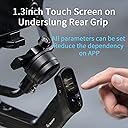
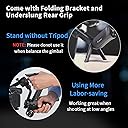
The FeiyuTech SCORP is a lightweight 3-axis gimbal stabilizer designed for DSLR and mirrorless cameras up to 2.5kg. Featuring a 1.3-inch touchscreen and a multifunctional knob, it offers intuitive control over camera movement, focus, and settings. Its innovative integrated handle enables effortless low-angle shooting without extra accessories. Compatible with major brands like Sony, Nikon, and Fujifilm, the SCORP empowers creators to capture smooth, professional-quality footage with versatile shooting modes including 360° rotation and time-lapse.
| ASIN | B09LXML4PX |
| Best Sellers Rank | #100,501 in Electronics ( See Top 100 in Electronics ) #380 in Camcorder Handheld Stabilizers |
| Item model number | SCORP (F2) |
| Manufacturer | GUI LIN FEI YU KE JI YOU XIAN GONG SI |
| Product Dimensions | 0.03 x 0.03 x 0.01 cm; 1.2 kg |
R**7
Great accessory at a great price. The company has several beginners tutorials on YouTube which are very worthwhile. I love it.
R**R
Before I checkout, I watched a lot of reviews on Youtube and all the positive reviews I saw were all true. I did not make a mistake in choosing my first gimbal in my life.
S**H
The gimbal itself was very good and you can use the app to operate it. It charges up very quick however, I was recording at some weddings recently and the battery life let me down so much. The product description says the battery should last "13 hours theoretically" but I found myself charging the gimbal a number of times after an hour / hour and half. Then It was so difficult, I had to connect a portable charger to it. It may be worthwhile if you are recording short videos, but not the best if recording for long periods. Due to the kind of shooting I need it for, it's not right for me
M**N
It well be very hot if you use it, i don’t know if its just mine or all the products
S**D
It took several goes to get the process of setting up the mounting and balance right but it is important otherwise the motors and the battery is working harder to keep things set up. The help videos were OK but personally I work much better from clear images and instructions and the enclosed were not; (minus one star). Once the central balance is set, changing a lens should only require minimal adjustment of one axis, and the use of markers helps as you can take note of the balance point for each focal length. Internal zooming lenses that don't extend the barrel will be easier to use in this respect. Movement seems well damped when walking around on fairly even ground and a stairway. I've yet to test it on uneven terrain or where the set up is being affected by wind. (One of my intended uses is outside filming on foreshore locations at low level). It set up with the phone app OK but this is of limited use to me as I've got enough to hold without trying to use a smartphone as well and it's a recipe for something getting dropped. The only handling issue is the proximity of the holding \ control handle to the gimbal assembly itself. I did find my fingers brushing against the gimbal in some positions. Longer lenses, requiring the camera to be set back more, may be an issue here. Users with small hands may find one-handed support and operation of the gimbal controls a little awkward.
Trustpilot
2 weeks ago
1 month ago