🚪 Unlock smart control—your garage, your rules, anytime, anywhere!
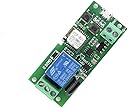
The MHCOZY WiFi Wireless Smart Switch Relay Module is a compact, low-voltage 5V device designed for smart home automation. Supporting only 2.4GHz WiFi, it enables remote control of connected devices like garage doors and PCs via the eWeLink app or voice assistants. With flexible inching and latching modes, a 10A max current rating, and over one million relay cycles lifespan, it offers reliable, energy-efficient, and versatile smart switching for professional-grade access control and automation.
| Brand | MHCOZY |
| Coil Voltage | 5 Volts |
| Connector Type | Usb |
| Contact Type | Normally Open |
| Current Rating | 10 Amps |
| Operation Mode | Automatic |
S**N
Flexible and Useful!
Great solution for making almost anything (that can be operated by pushbutton) an IoT device. If you don't want to have to rely on bridges (or "hubs"), this works great. And the value is excellent. OK, so our pictures are pretty redundant to what is shown by the vendor but maybe help perceive scale a bit. We bought a few of these MHCOZY devices to get WiFi control of some access controls from wherever we are in the world. They boot up quickly, connect to WiFi quickly, and if the eWeLink app is to be believed the WiFi radios seem to get good reliable signals in relatively impossible places (steel parking bar motor housing, sliding door motor housing under a layer of sheetmetal and reinforced concrete, etc.). The USB connector is handy for powering up the device for initial configuration before moving it to where it will be used, and the 7-32VAC power inputs mean it can "vamp" power from almost any device it will be crammed into. We have one eWe2.4 running on 12VDC one place and on 24VDC in another. For me it was a snap to set up but on my first try, I was thwarted by needing to put my iPhone on our 2.4GHz WiFi instead of the 5GHz side. One tiny annoyance, the texture on the back of the ABS case means that double-sided tape doesn't stick quite as well as it could (3M VHB for the win). But it seems to stick well enough. This should not really be a review of eWeLink but in our scenario it was mandatory. So far the free version has been fine for us and it seems to play well with Siri. Which means I can do decadent things like saying "hey Siri open my door" when I have my hands full with packages and groceries. Yay. I'm addicted. What else can I automate now, mwahahahahaha...
H**.
Manual is Lacking- but for the Money it's great!
I would pay 10x for something that actually worked perfect outside the box, from a US company and a better app/manual. But since it was under $15 I really did not mind getting more involved on the DIY side. I use this to open and close my commercial garage bay in my warehouse. Before, I had to use manual push buttons inside the door to operate. It's a 3 button system, Open (1 press opens door fully), Close (Need to press and HOLD to close), and STOP (emergency stop/used for when you don't want the door fully open). I setup relay one to click on for 1/2 second to activate the UP button. The second relay I set to inch for 18 seconds to close the door. The third relay I set to activate the STOP button- however this does not work as the STOP button seems to be wired in a different manner. I will update when I figure that out. 2 Things that I found difficult: 1- Initial connection was clunky. I do not like to allow location settings, but the app requires a precise location for initial wifi connection. After doing that I setup no problem. 2- The inching did NOT work at first. After several google searches, I found out that the "Mode" button needed to be pressed to activate this. I had to press it 2x to get the inching settings to work in the app. This I found totally pointless- why would you need me to press a physical button when the app allows you to set these times on your phone? It worked after doing this even after unplugging the unit a couple times. I was able to get this to work with Alexa no problem. So now, I can say "Hey Alexa- Open the Garage!" and my garage bay door opens right up. I have a camera facing the door just in case, and will install a wifi outlet to shut the relays off after business hours to reduce security risk. (ie, if a potential intruder shouts "Open the door" the relays would be totally powered off and would not respond). Another major plus- I have forgotten my keys before, and that means a trip home and wasted time. Now if that's the case, I can open the garage! And I can now drive my car right in to the warehouse on hot or rainy days without getting out of the car- provided I don't have too many pallets stacked up inside the door. Overall, it was a great solution to opening and closing a COMMERCIAL garage door. There are many, many ready to go options for RESIDENTIAL garage doors, but the commercial 3-button setups are sadly overlooked by most manufacturers.
E**R
Good value, not so good documentation
As others have noted, the instructions are not very helpful. Also, the two buttons on the unit are not labeled. The top one is manual on/off, the middle one is reset/pairing. You need to look at the picture of the circuit board to determine that. Setting up the ewelink account was a bit of a pain. The 60s window for entering the PIN they email you AND picking a password is tight. Initial pairing was wonky. It didn't work at first because it said it created a hot spot network with the name being the device number. I was supposed to connect my phone to the hot spot network, but my phone couldn't see it. I backed out and tried again, and it found the wi-fi network just fine when I paired it. Dunno what happened there. The good news is the device works well once connected. Manual on/off works as expected, and the ewelink app controls it easily. I used the inching feature to simulate the momentary button press on my sauna. In summary, instructions and setup were not so great. Actual functionality is just what I hoped for.
M**D
Easy to install
Very easy to install and works seamlessly, immediate response when activated
R**S
Great little WiFi switch!
Great little WiFi switch! I was looking for a device to act as a remote control momentary button to activate hot water recirculation on my Navien NPE 240A2 Tankless Water heater. I discovered that my water heater came with the Hot Button control board already installed. I bought this inexpensive device not thinking much would come of it but was pleasantly surprised to find all the features I needed to connect it and momentarily trigger the system. The eWelink app worked flawlessly to connect it to my network and after a firmware update, I found it had the "inching" setting that could use to simulate a push button switch. I powered it with a micro USB cord and an extra USB charger I had. Then I connected it to my Google Home and Alexa and it worked like a charm.
H**N
Works great on my old Lift Master/Setex gate controller.
My 1998 vintage gate was supposed to be controlled via landline phone system (just the wires) but the long run of wires started having issues. I already had wifi via "TP-Link power line wifi extender" for a camera at the gate. The hook-up is very simple at the gate circuit board, in fact mine already had an open/close button wired in hidden inside the cover, I just had to hook onto those wires. I only need a short "button push/inching" and it came that way but I did confirm inching is easy to change. Regarding the actual wifi connection from this module, it wasn't dead simple just a little clunky but believe me at 62yo I only have a very basic understanding of all this wifi/computer stuff and I was able to make it work.cube so my wife can easily open or close the gate from inside the house. It was also easy to make it work thru my Alexa The eWeLink isn't hard to get to work and works really well after it's running. I think (if there is not one) I will start a Facebook group so people can ask questions and give tips. For doing things like this there absolutely is nothing that can do this job at this price. If you have one already please join the Facebook group and help other out. At this cheap price I am going to order another just to play with and maybe be able to give support. Going to name the group "MHCOZY wifi Controller"
E**L
Difficult to set up.
I suppose I am almost a networking expert, but I had fits setting up this dude. I finally set up a old spare 2.4 GHz WiFi router with an SSID the same as my home network, powered off my home WiFi mesh network and thereby got this card and my phone onto the same 2.4 GHz network. My phone kept going to the 5 GHz band, while this card only talks 2.4 GHz. Even when a 5 GHz signal was much weaker than the 2.4 GHz signal, my phone would connect to the 5 GHz. I still had trouble with the app on my Google Pixel XL with Android 9, so I used an old phone running Android 4.4. Once I got the card set up, I removed my jerry rigged router, restored my home network, and the card connected to the home network OK. I've used it a month or so and it has been reliable. I have it configured for momentary (inching) mode and use 3 of the card's relays to "press" our elevator buttons. I used the elevator's 24 VDC power supply to power the card and mounted the card in a box high on a wall with a mesh WAP in view. I used IFTTT with Google Home/mini, and now say "Hey Google, Elevator garage" or "elevator main floor". It's nice when we arrive home in our basement garage, and we can summon the elevator while exiting the car, unloading groceries onto a cart, or whatever. When I am really busy (sitting in my recliner reading my newspaper sipping my martini) and I see a guest driving up the driveway, I just holler "Hey Google, we have a guest" and a google home routine opens 1 garage door and sends the elevator down to greet the guest (usually a family member).
J**E
Quick and slick - Software not so great but forgiveable
In less than one hour after unboxing, I whipped up a 3-zone sprinkler controller. Unlike another comparable product i bought a couple of days ago (and returned), the process to wirelessly discover the unit (using the eWelink) was amazingly painless. You simply plug in a Micro-USB charger, run the app, do Quick Pairing, and in practically no time you should be able to starting clicking any or all of the four relays. Since I intended to use this 4-relay system to control a 3-zone sprinkler (so I didn't need all four, maybe I'll add another zone later), I needed the relays to stay on until turned off. This is not the default behavior. Instead, when you press a button on the app corresponding to one of the four relays, it will come on and turn off almost right away. To change this, you have to press the "mode" switch (one of the settings will change the relay switch behavior t o stay on persistently). There is an "inching" behavior also, which is basically a programmable dwell time (if you need the relay to stay on a certain amount of time before turning off), which is controlled by the app. For sprinklers, the preferred method is to have a persistent "on" behavior, and then use Alexa (or other smart assistant) to control the on/off timing. One very slick feature of this unit is that you can choose to power the unit two ways. The first is to use a micro-USB. The second is to use 7-32V DC...or AC. The AC is convenient because standard electrically controlled sprinklers use a 24V AC supply. As such, you can use a single power supply to both power the relay board and to control your sprinklers. I did a quick installation, replacing the old, complicated $60 automatic sprinkler controller (which is a nightmare to program) with a single, simple Alexa-enabled controller for $20. You can simply bridge one of the AC power lines to a pin of each relay and connect the common to the other AC power line (24 V, not 115). The remain pins of each sprinkler are then connected to the remaining pin of each relay. Plugged it in, and it worked great. I was amazed at how quick this simple project came together. Integrating with Alexa took longer than the construction in the picture, but I eventually figured it out. You have to search for an Alexa skill called "eWelink Smart Home". I had a number of software crashes but eventually somehow got the device registered, and four individual devices were present in the Alexa device list. I promptly renamed three of them to "zone 1", "zone 2", and "zone 3". I then defined a few simple routines, each turning on a particular zone, waiting a fixed amount of time, then turning the zone off before advancing to the next zone, repeating the process for each zone. This is a Godsend, because I don't have to struggle with a flashlight in the garage, standing over a poorly designed gadget with small chiclet keys and a manual with tiny font print hoping I programmed it correctly. Now, you can just say "Alexa, turn on zone 1". This allows me to turn on each zone manually (with a voice command). I also programmed a pre-set number of routines to run the zones automatically through the week. Anyway, I should have waited to write this review, but was pretty thrilled to be able to knock out a simple project so quickly and effectively, and hope to inspire others to try.
Trustpilot
3 weeks ago
2 months ago