🖨️ Elevate your workspace with pro-level prints that make your creativity pop!
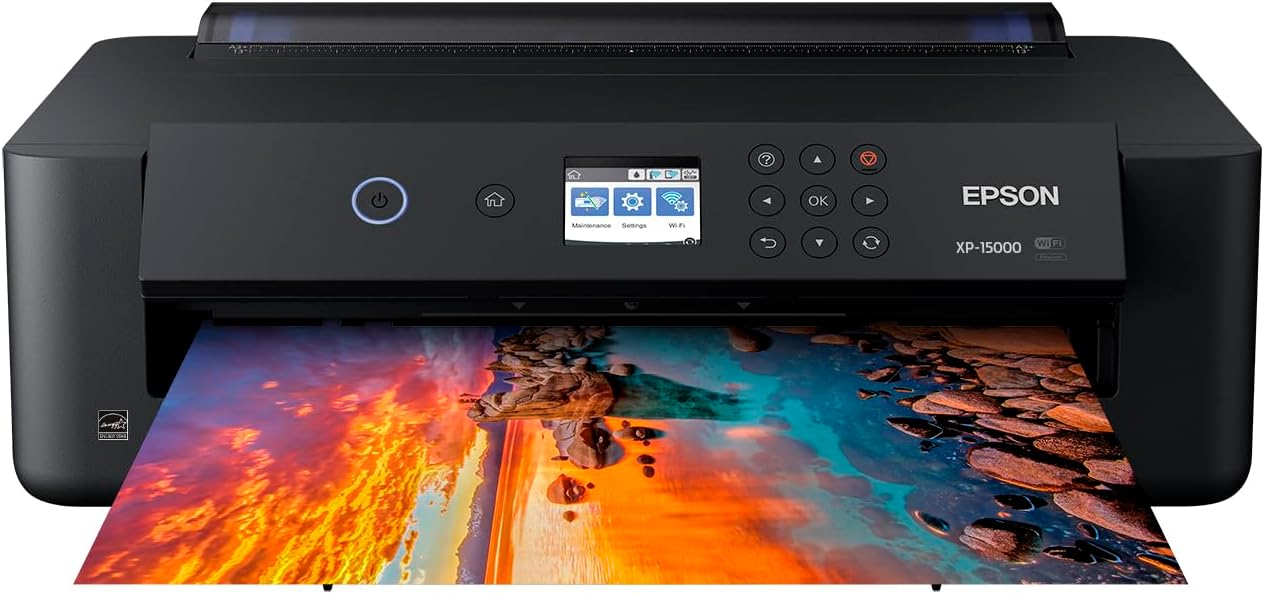
The Epson Expression Photo HD XP-15000 is a wireless wide-format inkjet printer designed for professionals and enthusiasts seeking ultra-high-definition, borderless prints up to 13x19 inches. Featuring a unique 6-color Claria Photo HD ink system including red and gray inks, it delivers an expanded color range and superior black-and-white detail. Compact yet powerful, it supports automatic duplex printing, wireless and Ethernet connectivity, and includes Amazon Dash Replenishment for hassle-free ink management. Ideal for producing gallery-quality photos and specialty media with ease.


| ASIN | B076PLTQQT |
| Additional Printer Functions | Print Only |
| B&W Pages per Minute | 20 ppm |
| Best Sellers Rank | #21,015 in Office Products ( See Top 100 in Office Products ) #33 in Ink Tank Printers |
| Brand | Epson |
| Built-In Media | 1 Cleaning Sheet, 2x Claria Photo HD 314-I ink cartridges (1x Gray, 1x Red), 4x Claria Photo HD 312-I ink cartridges (1x Black, 1x Cyan, 1x Magenta, 1x Yellow), CD-ROM for product setup, Expression Photo HD XP-15000 printer, power cord |
| Color | Black |
| Color Depth | 48 bpp |
| Color Pages per Minute | 20 ppm |
| Compatible Devices | PC, Tablets |
| Control Method | App |
| Controller Type | Android |
| Customer Reviews | 3.9 out of 5 stars 2,251 Reviews |
| Display Type | LCD |
| Dual-sided printing | Yes |
| Duplex | Automatic |
| Global Trade Identification Number | 00010343120655, 00010343937505, 00010343941632 |
| Hardware Interface | Ethernet |
| Ink Color | black, cyan, magenta, yellow, gray, red |
| Item Dimensions D x W x H | 18.7"D x 30.9"W x 16.2"H |
| Item Height | 16.2 inches |
| Item Type Name | Expression Photo HD XP-15000 Wireless Color Wide-format Printer |
| Item Weight | 18.7 Pounds |
| Manufacturer | Epson |
| Maximum Copy Resolution Black and White | 5760 x 1440 dpi |
| Maximum Copy Resolution Color | 5760 x 1440 dpi |
| Maximum Copy Speed Black and White | 20 ppm |
| Maximum Print Resolution Black and White | 5760 x 1440 dpi |
| Maximum Sheet Capacity | 200 |
| Maximum print Resolution Color | 5760 x 1440 dpi |
| Media Size Maximum | 13 x 19 inch |
| Model Name | XP-15000 |
| Model Number | XP-15000 |
| Model Series | Expression |
| Number of Drivers | 2 |
| Number of Ethernet Ports | 1 |
| Number of Trays | 2 |
| Other Special Features of the Product | Auto-Duplex |
| Output sheet capacity | 20 |
| Paper Size | 13 inch x 19 |
| Power Consumption | 24 Watts |
| Print media | Card stock, Paper (plain) |
| Printer Connectivity Type | wired, wireless |
| Printer Output Type | Color |
| Printer Type | Inkjet |
| Processor Count | 1 |
| Resolution | 5760 x 1440 |
| Scanner Type | Photo |
| Series Number | 1000 |
| Total USB 2.0 Ports | 1 |
| Total Usb Ports | 1 |
| UPC | 010343120655 010343941632 010343937505 |
| Unit Count | 299.2 Ounce |
| Warranty Description | manufacturer |
| Warranty Type | limited warranty |
| Wattage | 24 watts |
W**W
A must have high quality Photo Printer for cheap!
If you’re searching for a high quality printer without breaking the bank , this is the printer for you. I had spent a good amount of time researching various printers and the picture quality they offered . I really spent my time looking this up . I found that the Picture quality on this printer is incredible . If you look at other models that can print 13x19 they cost way more. Now the ink capacity I’m not entirely sure about but I do know the ink can be expensive but it’s a trade off for getting an affordable printer without breaking super high quality pictures . Setup was very straight forward and it makes it essentially easy for anyone to connect to their network to print wired or wireless. You have the ability to print from your phone which is really amazing as well . All around this printer is great and if you’re hesitant you should just pull the trigger because you get quality with this model and affordability .
T**E
hobbyist only
Purchased to replace a 15 year old Epson. I still have three weeks to decide to return this so I will edit this review if I decide to do that. PROS: After a few test prints, I love the quality of color, the accuracy of reproduction to what I see on my monitor, and the number of choices for print size and quality. I found, as others complained, that with cheap gloss paper there was puddling of ink. When I switched to my best papers, especially my favorite highest quality matte finish, the results were astounding and I'd do matte for everything. As for ink usage, I made the choice to go with a cartridge printer instead of the newer high-volume inks because I wanted the archival quality. Test the output for your needs, because I found the "draft" setting produced better on gloss paper. CONS: Like so many electronics now, you only get instructions if you download and print them. Second, when the printed photo feeds out, it has been curled and as it feeds into the receiving drawer, wants to drag the wet ink against the body of the machine. You have to be there to watch and push it down with a finger. Cheaper gloss paper in 4x6 size curled up in a little wet roll 1/2" diameter and is not usable AT ALL. The miniature screen on which to select papers is ridiculous. I wish the computer interface let you make the choices on your computer, but it does not.
H**R
Defective printer and poor wifi performance
I cannot recommend that anyone buy this printer. At this price, I expected a consistently working and decent quality printer. For initial wireless setup with a Mac, we had to spend 45 minutes on the phone with Epson technical support. That got it working. It worked for a couple of weeks and then the printer would frequently lose its wifi connection even though our internet is high quality cable and very consistent. We'd have to turn this printer off and on repeatedly to re-establish the wifi connection. Then after 6 weeks it stopped working totally. After another 45 minute call with Epson, they said it had a hardware failure and we had to return it to Epson and would receive a refurbished unit. This is less than 2 months after buying a new high priced printer that they are suggesting we accept a refurbished unit. Finally Epson said they'd send a new one. We got the new one and did our customary call to tech support to set it up for wireless with a Mac. It turns out they forgot to send the factory ink cartridges in this replacement printer that are required to do an initial setup. We have the Epson cartridges that are spec'ed for this printer, but they have to be the ones that COME INSIDE the printer for the printer to begin its initial setup. So after another 45 minute call, Epson now says they have to send us new ink cartridges for the printer to even print a single piece of paper - even though we have Epson ink cartridges purchased just for this computer. So after weeks of no printer for our business, we now have to wait for another shipment from Epson. Then we will have the next 45 minute call to set it up.. This painful and costly experience has had way too many headaches - all caused by Epson defects and mistakes. We will not be buying Epson again.
A**R
Day two and I love it.
Just received my Epson XP-15000. I am a Mac user and had no issue setting up the printer. Including updating the firmware, all was set up in about 30 minutes. I am using it as my office printer and a fine arts printer. Have had no issue printing on card stock or photo paper and it prints beautifully. Below is a print of one of my paintings. The color is spot on and this was printed on a very cheap matte photo paper as a test.
C**S
Ink is a problem
Printer is great. It prints very nicely.. had no problem setting up.. it all works fine. What I didn't like is the ink is kind of expensive and doesn't seem to last long. Once one color is out .. you can't use at all. Says "print in black" but it only allows that a few pages then it's done even tho there is black ink left. Epson customer service kind of sucks also.
G**N
Amazing quality print for artists!
The two on the left were printed with the Epson while the one on the right was printed by staples “photo quality”. I love the ability to set up the print file myself and that it prints at full-bleed flawlessly on a basic 8.5x11 photo paper! I printed 2 to test the satin vs presentation matte paper and the colors have little difference! You can see the Staples print does not match the color and appears darker than on screen. I didn’t do any color correcting prior to printing and it only took 2 minutes to print a photo. It’s pretty spectacular for the price! I’ll update in about 6 months to see where we’re at with quality. Edit: original post Aug 2022, edit Jul 2023 Still going strong one year later using this as my primary source of creating prints. I have found the best paper to use is by Moab or Canson instead of buying staples/Office Depot brand papers. After lots of printing I recommend cleaning the print heads for maintenance and aligning print heads after cleaning. The wire has gotten to a point where I have to unplug it then plug it back in to turn on, after a few tries of troubleshooting. Know that every printer no matter how expensive will need this maintenance. I used to work in a mass print shop where multi-thousand dollar printers needed the extra love and care. I don’t need to replace the wire just yet, but I’ll see after another year!
A**7
Beautiful, High-Quality Prints — A Great Photo Printer
I was looking for a good quality photo printer that could handle larger sizes, and this Epson XP-15000 really delivers. I’ve been so impressed with the print quality — the 13×19 prints come out beautifully: colorful, bold, and clean. Since it uses individual ink cartridges, it does go through ink pretty quickly, and buying all the separate cartridges isn’t cheap. But the results are worth it. The extra gray and red cartridges really make the colors stand out and give the prints a professional look. I’ve printed a number of images so far, and every single one has come out flawless. I’ve only had it a short time, but I’m extremely happy with it. Honestly, I do wish I had spent a little more and gotten the ET-8550 with the ink tank system, since it’s more cost-effective in the long run — but for what I paid, this printer still does an amazing job. If you’re looking for a printer for craft bags, chip bags, photo prints, stickers — this can handle it all beautifully. I’d definitely recommend it!
J**3
Limited Functionality
This computer will not serve the needs of the average home office or student's needs. It does not make copies or do faxing. It is mainly designed for the professional photographer. It does not have a separate paper tray for photo paper. It requires adjustments of the one paper tray. There is a back paper feed that can manage heavier and larger paper formats. It prints CDs with a separate tray. It requires 6 ink cartridges; the 4 standard-magenta, cyan, yellow, black- and grey and red, for more definitive picture coloring. I found the cost of the ink a little cheaper than my last printer. A lot of the required interaction on the control panel, such as retracting the paper output tray, could be handled with a dialog box on the computer or make it automatic. Instead, you have to go to the printer and push buttons. Setting up print jobs, such as printing an envelope is not, initially, an intuitive process. You will need to reference the user manual to set that up because of the menus on the printer's control panel. The menus aren't clear, at least for me. I always have to reference the user manual to get through them. I imagine after a few times through the menus I'll become accustomed to them. This would be an easier process if this could be completely set up in the print dialog box. Photos come out beautiful. The printer allows paper as wide as 13 inches and longer than 17 inches (not sure of length limits). I chose this printer so I could print on watercolor paper. It will accept heavier paper like cardstock where other printers can't handle that weight. Crafters would like that. I do not have my printer next to my computer since I share it with the household so I am constantly having to get up and down to interact with the control panel to make selections and to close the paper tray after printing. This is an inconvenience for me since I am disabled. If more of the control panel's interactions could be put into the print dialogue boxes on the computer that would be a great improvement. Adding at least a copy feature would be very helpful, too, since it is the most common and often necessary feature used besides printing pages with a printer. Honestly, I regret buying this printer. But that was my fault because I didn't research it's functionality thoroughly enough. I need a printer that does copying. I would have preferred a printer that communicates more through a dialog box. Actually, this is a replacement for one I had for only a month. The first one's paper output tray broke. It wouldn't retract. It looked like it came off its track. I tried to reseat it but it wouldn't budge. Epson replaced it, no questions asked.
Trustpilot
3 weeks ago
2 months ago