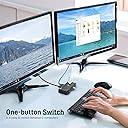
🔀 Master your workspace: Switch smarter, work faster!
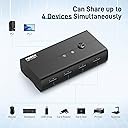
The FIDECO USB 3.2 Gen 1 KM Switch Selector is a compact, durable USB switch that enables seamless sharing of up to 4 USB devices between 2 computers. Featuring ultra-fast 5Gbps data transfer, one-button switching, LED status indicators, and broad OS compatibility, it’s designed for professionals who demand efficient multitasking and a sleek, portable design.


| ASIN | B0BNN6YJ8H |
| Best Sellers Rank | 71,399 in Computers & Accessories ( See Top 100 in Computers & Accessories ) 235 in KVM Switches |
| Guaranteed software updates until | unknown |
| Item model number | HKV24U3 |
| Manufacturer | FIDECO |
| Product Dimensions | 10.4 x 5.2 x 2.3 cm; 0.28 g |
T**E
Works perfectly
Works as intended. Cheapest one on Amazon I could find for quick KB/M switching between work and home computers. Button works every time. Powered off a decent usb cable and plug it's fine. Don't try powering it off your pc though use a wallplug. Fakespot put this at a D but honestly I reviewed it because it works and it's the cheapest.
D**N
Worked great for 6 months but not so much now
Worked great for 6months. Now when trying to switch between PC's from input 2 to input 1, it automatically goes back to 2 straight away. I need to click the button 2 or 3 times before it stays on input 1 Edit: Downgraded to 1 star, now completely unusable as just keeps switching. Aviod
L**O
happy user
happy user... works as expected
P**D
Unreliable and no hotkey support
I have bought 2 of these a few months apart. One failed within 6 months and would only stay on port 2. It doesnt have hotkey support (which is a shame), so you must manually use the button on the top. On the second unit, after a few months, one of the LEDs has failed, so you can only tell which machine is active by an LED being on, or the other being off! If the second LED fails, it's game over!
M**N
Well constructed but can’t get usb 3.2 speeds
I don’t know if it’s because I haven’t connected it up correctly. But I have this connected to a 3.2monitor usb port. I should be getting 1gigabit transfer speeds as I have a network usb connected to it. I know the network usb is 3.2 and can get the speeds. Best I’ve managed is 33megabits. This isn’t giving me the speeds. I’ve tried with a connecting the 5v to a 3.2 usb port and this doesn’t fix it. The cable to do this isn’t included so it could easily be the cable. I’m not marking this down but in my experience I’m getting usb 2.0 speeds.
U**R
It does what is meant to do at a great price.
It does the job realiable and at a great price. I connected two PCs which share one wireless keyboard transmitter and a USB camera, still two ports remain available.
M**E
Great
Packaged very well, with the main unit inside an anti-static baggy. Feels like a more expensive product to be honest and the cables included feel very durable and well made. It is a simple as plug and play. I'm using a Corsair Strafe RGB MK.2 keyboard with a Corsair M50 Pro mouse. Both plugged into this switch, which is linked between my Windows 11, AMD based, main PC and my secondary little Microsoft Surface Pro 3. No installs were required for this to work. I cannot find a single fault so far.
N**.
It breaks after a while
It is not worth buying, I got it a few months ago and connected my laptop and PC to it but after some time it started to switch back automatically to connection number 1 always, and then the switch button stopped working until you unplug the power and plug it again and when you press to switch to connection 2, it stays on it for some minutes and then it returns to connection 1
A**.
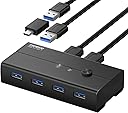
E stato costruito per avere periferiche collegate a 2 PC ,senza tutte le volte scollegarle ed attaccarle al pc che si deve usare. Grazie al comodo interruttore è possibile gestire e splittare quale PC usare e il Led mostra su quale Pc sta funzionando. Nella confezione oltre che al commutatore vengono forniti 2 cavi USB 3.1 Maschi-Maschio. Nel commutatore vi è anche l’ingresso per poter dare alimentazione supplementare. Ma io l’ho acquistato per un altro uso, che vi spiego magari puo essere utile a qualcuno. Possiedo uno Zyxel Nas 520 che ha due prese USB 3.0 nel pannello posteriore. Poi possiedo un Hdd esterno dove metto i miei film o musica e che collego al NAS per far risultare in rete anche quello. Poi ho Nvidia Shield tv che uso come lettore multimediale Questa apparecchiatura è nella sala dove ho la TV. IL PC invece è in un'altra stanza collegato in rete domestica, quindi da PC riesco a vedere il NAS e l’HDD con i film dentro visto che lo collego al NAS tramite USB 3.0 Quando scarico i film dal PC li passo nell’HDD collegato al NAS, e quando devo vederli devo fisicamente togliere il cavo USB dell’HDD dei film dal NAS e collegarlo all’ Nvidia Shield TV per poter visionare i film o ascoltare la musica. Siccome questa operazione la faccio spesso mi sono stancato, allora ho acquistato il commutatore. Nei due ingressi inserisco il NAS e IL lettore Nvidia, in 1 delle 4 uscite inserisco l’HDD con i film,cosi in questo modo non stacco piu fisicamente nessun cavo,ma commuto semplicemente con il tasto 1-2 dove devo indirizzare l’HDD con i Film. Comunque il prodotto funziona,commuta bene e per sicurezza ho dato anche alimentazione. Se non avete capito perché mi sono spiegato male,semplifico la cosa…. PC-Lettore multimediale e HDD esterno. PC e lettore collegati alle prese dietro che sono 2,HDD collegato davanti. Cosi se impostato su numero 1 vedete HDD dal PC,quando impostate su numero 2,l’HDD lo vedete dal lettore multimediale. In questo modo non staccate e riattaccate HDD. Se su questo prodotto dovessi riscontrare delle problematiche in futuro, aggiornerò la recensione. Se avete domande non commentate sotto la recensione, non si ha più la possibilità di avere una notifica, fatelo in Domande e risposte dei clienti.
P**N
Funciona bem, a troca leva cerca de 1 a 2 segundos. Tenho um windows e um Mac. Uso usb3 no windows e no Mac o adaptador para USB c funciona bem.
L**L
So handy- I have 2 PCs, but only one keyboard and mouse. This switcher made my computer setup(s) easy peasy
م**ل
رهيب ساعدني في عمل في المكتب الان استطيع ربط جميع اجهزتي بالجهازين دون كثرت اسلاك كالطابعه والماوس والكيبورد
K**Y
Plugged my USB 3.0 Dell docking station into this. I have 2 monitors, mouse, keyboard, and a foot pedal plugged into either this or the docking station(it works if everything is in the docking station too), and this lets me connect everything using a single USB 3.0 port for both my laptops. It doesn't require (at least for me any dedicated power source) but a power supply can be plugged into it (not included). I was told I'd need one to get video, but I've had no problems The only thing I don't like rn is when I disconnect or power off one laptop from 1 it auto switches to 2 even if nothing is connected or on. It's technically working as designed I'd just rather it not lol. I did confirm if I disconnect from 2 it just shuts off instead of switching to 1, if nothing is in 1. And auto connects back to 2 when I plug the laptop back in, so issue fixed I guess lmao
Trustpilot
1 day ago
1 week ago