


🎬 Take command of your shots—wireless precision at your fingertips!
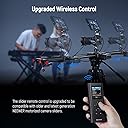
The NEEWER Upgraded 2.4G Remote Control is a rechargeable, ergonomically designed wireless controller compatible with multiple NEEWER motorized camera sliders. It offers stable 2.4G RF connectivity up to 10 meters, supports advanced video and time lapse functions including A/B point setting and exposure adjustments, and pairs easily without firmware updates for newer models. This remote elevates professional shooting workflows with precision and convenience.


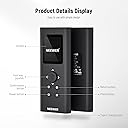

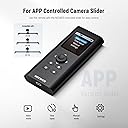


| Button Quantity | 7 |
| Controller Type | Button Control |
| Supported Battery Types | Lithium-Ion |
| Maximum Range | 10 Meters |
| Compatible Devices | Camera |
| Connectivity Technology | Radio Frequency |
| Special Features | Ergonomic |
| Maximum Number of Supported Devices | 1 |
| Item Dimensions L x W x H | 4.92"L x 1.97"W x 0.59"H |
| Item Weight | 10.58 Ounces |
D**T
Free up your phone...
Perfect for what it's for!
C**R
Save your money!
This thing is so lame; some outdated primitive toy from the 80's. Thought it would be more dedicated than the app; I laughed when I started it up. Just use the app that goes with the slider, and save yourself the aggravation. Proof: look for instructions on the controller; there are none in the box or anywhere on the internet, including Neewer's own website. All you can find are users using the app.
J**D
Must have accessory for the ER1-80 slider.
Love having this remote to control my ER1-80 dolly. Without the remote, I had to rely on using the app on my phone. While the app is actually perfectly fine, I prefer to work without my phone being in the mix as an unnecessary distraction. This remote allows me just that - the ability to focus on what I'm doing without a phone there to distract. At only $37 at the time of writing, I think its an essential piece of kit for anyone with one of Neewer's motorized dolly sliders. Since the remote has a built-in in LCD display, anything you can do with the app you can now do with this remote. So much easier to control the movements with this. Build quality is much better than I expected - the remote feels pretty solid. Battery is built in and rechargeable via USB-C.
A**M
Make sure it's compatible with your equipment
Could not get this to work with my system.
J**D
Great add on for the Neewer Camera Slider Carbon Fiber model
Although the Neewer slider can be operated from a phone app, I opted into buying this remote to avoid using up my precious phone battery charge during gigs. The Remote took a couple of attempts to connect, even thinking it was not compatible. Eventually, it did and it works well enough to operate the slider without having to use the phone.
F**E
NEEWER product just keep getting better! Great new updated remote for my VS-100WC Slider.
This new updated and innovative remote for the Neewer VS series camera sliders is more compact and useful than the original. The instructions included are very comprehensive and walk through the process of downloading and installing the firmware updates and pairing. All the operational control features are clearly delineated in the included manual, and the remote works perfectly after following the directions. Easy pairing and operation is flawless. The display screen is clear and easy to read. Charging at 5V/1A is simple and easy with a USB-C power port. This new remote is much more compact than the brick that was the original. It has more features and is much simpler to use. I couldn't be more pleased with this new remote and it has simplified using the slider remotely. Perfect for my food and cooking photography and video production. Neewer comes through again with a great product! Unquestionably FIVE STARS for this updated remote, and a very hearty recommendation for anyone who owns and uses one of the compatible Neewer Camera Sliders. Awesome!
A**R
Horrible
Don't buy no matter how many times I've done the firmware update it wouldn't connect, just stick to the app this remote is no good
T**O
Remote would not work
Very clunky. Material looks poorly made. Ended up using the App .. could not get remote to work
N**U
No se empareja con el slider ER1-120. Y el manual no es para nada claro, demasiado escueto. No viene con el cargador solo el cable.
み**々
とても良い。 初期設定が中々むずかしい!日本語取説もう少し丁寧にお願いします!
H**F
À bit complex to use.. you need to get used to it. But once you understand the user interface, the. It is less hussle in the operation of your slider. Also note that every 5-8 minutes the controller shuts down to save on battery. Then it takes sometime to turn it on again and you might loose on the moment.
D**C
Ich habe die Fernbedienung für meinen 100mm Slider gekauft. Der Slider hat eigentlich Bluetooth-Verbindung und App Unterstützung. Es funktioniert eigentlich sehr gut ABER: -Das iPhone geht schnell in den Ruhemodus und man muss immer wieder das iPhone entsperren -Wenn das Smartphone klingelt, kann der Slider nicht mehr bedient werden Die Bedienung mit dem Smartphone ist viel einfacher, intuitiver als mit der Fernbedienung eigentlich, ich wollte mit der Fernbedienung einfach ein Backup haben. Ich habe bewusst mich gegen das Modell mit der Fernbedienung entschieden, die out of the box Fernbedienung hat ein viel kleineres Display. Touchscreen wäre super aber bei dem Preis sollte man es nicht erwarten.
M**R
I bought this remote to go with the ER1 slider motor incase there is a day that the app is no longer supported in the future. I had to seek Neewer support, send videos and though their support replied, it was slow and also somewhat inaccurate. I sense it is a simple language barrier. At the time of writing this the limited support documentation for this RT-08 and ER1 is incorrect in how to sync and over simplified (for older remote). There is no Neewer Videos on the website nor on Youtube for this device but I have requested it occure for future. Following is the order of success for pairing: 1. Disconnect battery from motor and leave it for 10sec to completely reset. 2. On the motor press and hold the power button while inserting the battery and continue to hold the button for 8 sec to enter into pairing mode (you must force pairing mode). The next step is critical to occur at the same time. 3. While inserting the battery and holding the power button on the motor, after about 2 seconds then activate the remote in pairing mode by holding the power and photo buttons that are next to each other (as instructions state and this can be done one handed). 4. As the motor activates into pairing mode the timing of the remote also activating into pairing mode is essential (You have about a 1sec window). Only then will it sync up. Note: The app and remote cannot work at the same time so be sure the app is disconnected before attempting this. Once you have this running the remote and fine and works as intended. I suspect a firmware update may help. Secondary Note: I am on Mac and though the Neewer Firmware App can be downloaded, installed and bypass Apple security the actual Firmware updates cannot be run as they are not (at this time) Mac friendly nor can the remote be connected to the Mac. Thus there is no way to get the firmware onto the Remote. It does appear that the Motor accepts firmware updates via the app but the remote cannot be paired to the App for updates.
Trustpilot
1 week ago
1 month ago