We remain fully operational. Our teams are working around the clock to ensure your deliveries continue safely.

DOWNLOAD THE APP


Customer Services
Copyright © 2025 Desertcart Holdings Limited
DOWNLOAD THE APP

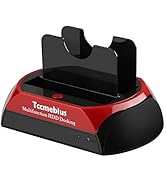
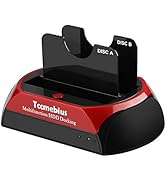
🖥️ Unlock your digital time capsule with the ultimate dual-drive docking station!
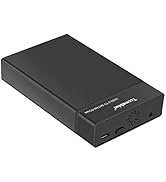
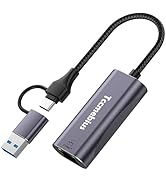
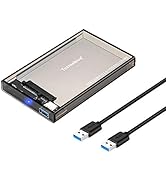
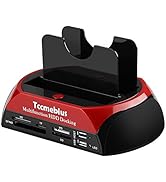
The TCC-S862-UK is a versatile USB 2.0 external hard drive docking station featuring dual IDE and SATA slots compatible with 2.5" and 3.5" HDDs/SSDs up to 20TB. It includes an all-in-one card reader and USB hub, supports data transfer speeds up to 480Mbps, and offers one-touch backup functionality. Compatible with major operating systems, it’s designed for seamless data recovery and expanded connectivity, backed by a 1-year warranty and lifetime technical support.








| ASIN | B075ZF845X |
| Are Batteries Included | No |
| Best Sellers Rank | 5,186 in Computers & Accessories ( See Top 100 in Computers & Accessories ) 3 in Hard Drive Docking Stations |
| Compatible devices | Desktop, Hard drive, Laptop, Smartphone, Tablet |
| Customer Reviews | 4.2 4.2 out of 5 stars (3,395) |
| Data transfer rate | 480 Megabits Per Second |
| Date First Available | 20 April 2017 |
| Guaranteed software updates until | unknown |
| Hard disk form factor | 3.5 Inches |
| Item Weight | 246 g |
| Item model number | TCC-S862-UK |
| Item weight | 246 Grams |
| Manufacturer | Tccmebius |
| Material | Plastic |
| Max number of supported devices | 5 |
| Memory storage capacity | 64 GB |
| Operating System | Android, Linux, Windows, iOS |
| Product Dimensions | 18 x 11 x 10 cm; 246 g |
| Series | TCC-S862 |
| UPC | 742500084882 |
A**A
A Time Traveller’s Best Friend for Data Recovery
I bought the Tccmebius USB 2.0 Hard Drive Docking Station, and it has turned into my personal time machine, allowing me to connect ancient hard drives to my ultra-modern SSD system without needing to open up my PC and perform some Frankenstein-level tech surgery. Seriously, I’m not about to hook up prehistoric IDE cables to my futuristic motherboard like some mad scientist. This docking station saves me from that chaos. Ease of use? Ridiculously simple. Pop in the old hard drive, plug it into the docking station, and bam, data from the dark ages is at your fingertips. Heat dissipation is solid too, no molten lava of electronics here, just cool, calm, and collected data recovery. I’ve been transferring files from decades-old drives without turning it into a sauna for the old hardware. Noise level? Barely a whisper. It’s like it’s too busy pulling off the greatest data recovery trick in history to bother with making noise. I haven’t tried the cloning function, yet, but let's be real, until scientists can clone humans and animals without it turning into a bad sci-fi plot, I’m sticking to file transfers. Bonus points: it has USB ports on it, so I can plug in other devices and play around while I’m transferring files. It’s like having a USB hub and data recovery wizard all in one. Highly recommend if you need to resurrect data from the depths of digital history. Five stars, because honestly, this thing deserves a spot in a tech museum for how well it works.
U**K
Good, flexible unit
Needed a dock for an external USB HDD that had stopped functioning. I suspected the issue was enclosure based, rather than with the drive. I went for this as it looked solid, had the option for SATA and PATA/IDE of multiple sizes AND a 2-port USB hub AND card reader. Removed the drive from it's original enclosure, slotted it in, switched the dock on (nice touch having a power switch) and it spun up and connected to my Linux machine with no issues. Slotting the SATA disk in is easy, though you're doing it a little blind so I did it a bit gingerly (also, if you've left any mounting screws in the drive, take them out or it won't fit!) It's solidly built, the packaging is OK, with some considerate and friendly (translated) instructions and all cables etc. Though others may have already done so, to address some complaints in other reviews ... There was a comment saying the supplied cable was a mini-USB jack. The correct cable, as included in my package is a USB type A on one end (for the computer side of the connection) and Mini-USB on the other. The mini jack goes in the back of the unit. Possibly previous reviewer assumed the front USB-A HUB jacks were the unit connection? Possibly they did get an incorrect cable. There was a complaint about the inclusion of IDE - simple answer to this is you bought the wrong device if you didn't want IDE. There was a complaint about it being USB2.0 ... again you bought the wrong device, buy the USB 3.0 version or from a different manufacturer. The comment about "why provide a link to driver downloads" is misleading. The instructions provide reference to a download for using the One Touch Backup (OTB) button on the unit, not for OS drivers - I used on a Linux OS with NO additional drivers. If there is an issue it might be the use of the acronym OTB in the instructions without explanation, which could lead to the impression the software is a requirement for use, but if you just want to access the drive(s) via your file manager, it isn't. I suspect this is mainly down to the translated nature of the instructions which has also had mention. Whilst it is obvious the instructions are a translation effort, they are FAR better than many I've seen and would be fine with just a few tweaks from a native speaker. I can't yet speak for IDE connections which some have complained about. The moveable power connector seems like a good idea for fitting different size disks but who knows... I also can't yet speak to the long-term build quality - things seem fin now but I will be being careful with the rear USB connector that some seem to have had issues with. My SATA disk DOES rock back a little in the caddy and it may do moreso with a smaller disk, so be careful of that, but you have to either push it or tilt the whole unit for it to happen (and why would you doe either) so no big deal.
C**N
Good piece of kit
I brought this to connect hard drives from my old computers to my new one to transfer files and use as extra storage capacity. It worked well and was easy to connect to the new computer. Its a bonus that it has the card readers as well. The only issue I had was that It was tight to fit the hard drive in the caddy so you have to use a bit of force. It went in though and worked a treat. A useful bit of kit to have around.
A**R
Perfect for reviving old hard drives!
I bought the Tccmebius TCC-S862-UK docking station to access a SATA hard drive I’d kept since 2011, and it worked flawlessly. I connected it to my Windows 11 PC and the system recognised it instantly—no drivers needed. It’s very easy to use, and the compact design makes it convenient to keep on my desk. The built-in card reader is a nice bonus too. Highly recommended if you want to recover data or reuse older drives.
W**M
I wouldn't recommend this item.
The unit appeared to work, however, the instruction manual and requirement for download software made it a bit of a hassle. I have only used it since as an external docking port to interrogate and format IDE HDDs.
V**V
A good device that worked well.
A great device for transferring your data to another computer or larger capacity HDD. I found it easy to use however I dint like the software and found that it wasnt clear which hard drive you was copying from. I decided to use file manager select all files then copy to the new drive which worked well.
D**W
This is Complete Garbage!!!
This is a piece of junk. As soon as I took it out of the box and plugged it in the power p,ugly wouldn't go all the way in and kept dropping out. After I managed to get around this problem, the drives I out in this worked intermittently. Also, the IDE I terface is so flimsy that I was sure it would snap, as it moves, I presume to cater for the different sizes. I would NEVER order another one of these! Also, I am currently battling with Amazon online to try and get my money back. I would avoid this company like the plague.
J**N
Perfect! made things so much easier!
worked perfectly. Used with two 500GB drives. It was plug and play on windows 10 and the cloning feature worked perfectly. Great value for money and has made data preservation much easier and more efficient. Also tested the compatibility on windows 11 and again, it was plug and play. Easy to use for most, would highly recommend.
Trustpilot
1 month ago
1 month ago