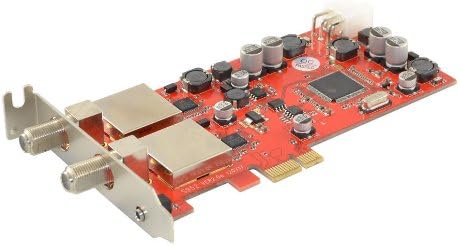
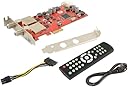
Dvbsky S952 V3 PCIe card (low profile) with 2x DVB-S2 tuner (Dual Twin Tuner), CD with windows software
Product ID: 50007314
Review: product is great does exactly what it should - product is great does exactly what it should. The one issue I had was that my Pcie slot is too close to my graphics card so I purchased an adapter to move this card to standard pci slot to enable proper cooling. Review: DVBSky S952 - Decent card. Works perfect in Windows Media Center in Windows 7 it just works it's a far better card than the Video Mate S360 which I bought and couldn't get it to work like this S952. Even get HD Channels the good thing is that the card takes the load when watching channels not the CPU. Some cards uses the CPU to encode the video but the encoding side is on the card. Using this card in a Dell Dimension 530 which I turned into a Media Center machine. Recommend downloading the latest drivers from DVBSky website. I'm defiantly going to order another one of these cards for the HP Elite 8000 in the living room. The DVBSky S952 requires a 6 pin power if your power supply doesn't have one then you can use the 6 pin to sata cable which the card comes with. If your power supply doesn't have a SATA power cable spare then I highly recommend you replace your power supply to something decent. Core 2 Duo handles HD channels perfectly fine. Wouldn't recommend anything older such as Pentium 4 or HD channels won't play. All Transponders and frequencies in Media Center work you may need to add some frequencies depending on what part is the world your in. Using Astra Transponder in the UK and Northern Ireland. Your satellite dish requires dual LNB. If you only have a single LNB on your dish then you will need to replace it to either a Dual or quad LNB. You can use a single LNB but you will only get playback side on tuner 1. Tuner 2 is for recording when watching one channel and recording another. If you decided to use only playback side on tuner 1 then you will only be able to watch one channel and record one channel. I will be ordering another. I highly recommend this card. The HD channel list I get BBC ONE HD BBC TWO HD ITV HD Channel 4 HD Channel 5 HD The dell machine specs. Dell Dimension 530 Core 2 Duo E8400 4GB DDR2 667 ATI Radeon 5450 1024MB 64GB Sandisk Solid State 1TB Seagate Hard drives.
| ASIN | B00FAPDVDS |
| Analog Video Format | PAL |
| Antenna | Television |
| AntennaDescription | Television |
| Box Contents | AV Adapter, TF Card Reader |
| Brand | DVB |
| Brand Name | DVB |
| Compatible Devices | Television |
| Compatible devices | Television |
| Customer Reviews | 4.0 out of 5 stars 30 Reviews |
| Manufacturer Part Number | S952 |
| Model Number | S952 |
| Tuner Type | DVB-S2 |
| Tuner technology | DVB-S2 |
D**H
product is great does exactly what it should
product is great does exactly what it should. The one issue I had was that my Pcie slot is too close to my graphics card so I purchased an adapter to move this card to standard pci slot to enable proper cooling.
T**Y
DVBSky S952
Decent card. Works perfect in Windows Media Center in Windows 7 it just works it's a far better card than the Video Mate S360 which I bought and couldn't get it to work like this S952. Even get HD Channels the good thing is that the card takes the load when watching channels not the CPU. Some cards uses the CPU to encode the video but the encoding side is on the card. Using this card in a Dell Dimension 530 which I turned into a Media Center machine. Recommend downloading the latest drivers from DVBSky website. I'm defiantly going to order another one of these cards for the HP Elite 8000 in the living room. The DVBSky S952 requires a 6 pin power if your power supply doesn't have one then you can use the 6 pin to sata cable which the card comes with. If your power supply doesn't have a SATA power cable spare then I highly recommend you replace your power supply to something decent. Core 2 Duo handles HD channels perfectly fine. Wouldn't recommend anything older such as Pentium 4 or HD channels won't play. All Transponders and frequencies in Media Center work you may need to add some frequencies depending on what part is the world your in. Using Astra Transponder in the UK and Northern Ireland. Your satellite dish requires dual LNB. If you only have a single LNB on your dish then you will need to replace it to either a Dual or quad LNB. You can use a single LNB but you will only get playback side on tuner 1. Tuner 2 is for recording when watching one channel and recording another. If you decided to use only playback side on tuner 1 then you will only be able to watch one channel and record one channel. I will be ordering another. I highly recommend this card. The HD channel list I get BBC ONE HD BBC TWO HD ITV HD Channel 4 HD Channel 5 HD The dell machine specs. Dell Dimension 530 Core 2 Duo E8400 4GB DDR2 667 ATI Radeon 5450 1024MB 64GB Sandisk Solid State 1TB Seagate Hard drives.
I**H
Not a good card. I already have a TBS 6981 which ...
Not a good card. I already have a TBS 6981 which has been solid and I wanted to add another 2 tuners. I thought I'd try this seeing as it's nearly half the price of another 6981 but this was a mistake. One of the tuners just randomly decides whether it's going to work or not, making scheduled recordings a complete lottery. I'll be returning this as soon as the new 6982 arrives to replace it. For reference, this is on Windows 10 x64 with the Nov 2015 driver. Same issue in both DVBViewer and DVBLink so I'm pinning this on lame hardware or drivers.
D**N
Two Stars
If your using a 64bit os.. The drivers are not signed so will not load.
P**E
Drivers not reliable in Windows 7 media center.....
I bought this to use via DVBlink in a windows 7 64 bit media center PC. Unfortunately, even with the latest drivers from the web site, it sporadically missed scheduled recordings. I already have a BGT3595 which works fine in this setup. So I returned the DVBSky S952 and got a TBS6902 instead. The TBS6902 also works fine in my setup with scheduled recordings, so I have to put this issue down to the drivers.
S**N
Great card, Just a a little tricky to set up in WMC (Win 8)
Delivery was 1 day early. Card was a bit of a pain to set up in Windows Media Center (Win 8) but got there eventually. Tip for setting up WMC (Win 8) in the UK using SKY dish: Install the latest driver from the cards web page. Manually set the card up with ASTRA 2A-B-D (28.2E), EUROBIRD 1 (28.5E). I had no bars on the signal (The signal was there but WMC did not detect it). Then scan for channels and it should detect them. If not check you line feeds are connected properly and try again. Note: on my system there was NO signal strength showing in WMC but it was there. Hope this helps, as there was no manual. The supplied player software was OK but not really user friendly. and driver CD was outdated, so get the Windows driver from their website (http://www.dvbsky.net/Support_win.html)
M**H
Great value for a dual tuner card.
I bought this to replace an aging TBS 6981 card that had done it's job well for many years but my problem is that I wanted to add a DVB-C card into my system to work parallel with the DVB-S card. However, TBS linux drivers don't play well with other make cards and I had just bought a DVBSky card. Installing is a doddle as you'd expect for a PCI-E card. I had to switch the back plate to the longer profile as it comes pre-installed with the low-profile plate. Again, this was a straightforward exercise of undoing 2 screws on the card and replacing. The Linux drivers installed without a hitch and one set of drivers were enough to make both DVB-S and DVB-C cards to work without any issue. I use this card in an Ubuntu 15.04 setup, using Tvheadend software. It scanned the channels without issue and the quality of the channels are perfect with no glitching. One thing to mention is that Tvheadend doesn't seem to report the signal and SNR correctly but that is purely a cosmetic issue. It is excellent value for a dual tuner DVB-S card.
J**S
Would be 5 stars if not complicated
First of all, before you order the card, open up your pc and make sure you have a spare SATA power supply and, if you dont, order the wires you need. Fitting the card is straightforward; ensuring a signal is somewhat harder. Make sure you have a slightly longer centre on your coax than a Set Top Box allows Tuning- Once you've scanned all channels, play the ones you want as favourites. Some channels are mislabelled (I chose the Horror Channel and got some gospel show!) If it's for UK use, after your scan look down the list. Near the bottom you will see Sky listed as a category. Select your favourites from three to get equivalent Freesat channels.
Trustpilot
2 days ago
1 month ago