🚀 Elevate your data game with Synology DS923+ — where speed meets scalability!
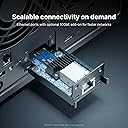
The Synology 4-Bay DiskStation DS923+ is a high-performance, diskless NAS designed for professionals and small businesses. It delivers up to 625MB/s read and 559MB/s write speeds, dual 1GbE ports with optional 10GbE connectivity, and supports expansion up to 9 drives with the DX517 unit. Featuring ECC memory and Btrfs file system, it ensures robust data protection and reliability, all housed in a compact, quiet, and energy-efficient design.


| ASIN | B0BM7KDN6R |
| Best Sellers Rank | 46,869 in Computers & Accessories ( See Top 100 in Computers & Accessories ) 22 in Network Attached Storage (NAS) Devices |
| Box Contents | 1 x DS923+ main unit; 1 x Quick Installation Guide; 1 x Accessory pack; 1 x AC power adapter; 1 x AC power cord; 2 x RJ-45 LAN cables |
| Brand | Synology |
| Brand Name | Synology |
| Colour | Black |
| Compatible Devices | Server, Network Attached Storage |
| Compatible devices | Server, Network Attached Storage |
| Customer Reviews | 4.6 out of 5 stars 709 Reviews |
| Enclosure Material | Metal, Plastic |
| Is Assembly Required | Yes |
| Item Dimensions D x W x H | 16.6D x 19.9W x 22.3H centimetres |
| Item Type Name | Synology NAS |
| Item Weight | 2240 Grams |
| Manufacturer | Synology |
| Material | Metal, Plastic |
| Mounting Type | Tabletop |
| Product Warranty | 2 year manufacturer |
| Product dimensions | 16.6D x 19.9W x 22.3H centimetres |
| Size | 4-bay; 4GB DDR4 |
| UPC | 846504004454 |
| Unit Count | 1.0 count |
| Weight Capacity | Maximum weight: 2.24 kg |
H**T
Simply brilliant
I had an old DS414j for a decade, and astonishingly Synology would still deal with support queries. It was time, however, to replace it, so I bought this and have not been disappointed. Setup was a total breeze and its performance is excellent. Given the limited role I have for it, it's basically bored out of its skull most of the time.... but it just works. It's quiet, it's cool (in all senses of the word) and I know it'll be reliable. Brilliant.
S**K
Definitely worth the money
Reliable and straight forward to use. Setting up takes a bit of time as you need to customise the files to your own needs. there are sufficient videos on YouTube explaining the various functions. The unit runs quietly in the background and once linked to Mac Time Machine it is also backing up your file registries. Perfect for personal or small business use. Highly recommended
D**L
Life Changer
Small very light unit. Bit plasticky. Easy to setup. Shove in drives (in my case 2 x 14TB which brings it down to useable 12TB), find on the network, do initial setup. Then flaff around on apps and desktop applications to get to start talking to desktop and phone. Yes, that takes a bit of time to learn how to use. Its syns files exactly like OneDrive. That way you can see files on any desktop, change and every computer has latest files. Backup entire desktop in background once a week or whenever you please. Love the app on the phone (not the photo one as that doesn't work properly on android) which when turned on auto. syncs photographs. Also used as Plex which works well. Is it worth it?? Yes if you consider your data valuable. It just does everything silently in background and doesn't impact performance of desktop or phone(save for battery life). But, with the drives inserted its noisy. Not the fan, but the actually drives clicking away all day and night as if there the roof is leaking (drip-drip-drip), so you do need to put in a room or cupboard out of the way and certainly not next to your desktop as they show in videos and photos. I recommend it.
E**E
Works smoothly
This was my first foray into the world of NAS. I wanted a solution to backing up data on cloud drives and my phone & laptop etc. Sooner or later there is going to be a problem with OneDrive / Google Drive etc and I want to make sure I have a copy. OneDrive especially can be temperamental, occasionally everything disappears, but then reappears a bit later. I'm never sure why, but keeping it all backed up seems like a good idea, so I don't get that awful sinking feeling that accompanies irretrievably lost data. Did a lot of research on NAS's on YouTube. There is quite a steep learning curve. I found the SpaceRex channel very helpful for the choice & step by step setup. I choose Synology as the consensus seemed to be that their software is better than the hardware. With QNAP it's the other way around. Horses for courses. I like the Synology Drive app, it's very easy to check what is on the NAS from the convenience of my phone. The file manager is also pretty easy to use. There's a lot more the NAS can do, lots of apps to choose from. I did find the initial setup and settings confusing and would have needed help from someone else had it not been for YouTube videos. Quick Connect worked smoothly for network access, as did mapping the folders on the NAS to Windows explorer. It was quite slow uploading my files, but now it is done updating them is quick. I've plugged in an external HDD via the USB and that shows up in the file manager with no problems. The NAS is not noisy, but I probably wouldn't run it in a bedroom if possible as there is a very low hum and the lights on the front. I'm only using the NAS to a small part of it's potential at the moment. Overall, not the cheapest backup solution. However this is a flexible setup which I can tailor to my needs as time goes on and as I get a better understanding of how I can use it.
A**R
My First NAS - Great Buy
I spent a day researching various Synology NAS devices, such as 2-bay, 4-bay and 5-bay versions. My main use case is as a storage server for my own images and videos. I ended up going with the following configuration: - Disks: WD Red HDDs 6TB @ 5400 RPM - RAM Extension: Kingston 16GB - KSM26SED8/16HD - NVME (cache): WD Red SN700 500GB I considered the WD Red SSDs, for a super quiet build, but I must say that the 5400 RPM HDDs are very quiet and I would no longer consider the SSDs for the noise level, only if I needed faster read/write speeds. This is my first Synology device and I'm very happy with the ecosystem. - Synology Photos: works great, and automatic backup from mobile devices works well. The automatic face detection could be better and will require you to manually tag and match people most of the time. The Synology Image Assistant extension allows your computer to generate thumbnails and smaller compressed versions of videos and image-previews. I've observed massive memory usage from the plugin, so it does not seem entirely stable yet. I like the "Image Request" feature, whereby you can send a link to a folder, where anyone can upload images. This is very useful during a vacation for everyone to upload content. - Synology Drive: feels similar to Google Drive (that I previously used). You can easily share individual folders that can be accessed by anyone online, very useful if you want to expose a particular set of videos. If this is your first NAS, I would strongly recommend you look at Synology NAS setup videos on YouTube as there are particular settings/concepts you should configure and know about: - SMART scans - Automatic Recycle Bin cleanups - Health Checks - 2-factor authentication - Data Scrubbing - BTRFS Snapshots - Creating Shared Folders It should take you less than 30 min to configure everything.
D**H
One of the best nas servers I have brought and used
This was so much better than my ds223j and it works flawlessly as a cloud drive, Plex server, vm, vpn and much more, it’s amazing how many things it’s able to handle all at once and I love SHR for the flexibility in using different capacity drives, the nvme ssd slots are also really useful for a fast read and write cache. Super easy to setup and use and the fans are almost silent.
K**R
Great upgrade
So much better performance than my old ds215j. Bought for facial recognition capability which works OK but needs setting per user. Easy to swap drives over
G**Y
Reliable hardware and brilliant software.
Synology NAS are well designed but lag slightly behind the competition in terms of hardware features for the money. The DS923+ is a good example as it could come with more RAM and a 10GBps Ethernet port as standard instead of as optional extras. On the other hand, it allows you to configure your NAS according to your needs: more RAM if you run many applications, 10GBps if your network supports it, NVMe SSDs if you need cache or a high speed volume and an extension enclosure if you need to grow beyond 4 drives and up to 9. It is more expensive, but it allows your NAS to grow with you. The really impressive bit here is the software which allows the NAS to be used for a myriad of tasks beyond file serving. In-house email, web server, VPN, media server, messager… there are dozens of applications which are all included for free unless they are provided by a third party (McAffe for example) or involve using the cloud. I was particularly pleased with the instant compatibility with Macs, PCs, phones and tablets, SONOS etc.. while still having thousands of settings for those who need a very personalised implementation. I was delighted to see an option to only allow including the web interface in an iFrame in specifically named sites. This allows you to insert the NAS control interface in your own company web site, with personalised graphics, of course, while preserving security.
Trustpilot
1 week ago
5 days ago