Buy anything from 5,000+ international stores. One checkout price. No surprise fees. Join 2M+ shoppers on Desertcart.
Desertcart purchases this item on your behalf and handles shipping, customs, and support to Morocco.
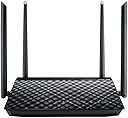
🚀 Elevate your home network game with ASUS RT-AC1200G+ — speed, range, and flexibility in one sleek package!
The ASUS RT-AC1200G+ is a dual-band wireless router powered by a Broadcom chip delivering up to 867 Mbps on the 5 GHz band. Featuring four external antennas with AiRadar beamforming, it ensures strong, reliable WiFi coverage across medium-sized homes. Its built-in USB 2.0 port supports file sharing, 3G/4G dongles, and network printers, while the ASUSWRT firmware offers advanced network management and flexible operation modes. Ideal for professionals seeking a balance of performance, versatility, and user-friendly controls.
| ASIN | B019ZMMZ8I |
| Antenna Location | Home |
| Antenna Type | Fixed |
| Best Sellers Rank | 271,326 in Computers & Accessories ( See Top 100 in Computers & Accessories ) 1,966 in Routers |
| Box Contents | LAN (RJ-45) |
| Brand Name | ASUS |
| Colour | Black/White |
| Compatible Devices | Personal Computer, Smart Television, Smartphone, Tablet |
| Connectivity Protocol | of |
| Connectivity Technology | Ethernet^DC-in jack |
| Control Method | App |
| Controller Type | App Control |
| Coverage | Medium households |
| Customer Reviews | 3.9 3.9 out of 5 stars (4,774) |
| Data Transfer Rate | 1167 Megabits Per Second |
| Frequency | 5 GHz |
| Frequency Band Class | Dual-Band |
| Global Trade Identification Number | 04712900079678 |
| Has Internet Connectivity | Yes |
| Has Security Updates | Yes |
| Is Modem Compatible | Yes |
| Item Type Name | Wl-Ac1200 Gigabit Dual Band |
| Item Weight | 395 Grams |
| LAN Port Bandwidth | 1167 megabits_per_second |
| Manufacturer | ASUS |
| Manufacturer Part Number | RT-AC1200G+ |
| Maximum Upstream Data Transfer Rate | 1167 Megabits Per Second |
| Model Name | RT-AC1200G PLUS |
| Model Number | 90IG0241-BM3000 |
| Number of Antennas | 4 |
| Number of Ports | 5 |
| Operating System | Ubuntu 10.04, Ubuntu 10.10, Ubuntu 11.04, Ubuntu 11.10, Ubuntu 12.04, Ubuntu 12.10, Ubuntu 13.04, Ubuntu 13.10, Ubuntu 14.04, Ubuntu 14.10, Ubuntu 15.04, Ubuntu 8.04, Ubuntu 8.04.1, Ubuntu 8.04.2, Ubuntu 8.10, Ubuntu 9.04, Ubuntu 9.10 |
| Other Special Features of the Product | Security algorithm: 64-bit WEP, 128-bit WEP, WPA, WPA-PSK, WPA2, WPA2-PSK, WPS^Restore button^LED indicators^MAC, address filter^WPS push button security |
| RAM Memory Installed | 128 MB |
| Router Firewall Security Level | True |
| Router Network Type | Dual_band |
| Security Protocol | WEP |
| UPC | 889349079676 |
| Unit Count | 1.0 count |
| Voltage | 240 Volts |
| Wireless Compability | 802.11bgn |
E**S
Brilliant router although missing a key feature for me...
First of all, let me say that unless you buy the ASUS Wireless Dongle that goes with this router, you will not achieve 900mbps (and even then expect to have to sit in the same room ~5 meters away) However, the wireless capability is not why I purchased this product... Usage: This router is connected to my Virgin Media homehub which is switched to "Modem Mode", internally I have 3 devices connected directly to the router with a 6 port gigabit switch connected on the fourth port. On this switch a further 4 devices are connected. Wired connectivity is excellent. Tests were between two Windows 8 machines with SSD's. On a large file (8Gb ZIP File) transfer, speeds remained in the 90-110Mbyte/sec area, occasionally reaching 115Mbyte/sec. On a small file transfer (500x4K and 500x8K), speeds were sporadic but did not drop below 70Mbyte/sec. I cannot confirm if the SSDs were the cause of the speed drop. Wireless connectivity is strong and consistent on the 8 connected devices in the house. I have my router sat next to the bottom floor window. Wireless range extends approximately 130meters beyond the house in the direction of the window and easily covers the entire of the back garden which is 'hidden' behind an internal wall, external wall and microwave. Network saturation is handled nicely and QoS seems to do its job well. There was no noticeable internal network jitter when connecting 3 internal devices to an academic torrent server. Internet bandwidth was saturated and became sluggish until QoS was turned on. Once QoS was enabled, there was no noticeable difference in browsing speed with Torrents on or off. The configuration UI is rather sleek and somewhat similar to the style you might see in ASUS' UEFI BIOS. There is a quick setup wizard to configure your connection. As I use cable, configuration took approximately 15 seconds and the router was up and running immediately. Some of the options seem counter-intuitive and hidden away, such as DHCP Address Reservation wasn't in the DHCP configuration dialogue. Once you find the controls you're looking for, configuring what you want to do is extremely easy and even a novice could understand and configure the various advanced settings. As a note, this is the first "after-market" router (one not given to you by an ISP) where the UPnP and NAT actually works properly all of the time. NAT sessions are discarded in an orderly and timely fashion and software that typically threw up NAT and UPnP errors has now stopped doing so and works perfectly (take note CoD players...) One good feature which often gets overlooked is the network restrictions sections. This allows you to set a schedule that certain devices are allowed to connect to the internet and network. This takes a little effort to initially configure, but from there works perfectly. The one problem I have with this router is the quality of the diagnostics and reports. Although there are graphs for Internet, Wired and Wireless (2.4 and 5Ghz separately) there is no graph to show me which device is using the bandwidth. This is very useful when you can see a lot of traffic going out of the network but have no idea which device is the problem. There is also no NAT session information or device connection information. So if getting reports or monitoring activity is your thing, unfortunately the N66U won't provide :( As this is more of personal preference and a "nice-to-have" than something wrong with the router, I see no reason to remove a star from the rating. If you buy this, you won't be disappointed by it's design, performance or reliability.
D**Y
Excellent router (edited)
Ok I tend not to give bad reviews unless really needed and I wouldn't say I dislike this router because I don't but I have had problems. At first everything was working fine , fiddled about to get the feel of how it works. Wireless is fantastic on this puppy and has a decent range !!! and it even works real good on those cheap android tablets that have poor wireless pickup !!! Gui was simple and quite easy to navigate and its web access quite easy to use from anywere in the world too!!! Now for the reason I give this 3 stars !!!! At first everything worked well Usenet downloaded max speed and internet loaded ultra fast !!! but after one day my usenet speed dropped and wouldn't go above 600KBs which is pretty poor compared to I was getting 6MBs !!! I though hey it may have been a setting I hit or changed upon setup and so I tried tweaking about !!! switched QoS on and forwarded the correct port but no go I turned it off but no go still 600Kbs. I thought hey my isp might be having issues and so I plugged my computer direct to modem and low and behold I was getting max speeds 6MBS. I plugged router back in and reset modem and router so the isp could register the new mac and retried to download but again no go !!! so now I reset the router back to factory default to see if that solved the issue but again only 600KB and so again I fiddled about with every combination of things to do from QoS to disabling plugandplay etc ... So I thought hey I updated the firmware as a new version was detected at start up , I then decided to flash the modem back to its original factory sent firmware and again no go still only 600KBs , I even loaded a merlin custom firmware too see if that helped but again no. I tested http downloads and those worked fine , I tested the inbuilt nzb usenet app and that had the same problem. Anyway I decided enough is enough !!! this is supposed to be an easy fast setup as the box says and so I had to return the router. It is such ashame because it was an excellent router :( I would have ordered a direct replacement but I am cautious now and tend to not request a direct replacement of the same product , just in case the same happens !! :( If anyone knows what the problem is or was I would appreciate a reply to my review . edit Well after getting a replacement everything works fine :) the problem was hardware error , I thought maybe it was a port error , although yes one port didn't work very well the others did :) but for some reason the failed router was not allowing any ports to pass though. Now the router works 100% and must say im glad :)
C**N
Menús de configuración tipo ASUS, fáciles, dinámicos y muy configurable. La calidad y estabilidad de la señal buena.
I**D
Después un tiempo utilizándolo puedo escribir la reseña sin dudar de que es un muy buen router con un alcance impresionante. Lo he utilizado tanto para sustituir un router de Movistar, por lo que también me fue compatible con Movistar TV, como ahora para utilizarlo de router secundario con Orange y ampliar la señal en toda la casa. Es muy sencillo de configurar tanto desde el ordenador como de la aplicación para Smartphone de Asus(muy útil para controlar velocidad, actualizaciones, compartir contraseñas con invitados, etc) También dispone de aplicación para poder compartir contenido con un usb desde el router sin necesidad de un PC (es decir, poder visualizar o compartir archivos conectando un usb al router, y recuperarlo o bien desde el pc o desde la aplicación del Smartphone) Dispone de los dos tipos de canales (2,4Ghz y 5Ghz) y de wifi AC (mucho más rápido que el wifi gn convencional) Desde que lo instalé no he tenido ningún tipo de cuelgue por conectar varios dispositivos, ni reducción de velocidad. Ahora puedo disfrutar de mi conexión de 300mb de Orange por Wifi sin problema. El packaging perfecto, a la altura de una marca como la de ASUS. Lo recomiendo sin ninguna duda tanto para sustituir routers de las operadoras como para ampliar y/o mejorar la señal.
A**.
Edito: Antes de nada, este análisis es para la VERSIÓN NORMAL con USB 2.0. NO estoy analizando la revisión B1 con USB 3.0 Un buen router para fibra. Soporta VLAN's para los nuevos servicios 802.1Q que traen por la misma red de fibra VoIP, TV (Imagenio por ejemplo) e Internet. Yo lo he configurado en dos modalidades que me son necesarias (para Movistar Fibra a través del ONT Huawei y por otro lado para utilizar 3G para servirlo por WiFI en un hogar sin conexión). - FIRMWARE: Un router de 10 en cuanto al Firmware de ASUSWRT, basado en Tomato, tendrás muchas opciones que cualquier router no tiene: como la posibilidad de tener dos conexiones a Internet (una principal de fibra por ejemplo, y una de backup en caso de que falle la conexión primaria, usando por ejemplo 3G con uno de los dongles 3G compatibles - en mi caso uso el Huawei E303-), conexión OpenVPN como cliente y servidor, opciones de WIFI para invitados que te permite proteger tu red local, Gestión de ancho de banda mediante QOS. - USB: Tiene dos puertos USB para conectar dongles USB 3G (ver lista de compatibilidad de ASUS), discos duros, pendrives, admitiendo incluso acceder a tus datos desde Internet mediante app de ASUS, compartir impresoras USB... una pasada. Si que es cierto que yo la compartición de USB de discos y pendrives no me interesa porque la velocidad de transferencia siempre será mayor en un NAS. En cualquier caso para el hogar y mucha gente que pretende acceder a sus ficheros y demás desde Internet o la red local, es una manera sencilla y efectiva y el fabricante pone estas caracteristicas avanzadas desde la sencillez. - WIFI: Es compatible con 5GHz y 2.4GHz y admite hasta 1750 mbps por WIFI (la razón por la que su precio es elevado). Admite crear Wifis para invitados de una forma rapida y sencilla encapsulando tu red local. Ademas admite la posibilidad de usarse como modo repetidor, modo cliente,... un mar de posibilidades - APP Movil. Desde ella verás de manera sencilla cuanta gente está conectada a tu red local y gestionar de manera rapida desde tu movil muchas de las opciones. - DISEÑO: Es bonito por fuera, nada que ver con los típicos routers de los operadores. - RED: Todo el router es Gigabit Ethernet, tanto el puerto WAN como los puertos LAN. - POSIBILIDAD DE AMPLIAR FUNCIONALIDADES (Custom Firmware): Con la instalación de ASUSWRT Merlin, un firmware basado en el código del original pero ampliando algunas de las opciones, podrás tener opciones utiles como poder apagar todos los leds del router (para aquellos que ven pelis a oscuras o les molesta), tener mas detalle de las conexiones, podremos configurar varias instancias de VPN y de una manera mas detallada (usando autenticación mediante clave pública/privada), posibilidad de configurar scripts de Linux basados en eventos del sistema del router (yo he logrado que cuando alguien se conecta por VPN te envie un Email el router para saber si entre algún tipo de intruso, por ejemplo), e incluso el acceso nativo de la red local a la red TOR (a mi personalmente no me interesa). Un detalle importante es que si el firmware al actualizarle se corrompe y se nos convierte en un ladrillo el router, ASUS pone a disposición un recovery para poder reflashearle incluso aunque esté totalmetne muerto. Lo que reduce mucho las posibilidades de cargarnoslo al actualizarle. - ECOLOGÍA ELECTROMAGNÉTICA: Aunque el consumo eléctrico no suelen ser poco, quizás es un punto curioso de mi cosecha, pero empiezo a conocer mucha gente que le preocupa el WIFI alrededor de niños pequeños (y mas con noticias acerca de las polémicas del WIFI en colegios y demás), este router de serie nos permite no solo especificar horarios para que se desconecte y conecte la WIFI automáticamente, si no también usar el botón WPS (detrás del router) para que en vez de funcionar para WPS, usarlo para que al pulsarle la WIFI se conecte/desconecte (cuando en otros routers deberíamos meternos en el panel a través del navegador y demás). - RUIDO: Si nos acercamos a el podemos escuchar un pelín de ruido, debido, bajo mi punto de vista principalmente al WIFI. RESUMEN: Un router con el que podrás retirar el router del operador y teniendo un alto rendimiento en WIFI y abriendo un mar de posibilidades en el hogar para configurar tu red local y WAN. Si que es cierto que dependerás de un conversor fibra - ethernet y no tiene salidas de teléfono analógico que sean previamente convertidas del VoIP, pero si tienes el ONT de Movistar no tendrás problemas. Compatible con VLAN's, con Imagenio,... De diseño bonito, con posibilidad de usar una conexión de Backup con red móvil 3G, redes para invitados, 2.4GHz y 5G a 1750mbps, OpenVPN, gestión del ancho de banda, app móvil, compartición de tus archivos mediante pendrive y disco duro mediante ASUS AirCloud, admite custom firmware, posibilidad de repetidor WIFI y punto de acceso. En definitiva un router que podrás usar para distintos menesteres durante mucho tiempo. Un router sin pegas para los que nos movemos bien en este mundillo, mas vale tener un router bueno, y es un dinero muy bien invertido. Y para aquellos que no son expertos quizás necesiten ayuda para configurarlo al principio, pero una vez colocado y configurado van a disfrutar de una manera sencilla de sus posibilidades.
M**L
Facile à configurer. Acheté pour remplacer le wifi d'une Freebox Révolution qui est assez nul. J'ai une couverture Wifi dans toute la maison.
A**O
router eccellente molto facile la sua installazione grazie alla sua interfaccia grafica anche in lingua italiana. Molto utile l'app, installata sul mio cellulare, con cui posso gestire al meglio il dispositivo
Trustpilot
1 day ago
2 weeks ago