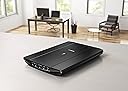
🚀 Elevate your desk game with pro-level scans in a snap!
The Canon CanoScan LiDE 220 is a compact, lightweight USB-powered scanner delivering ultra-high 4800 dpi resolution and 48-bit colour depth for exceptional image quality. Designed for professionals and creatives, it offers rapid 10-second A4 colour scans, direct cloud integration, and one-touch multipage PDF creation—making it an essential tool for efficient, high-quality digitization in any modern workspace.


| ASIN | B00MWLHV2U |
| Best Sellers Rank | 31,268 in Computers & Accessories ( See Top 100 in Computers & Accessories ) 34 in Document Scanners |
| Box Contents | scanner, cable |
| Brand | Canon |
| Brand Name | Canon |
| Color Depth | 48 bpp |
| Connectivity technology | USB |
| Customer Reviews | 4.3 out of 5 stars 3,523 Reviews |
| Global Trade Identification Number | 04549292013405, 04549292013412 |
| Item Type Name | Canon CanoScan LiDE 220 Compact Scanner |
| Item Weight | 1.6 Kilograms |
| Item weight | 1.6 Kilograms |
| Light Source Type | LED |
| Manufacturer | CANON |
| Media Type | USB |
| Minimum System Requirements | Modern computer with USB port |
| Model Name | Lide 220 |
| Model name | Lide 220 |
| Network Connectivity Technology | USB |
| Optical Sensor Technology | CIS |
| Paper Size | A4 |
| Product Warranty | europe |
| Resolution | 4800 dpi |
| Scanner Type | Image Scanner |
| Scanner type | Image Scanner |
| Standard Sheet Capacity | 1 |
| Wattage | 5 watts |
C**N
Great quality scans - excellent valu
I bought this to replace an HP Envy 100 all-in-one I was using for scanning. I've had the Canon DSLR cameras for years and I've always liked them so I thought I'd try out the CanoScan range. I'm using a Macbook Pro with High Sierra so I just plugged it in. May laptop has no disk drive so I have no idea what's on the CD that came with it. The scanner worked with Adobe Photoshop straight out of the box but with slightly limited functionality. If you want to use the higher resolutions and colour depths you'll need to first install the driver, then the catchily named "Canon IJ ScanGear Starter EX" - both downloaded from the Canon website. In the advanced mode you can access the 48 bit colour depth and the 1200dpi scan resolution. The "IJ Scan Utility" app seems to be a more straightforward interface if you just want to press a button and scan, but it doesn't allow 1200dpi scanning. Don't bother with the "My Image Magic" app which is total rubbish. I couldn't even get it to recognise the printer and it looks like they dug it up from 1999. The scanner itself is not expensive and it feels a bit flimsy so I was sceptical of how good the image quality was going to be. It turns out it's actually great. It handles documents and artwork with no issues. I haven't needed to scan any photos in yet but it picks up watercolours and gouache just as well as any other non-specialist scanner I've used in a professional studio. I think it's really good value and it's nice and small and light so you can pop it away in a drawer.
M**S
Does a trouble-free job
Bought as an upgrade from an old Medion scanner which had served well but with no 'Windows 7' drivers had become redundant. The drivers & 'IJ Scan Utility' (I rarely bother installing the free supplied software although there is some on the CD) installed with no problems but I got the latest versions from the Canon website & not from the supplied CD... always a good idea ;-) The 'IJ Scan Utility' is straight forward to use & works well, scanning to an editable PDF file or using OCR to scan to a 'MS Word' document are just a couple of the handy features. The scanner works fine & scan quality is what I'd expect across all types of documents. The 'Z' lid enables scanning of thicker documents like books & is a nice touch. The only drawback is that when you're scanning a document (books in particular) it must be totally flat on the glass bed to be scanned properly, my old scanner was a bit more forgiving in this respect. This isn't a fault but a drawback of utilising a newer & "better" CIS scanning element. Speed of scanning & transfer seems fast, certainly better than my old Medion. The only real criticism I can level at the Canon is that it's much noisier than the old Medion. It's quite a metallic grating noise as well so gets a bit annoying after several scanned pages but nothing I can't live with.
K**N
Less than an hour from delivery and I am already scanning and saving images AND THEY ARE GOOD QUALITY TOO.
I bought this inexpensive lightweight scanner for scanning documents and photographs etc for my family tree read to upload to Ancestry. I opened the box and all was present. At first you have to wade through the pieces of paper and put aside all the ones in foreign languages. Not too much info really in paper form. It says there is an manual on the cd. What it does not say is that you have to move the black plastic slider from LOCKED to UNLOCKED which is on the base of the scanner. This merely unlocks the mechanism that stops the scanning heads from moving while in transit. It must be unlocked before you plug into your computer/laptop etc or you will hear the scanner making noises while it tries to set itself up. My computer has Windows 7. Attached the scanner to my laptop using the cable that came with the scanner thus you don't need any additional cables so the one new one I bought with it is now just another cable to add to my collection. I put the cd in my laptop and quickly things started happening. I followed the screen instructions. It then placed an L shaped icon in bottom right of my laptop screen right OVER THE TOP OF SOME SHORT CUT ICONS - I tried to move the new icon as I could not get to the original underneath but it would not move so move any short cut icons you have in the bottom right of your screen to somewhere else on the screen before you start. The downloading failed because as mentioned in another review the cd contents proved to be because out of date. I switched of my computer and counted to 30 slowly and switched back on. The scanner does not have an ON/OFF switch so because it was still connected to my laptop I heard the setup movement of the mechanism inside it. I am thus not going to leave it connected to my laptop except when in use. I touched the L shaped icon with mouse and an X appeared so clicked and the icon disappeared. I could move my short cut icons before I tried again. I googled Canon CanoScan LiDE 220 Compact Scanner and found a Canon website mentioning updates and selected it. I clicked to download the files and my computer showed all the screens as before but this time direct from Canon. Finally it was complete - Actually easy weasy. I put a label off something in the scanner - bottom left hand corner with the scanners buttons which I did not use nearest to me. I clicked on the little picture on the L shaped shortcut icon on my screen and the scanner jumped into action. A time line counted down the scanning. A screen popped up with the image of the label visible, I clicked to copy and opened up Paint Shop Pro 9 but the Paste words were greyed out - Damn. Back to the picture and by investigating discovered a pop up menu of the visual programs on my laptop. I clicked on Paint Shop 9 which then opened up automatically. At first there was a pop up message appeared saying it could not be done. I clicked on OK thinking "damn again" but the message just disappeared being contradicted followed by the appearance of the image. So there it is. Easy weasy. Paint Shop Pro allows you to SAVE in whatever format you want. Ancestry allows ,jpg so it is fine. I decided to experiment with something thicker - you see I had arranged the scanner on it's stand which leans slightly to the right. I put a dvd case in place but of course this time I had to press lightly on the cover of the scanner with my right hand while I clicked on the icon with the mouse in my left. The mechanism did its job. and I soon had the image of the dvd case in Paint Shop Pro. Not being into copying these - I found where the Canon software had placed the file and touching the image with the mouse shows you a fingerprint of the image. I deleted the file. This of course means I can save the image in .jpg format and place it in the correct folder amongst my Family Tree folders and delete the original scan. I remember my old scanner that had to be fixed to my computer and then my printer attached to the scanner - imagine the cables. There were a lot more settings to get used to. I expect this scanner has things I need to learn about but the quality of the label and the film dvd cover through its vinyl protector were very good. So I hope this simplistic explanation of what to expect will help anyone who is worried about a new scanner. Now I need a padded case such as a laptop case to store and keep safely in when not in use. These days I tend to do scanning in batches - not every day. I CANNOT BELIEVE HOW QUICKLY I GOT IT SET UP EVEN INCLUDING HAVING TO DOWNLOAD MORE UP TO DATE FILES. If you want a scanner and you don't want to deal with slides and film then this is an ideal for non professional use. A photographer may want a more highly spec version.
J**O
Best scanner I've ever used and quick too
I needed a scanner urgently to replace a broken "all in one" device, but didn't need the printer/fax parts - so looked for a good scanner instead. I use windows 7 pro 64 bit, so the scanner had to work with that, and although transparencies/negative option would have been nice it would have more than doubled the price of some of the scanners. I had read the review of this items predecessor, the LiDE 210, which was great, and then found this one at an even cheaper price on Amazon. It arrived as promised, and so far has performed extremely well in scanning some old photos - the supplied software does a good job of splitting multiple photos into separate files - but is not always successful. Compared to other scanners I've owned (usually as part of all in one printers etc) this one is so quick. It takes about 10-12 seconds to scan the A4 bed in photo mode at 600dpi, and less than 10s to scan a document page. I like the fact it's powered just by the USB cable - less clutter and easy to connect when I need to use it. Overall - very pleased with this, especially at the price paid.
M**K
Great scanner, poor manuals HOW TO INSTALL
My old LIDE80 finally packed up after many years good service , so purchased an LIDE220 from Amazon. Very similar machine in all respects to the LIDE80 except no direct photo negative scanning. Although i notice another review does say you can scan negatives from the platten and use photo editing software(eg free Fastone Image Viewer) to reverse the image. The resolution on this scanner is high enough to do so. The scanner is USB powered but doesn't like my USB hub(unlike LIDE80) so must be plugged directly into the laptop USB port. Manuals very poor,so i will briefly outline important points in installation. Firstly turn machine over and slide lock setting to unlocked. Then download the FULL software package from Canon website(LIDE220 Support page- Software) to get the latest software. Do not use the CD, it will be out of date. https://www.canon.co.uk/support/consumer_products/products/scanners/lide_series/canoscan_lide_220.aspx?type=download&language=&os=WINDOWS%207%20(32-bit) Install software BEFORE CONNECTING SCANNER. It will tell you when to connect the scanner. Set a restore point. Double click on downloaded file to install. Once the install is complete, go into the main program list from the start button. Find Canon IJScan utility. Right click and send link fron IJScan utility to desktop. Dont bother with Quick Menu--it doesnt work very well on Win 7. Start IJScan utility, go into settings to set up filenames, locations for saving scan files eg photos or docs- and set function parameters for scans eg always apply recommended image optimisation, or for docs produce a searchable PDF or an image file. The Scangear option is important if you want control over image enhancement eg restore faded photos, adjust brightness etc. It should have been called 'advanced settings'.You need to run PREVIEW to get all the options. You can select the higher DPI options in this mode. Thats it really! Had a lot of trouble installing under Windows 7, needed to reboot immediately after completing installation and i needed to repeat the whole process twice to get it to work. This might be because Win7 searches windows update for software and installs the wrong driver first time --to avoid this cancel this search and select install from pc option. I only realised this was probably the cause afterwards, so cannot say this works. Installing twice does work if you disconnect the scanner before the second try and connect again once instructed to do so. Then reboot again. No problem with Win 10 installation.
W**Y
Must Try Harder
Like many others my main gripes are about the software and its usability. an example is that if you scan in a photo the default DPI is only 300. You can change that, to a maximum of 600DPI, within the software but why is the default so low !?? I love Canon Cameras for their quality. I really like their printers (I have a TS8050 and the 8000 A3 printer - both are excellent quality printers. But wow the software is very average, its windows XP level at best. If you scan in hundreds of old photos take with film cameras, this will do it but very very slowly. The scanner can take A4 size but you can only squeeze in 2 6x4 photos if you want that to produce two scans, one per photo. If you add a third, it fits but its one scan of 3 photos, which you than have to crop 3 times, and save ........ ouch. It takes about 60 seconds to load, scan and get the results. They are OK at 6x 4 level but if you want to do anything with them, such as crop or turn let alone anything like change exposure, then use other software. I get the feeling the 65 pounds I paid is so little its not worth Canons time to make better software for users. This did work out of the box with using windows 8.1 - no driver issues, and after about 800 scans my sense is I would recommend it, especially if you want something cheap and fairly small in desk size. but the stand they supply if you want to store it on its edge, vertically, is so cheap and flimsy that its useless. It has no rubber feet, its plastic and weighs almost nothing - it has two tiny pegs that the scanner (which has two holes to match) is supposed to fit into and rest on ........why/how would anyone use that as a stand and not expect it to fall off if lightly brushed - come on Canon - use the Product and ask yourself are we trying to make the best scanner and make it easy to use ?
B**6
LiDE 220 - A decent quality scanner for a decent price.
When I upgraded to Windows 10 it refused to load the twain driver for my Canoscan LiDE 60 which had been working perfectly well with Win7. Canon have classed my old scanner as "unsupported" and will not produce Win10 drivers, so I needed a new one. I've stayed with Canon as the LiDE 60 is a good machine (which I donated to a relative with a Win7 pc). The LiDE 220 has quicker warm-up, faster scan, more compact and easier to use interface, better resolution, greater flexibility of use and it is about the same dimensions as my old one. I've had this one since February 2018 and it works perfectly, just as it should. I would recommend this scanner to anyone needing a decent quality scanner for a decent price.
M**J
Good quality scanner
I had read quite a few reviews on scanners before buying this. I wanted something to scan my artwork at a reasonable price but I didn't want to compromise on the quality of the scan, in particular the colours. I had read some mixed reviews on this scanner and many artists had suggested an Epson which was one I was considering, but the price on this scanner was much cheaper. I have scanned several pieces already, paintings sketches and inkings, and all have come out perfectly well. The colours have matched my original works exactly and the images are sharp. It is very useful just using the USB lead to connect to the laptop and it is very easy to use once you have installed it. I have windows 10 and have had no problems with connecting it. It is definitely worth the money and gives good results.
Trustpilot
2 months ago
2 days ago