Desertcart purchases this item on your behalf and handles shipping, customs, and support to Morocco.
🚀 Elevate your home office game with the ultimate all-in-one dock!
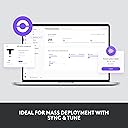
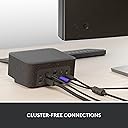
The Logitech Logi Dock is a premium all-in-one USB-C docking station designed for professionals seeking a clutter-free, efficient home office. It supports up to five USB peripherals and two monitors, features six noise-canceling beamforming microphones for crystal-clear calls, and delivers up to 100W laptop charging. Certified for Zoom, Google Meet, and Google Voice, it integrates calendar syncing for one-touch meeting joins and pairs seamlessly with wireless Logitech peripherals, making it the centerpiece of a modern, productive workspace.


| ASIN | B09JL47R12 |
| Best Sellers Rank | #11,877 in Computers & Accessories ( See Top 100 in Computers & Accessories ) #672 in Laptop Docking Stations |
| Brand | Logitech |
| Built-In Media | Power Supply Cable 1.6 m,AC Power Cord 1.7 m,USB-C to USB-C Cable 1 m |
| Color | Graphite |
| Compatible Devices | PC or Mac with USB C port |
| Customer Reviews | 4.0 out of 5 stars 82 Reviews |
| Hardware Interface | HDMI , USB 3.0, USB Type C |
| Item Dimensions L x W x H | 5.18"L x 6.3"W x 3.34"H |
| Item Type Name | Docking Station |
| Item Weight | 2.1 pounds |
| Manufacturer | Logitech |
| Mfr Part Number | 986-000025 |
| Model Number | 986-000025 |
| Number of Ports | 8 |
| Product Dimensions | 5.18"L x 6.3"W x 3.34"H |
| Total Number of HDMI Ports | 1 |
| Total USB Ports | 6 |
| Total Usb Ports | 6 |
| UPC | 097855172822 |
| Unit Count | 1 Count |
| Warranty Description | 2 Year Limited Hardware Warranty |
| Wattage | 100 |
J**W
Great product for work from home setup.!
This product looks, sounds and works great.
M**.
Works as described, makes desk less cluttered
I've used this for about a week and it works great. This product is new to the market so I was worried it would be buggy but that's not the case. I'm using a Lenovo Thinkpad, which still needs its regular power cord plugged in. I have it hooked up to two LG monitors at 1920x1080, a drawing tablet, wireless keyboard and mouse, and webcam. Pros - easy set up, just plug everything in and turn it on - good speakers and microphone - so far works great with Teams - looks great, really cleans up clutter on your desk Cons - I wish it came with USB A to USB C adapters - could use a few more USB ports but its ok - the physical buttons on the dock for mute/video don't work in Zoom, at least not with how my employer uses it. The mic/video still works though - the speaker makes a little humming noise whenever a quick sound plays on my computer (ex. when a Windows error message pops up). The humming is not noticeable during zoom calls or when playing music - There's only one HDMI and one DisplayPort, which means I have two different types of cords to hook up my dual monitors (1x HDMI to HDMI; 1x HDMI to DisplayPort). Not a big deal, but something to be aware of. - You can't run dual monitors in extension AND use your laptop screen as a third extension. One of the three screens will have to be a mirror of another screen. So I just shut my laptop and use the dual monitors in extension. - no power button, I use the one on my laptop. Not a big deal. - one Youtube review said that the USB ports have different power levels but aren't labeled, so this can be annoying if you are trying to charge device and need to select the best port. I don't have this issue though since none of my USB devices draw high power and I haven't tried charging my phone through the dock yet
J**K
Good dock, great sound, not compatible with everything
Overall I think this is a really good dock, but it has a couple downsides. First, it only has 2 USB-A ports. My keyboard, mouse, and webcam all connect to USB-A so when I'm using my webcam, I have to connect it directly to my laptop. Second, while the dock supports multiple displays, the resolution and refresh rate depends upon the system you are connecting to, and they don't do a good job of detailing that support, unless you have a Mac. More details on that later, if you care. The good: The dock will charge up to 100W while providing all the dock features, so for the most part you just plug in one cable, and you're good to go. The speaker and noise cancelling mic work great. I used to need headphones for meetings to avoid background noise and speaker feedback, but not anymore. The sound is decent for other things, too - much better than any laptop speakers I've had. The buttons on the dock do work, but situationally. In my experience, the volume buttons work all the time, but the other ones only work when you are using the conferencing software your model is specifically made for. Not a big deal, but maybe annoying if you use multiple types of conferencing software for different things. Specific display details I have noticed: The dock does NOT support Thunderbolt, but it does support USB Alt Mode on those ports. Based on my experience, if you have Thunderbolt 4, you can probably safely connect 2 external displays up to 4k at 60hz (5k Ultrawide are limited to 30hz). If you just have a USB 3.0 type C port like my old laptop, you may be stuck with 2x1080p@60hz, 2x1440p@30hz, or a single display over 1080p at 60hz. Basically, even though the dock doesn't support Thunderbolt 4, the hardware behind it gives the dock what it needs to work its best. Also notable, though the dock has USB-C ports, they DO NOT support USB-C displays. Your displays must be connected via a standard HDMI or Display Port cable.
K**F
Great until the warranty expires. . . 3 years
Worked great for 3 years and the warranty expired, immediately the microphone stopped working.
A**R
Impressive All in One Docking Station!
Minimizing multiple computer cabling connection into one. Great external speaker for audio and Zoom meeting.
R**N
Had high hopes, but there are a couple glaring items missing
I wanted to use this for our executive committee to make their Teams calls easier and desks cleaner with a sleek docking station. The built in speaker is great! clears up some deskspace and sounds great. I'm blown away that this does not have an ethernet port. I've never seen a docking station without a wired connection. This a primary function of a docking station is to offer the added throughput of a wired connection over the wireless connection otherwise used by a laptop. File sizes are too large to feel we are a wireless only society now. Also, need two HDMI ports. Having one HDMI and one DisplayPort is fine.. but just a pain in the butt when most monitors are HDMI. Need additional USB A ports and possibly another USB C port. With the lack of ethernet port, you are forced to hang a USB to ethernet dongle off of the dock, eating up one port. If the user has a printer, keyboard, mouse, webcam and monitors with USB ports, you start to turn this once sleek looking docking station into frankenstein. I'm hoping the next attempt has the LAN port at least.
J**S
Fantastic Docking Station
Bought these for my office, and they are wonderful. They get the job done in terms of sounds quality and mic quality is pretty decent too. I love the integration with Team and Zoom/google meet so that settings are already ready to go. Thunderbolt 4 cable is a must so now there are not a million cables going everywhere with other docks. I highly recommend you buy this.
M**O
Good product for professionals that work from home
It works as presented on the videos and on amazon. I have used it with apple and linux products without problems. Good speakers and easy integration to the desktop devices.
T**1
Perfect MacBook docking station
I'm using this with a monitor, an external USB 3 external drive and a Logitech webcam. Everything works perfectly and instantly with my MacBook Air M3. Definitely recommend it as the integrated speaker sounds great too.
A**Z
Gran producto para conferencias!
Excelente producto con gran calidad de audio y micrófono para conferencias, el mejor complemento para las reuniones de oficina
P**R
Amazing performance with a little design flaw...
This unit has amazing microphones and speakers. We are actually using it for a conference room table and it gets great coverage. Where there is a weakness is with the 3 foot proprietary USB cable shipped with the unit. I get that it is intended for single desktop use so 3 feet should be ample, but it is proprietary and so you cannot get a longer cable if you need one. Some research appears to indicate that the Apple Thunderbolt 4 cable will work, but that is a very expensive option.
Trustpilot
1 week ago
1 month ago