Desertcart purchases this item on your behalf and handles shipping, customs, and support to Morocco.
🌬️ Transform your AC into a smart comfort hub—because your home deserves genius control!
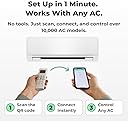
Sensibo Sky is a compact, wireless smart controller that upgrades any remote-controlled air conditioner or heat pump into an energy-saving, app-controlled climate system. Compatible with Google Assistant, Alexa, and Siri, it features geofencing, dual temperature and humidity sensing, and a 7-day scheduler to optimize comfort and reduce cooling costs by up to 40%. Easy to install and lightweight, it’s designed for modern smart homes seeking effortless, eco-friendly climate control.


| ASIN | B01MU2YSR4 |
| Additional Features | Portable,Eco Friendly,Energy Efficient,Lightweight,Wifi |
| Best Sellers Rank | #30,956 in Tools & Home Improvement ( See Top 100 in Tools & Home Improvement ) #46 in Home Automation Hubs & Controllers |
| Brand | Sensibo |
| Brand Name | Sensibo |
| Cable Length | 1 Meters |
| Color | Gray |
| Control Method | App, Remote, Voice |
| Controller Type | App Control |
| Customer Reviews | 4.2 out of 5 stars 5,996 Reviews |
| Efficiency | A+++ |
| Form Factor | Portable |
| Global Trade Identification Number | 07290016037098 |
| Included Components | 1 x Sensibo Sky Device, 1 x Power Supply |
| Installation Type | Split System |
| Inverter Type | No Inverter |
| Is Electric | Yes |
| Item Dimensions D x W x H | 2.17"D x 3.23"W x 0.67"H |
| Item Weight | 2.4 ounces |
| Manufacturer | Sensibo |
| Model Name | Sensibo Sky |
| Model Number | SEN-SKY-01 |
| Noise | 1 Decibels |
| Power Source | Corded Electric |
| Product Dimensions | 2.17"D x 3.23"W x 0.67"H |
| Seasonal Energy Efficiency Ratio (SEER) | 3.2 |
| Special Feature | Portable,Eco Friendly,Energy Efficient,Lightweight,Wifi |
| Start Year | 2018 |
| Start year | 2018 |
| Unit Count | 1 Count |
| Voltage | 140 |
| Warranty Type | Lifetime |
| Wattage | 1 watts |
M**E
Simple and effective
So I've had this for about 3 years using it with a window air conditioner can't tell you the brand off that my head it works quite well occasionally the IR broadcast doesn't make it to the air conditioner but that's very few and far between and tends to be when adjusting the volume up or down so it might be off by a degree on occasion it's easy to fix just switch it back to Fan adjust up or down so that the app matches the device and then continue using schedules work great climate react Works quite well I have the issue where my window air conditioner will let it get quite hot in my room if it's cooler outside but I'm allergic to cut grass so sometimes I still need the air conditioner on even when it's nice out so the climate react can help prevent it from getting overly hot in the room when it's set to auto on the air conditioner which is a lifesaver sometimes on top of that if you do pay for the subscription there are a lot of very interesting and potentially useful add-ons I personally I don't use it but I have in the past and since I used it and they have added a lot more capability however I'm not sure how many of them would actually function with my air conditioner which is pretty old it's 10 years old or so but basically as long as it has an infrared receiver this device will work with any air conditioner maybe even heating unit. It'll also keep track of how long the device has been on and when the built-in filter to your air conditioner should be checked which is quite nice to just get a notification on the phone because when my air conditioner it's a little orange light that unless you're standing right in front of it you're not going to notice at least I don't. One last thing I don't have a Lexus I can't State how well it works with that however Google Assistant Works quite well the only issue I have is that you can only set it with Google Assistant to heat cool and fan you can't set it to the auto setting and I don't know if that's the restriction from my air conditioner or if it's because of Google but to be honest it's not the end of the world either and if I need to turn it on remotely having it set to cool is fine and then when I get home or when I can pull out my phone or something I can adjust it.
P**R
Easy to set up and works when your out.
Tealy happy with this device. Controls all features and took 5 min to set up. So easy. 5 stars my unit is an Acecool. Mini split. It also works over 4 and 5g.
M**N
product works, but company is not truthful
First, the good news: The Sensibo Sky product works pretty well, at least if you own a recently-purchased Mitsubishi mini-split AC system. Since that is the only AC system that I've used the Sensibo Sky with, I can't say how well the Sensibo Sky works with any of the myriad other AC systems that are out there. One other bit of good news: If you send the Sensibo support folks a question, they will respond promptly with good, clear English. Now, the bad news: The Sensibo support folks may respond to your question with complete lies. This puts you, the buyer, in a tenuous situation at best. I have a Mitsubishi minisplit system, with four indoor "head" units. I want to be able to remotely control these units. That is exactly what the Sensibo Sky product (and other products, such as the Cielo Breeze) is designed to do. The Sensibo product consists of two parts: A small indoor device that you near your AC unit, and an app that goes on your phone. When you setup each indoor device, you use your existing AC remote control to "teach" it what kind of AC you have. Once taught, the indoor device will send infrared (IR) signals to your AC system. For example, if you want to turn one of your AC systems on, you open your Sensibo app on your phone, click on whichever AC unit you want to control (you need one Sensibo Sky unit per AC system), then click the "on" button on your app. This sends a signal through the Internet to the relevant Sensibo Sky device, which sends an IR signal to your AC system to turn it on. In the same way, you can set the temperature, fan speed, etc. All this works pretty well, as long as there is no power outage where your AC systems are located. A power outage is one of the most common ways for the Sensibo unit to become out-of-sync with your AC system. If your AC system was on when the power outage happened, the Sensibo app will think your AC system is still on when the power returns. But it won't be. Your AC system will be off. When you look at the Sensibo app on your phone, it will say the system is on. When you click on the app to turn the AC system off, the result can be unpredictable. Before I purchased the Sensibo Sky unit, I asked Sensibo support about this little problem, and they told me that they have solved this problem with a feature that will automatically re-sync the Sensibo unit with your AC. That's not true, and they know it. What the "sync" feature does is it allows you to manually tell the Sensibo app which state your AC is in .... but you have to be physically there, next to your AC system, to know this! After I bought the unit, I saw how the sync feature actually works, and I told the Sensibo Support folks that they had mislead me. I asked them if there was anything that could be done to ensure that the Sensibo Sky unit in sync stays with the AC system. They told me no. Again, this was a lie. The actual truth is that, if you own a modern Mitsubishi mini-split system, you can ensure that the Sensibo system is properly synchronized with your Mitsubishi system simply by sending two consecutive on/off commands via the Sensibo app. For example, suppose the Sensibo app says that your system is on. That might or might not be true -- you have no way of knowing if you are not physically present. You simply use the Sensibo app to click "off" then click "on". If the Mitsubishi system was already off, the first command will be ignored, then the second command will turn the system on again. After I discovered this (via extensive testing that I did), I pointed this out to the Sensibo support folks. They responded that they already knew this to be the case! Why they misled me twice in a row is ... beyond me. If you don't have a modern Mitsubishi mini-split system, the trick I described above might not work for you. It's all dependent on how the remote controls work for your specific system. Now that I know how this product works, I'm quite happy with it. My particular use-case is a vacation rental. Using my Sensibo Sky app, I can remotely turn the AC units on before my renters arrive so that my unit is nice and cool for them when they arrive. And after my renters leave, I can ensure that the AC is turned off so that I don't waste money cooling an empty rental unit. The same thing applies during the winter. The Sensibo company sells a bunch of other features that you need to pay for ($/month), but I am not using any of them, and I never intend to. As long as the Sensibo company stays in business and supports this app, I'll be happy.
J**J
Some limitations initially, but quickly worked it out with their awesome customer service.
Update: I should have updated this some time ago but been putting it off for too long. I initially the device had some limitations for my preferred use, as can be read in my initial review below. However, I contacted Sensibo customer support and they were able to set up a date and time with me to go over the various missing functions. A few days later, the device worked the way I wanted, with all the functions of my Daikin mini-split the way I wanted them to work. What can I say, the device now works the way I wanted. Given it some thought, and it kind of makes sense they cannot have detailed settings for the hundreds (thousands?) of different AC units in the world, right out of the box, but the fact that they're more than willing to work with you to get the device working the way you want, makes up for it all in my opinion, hence the updated 5 stars from originally 4. I'm about to order a second device for another AC unit, they definitely made me a happy customer! :) === Original review: After the installation of a new "dumb" mini split A/C unit, I wanted something that I could use to make the unit more "smart", and after having compared several devices, I felt Sensibo was the one coming closest to what I wanted. Unfortunately, it is not without some dislikes. Let me start by saying that the install was very simple. You place the device somewhere in range of the infrared eye of the A/C unit, plug the device in, make sure you have the app downloaded, and then follow the setup instructions on your app. In my case it started with simply turning the A/C unit on and off while aimed at the Sensibo device, and the Sensibo registered what remote I had. At this point things started to work, almost flawlessly. I'm saying "almost flawlessly" because it had some hiccups. For some reason, when I started using the Climate React function (which basically uses either the actual temperature, feel temperature, or humidity levels to do something), it turned out it wasn't always working (meaning, the log said the device turned on or off, but it didn't actually do anything, no blue indicator light that it was transmitting, nothing). I contacted support, and while I received an answer that did not actually help me at the time, the device miraculously started working correctly. Another thing that did not work right away was, while the device did register the IR signals for my remote for the most basic functions, it did not actually see the other functions my remote and A/C unit has available. It only showed Cool, Dry, Fan, few fan levels and that was about it. My actual A/C unit, however, is capable of so much more. So I contacted support again (who, by the way, is the main reason they are getting four stars, and not just three), giving them my remote control's product number, and I received a quick reply back, telling me that they updated my Sensibo's settings and that I should log out and back into the app. Sure enough, much more functions became available for me to control. I like that I am able to have my A/C unit turn on and off automatically at a specific feel temperature setting through Climate React, which seems to be about right. My A/C unit is capable of doing this on it's own, but that does mean it has to stay on (it switches between cool and fan in that case), so the Sensibo makes it more efficient by using less electricity. Another thing I like is that it is hooked into the Google Homes, and can simply ask Google what temperature it is inside, ask it to turn the A/C on or off etc. One thing I don't like, and this is pretty major to me, as it makes me turn off Climate React at times and use the original A/C remote control instead, is that Sensibo is not capable of controlling my vertical and horizontal fan slats independently. My A/C unit is capable of 3D airflow (up/down/left/right), and while Sensibo is capable of doing that, it is unable to just do left/right or up/down by itself, while my A/C unit does have that capability. I personally don't like the fan slats going up/down, as it blows cold air straight onto us, so I like them to be in the most upper position (my A/C unit calls that the "comfort setting"), Sensibo isn't able to do this, and keeps setting the slats back to the middle position, meaning it blows air onto us. I also like to have my A/C unit automatically blow the air from left to right with the vertical slats, so the entire room gets cool air, but the Sensibo is again incapable of doing this by itself. Meaning I still end up using the original remote from time to time, making the Sensibo a bit obsolete. While I do recommend this product as it works, if I had a better understanding of it all in advance, I would probably not have purchased the Sensibo due to the limitations. The reason I am keeping it and wont be returning is simply because I hope they will update the software at some point, adding the missing features, or perhaps make it self-learning so we can add the missing features ourselves.
M**I
Amazing sopution
Amazing! Huge help to cool down one room while traveling!!
K**H
Does not work as advertised
My excitement level was high. However, this faded quickly when the reality of the poor design and even poorer functionality became apparent. Firstly, this unit uses old technology - there are TWO WiFi networks to join the LAN from the device and your home WIFI. Not easy, but eventually doable. Remote (Daikin) identification worked. The Sensibo Sky ran for two days - then failed. Nothing changed with the WiFi (2.4Ghz) signal. Now comes the kicker, support is ONLY by email. While responses are within an acceptable time frame, the information is AI generated. I was never sure I actually communicated with a human. I spent 10 hours+ in 17 emails going back and forth, resetting the unit per instructions. Nothing worked and my frustration with their process was off the charts. This amount of work for a $99 device is UNACCEPTABLE. As another nail in the product coffin - “Climate React” is a great idea but a disaster in practice. This feature, supposedly , allows you to set Humidity, temperature or “feels like temperature” triggers. However, when setting the humidity trigger to 50%, the temperature and “feels like temperature” were also set to “50”. I don’t know about you, but a 50 degree Fahrenheit room is too cold for me. The Climate React feature is a great idea that FAILS. miserably in practice. I returned the Sensibo Sky as it DID NOT WORK. I purchased a competitive brand - Cielo Max for essentially the same price. It works perfectly.
T**G
Device is 'cool' and support is even cooler
Purchased this device several weeks ago after disqualifying some of the similar devices out there from my search after reading about the challenges they pose. The Sensibo Sky was among the lower cost options that came with all the features I needed (Alexa, App, SmartThings - currently unsupported but it works for me - but without the hassle. The app is very easy to use. Setup took me only a few minutes, and pretty soon I was able to ask Alexa to turn my Air Conditioner on or off. Cool!!! The IR Blaster is not that great, but I have it mounted near the unit and it works well for me and the App controls most of the functions natively. I must admit however that initially I was not totally thrilled with this purchase. It worked, but without the range from the IR blaster and some of the features my particular AC not working 100%, I was resigned to thinking I had picked the wrong product. Then I remembered reading a review somewhere suggesting I contact support. I reached out the same evening (a Friday night) and almost immediately received a response from 'Alex' asking for a picture of my remote. Upon sending the picture, I received another response from Alex saying they'd jump right on it. I went to sleep and within a day or two I woke up with new features more closely matching my ACs capabilities showing up in the app. They worked!! I let Alex know of a few more quirks with the App and my AC and within another day all features were working flawlessly! I had a few more questions and suggestions that Alex responded to promptly and graciously and my Sensibo Sky has been working flawlessly ever since. While working with Alex, I was also researching SmartThings integration and found a particularly helpful thread on the SmartThings website. After some tweaking there, I now have my Sensibo Sky working with SmartThings nearly perfectly. Not bad for no official support!!! My Echo Dot supports it with the appropriate Skills enabled. All in all, I will recommend this device. Very cost effective, intuitive app, and AWESOME support if there are issues. I totally made the right purchase here and will recommend to everyone! Thanks Sensibo team!!
M**.
Almost great...
I have been keeping my eye on this product for a long time. Just could not get myself to spend the money on the device when I have a remote sitting right next to me. I just wasn't sure it was worth over $100 to not have to click the remote numerous times throughout the day to keep from being too cold or too hot. But then I got enough points on the California OhmConnect program to get one for free. I must say, I am overall pretty impressed. By the way, I use the Sensibo Sky to operate my DeLonghi Portable Air Conditioner PAC AN280HG1W-3A in a 120 sq ft shed that I call the Home Office in the back yard. Pros 1) Climate react is great. I have mine turn on at 72 degrees and off at 70 degrees. My backyard office shed only needs AC even though the unit can do heat. I have no review in how Sensibo manages super cold weather with a 3-in-1 AC unit. All the computing hardware keeps the shed warm out here even in the winter months. The office is always at the perfect temp in the summer now and I do not have to think about it all day. +1 for Sensibo. 2) The APIs are great. I can do everything that the app can do from Postman or an AWS Lambda Function 3) The iOS app is pretty decent. No real complaints other than the cons below. 4) I have no AC power Sync issues. I see many other that complain of this issue. I only use the Sensibo app or Alexa or an API call to operate the AC. I have put the AC remote away and instructed everyone in the family to not touch the control panel. By taking this step, the AC has thus far ALWAYS been in Sync with the Sensibo. 5) The physical unit is much smaller than I had imagined. Mounted under sit/stand my desk between a powered grommet and the cable tray. Super clean install. Cons 1) No schedule for Climate React. This is a huge con. This is BASIC functionality of any smart controller. By making it a subscription based feature you are basically selling me a $119 *DUMB* AC controller that I have to pay a monthly charge to make it smart. This is just a greedy power play by the manufacturer. If you are going to charge me $5 per month for the unit to be fully functional, then the base unit should only be $39.99. I feel like you are right up there with printer ink. At the cost of ink, the printer should be free. At the cost of your subscription service, the unit should be free. I simply won't recommend paying for Sensibo Plus. I will just use a CloudWatch Event and a Lambda Function to toggle Climate React on and off. Anyone deep in home automation can simply use a Broadlink RM Mini 3 to do all the same functionality as Sensibo for $90 cheaper and no monthly subscription. So, dump the lame monthly subscription and give us a Smart AC controller. I do not mind paying $119 for your unit but if you nickel and dime me with a subscription for basic functions then I will just make my own. 2) Same goes with Geofencing as a plus feature. I will do all of your paid features in HomeAssistant and AWS Lambda. A one time $20 fee for plus features...fine. At $60 per year, your value just isn't there. Overall, I like the unit. It has been good so far. I just really hate the ROI of Sensibo Plus. The value isn't there. Just too expensive and unnecessary. It is right up there with having to pay a subscription for a smart light bulb. One where it turns on and off for free but brightness and color temp can only be controlled for $2.99 per month. Nobody would buy that subscription. I expect very few would buy Sensibo plus. I hope they don't.. Sensibo Plus makes no sense to the consumer and you should expect the consumer to revolt. This would have been a SOLID five stars if there were no subscription model.
S**I
Great
The product is perfect, save me being worried especially in summer in this part of the region (Middle east summer time) However only one problem, it is expensive if am going to buy one for each unit. However, the installation was easy and i like the product.
X**0
super worth it
100% worth it super-friendly apps and easy to installed it.Just plug and play, and it is done. You just need to download the apps from the Play Store to start using the controller. Just follow the instructions from the apps, and it will only take 5 minutes to complete the process. So far, I don't even need to choose which brand of air conditioner I am using; it is just automatically configured and can be used immediately after you install it. The item was very small, and Compaq is half the size of my phone. The controller has a lot of functions and features that you can try to use, but in the meantime, I just set a few functions on the apps.One of them was that they had a graph where you could see how much you were using the air conditioning either day, month, or year. I'm thinking of getting another one soon because it is much better than the one I had from a third party, which should be compatible with my air conditioner but somehow gave me a lot of issues with connection and always crashed.
Z**E
Fonctionne parfaitement et simple à utiliser
Super produit! je l'ai acheté pour connecter une clim mobile (Whirlpool). Installation très simple et rapide, application iOS intuitive et facile à synchroniser avec l'appareil puis à utiliser. Sensibo me permet d'activer la clim à distance ce qui est très pratique. J'ai un vieux chien qui apprécie d'avoir la clim l'après-midi quand il fait chaud dans l'appart. Plus besoin de l'activer le matin en partant au travail alors que ce n'est pas nécessaire... ce qui m'arrange pour ma consommation et facture d'électricité! L'application permet en plus de régler l'intensité (fort, moyen, faible) et la température. Il est également possible de créer un scénario qui dit 'si la température de la pièce dépasse 20°, activer la clim, etc" ... Je n'ai pas testé l'activation par géolocalisation. Il m'arrive de l'activer "manuellement" via l'appli 20 minutes avant de rentrer. Et il y a aussi une skill Alexa FR, quand je suis à la maison je peux juste demander à Alexa "allumes/éteins la clim"! Produit un peu cher mais je me dis que ça sera amorti grâce aux économies d'énergie. Enfin, le petit plus que j'ai trouvé sympa, lorsque que vous activez votre compte Sensibo, vous recevez un email de leur équipe support pour vous souhaiter la bienvenue et se met à votre disposition si besoin. J'ai tout simplement répondu après 1 mois d'utilisation pour leur faire part de ma satisfaction, réponse personnalisée de l'équipe dans l'heure!
L**.
Fantastico!
Ho acquistato questo dispositivo dopo aver provato il modello Ambi climate 2 che purtroppo ha smesso di funzionare dopo poche settimane. Anche questo prodotto, pur costando meno, ha un prezzo importante CONFEZIONE ⭐⭐⭐⭐⭐ Il packaging è ben curato anche se essenziale (da subito risaltano le dimensioni ridotte del device) All'interno della confezione trovate - cavetto di ricarica microusb con alimentatore ( vi sono due alimentatore sia per presa italiana che per presa inglese) - device - istruzioni CARATTERISTICHE ⭐⭐⭐⭐⭐ Il device è realizzato con buoni materiali. Le dimensioni sono estremamente compatte oltre ad essere estremamente leggero (più piccolo di una carta di credito) La parte superiore è caratterizzata da una superficie semitrasparente che garantisce l'uscita del segnale infrarosso. La copertura del segnale è di 180 gradi rispetto alla superficie di installazione. A differenza del modello Ambi questo dev'essere obbligatoriamente installato a parte in quanto non possiede supporti per poter essere appoggiato su di una superficie piana (tavolo, mobile etc..) Nella parte inferiore si trova: - port micro usb per collegamento elettrico - QR code per installazione Anche questo prodotto ha una codifica colore che si attiva solo n fase di ricerca ed abbinamento. Durante l'operatività non vi sono led di stato accesi PRINCIPALI FUNZIONI ⭐⭐⭐⭐⭐ Il device clona il telecomando del vostro climatizzatore Devo dire che la fase di installazione si è rivelata molto rapida e l'app molto pratica e stabile. Il comando viene trasmesso al clima con una latenza quasi inesistente. Devo ammettere che l'app è un vero punto di forza ed è maggiormente performante rispetto al modello proposto da Ambi. Priva di fronzoli, semplice e molto pratica nell'utilizzo INSTALLAZIONE ⭐⭐⭐⭐⭐ L'installazione è veramente semplice. Anzitutto è necessario collegare il dispositivo all'alimentazione e verificare che il led frontale lampeggi. Vi consiglio di installare il dispositivo prima di installarlo a parete (se utilizzate il biadeviso in dotazione), in quanto il QR code è presente nella parte posteriore e vi evita di cercare i codici seriali. Scaricare la app Sensibo dallo store (Apple o PlayStore) Avviare la app e seguire le istruzioni riportate. In buona sostanza il dispositivo attiva una rete wifi cui vi dovrete collegare con il device che controllerà il dispositivo. Una volta connessi l'app chiederà di selezionare la rete di casa inserendone la password. Il dispositivo sarà collegato. L'installazione comporta la registrazione al cloud Sensibo Il device dev'essere posizionato in modo che lo split sia "visibile" in linea d'aria (copertura 180gradi) ESPERIENZA DI UTILIZZO ⭐⭐⭐⭐⭐ Non utilizzo più il telecomando in dotazione in quanto comando tutto dalla app. Trovo comodissimo poter configurare il clima da remoto al fine di trovare un clima fresco al rientro in casa. ho interfacciato il sistema anche con Alexa, ma sinceramente lo utilizzo sempre in modalità app in quanto, a mio parere, è realizzata molto bene. CONCLUSIONI ✓ Materiali di qualità ✓ Design funzionale ✓ App veramente intuitiva e pratica Veramente ottimo dispositivo anche se il prezzo resta importante.
P**N
Miskoop
Miskoop. Werkt meer niet dan wel.
Trustpilot
1 month ago
2 months ago