Buy anything from 5,000+ international stores. One checkout price. No surprise fees. Join 2M+ shoppers on Desertcart.
Desertcart purchases this item on your behalf and handles shipping, customs, and support to Morocco.
⌨️ Elevate your workflow with 8 keys of customizable power—because every shortcut counts!
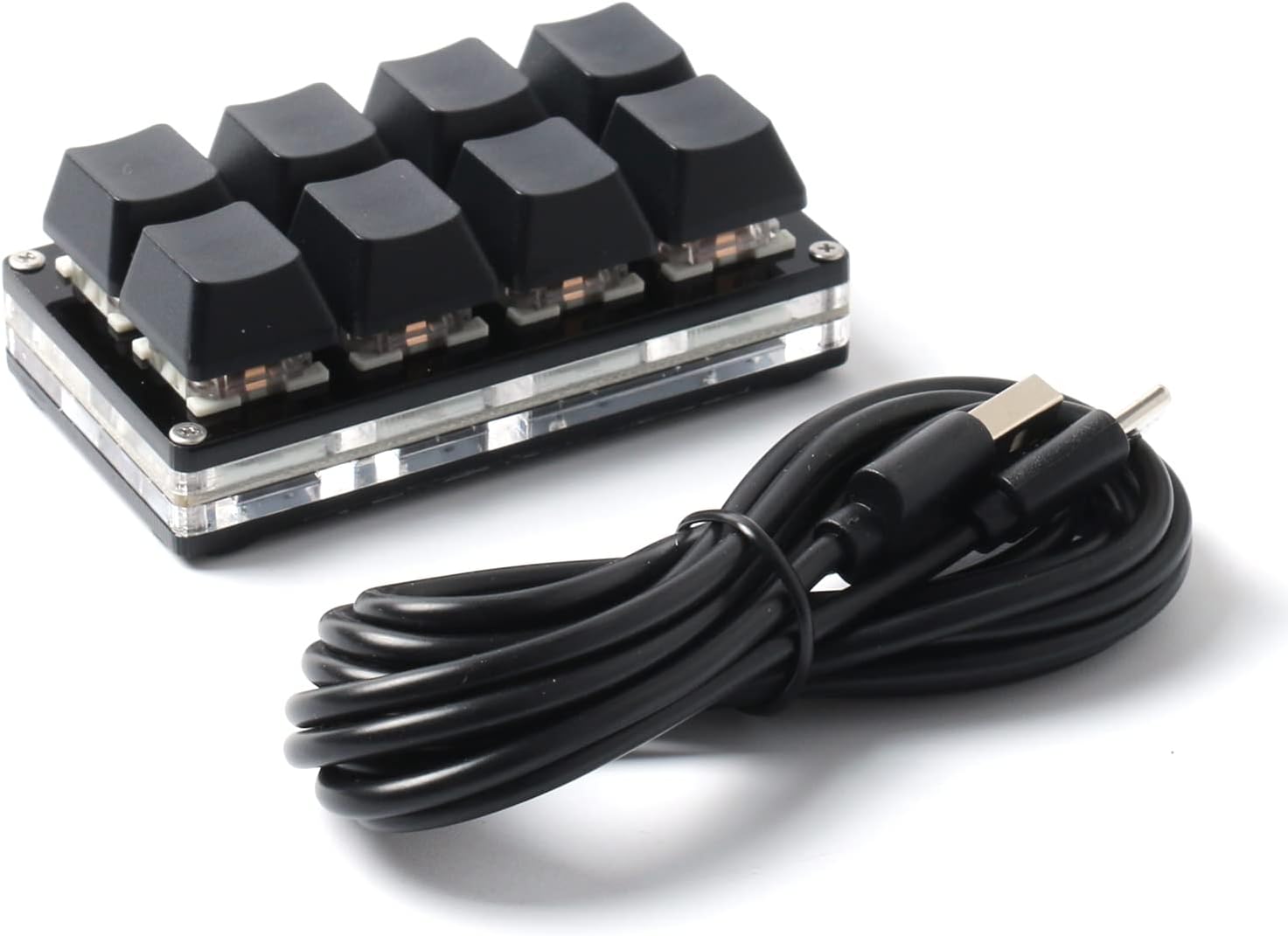
The LICHIFIT 8 Keys Keyboard is a compact mechanical USB keyboard featuring 8 fully programmable keys with onboard memory. It supports multiple function modes including multimedia control, gaming, and password entry, compatible across major operating systems without requiring drivers. Designed for professionals and enthusiasts seeking efficient shortcut management, it offers plug-and-play convenience and a durable, tactile typing experience.
| ASIN | B09CGZJGSH |
| Additional Features | Split Keyset Design |
| Antenna Location | Gaming, Office |
| Best Sellers Rank | #13,585 in Video Games ( See Top 100 in Video Games ) #93 in Mac Gaming Keyboards #294 in GEM Box Microconsole #875 in PC Gaming Keyboards |
| Brand | LICHIFIT |
| Built-In Media | USB Cable |
| Button Quantity | 8 |
| Color | Multi |
| Compatible Devices | Laptop |
| Connectivity Technology | USB, USB-A |
| Customer Reviews | 3.8 3.8 out of 5 stars (196) |
| Enclosure Material | Plastic |
| Hand Orientation | Ambidextrous |
| Keyboard Backlighting Color Support | Single Color |
| Keyboard Description | Multimedia |
| Keyboard Layout | QWERTY |
| Manufacturer | leagoods |
| Number of Keys | 8 |
| Number of Sections | 1 |
| Power Source | Corded Electric |
| Style Name | Contemporary |
| Switch Type | Linear or Clicky or Tactile |
| Unit Count | 1.0 Count |
| Water Resistance Level | Not Water Resistant |
K**D
Great for RTTY contests with Icom.
Using this on my ICOM 7610 for RTTY contesting macros and it works awesome. Much easier than using then wiring to the keypad jack on the back of the radio. You'll need to download the software to configure it to function as Funtion keys 1-8. There are no clear instructions for doing this but the links are in the product details. It only took me 10 minutes or so to figure it out. Set it and forget it! Used a silver sharpie to number the keys. Change the settings in the ICOM 7610 to use keyboard for RTTY, plunged it into one of the USB ports on the front of the radio and I was on the air. Also works for CW and SSB contests.
N**N
Use the included cable and a dedicated USB port!
I ordered one of these a while back to use as a poor-mans streamdeck and it worked great. I ordered another one recently and found they've been revised and now have RGB lighting. However, for whatever reason the board refused to work when connected with my own Type-C cable that was connected to a USB hub. I thought it was defective somehow because the old board worked fine with the hub+cable but this one gave an error in Device Manager and the Sayobot software wouldn't pick it up. After some troubleshooting, I discovered the board is picky and works best when you use the included cable on a dedicated USB port on your computer (not on a hub/splitter). It works fine now without complaint from Windows and the Sayobot software now detects it as well.
S**N
Sayo Device programmable keyboard, many uses
I have nerve issues in my left hand and I like to play mmo video games, sometimes it's hard to hit the controls without stretching my hand across the keyboard which causes numbness and tingling. I thought I'd try getting one of these keypads and programming the essential keys onto it so they'd all be nicely next to each other. I know this will work, I already have a four button and it works great just wanted a few more keys so I got this one. When I first tried setting one of these up I had issues with the software, if you have problems try unplugging your other keyboard devices I believe the company makes a lot of keyboard type devices and my numeric keypad was conflicting and causing the save button to be missing. You have two choices of the software, one runs under chrome (or Edge) and doesn't have to be installed but there is also a downloadable executable. It runs natively under windows but supposedly will work for mac if handled a little differently. There are a lot of functions I'm not using, it looks fairly powerful but I don't need all that. You can program your keypad and it will save the settings internally and you can put it on any computer without reprogramming (other than a mac perhaps). This is basically a hardware setup that holds 8 standard 3 pin keyboard switches, it comes with squishy quiet red switches but you can easily replace them with clicky blue switches if you want to (switches are cheap and easily replaced but this thing is most likely not hot swap you have to unplug it when changing switches). My other product like this has two usb c ports on it one on the long side and one on the short side making it easy to use it in either orientation, this one just has the one port on the long side which is probably how most people would want to use it. You can buy stick on labels for the keys or use a sharpie or paint pen to write on the keycaps (someone even makes some keytops that open up so you can put your own bit of paper inside to mark it). Other than the hardware conflict that messed up the software, this is easy to use and self-explanatory. To set a key function, you click on the button a keyboard comes up you click the button you want and after programming all the buttons hit the save button that should appear bottom left. There is apparently some rudimentary firmware on the device, the chrome based utility didn't seem to offer the firmware update but the standalone windows software did offer the firmware update. Don't know if it was needed but I upgraded it anyway. I have seen products like this come in just a few buttons to as many as 24 buttons and even some with knobs (potentiometers for volume etc.) I can think of a dozen applications for a small keyboard like this. Update/note: Be aware, not every usb A to C cable will work with these keyboards (I have three of these now) the cables may be different somehow you'll know if it doesn't like the cable when the keyboard doesn't work (but it does light up, go figure) if somebody is going to have custom cables they need to admit that when they sell it if you ask me. The cables that come with these tend to be quite long I'd like to use a shorter one but so far I'm having a problem finding a shorter cable that works..only the long ones that came in the boxes with the sayo device keyboards work so far. I've been trying to find some info about the usb cables for these not finding anything and no way to ask questions anyplace that I've found. I wish they'd either make these work with any cable or provide a way to buy different length cables that work with these. One last mention: You might have issues with this on a hub my main powered with hub has so far not had an issue but some of my smaller un powered hubs on the edge of my desk it sometimes refuses to work even though the keyboard lights up. These are just too picky I hope they work on that.
S**Y
SW does not work! It won't install despite all the videos and links.
Marco Keyboard works but SW does not. I can not program the keys with MINI KeyBoard. The program will not run or install. Don't sell something that is not supported. I'm going to return it.
J**E
This is wonderful, high quality and very easy to set-up and use
The 8 keys correspond with the numbers 1 through 8 on the main part of the keyboard. You can download and use the custom software to further customize. I did not find that necessary. The feel of the keys is silky smooth. This was well worth the price.
J**R
Switches are soldered on, Software is a bit rough around the edges
I bought this knowing I was looking to replace the red switches with blues so I can get the clicky feel for the macro device I was configuring. To my surprise they switches were soldered on, and soldered well. I do wish that was stated in the product description, or perhaps a picture of the board showing it. It wasn't a huge deal and I replaced them and resoldered blues, but if you are not comfortable with de-soldering and re-soldering and plan on changing the switches this is not for you. If you are looking to stay with the red switches, then it is a decent affordable macro keyboard. Now the software, there are two versions out there, the original and V2. The original has everything translated to English but a lot of the advanced features do not work. V2 all functions work, but you are going to run into numerous sections (as well as the help) that is in Chinese, with no translation. I kind of muddled my way through going by what I "Think" this setting is, and came back with something workable for my needs. That being said, I really do hope that a version 2.5 or 3 is released that has a full English translation because I feel I am missing out on some cool functions.
R**Z
Works as a function row
I bought thing to at least have f1 thru f4 available without FN rows on my 60% wooting. This little macro pad does the job as it's intended for my use case. No need to download anything, the Sayo website on edge(and I assume Chrome) detects the device and allows customization through the browser similar to VIA and Wootility.
R**E
little plug and play, no software!
plug and play only supports 1 to 8. I could not find software connected to it.
K**N
Okay this is my second review which is quite annoying because my first review was quite in-depth and I can’t seem to recover it. Even when I click edit review it just creates a blank page so I can’t redo the review but that’s more of an Amazon thing not this product so Yeah. Anyways, the TLDR of my first review basically was mentioning that the software that was provided with this keyboard that you can only access from the product page in the tech details or something was actually outdated software, if you poke around the website they provide you you can find version three of the software which is the most up-to-date easy to understand and translated better to English. My previous review gave a lot of detail on how to get to it which I think is why it got removed so good luck finding it yourself LOL Anyways, the product itself that you get when you receive it in the mail is a nifty little keyboard, I normally don’t like mechanical keyboards due to the noise they make but this one has a mechanical feel but is quite quiet. Initially, I thought you could only program the eight keys on the keyboard, but with the configuration software it turns out you can have “layers“ of key bindings. Kind of like how the normal keyboard has that FN key but this keyboard can have FN 0-5. How I have mine set up is I use the two rightmost keys as kind of like a page system going up and down FN layers so I have six keys times five. So in this tiny keyboard you can have around 30 macros! Impaired with the custom lighting it can give you a sense on what FN profile you’re on. The main reason I’m writing this review is cause I’m literally going to buy another one for work. It’s programming is built into the keyboard so when you finish configure it using the software you can plug it into any keyboard and it will remember. It’s programming it saved on board to the keyboard. For the price of this keyboard, it is amazing after you get past the hurdle of the software. This is literally one of the best investments I’ve made. Another recommendation is custom key caps. I haven’t done that yet but I know the key caps are replaceable as with most mechanical keyboards.
N**N
I had this sitting on my desk and plugged in for a year before getting round to fully using it. I’ve just ordered another one based on how good it is. It’s fabulous! There are 8 physical keys and 5 ‘function layers’, which gives 40 button options. Each key can be programmed to hold 2 key presses (key up and key down, short press and long press), so that makes potentially 80 buttons available. In practice one needs to reserve 8 keys for device navigation, but that still leaves 72 possible actions! On level 0 I have 4 keys to switch to layers 1,2,3, and 4. On each of levels 1,2,3, and 4 I have 1 key which switches back to level 0. I’ve configured it for truck sim use (ETS2 and ATS) and also have system sound volume keys on level 0. I’ve swapped the keycaps for coloured ones, which allow the backlight to shine through. I’ve also discovered that one can back up a given profile and rename it to suit the application. So each profile can be loaded to suit the specific application and each application can potentially have 72 actions available. I find the online software easy to use (sayodevice.com) . The downloadable version isn’t quite as good (tap/long press is missing in the offline version and some of the functions are offered only in Chinese). For those concerned about viruses, the ‘warning’ messages for the download version is standard for ‘unsigned’ apps on Windows and pretty much means that the developer didn’t want to pay for a signed version. I have quite a few such unsigned apps on my PC, mostly from small independent developers. With regard to the online version, it’s important to remember that once you have set up the buttons you never have to visit the online configuration site again. The slight possibility that the website might disappear is only of concern if you plan to repeatedly and regularly change the button configurations. I do plan to do that, but I will create back ups of each of my profiles once they’re finalise. A really excellent product and hugely flexible, especially for the price. Many more options are available than similar products at this price level.
H**Y
Is a working product but the software is a bit annoying to use. Also there was no manual included in the package so had to look it up online and that was a hassle because there where allot of outdated software. Cost me a while to find the right one and even then it was not very workable on a mac
T**I
Funktioniert einwandfrei und kann mit der richtigen Software für jegliche Makros verwendet werden.
C**N
Funziona bene si può programmare io la uso nel sim racing per tasti rapidi
Trustpilot
5 days ago
1 week ago