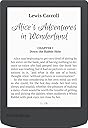
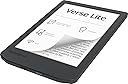
📖 Elevate your reading game—because your library deserves the best!
The PocketBook Verse Lite is a sleek 6-inch E Ink Carta touchscreen eReader featuring a glare-free, eye-friendly display and built-in frontlight for versatile reading anytime. It supports over 25 eBook formats including DRM-protected files, offers Wi-Fi and cloud connectivity for easy content management, and boasts a long-lasting battery that can last up to two months on a single charge. Compact and lightweight, it’s designed for professionals who demand format freedom, portability, and a premium reading experience without compromise.


| ASIN | B0F2FKY2SR |
| Batteries | 1 12V batteries required. (included) |
| Best Sellers Rank | #23,959 in Electronics ( See Top 100 in Electronics ) #87 in eBook Readers |
| Customer Reviews | 4.1 4.1 out of 5 stars (597) |
| Date First Available | March 25, 2025 |
| Item Weight | 11.6 ounces |
| Item model number | PB619-T-WW |
| Manufacturer | PocketBook |
| Product Dimensions | 5.28 x 0.87 x 8.74 inches |
B**N
The perfect device to mimic reading a real book
This is the ONLY e-reader on the market that ticks all the boxes I care about and ditches stuff I don't: 1. BW, not color = more battery life. If you don't read Manga or anything that benefits from color, just regular books, this is perfect. 2. It runs on Linux = more battery life, less bloat. 3. It's as open source as you can get with e-readers; not fussy about book formats/DRM etc. 4. You can transfer books from your PC via a USB-C cable - no messing around with wireless transfers via email, Dropbox etc (although Dropbox functionality is there if you want it), just drag and drop like you would with an external hard drive. 5. It has a micro SD slot. This bears repeating - IT HAS A MICRO SD SLOT. This is an INCREDIBLY RARE feature now - most companies are forgoing expandable memory with silly features like waterproofing instead. It has 8GB internal storage space which may sound a bit chintzy but come on; that's around 7000 EPUB books! But if that's not enough for you then you can fit more books than you could ever wish for on a Micro SD card and read them from there. 6. You can set up the device without creating any kind of account. Does any other company let you do this these days? 7. It's a great size - most e-readers are 6" or 7" or so, which is great for portability and you can fit in your pocket, but for reading in the house the text area on this device is just about exactly the same size as a large paperback which I think is perfect, and if you don't care about note taking with styluses etc that most devices around 10" concentrate on this is the one to get. 8. It has physical page turn buttons, and they're conveniently placed to the side of the screen, not beneath it, like the Inkpad 4. Side buttons are great for reading on a stand, whereas ones at the foot of the device are a bit awkward 9. It has a fairly large 2200mAh battery and it lasts a LONG time - many weeks between recharges, mostly because the device is BW, and running on Linux. This is the second Inkpad Lite I've bought but there's nothing wrong with the first. The reason I bought this is because it seems like the last of a dying breed, and as it first appeared on the market 4 years ago I'm assuming it will be discontinued at some point soon and there's nothing else on the market that has this feature set. As a side note, people complain about the 150PPI resolution, but the quality of the text on all the books I've read looks great to me - it's as good as or better than text on the page of a real book so I don't think I care what the number is. TLDR: This is a great device for someone with a PC and a large library of books downloaded from various places who wants a bigger screen and is sick of the restrictions that come with most ebook readers today.
G**L
Very nice e-reader.
The PocketBook InkPad Lite is a compelling choice for readers who prioritize a large screen and format flexibility without breaking the bank. It carves out a niche for itself by offering an impressive 9.7-inch display, a size often reserved for more expensive e-readers and E Ink tablets. Here's a breakdown of what makes the InkPad Lite stand out: The Big Screen Advantage The star of the show is undoubtedly the 9.7-inch E Ink Carta screen. For those who find standard 6-inch e-readers too small, this larger canvas is a game-changer. It's particularly well-suited for reading PDFs, comics, and textbooks, as it allows for more content on the page and reduces the need for constant zooming and scrolling. The screen is non-reflective and provides an eye-friendly, paper-like reading experience. Customizable Comfort with SMARTlight PocketBook's SMARTlight feature is a welcome addition, allowing you to adjust not only the brightness but also the color temperature of the frontlight. This means you can have a cool, crisp light for daytime reading and a warmer, amber tone for nighttime sessions, which is easier on the eyes. The ability to customize these settings is a significant advantage over devices with a fixed light color. Format Freedom and Sideloading One of the InkPad Lite's biggest strengths is its extensive support for e-book and graphic formats. It can handle a wide variety of files, including EPUB, PDF, DJVU, and CBR/CBZ for comics, without the need for conversion. This makes it an ideal device for those who have a diverse digital library and don't want to be locked into a single ecosystem. Sideloading books is also a breeze, with options for USB-C connection, Wi-Fi, and cloud services like Dropbox and PocketBook Cloud. Design and Ergonomics The design is pragmatic and classic, with a comfortable feel despite its size. It features physical page-turn buttons on the side, a feature many readers prefer over relying solely on the touchscreen. A G-sensor for automatic screen rotation ensures the device is comfortable for both right- and left-handed users. The device is also surprisingly compact for its screen size, making it relatively easy to carry around. Potential Downsides While the InkPad Lite offers great value, it's not without its compromises. The screen resolution of 825 x 1200 with a pixel density of 150 DPI is lower than some premium e-readers. This can result in text and images appearing less crisp, particularly with small fonts or detailed graphics. Some users may also notice that the backlight isn't perfectly uniform. Additionally, the device lacks note-taking capabilities and water resistance, which might be a deal-breaker for some. Conclusion The PocketBook InkPad Lite is an excellent choice for a specific kind of reader: one who prioritizes a large screen and the freedom to read a wide range of file formats. If you're a student, a comic book enthusiast, or simply someone who enjoys a more immersive reading experience on a bigger display, the InkPad Lite offers a compelling combination of features and value. While it may not have the highest resolution on the market or all the bells and whistles of a premium tablet, its focus on core e-reading functions makes it a standout option in its category.
J**Y
There's so many things to like.
There are so many things I like about this. I am using it as an ereader and not much more. So there's much I cannot comment on. As an ereader, I am quite happy. I like the size and ease of it. I love that I can make the wording better by just using two fingers and scrolling out or in (to make it smaller). The light isn't hard on the eyes and lights the wording really well. That it has a micro SD made me choose this particular Inkpad. Battery is okay. I read for around 12 hours and then recharge. The cons; Like every other ereader and touch screen I have, they are glitchy. But I'd say this is a tiny bit more glitchy than most. If I use the buttons to go to the next page, that's fine and never glitches. However, in the dark they are hard to see and use and have no feel to them to know what is the right button to hit. However, if you can't see you can use your finger on the screen to to swipe to turn the other page. Now, this is where glitches come into play. Sometimes it goes a few pages instead of one. Sometimes it acts as if I used two fingers and is now trying to resize the page. This can truly be annoying when I am waiting for it to resize when I am at an important part of the book. Since are no buttons on both side, I have to struggle to find the button to change the page with my right hand only. Would be much nicer if on both sides. Would I buy this again? Of course. Out of all my options, this was the one I kept coming back too and I have been happily reading since.
C**O
Lo que distingue a este eReader (y esta marca en general) es que tiene integracion con Google Play Books/Libros lo que hace muy facil pasar los libros que ya compraste o que tienes en tu telefono o Drive. Y aun si no tiens libros de Google Play mandar libros de otros lados es muy facil.
M**Y
My wife suffered an injury which left her unable to see properly for nearly two years. (Everything was fuzzy and eye glasses didn't help. Scary stuff. -Thankfully, her vision has slowly regenerated and now 90% back to normal). For the first few months, she was effectively blind. Things got better, but it wasn't possible to read anything but huge text. I got her this reader and cranked the font size. She cried. It allowed her to read again. Yeah, a full page of text was only about 8 lines long, but it was possible. So.., my positive feelings toward this reader are colored by some emotion, but I think I can objectively say that it's a well engineered device. Solidly built, the screen is gorgeous, the OS isn't buggy nonsense like I've experienced with other readers. Good battery life. It's basically a standard high-quality e-reader. And it's big. And it wasn't nine hundred dollars like all the others at the time I bought it. (Honestly, it was half the price of competitors, and that felt too good to be true. Turns out to have been the exception to that cynical rule. Sometimes something really is that good.) I will offer one criticism; Personally, I don't like the placement of the physical buttons, (My own little 7" Kobo Libra perfected the ergonomics of the button and the "how-do-I-hold-it?" problem). But my wife doesn't use the buttons, preferring the touch screen feature, so for her it's a non-issue. In any case, we both love the InkPad Lite. Recommended.
L**S
funziona perfettamente
P**C
Muy bien, funciona de maravilla y mi madre puede acceder a la aplicación de la biblioteca pública, así que está contentísima.
J**D
Excellent device overall with smooth operation and all the necessary adjustments. The best thing is that, unlike some other readers (Kobo) this device really works with the library books that are protected with Abode DRM. Just enter your Adobe credentials when you take it into use. When you download an acsm file from your library, the reader opens it right away. No need to convert anything.
Trustpilot
4 days ago
1 week ago