
🎧 Elevate your audio game — don’t just hear it, live it!
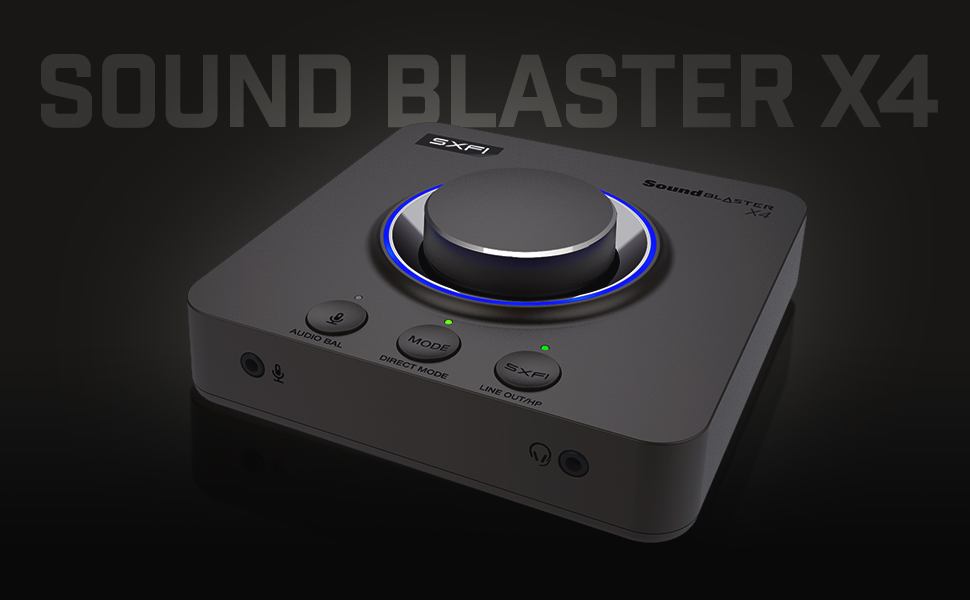
The Creative Sound Blaster X4 is a premium external USB-C DAC and sound card delivering 7.1 discrete surround sound with Dolby Digital Live and Super X-Fi technology. It features advanced communication tools like SmartComms Kit and CrystalVoice for crystal-clear calls, supports high-impedance headphones up to 600Ω, and offers versatile connectivity including optical-in. Designed for professionals and gamers alike, it combines high-res 24bit/192kHz playback with easy hardware controls and app customization to transform your audio experience across PC, Mac, and consoles.










| ASIN | B0953LL5R6 |
| Audio Output Mode | Dolby Digital, Surround Sound |
| Best Sellers Rank | #30 in External Sound Cards |
| Brand | Creative |
| Compatible Devices | Personal Computer, Laptop, Gaming Console, Speaker, Headphone, Amplifier |
| Customer Reviews | 4.0 out of 5 stars 2,105 Reviews |
| Hardware Connectivity | USB |
| Hardware Interface | USB |
| Hardware Platform | USB |
| Item Dimensions L x W x H | 5.16"L x 5.16"W x 1.61"H |
| Item Height | 4.1 centimeters |
| Item Weight | 620 Grams |
| Manufacturer | Creative Labs |
| Maximum Sample Rate | 192 KHz |
| Model Name | x4 |
| Model Number | X4 |
| Platform | Not Machine Specific |
| Signal-to-Noise Ratio | 114 dB |
| Surround Sound Channel Configuration | 7 1 |
| UPC | 054651194731 |
M**L
Creative Sound Blaster X4 | Crazy good
This has pretty mind-blowing audio when you set it up properly. At first, I didn't think very much of it at all and even considered returning it until I started playing with the dials and buttons Here's my pros/cons: + Likely the best sound delivery alteration implementation I've experienced yet + All *hardware* aspects feel extremely premium - Does take some tweaking/getting used to - Many features are not intuitive; you're going to have to fully read the manual and keep it around for reference for a while. -For whatever reason when I got it, I fully expected the LED ring to indicate the volume level in some way such as dimming as volume goes lower or turning them off around the ring as the volume gets lower. It does not. I know that was not an advertised feature in any capacity but to me it would just make sense that it should/would. Seems like a bit of a missed opportunity to just "feel right/satisfying" to have that physical indication of what you're doing on the unit itself at a glance - The apps (yes multiple) suck. There's really no excuse as to why you should have to use Location Data to connect to the unit -- Yes I know you use it for this reason or that reason (likely something to do with low power bluetooth connectivity). I don't care. I never have my location on unless I especially need it to preserve battery life and further, it's aggravating that the entire suite of apps is not compiled into a single one; that's multiple apps for both PC and the Mobile versions. People shouldn't have to have multiple apps/programs to control a single device - I'd very very much like to have some basic passthrough capabilities through the Bluetooth, such as being able to connect the x4 to bluetooth speakers so they can benefit from it using the app as a control to do so. To my knowledge, that is not possible. - Would very much like the microphone output and headphone output on the back or either side of the device instead of the front. Would also be okay with a set on each side of the device. It would be far more flattering on my desk than having my microphone input on the front Overall, despite criticisms, the pros heavily outweigh the cons. I am more than willing to trade ascetics for functionality, and I'm more than willing to spend the time to get the software side doing what I want and boy does the Soundblaster x4 ever deliver function. If I were to upgrade to the x5 down the line though, Creative will have to have a very compelling new feature set, or they'd have to remedy most if not all my cons above (2025 edit) Oh, this is way after the fact but an important note Fully functional on Linux *after* setup, softwareless. That was a very pleasant surprise.
E**Y
Beats the heck out of onboard sound!
I hooked this up to an old home theater receiver that still had analog inputs. The sound quality is AMAZING, this device works so much better than the onboard audio on my motherboard which is a fairly high end board, the MSI X870E CARBON. Worth every penny! First time I watched "The Avengers", I was blown away. Felt like I was in a movie theater. Software installation on Windows 11 was a breeze, and the cabling setup was easily wired up because of thoughtful jack placement. I don't use the built-in knobs or buttons at all, I just hooked it up and installed the software. HT receiver controls volume.
S**M
Sound Blaster X4: surprisingly good external USB DAC, software needs work though
Creative's SB products have tended to be decent hardware-wise but overpriced and have a multitude of driver and software issues over the years. This seems to break that trend! Sort've. Yeah its going to cost more than those Chinese DAC's but vs anything from a reputable company its actually not priced badly while fairly well made. Sound quality is a noticeable step up from motherboard audio, even vs good motherboard based audio (I have a Aorus X670E Master that has a decent built in audio set up), right off the bat. Driver stability was always a huge issue for SB stuff (years ago, WinXP era I think, Microsoft actually tracked back most of their BSOD's to sound card drivers!!) and that seems to no longer be a issue now. I've had 0 crashes and all my old games now have their EAX capabilities working properly again and sound quite good! Where they fumble the ball is with their new SuperFi software features. Its supposed to be able to simulate HRTF when working properly. And who knows maybe it does! But I don't know if it does since I didn't bother with their irritating set up, log in, and EULA nonsense associated with it. I have no idea why they made it all so complicated and difficult to use! I've been building PC's and troubleshooting them for years so if I'm having trouble making their process work then you know others are having the same issues. The "scout mode" will work without signing up for anything but isn't worth using IMO (distorts lots of background sound to make footsteps louder) and feels cheaty so I don't use it. One issue I did have with this DAC is that I had to switch around several USB ports to get it to work. I don't know why this is a issue exactly but supposedly some ports on the mobo just won't deliver enough power to make the DAC work and you have to randomly plug the unit in to them until you find one that works. Once it does get working you're fine though and I haven't had to mess with it since the initial set up. I have a pretty modern mobo (Aorus Master X670E) with lots of higher power USB A and C ports so if my mobo had this issue I'm sure its a fairly common one. Anyways if you're looking for a fairly good USB DAC/soundcard combo that didn't cost too much, was well made, and still supported older games sound features properly this thing is pretty good.
H**.
Great Upgrade for SPDIF Surround Sound
I have an old Logitech THX 500W speaker system that still sounds fantastic, but unfortunately, the analog inputs stopped working. The optical SPDIF connection still functions, but as many know, SPDIF typically only supports stereo, not surround sound. I had been using the Sound Blaster Omni USB, but the software was a bit glitchy on Windows 11. I decided to upgrade to the Sound Blaster X4, and I’m seriously impressed! Right out of the box, the software natively restores surround sound over SPDIF using Dolby encoding—something that most sound cards don’t offer. If you're looking for true surround support over SPDIF, this absolutely delivers. Just make sure to update the firmware, switch to speaker mode (not headphone mode), and enable Dolby encoding in the software settings. Highly recommended if you want to breathe new life into your existing speaker setup!
C**H
Stuttering sound, poor software
I bought this external sound card because this is one of few cards which have optical out. I needed optical out (toslink) for the connection of my PC to Sonos beam. I expected this card will work well for my purpose, because this card is a new model from Creative/Sound Blaster. However, this card does not work very well. Most critical issue for me is the stuttering sound. When I play the music or movie, the sound from this card stutter or jitter every 10 second. I tried to use this card because sound quality is on a good side, but it is really annoying to listen to the music which is disconnected/shuttered every 10 seconds. Just imagine how terrible it is, if the music or movie sound shutter every 10 seconds -- which is really distracting. This is a huge problem for the external sound card which costs $120, because even the internal sound card on my motherboard does not have this issue. Another issue is their software, so called "Sound Blaster Command". This should work as a "command" center to control this card, but this software has the bugs. For example, one of the function of this software is to set the preset of Equalizer. You can choose 3 preset, and there is an icon which looks like a lock -- which means my setting should not change. Funny thing is, this "lock" actually does not lock my setting. Instead, this software keep generating new preset again and again. Everytime I started this software generate "New preset", "New Preset 1", "New preset 2", etc etc. Thus, I should delete these presets, then should re-set into the preset I want. You need to do this job every time you run this software. Shortly, this card is not a very good choice, at least for the people who want the optical (toslink) connection. If you plan to buy this card for optical connection, I think you need to look at other options.
T**K
Great if you don't want a PCIE Sound Card
I have had the Creative Z, Zx, ZxR and AE-9. I have the Logitech Z906 5.1 system and Sony MDR1AM2 headphones and the X4 sounds great with it. It may not be the BEST specs like the AE-9 but the AE-9's breakout box for XLR input is HORRIFYINGLY bad for XLR mics. I bought a Scarlet 4i4 and then moved on to the Wave XLR because I wanted to stream and the Wave XLR has amazing software that replaced Equalizer APO and Voicemeter because the Wave XLR supports VSTs and audio routing. I really wanted this to remove the sound card from my system so all my fans would hit my massive 3090ti and the X4 allowed me to do just that. The X4 has all the features I need, optical out and a great headphone DAC at a way cheaper price than the AE-9. SXFi is a gimmick but it has its uses, just not really for me. To get 5.1 with the Z906, you need to click Playback then click Speakers (line out) and SPDIF Out you need to click "Set Default", then go to Device click Encoder and select Dolby Digital Live. To use heaphones go to Playback and click Headphones and under audio quality click "Set Default" for Speakers, then go to Device, Encoder and turn OFF Dolby Digital Live. I dislike having to click 3 things in different menus to accomplish this when on my AE-9 I literally just had to press one button of push the volume nob on the breakout box for 3 second. The software is also not as intuitive as the Sound Blaster Command Center but this very new so maybe they will fix a few things in the future. What I want to see is when I click the three dots for Speakers (Line Out) give an option to set to toggle the DD encoder and the same for Set Default for SPDIF Out, there should be an option to click use the DD encoder or not. When I click headphones or Set Default on Speakers, I should be given the same DD toggle. If they make those changes I would say this is literally perfect.
M**H
SXFI: Amazingly realistic at simulating bad sound
SXFI is a funny piece of technology. They spent a lot of effort to recreate the realism of listening to bad speakers. And I must say, it is genuinely an impressive feat. I was completely and utterly blown away, totally convinced that I was listening to mediocre speakers in someone's mediocre living room with no acoustic treatment, as opposed to my decent-quality headphones. The irony is that professionals and enthusiasts actually spend thousands of dollars installing acoustic baffling in their listening space to get rid of the same sounds that SXFI worked so hard to reproduce. "Hearing the room" is generally understood to be a bad thing, because it doesn't represent the original intended sound (if the room reflections sounded so great, the sound people would've just baked it into the sound itself). I imagine if Creative had spent all that effort towards simulating a perfect listening space as opposed to an average one, the technology would be much more usable. People who gave rave reviews/awards for "SXFI" likely hadn't experienced pre-existing binaural technology. Creative actually has another binaural 3d virtualization known as "SBX" which has existed for years, previously known as "CMSS-3D". In Youtube comparison videos, SBX and CMSS-3D is consistently rated as the best 3D virtualization, superior to competitors like Dolby Headphone. My hypothesis is the people who were impressed by SXFI technology were comparing it to no virtualization at all, as opposed to pre-existing tech like SBX. To make sure I was getting the full SXFI experience I went through the ordeal of taking pictures of my ears. Luckily my exact headphone model was also in their list of choices. One really stupid bug of the app that they won't tell you about: "Sign up with facebook" doesn't even work. It will silently fail to download your settings with no error message whatsoever. You have to sign up the traditional way, and then click the confirmation email to verify. Then it will work. Because of this, I had to create a new account and take the pictures all over again. By the way, if there is no one available to help you take pictures of your ears, it helps to have mirrors at a 90-degree angle and look through two mirrors deep. I launched a couple games and compared the sound of SBX 3D versus SXFI 3D. SXFI was impressive at first, but I realized it did not make sense. Every sound had added room reflections to make me feel like I was sitting in an empty living room. If I'm outdoors in a game or movie, why would I want to feel like I'm in a living room, as opposed to just outdoors? In SBX, a bird chirping in a tree sounds like a bird chirping in a tree. In SXFI, it sounds like a speaker in a living room with hardwood floors, playing the sound of a bird chirping in a tree. In that sense, SXFI is actually very similar to "Dolby Headphone" technology, which also simulates speakers in a room playing the sounds, instead of just the original sounds. Also, my semi-decent 5.1 setup sounds a little better than SXFI. So not only did they replicate the mediocre room, but they're also simulating mediocre speakers. One advantage of the SXFI is it has a slightly more impressive sound stage. It actually sounds like it's coming from real physical speakers some distance away. But note that SBX already does a good job with simulating distance of sounds; SXFI just does it a bit better (at the cost of sound quality). On the X3, you'll have the ability to choose between the SBX and the SXFI. However, one other flaw caused me to give it 3 stars. There is very subtle white noise in the headphones so your listening quality is actually slightly worse than onboard sound. You might not notice until you turn the volume knob all the way down to zero, at which point the noise will cease and you'll notice its absence. The noise is at a constant soft level and not related to your volume setting (except when you turn it to zero). I think this is because they have a powerful amp which can only operate at "on" or "off"; when it's on, it is capable of producing very loud sound but will also introduce some hiss.
T**R
So far its working great!
I had recently upgraded to a Sonos Ray soundbar for my PC which only works via SPIDF (Opitcal) output from the PC. My motherboard has a built in SPIDF out, but there were times when switched to my gaming headset for PC sounds and then switching back to soundbar would not play sounds from PC. I would have to restart my entire PC. This led me to believe somehow the onboard audio for the motherboard was having issues when not outputting sound for a few hours. I figured I would then try an external soundcard of some sort. I landed on the X4 from Creative Labs. There seemed to be mixed reviews, but being an external sound card / DAC seemed promising. Everything was easy to connect and it worked straight away after a couple updates. The Sonos Ray soundbar hasn't skipped a beat. More testing will let me know if this will 100% resolve the previous issue I had, but even if it were to happen on this device, I believe being able to unplug the usb-c connection to the device and plugging it back in would resolve such issue. Time will tell for sure, but for now, I can honestly say I highly recommend this if your looking for an external soundcard.
Trustpilot
5 days ago
3 days ago


