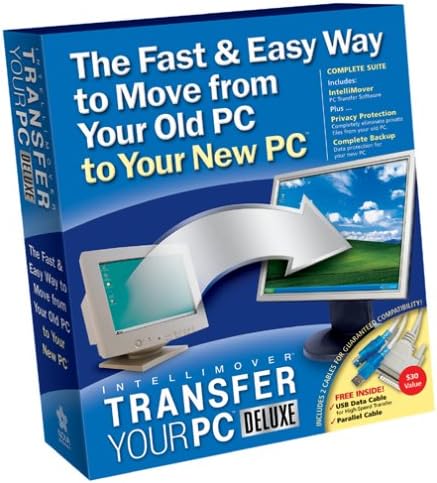
Intellimover Transfer Your PC Deluxe
Product ID: 3146782
⚡Fast 3-step PC migration
🔌Includes USB & parallel cables
🔒Clean privacy protection
Desertcart purchases this item on your behalf and handles shipping, customs, and support to Morocco.
⚡ Upgrade your PC game—transfer smarter, not harder!
Intellimover Transfer Your PC Deluxe is a fast, reliable PC migration software that simplifies moving your files, settings, and applications to a new computer in just three easy steps. It includes privacy protection features and both USB and parallel cables for flexible data transfer options, making it a comprehensive solution for hassle-free PC upgrades.
| ASIN | B0002CE0V6 |
| Best Sellers Rank | #3,797 in Software ( See Top 100 in Software ) #18 in File Conversion |
| Customer Reviews | 3.4 3.4 out of 5 stars (26) |
| Date First Available | May 29, 2004 |
| Is Discontinued By Manufacturer | No |
| Item model number | TYW |
| Manufacturer | Nova Development US |
| Package Dimensions | 9 x 7 x 1 inches; 1.65 Pounds |
I**O
It just didn't work.
zOne of the least enjoyable parts of getting a new PC is the migration of data from the old machine. Even though the hardware and software configurations of both my old and new PCs are not unusual or particularly complex, the idea of moving large quantities of data from numerous applications is odious. When I read about Intellimover Transfer Your PC Deluxe, I thought it would be just the thing to ease the transition to my new PC. I didn't only read the quick set-up guide, but the entire product manual. I prepared both PCs according to the instructions including reinstalling my applications on the new machine. The product software installation, although a little slow, completed successfully on both devices. When the Intellimover program called for connection of a cable between the PCs, I connected the supplied USB cable. The software indicated that there was no handshake between the boxes. I did some troubleshooting including reinstalling the product twice since interrupting the migration requires a full reinstall on both PCs. I determined that USB cable was faulty. I called Nova Development Technical Support who, after going through their troubleshooting routine, confirmed that the cable was bad. Rather that send me another cable, they told me to return the product to Amazon. Amazon did a very quick turnaround and I soon had a new Intellimover package. I reinstalled the software, got a good connection between the PCS, and started the data migration. Shortly afterward, the data transfer stopped and I lost the connection. More troubleshooting. More reinstalls. Back to Tech Support who did more troubleshooting and had me do reinstalls after deleting certain files. No change. More diagnostics. Tech Support said I had a bad USB port, then that there was driver conflict and that I should remove the printer and digital camera software from my PC. And then they bailed out. I uninstalled the printer and camera apps and restarted the Intellimover installation. No change. I didn't waste any more time with Nova Development Support. The bad reviews on Amazon of a similar Aloha Bob product persuaded me to buy an external hard drive and transfer my data to and from it. Not elegant but it worked fine in about a quarter of the time I spent trying to get Intellimover to function. Will it work for you? Maybe--it seems to work on some machines--but moving the data via an external drive or by connecting your PCs with an Ethernet cable is easy and, as with my experience with Intellimover, might save you a lot of time and irritation.
W**R
Good at What It Claims to Do
This product worked flawlessly for me. The documentation was good and it successfully, and without hassles, transferred my files and settings to my new computer. My one word of warning is that you should closely examine the list of supported applications. Frustratingly, the product does not support Palm applications. Now, it is not that hard to download the application from the Web and to import your data files, but you should be aware that not every application is supported. It is easy to get spooked about a file transfer product reading these reviews, both here and on other web sites. Typically, the people who post are motivated because they are mad about a screwup. No doubt, screw ups sometimes occur. My experience, however, was completely without hassle or problem. I recommend this product.
C**M
Five Stars
all the files were moved OK
A**L
Worthless! Old program no longer supported by Mfgr
I bought this software thinking I could transfer my files over to a new (used) computer with Win 7 on it. The program would not accept the security code printed on the disk sleeve. I was on hold for 50 MINUTES on the support line and then they told me that they don't support this software anymore. So the program, cables, books etc are all worthless. You're better off with Laplink or something newer than 'Transfer your PC' program. I've used Laplink before and it transfers even the .exe files. 'Intellimover Transfer your PC' doesn't. So if your install disk on your other programs like Word, Hallmark Card program, Chess & games doesn't automatically start, you will have to figure out how to get them to install. Either that or use Laplink to transfer the whole program over. Forget this product. It's not worth the time and effort trying to make it work.
3**9
Didn't work for me
Didn't work for me. Kept giving me a message to log in as administrator. Never could get it to work. Sent it back. This would not transfer the programs from my old pc to my new pc which is what I wanted. Not worth the time and money.
M**N
Completely set up My New PC in 2 Hours
My new PC was literally sitting in the corner of my home office for almost two months. I was aggravated because I didn't have a clue how I was going to get all my stuff over from my old one. My old one didn't even have a CD-R drive, and I didn't have an extrenal hard drive. I bought Transfer Your PC, and it worked like a charm. No hassle whatsoever. You install the software on the two PCs and hook up the parallel cable and, presto!, you can see your old PC from your new PC. You just click a button and it sucks all of the data onto the new PC through the cable. I was pretty amazed at how easy it was. My email, contacts, calendar, documents, MP3s, photos, files ... everything came over. Transfer Your PC also includes a program to privacy protect your old computer before you sell it and another program to back up data on your new PC. I haven't used those yet but plan to. Great software. Glad to be using my new PC and to be taking advantage of all the stuff I needed.
A**R
One Star
Didn't work Vista to Vista --- may work to 7 -No way to tell- Don't have 7!!!
D**D
Worked fine for me. The usb bridge cable is an extra bonus.
Transferred data rather easily. I believe the user guide tells you that this will transfer your data files. Applications are normally installed clean, onto the new pc, so as to get all the .dll files and registry settings for your new system. [EXAMPLE of why not everything will transfer: if you are transferring from a 486 intel to an AMD dual core, you can bet that a lot of drivers and such WILL definitely be different. Video, audio, northbridge and southbridge chipsets, RAID,SATA and so on will be different TYPES of files. Things like the .DOC or .XLS files you created in MS office are your own creations and are the type you would use this program to transfer. They are fairly common formats; simply a difference in VERSIONS]. I can understand that not every s/w program works for everyone (hence the wide range of reviews on this program). After all, this is for PC's, which come in thousands of possible configurations. [If it were for a Mac, (limited choices of configurations and models) I suspect the results could be more easily known in advance; more predictable]. Comes with both a parallel port cable (DB25) and the usb bridge cable. [NOTE: to connect 2 pc's together via a usb port, you need a usb bridge-type cable. A basic usb cable that is simply a straight thru type-A to type-A does not work]. The usb bridge cable can also be used with freeware software like the one called PC-linq (PL-2301). Produced by a taiwanese company Prolific, you can use the usb cable the prolific s/w, to bridge from one pc to another. I was looking to buy a usb bridge cable anyway, so this package sort of took care of 2 things at the same time.
Trustpilot
2 weeks ago
2 weeks ago