


🎶 Unlock your music’s hidden depth — don’t just listen, experience it.
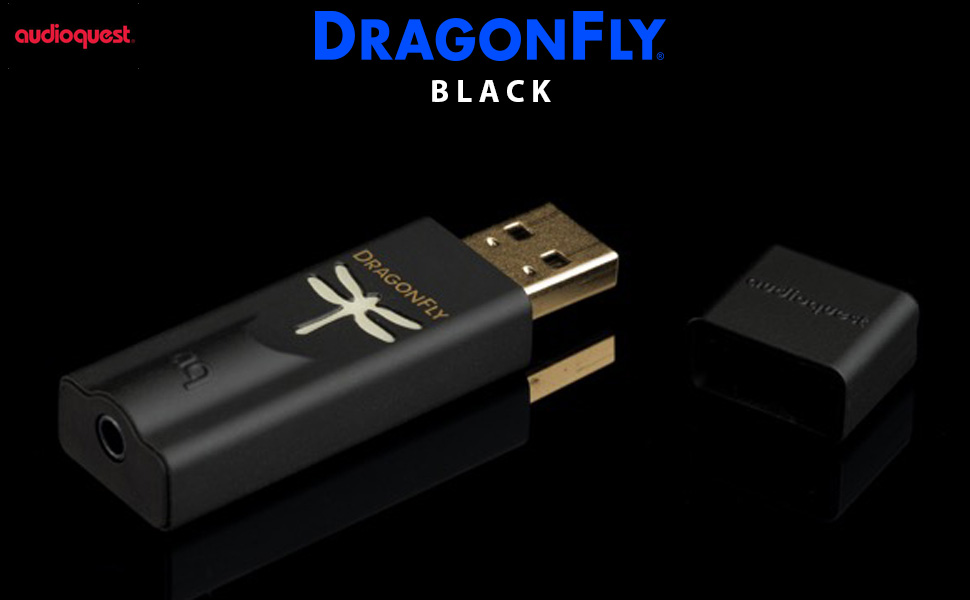
The AudioQuest Dragonfly Black is a compact USB Digital-to-Analog Converter featuring a 32-bit ESS 9010 Sabre DAC that delivers enhanced sound clarity and richness. Compatible with Apple and Android devices via USB 2.0, it supports high-resolution audio playback up to 24-bit/96kHz while maintaining low power consumption. Designed for audiophiles and professionals alike, its durable yet sleek form factor makes premium sound portable and accessible.


| ASIN | B01DP5JHHI |
| Best Sellers Rank | #168 in Headphone Amps |
| Brand | AudioQuest |
| Brand Name | AudioQuest |
| Customer Reviews | 4.4 out of 5 stars 4,626 Reviews |
| Global Trade Identification Number | 00092592048188, 00092592076365 |
| Included Components | Dac and Packaging |
| Interface | USB |
| Interface Type | USB |
| Item Height | 3 centimeters |
| Item Weight | 3.5 Ounces |
| Manufacturer | AUDIOQUEST |
| Material Type | Plastic |
| Maximum Supply Voltage | 2.1 Volts |
| Minimum Supply Voltage | 5 Volts |
| Number of Channels | 1 |
| Number of Pins | 4 |
| UPC | 009259204818 092592076365 092592076396 092592048188 |
| Warranty Description | 1 Year |
H**C
What’s Old is New Again.
What’s Old is New Again. All the reviews out there in the blogosphere/vlogosphere that tout the Dragonfly Cobalt and its ability to enhance your listening experience are overwhelmingly positive, so you can certainly look up any of those reviews from an expert’s point-of-view. But from an Average Guy’s view (like me), I can definitely hear the difference when using this device. I tend to listen to music in my car more so than any other place. And, for that, I usually stream music via my phone (Amazon Music HD) through the car’s AUX port. I have been doing this by simply taking a high quality 3.5mm audio stereo cable with two male heads and plugging one head into the AUX port and the other into the phone’s headphone jack. I own an LG G8 Thinq (the last flagship phone LG made in 2019 prior to exiting the smartphone segment; and this phone features that rare headphone 3.5mm headphone jack). Back then (and even today in late 2021), that in-phone DAC was generally regarded as the best by quite a margin (the phone’s max sample rate output is 24-bit / 48 KHz). Meanwhile, I own a 2014 BMW 3 Series and I have done lots to improve its musical components. I’ve upgraded my amplifier (Up7BMW) and all speakers/A-Pillar tweeters (FOCAL brand). And, I purchased an Equalizer app on the Google Play Store. Still, wanting higher fidelity, I then purchased the Dragonfly Cobalt DAC. Immediately, even with all of the upgrades that I’ve invested into my car’s sound system, I could hear a musical boost. And when I play my favorite songs, old and new, the enhanced fidelity peels back all of these musical elements that I had never really noticed before (a more pronounced drum beat; the sliding of the fingers along the neck of a guitar; the raw emotion of a singer’s voice; better defined strumming from a generally-hard-to-notice acoustical guitar, etc… - what audiophiles would describe as neutrality). I’ve read various articles stating that listening to your radio does sound muddy, which it does. You can (and I can) hear a difference when playing a CD. But, adding a good DAC takes it up one notch further, and you feel like you’re right there in the front row of a concert or at the recording studio itself. Now, your listening experience may differ because not everyone “hears” the same or perhaps as well. So, if seeing a number helps you to visualize improvement (although “seeing-is-believing” is different than “hearing-is-believing” in this case), here’s what I’m seeing with my LG G8 ThinQ. Without the Cobalt, the phone’s DAC can stream music at up to a sample rate of 24-bit / 48 khz, which is pretty good. I know this because with Amazon Music HD, you can press the music quality “badge” to bring up this kind of info. Now, with the Cobalt plugged in, the output increases to 24-bit / 96 khz. I’ve read that the max output, though, would be 24-bit / 192 khz, so let’s quickly talk about that pinnacle of sound quality for a second. The only way of possibly getting there from my readings (and I’m sure there are other ways that I haven’t discovered yet) is by subscribing to Tidal’s HiFi Plus Tier (which is their top tier) AND also downloading onto your phone an app called USB Audio Player Pro (also known as UAPP). Somehow – and I profess my ignorance on this as I’m not a sound engineer – this app plus the Dragonfly Cobalt plus its ability to play well with Tidal (the technical term sound engineers use is “unfolding”) allows access to that 24-bit / 192 khz musical experience Anyway, as you’ll already know, the Dragonfly has this helpful light that defines the quality of the music you’re hearing. Unfortunately though, unless you’re paying $240 a year for Tidal’s top hi-res tier, that light then also gives you a sense of FOMO. I pay $80 a year for Amazon Music HD (as I am already an Amazon Prime member). Now, for just $80 a year and despite not being able to reach that 24-bit / 192 Khz threshold, I can still attain musical nirvana. So, Amazon Music HD is totally worth it. And the Dragonfly Cobalt, IMHO, is totally worth it too. But, as with all things subjective (like hearing), your mileage may vary. Will this be worth it to you? In this case, there are four things that you’ll want to consider A) Can you hear the difference? Again, some of us have better hearing than others. If you can’t hear much the difference between music over the radio and music on a CD, then you probably won’t hear much of a sonic upgrade here. B) How many hours a day will you use this? That is, why purchase a pricey doodad if you’re only going to use it now and then? It’s kind of the same in-your-head argument when you think about joining a gym or subscribing to Disney+. C) Think about your music source. The idea of a DAC is to allow it to further “unwrap” the audio file to allow for that richer listening music (again, using that term “neutrality”). But, if you’re listening and happy with Spotify Free or any other lossy music tier (usually the free ones with possible ads), those files won’t have much to reveal anyway. The entry point at which to consider whether to invest in a DAC or not is when you are subscribing to a hi-res music service (i.e.: Quboz; Amazon Prime HD; Tidal Hi-Fi; etc…). D) Finally, think about the equipment that will be outputting your sound (e.g. earphones, earbuds, speaker systems). If they are of low quality, then a DAC probably won’t do much. And keep in mind that this DAC would also probably cost MORE than most run-of-the-mill earphones, earbuds, speakers). Oh, I do want to bring up one thing if you subscribe to Amazon Music HD. I saw on their FAQ page that Amazon Music HD is not always reliable in giving max audio quality if it doesn't sense a super-fast internet connection (or maybe if a lot of subscribers are trying to stream hi-res music at the same time – let’s call it ‘congestion’), so I’ve seen the light turn both powder blue (denoting a bitstream of 96 KHz) as well as cobalt blue (denoting a bitstream 48 KHz for the same song during different times of the day, but never below that number if you’ve set songs to play at HD or better quality). In fact, on its FAQ page, it does say, “For streaming, the current source file quality may change due to varying network conditions.” So, if you’re subscribing to Amazon Music HD and see this happening, it’s not the Cobalt malfunctioning. Finally … here’s a question you’ll want to ask yourself and a suggestion. Have you looked at the THX Onyx? It is also a very well-regarded DAC and probably a 2nd place runner-up if you read the various reviews out there about DACs (with the Cobalt being the consensus winner when talking about power/portability). However, at the time of this writing, the Onyx is currently on sale for $150 (down from about $200, and can be found here on Amazon or on Razer.com). Hmmm… $150 for the Onyx vs $330 for the Cobalt? That does make the Cobalt a tougher sell, actually. Again, the only real downer here is the price. $330 seems pricey, even though it’s a svelte yet powerful top-of-the-line product. If you are willing to consider really good dongle DACs with perhaps less of a svelte/compact form factor that cost just half as much, you may also want to check out these very worthy alternatives, also found here on Amazon. - THX Onyx, $150 - Helm Bolt DAC, $150 - Astell & Kern USB-C Dual DAC Cable, $100 In the end, the Dragonfly Cobalt is a 5-star product (although I’m not convinced that it’s $150 better than the THX). I’m very happy with this product. If you tend to listen to music quite a bit to complement your day, then investing in a really good DAC like the Dragonfly Cobalt makes for a solid purchase decision. Good luck on finding what suits you best.
C**N
Great little DAC
I will start this review by saying that I am not an audiophile. I very much enjoy good music and high quality audio, but I think that spending upwards of 1000 on a product that gives you an extra 5% performance is silly. So when I found the Dragonfly DAC in a variety of Audiophile magazines I was intrigued. The Audioquest DrogonFly DAC is a very interesting device. Much smaller and more portable than a standard DAC, but supposedly built with the same high fidelity bits you find on much larger tabletop DACs even including a headphone amp and an analog volume control. In my findings, this DAC performs admirably. The speakers I'm powering are a pair of Paradigm Shift A2s. In terms of build quality this thing is built like a tank. I have a large number of thumb drives (Although no waterproof/tough style drives) and this thing feels far more solid and robust than any of them. The included cap is nice, although like most thumb drive style caps it's quite easy to lose. The packaging that it comes in is very nice and indicates some serious thought was put into the product. It's shipped in wrapped in a velvet-esque carrying case, inside high density foam in a double cardboard box. I'm fairly certain you could drop this thing out of the delivery vehicle on a freeway and run it over a couple of times and it would still be in perfect condition. I've put it through the ringer with a large variety of music from pop streamed at 128kbps from Spotify, to classical 192/24 FLAC files. In all counts the DAC has impressed. I found it nice and neutral, just like a good audio device should be with no particular character other than very clean precise music. Coming from an onboard soundcard (albeit a decent one on a very high end motherboard) there was a world of difference. As cliche as it is, I heard details I'd never heard in a variety of tracks and everything I listened to seemed much more precise. I also enjoyed enhanced soundstage that was helpful in FPS games to more accurately locate the location of enemy footsteps. I have two complaints, both of them fairly minor. First and foremost, The connector worries me. I work as a Custom installer doing audio systems, and one thing I've learned in my work is never trust a mini-jack. The connectors are flaky at best and it's worrisome to see it included on a $200+ piece of equipment, especially one where it's likely to be plugged and unplugged on a regular basis. That being said, the build quality is fantastic, the thing feels like a tank, so although I'm wary of the connector, until I get evidence to the contrary I have no reason to believe it will be damaged. My second complaint is that with my initial unit, there was a fairly serious issue whereby the USB connector seemed to not make contact unless there was a significant amount of pressure on the DAC. I believe this was either an early production issue, or possibly just my sample, however it was extremely annoying. At best, my sound would cutout every time the pressure on the DAC was released, and at worst, it would make horrible popping noises that sounded as though they were desperately trying to blow my speakers. The constant pressure required on the USB ports on my computer worried me with regards to longevity. After some fairly substantial searching I was unable to find many similar complaints online, so I must assume that it was either limited to a very small initial run or people aren't speaking up. Given that this is the internet I'm forced to conclude the former. That all being said, after a couple weeks of searching to see if I could possibly resolve the issue through software, I contacted the company and they informed me it was a defective unit that should be RMA'd. I live in northern California near the Oregon border and after sending it out the new unit arrived within a bit less than a week. Given my difficulty tracking down similar issues with other purchasers, I believe this was a short term problem and I believe any currently selling models are well past having this issue. The replacement unit they sent me works perfectly and I've had 0 issues with it at all. Overall I have been very pleased with this DAC and I would highly recommend it to anyone looking for good, portable, reasonably priced sound.
K**H
Enjoy great sound + scoff at those who take out 2nd mortgages to pay for their gear
I discovered the audiophile world (or rabbit hole, depending on who you ask) several months ago, and have enjoyed trying various headphones + DACs/AMPs + hi-res tracks over that time. My goal is to (1) find combinations I like and stick with them vs endlessly salivating over things I don't own, (2) find good values that fit my lifestyle and make common sense (e.g. no telling my kids they can't go to college because I need new headphones, but also not fooling myself into thinking a $20 pair will somehow sound summit-fi) and (3) never become the guy who uses snooty "audio sommelier" terms I read all too often on message boards. In the DAC/AMP world I've already gone through the Fiio Q1 (was fine, but didn't really do much for me) and the OPPO HA-2 (looked super slick -- made everything louder -- but ultimately was too harsh/sterile in the treble dept). I've lusted over the Chord Mojo for quite some time and would love to listen to it. I have no doubt it sounds great! But my fear is that it won't sound "$600 great" to me (see point #2 above). And then I stumbled across the Darko review of this new Red just a few weeks ago and knew I had to try it. I'm playing it through an iPhone 5s connected via the Apple CCK (using Onkyo HF Player), an iPod Touch 6th Gen (through Korg's iAudioGate) and also through my Macbook Air (using Roon). Set-up is super duper quick and intuitive. Audioquest did a really nice job in including a detailed booklet written for the layperson, telling you everything you'd need to know (and why, which is sort of cool in the audio world -- too many companies treat you like you've already got a Master's Degree in HiFi Audio). Extra bonus: Audioquest ALSO threw in a nice travel pouch + a coupon voucher to HDtracks + a 60-day complimentary trial to Roon (this is super nice, as the trial period from Roon themselves is just 14 days). If you haven't read up on Roon I'd highly recommend it --- it allows you to play higher res tracks on your Mac computer...it's a lot more fun/intuitive/exploratory than the native iTunes player...it integrates with Tidal...and it absolutely makes your music sound better. Same thing with Onkyo HF Player for your iPhone. At any rate, let's cut to the chase. How does the Red sound? Quite good -- IF (1) you have good headphones, and (2) you're taking advantage of better sources (like the players I described above). If you don't do any of that, it will make your music sound louder but not necessarily a lot better. I'm using HIFIMAN HE400s, which are great reviewed/open style/planar magnetic headphones. They're efficient already so don't necessarily need an amp, but most everything sounds better with an amp. Anyway, if you're curious how exactly the sound improves with the Red, here's my best way to explain it: more full, and more realistic. Picture a comb -- imagine that this is a visual representation of your music without a DAC/AMP. Now, imagine that all those tiny spaces between the teeth of the comb get filled in -- this is the DAC/AMP going to work. It feels like it fills in gaps/missing info/details you didn't realize were there, so overall everything sounds a little louder/clearer/lusher/more realistic/more enjoyable. There's more bottom end to kick drums...more "plucking" you can sense on guitars and bass notes...more snap on snare drums...and little things like hi-hat cymbals suddenly sound real, vs a digital copy of what's real (if that makes sense). Also, there's more separation between instruments, creating the "space" that you read about, so it feels like you're in the studio surrounded by musicians rather than just being presented a wall of sound. I did an A/B test of a rock song I'm familiar with, listening to identical sections with and without the Red. Without, I found that the bass guitar disappears into the drums...sometimes you'd hear it, and sometimes you wouldn't (would just be sort of muddy). But with the red, there is a distinct bass guitar playing alongside a distinct drummer playing. Don't get me wrong -- the overall effect is not a massive night/day difference that bowls you over -- so don't go in expecting that or you'll be disappointed. Instead, if you take the time to get good copies of music + good headphones + good sources, then you WILL take notice of the improvement and enjoy the positive contributions the Dragonfly brings and you'll want to listen to more of your music. Also, geeky cool thing that's actually helpful: the dragon on the device glows and changes colors, to tell you what sample rate your music is. BOTTOM LINE: Sound is superb. Value is great. The care they put into the booklet + add-ins are nice surprises. Convenience is top notch. And the fact that it is pretty future-proof (they designed it to accommodate firmware updates) is great. If any of the above describes your philosophy, I think you'll really enjoy it. --------- UPDATE 1 MONTH LATER: I was going to be eternally curious about the CHORD Mojo, so I went ahead and decided to audition that as well. I spent about a week with it, and my 100% honest-to-goodness takeaway was: I personally could not hear an audible difference between the DragonFly Red and the Mojo. They both make my music sound better, but neither one is better at making it sound better (to my ears, anyway). I'm sure there are measurements or tests or something that prove Mojo "wins"...but I couldn't pick up on it. I have no clue if that's because there IS no discernible difference between the two, or my equipment isn't good enough to reveal that difference (although I use Hifiman HE-400s, Westone W30 and Audeze Sine, all of which is a far cry from entry level gear) or my ears just aren't "golden" enough to tell. Who knows - I'm sure others swear they can tell one from the other. At any rate, Mojo definitely sounded great....but so does Red. And Red is 1/3 the cost, firmware upgradeable, much more discreet/portable and never requires charging (I already had one annoying instance where I sat down to listen to music, but Mojo's battery died 10 minutes later and had to be recharged for 3 hours). Thus, I returned Mojo and am keeping the Red.
C**.
IPhone 7 is Perfect Excuse to Take to Take The Leap!
First of all, my setup relevant for this review is iPhone 7 Plus & iPad Pro, V-Moda Crossfade M-100 wired/wireless headphones, audio source a mix of Apple Music (at 256), audio podcasts (below 256) and a touch of some songs ripped from CD into Apple Lossless format. I have always been on teetering the fence on whether to go the route of the portable external DAC. Carrying around a digital media player is far too inconvenient an option for me, and the DACs on the market were either too bulky, pricey or battery intensive to make the switch. As rumors started circulating of the 3.5mm port's demise on the iP7 started floating, I starting looking around again and found this gem. The Dragonfly has met my expectations, and I would say even if you have a device with a traditional 3.5mm port, it is worth using this anyway (supported easily through any Apple device with a Lightning port and USB Camera adapter - sold separately). Now getting into the experience... Setup and form factor/convenience is a slam dunk here. The device itself is literally just the size of a thumb drive and is actually pretty stylish. The green dragonfly on the front is actually and LED status indicator that basically let's you know when the device is on standby, or when in use, the quality of the content playing (green, blue, amber for example for different quality levels of source content). Since tons of people will now be walking around with the apple 3.5mm adapter, explaining what this "fancy" one is may be a source of a brag moment for some audiophiles out there. Setup on any Apple device is literally plug and play. One end into the USB camera adapter, the other into your headphones of choice and done. The device immediately recognizes the player as a standard audio source. It is also possible to download a device manager to an actual computer, plug in the dragonfly and update to future software versions, but as of now, it is still version 1.0, so no updates are necessary/available - but it is good to know that if any efficiencies or features can be gained in the future through software update, the process is simple enough. Sound quality is a definitive improvement. Whether you listen to music through Apple Music, Spotify, Podcasts or rip your own, I can say that there is noticeable quality difference, regardless of of the bitrate quality of the rip. That said, I will not the key areas of improvement I observed. 1. Distribution of sound across the spectrum - this is the most immediately noticeable. I typically had to fiddle with the iPhone or iPad's internal equalizer to get the soundstage where I liked, but now, it's off completely. Sound distribution here is set well. I listen to a mix of genres but mostly R&B, Hip/Hop, EDM, Rock and top 40, and sound here would fit any of them well. Intricacies of that distribution will also depend on your headphones, but I can say the Dragonfly as the source is FAR better than the DAC inside Apple's devices. This is also one of the categories that is noticeable regardless of the headphones you are using. Even on a $30 pair, it's noticeably better. 2. Clarity/Separation of sound - this is also immediately noticeable but mileage will vary depending on your headphones and quality of the audio source. Even on a cheap pair of headphones, the sound will definitely be more crisp, but on a nice pair of headphones, the sound is more crisp AND you can truly hear separation amongst the sounds at different ends of the spectrum. Also, those subtle echos, bright spots and intricate sounds are simply more clear, hands down. I have the luxury of having a pair of headphones that can function as wired 3.5mm or wireless bluetooth, and comparing the difference in sound clarity between wired directly to iDevice, bluetooth and wired through Dragonfly is definitively noticeable. Bluetooth having the easily lowest rank amongst the three options. 3. Volume - This thing can push even a decent set of headphones pretty hard. Prior to the Dragonfly when plugging my headphones directly to the device, even at max volume, it was loud but tolerable and I could not get the headphone's drivers to distort at all. The dragonfly let's me up to about 80-90% volume (depending on the type of song) before it's too loud for comfort and at 100%, the headphone drivers are pushed too hard. They key is there is a much better sweet spot at high volume with no distortion that is sublime. In terms of potential downsides, there are a few things to be aware of but none that I would say should stop you from making the leap. First is battery life. The Dragonfly takes power from whatever device you've hooked it to, but another huge win here in that I have noticed no real difference. This could also be because previously I was using the iDevice's equalizer which also uses a bit more battery than not. In real world use, adding on the Dragonfly is a marginal, it all noticeable difference in battery life. Second is that as with any device plugged into the lightning port, you cannot charge the device and play through this at the same time unless you buy a separate adapter. And that adapter is UGLY and too large. I've still caved and bought the 2nd adapter that allows charging and playing and keep it on my desk for the rare occasion I need it but on the go use the regular usb/camera adapter. If you'd rather only have one and don't care about appearance, you can buy the larger adapter only, instead of buying both. Lastly, is that no in-line wire controls or functions are supported through the Dragonfly. This means, if your headphones have embedded volume, skip/previous, play/pause controls embedded in the wire, they will not function; also, microphone function will not work. So if you receive a call, you'll have to swap out the Dragonfly OR take the call with speaker or embedded mic in the iPhone. All in all, very happy with my purchase. One thing this has led me to hope for even more is that Apple adds higher bitrate streaming to the Apple Music service because once you get on this level, every little bit helps :)
D**R
Super solution to lower quality DAC
First off, this reviewer has a variety of listening devices and a current preference for Denon AHD600 headphones for listening to 320+ kps MP3 music files and playing video games. The Dragonfly is being used on a 2008 Dell Studio XPS desktop that has an OEM Sound Blaster card, 12 gigs of RAM and was recently upgraded to Windows 7. (Apparently, the Dragonfly will not work on Windows XP). While this sound card sounds acceptable most of the time with headphones or speakers, there is some background noise that is between some of the other sounds (or quieter sections) that can be distracting. This perceived distortion and noise was a primary consideration for purchasing a small transferrable and portable device that could be used (and tried) on any number of other systems. While the preference may be for properly engineered source material CD's played on proper equipment, the computer and other portable listening devices present a convenience that is hard to discount. For the most part, the Dragonfly is plug and play. For a Windows 7 system, you go to the sound settings in the control panel and make the plugged in Dragonfly your default for "speakers". Then you plug in your headphones or speakers to the mini jack input on the end of the device. File quality is automatically detected and the colored dragonfly logo on the top of the device shows a different color depending on the delivered sample rate. It should be noted that initially I plugged the Dragonfly into an extender and it did not want to work properly--producing lots of artifacts and clicking. A call to Audioquest indicated that the preference was to plug the unit directly and as closely as possible to the computer USB port. (Maybe it was the cable?). Using the Dragonfly for a week now, sound quality is perceived to be clean, free of the prior noise presented by the sub quality sound cards that are present in many computers. This change was not so much dramatic, but it is noticeable. The Dragonfly also acts as an amplifier. There is no volume control with the computer software providing that control (itunes or other program), although using an inexpensive rheostat as an intermediate plug in between the Dragonfly and headphones provides some fine tuning of the volume. Additionally, another intermediate device-a Fiio E11 is occasionally used as an intermediate amp and/or volume control. For this listener, sound quality is "about the same", regardless of these intermediate devices, as long as the computer's main volume control is between 25-50% of the arbitrary total. "About the same" comes with the caveat -the Fiio E11 is not the cleanest amp and source quality is important. Overall, sound quality, placement and staging seem cleaner, more distinguishable, and maybe slightly punchier in the transition from bass to mid ranges than with prior systems. Similar results were perceived with a Dell Alienware M11X-R3 and a Dell Latitude laptop used for work. Whether other users experience the same noticeable difference will depend on what role the Dragonfly plays in any given equipment or listening situations. If you have a higher quality sound card in your current system, you may not find the Dragonfly presents any advantage. This reviewer will leave those comparisons to others with deeper pockets or access to additional systems... of which there seem to be plenty on the web and in other forums. The Audioquest Dragonfly presents a compact, portable, usable, and high quality device to improve lesser quality DAC's that you may be using-providing better quality sound from music files and/or games you may play on a computer. This user would not hesitate to recommend it to others depending on their own individual equipment needs. Without more references for comparison it is difficult to provide a perfect rating, so let's settle on 4/5.
E**S
Amazing Sound! Reliability? Loud? Worth the price?
Where shall I begin? I am an audiophile, I truly love sound, I care for the quality of sound, music is so important in my life. I have a dedicated portable music transport and separate portable dac, but it becomes too much to carry around or to even travel with all the time or to go to the gym with or to even go for long walks with and I'm just too damn old to even carry it in a separate bag. So I decided to purchase a dac for the phone. I first started with the Black, which was a slight decent upgrade, but not what I needed. I borrowed a friends red, and that was a beautiful upgrade, nice warm sound, and then I bought the Cobalt (blue). I was amazed and disappointed at the same time. First, this truly upgrades the sound beyond what I had expected, the sound separation was mind blowing, the bass, treble and mid range were all separate close to perfection. When it comes to this dac, you must match it with a good pair of headphones or in ear buds. I used it with Bowers and Wilkins in ear and headphones and it was a great experience to a certain extent. What do I mean by certain extent? Well, once you pass the midway volume point, it begins to sound distorted due to the volume being so loud coming from the dac, listening to it at low and mid volume you will get perfect sound, but raise it up past the mid-level volume it sounds over bearing at times. Now, the build quality is great, it's smaller than the black and red. Quality of product? I had to return two of them, the first one I ordered had static on the left side, the second one I ordered had a strong loud whining sound that came on every 20 minutes. It was so loud that it would have caused hearing damage if I was listening to it at a loud volume. When looking into these issues, it seems to be an ongoing issue for many years. I guess it's hit or miss when buying this. I've read reviews that it isn't for every kind of music genre. I disagree with that statement, I listen to everything, from house and club music which sounds excellent with this dac, to listening to lossless files of Beatles and Elvis Presley music, to classic rock, classic instrumental jazz, old school hip-hop and so much more. And the difference is stunning. I'm not sure what the issue is with it being so loud to the point of being overbearing, which if you look online is an issue, to the static and whining sound which is also a known issue. Although Audioquest has a great return and replacement guarantee, it defeats the purpose of trying to trust this brand with quality control. Is it worth $200? It is if it didn't have these issues, I think the upgrade in sound that it gives you is worth the price. Is there a difference between this one and the red? Yes, the separation and detail within definition is better on the cobalt, however, if you like warmer sound similar to listening to vinyl records, I would go with the red. If you really don't care much for sound quality and want a slight improvement in sound, go for the black. But if you are someone like me that really cares for sound, and sit back and listen deeply to music, the red and cobalt are your options. If you really want to listen to definition and detail, and hear things you've never heard before on a song, the Cobalt is your go to. I will give you some examples. Pearl Jam - Rearview Mirror, at the very end of the song you hear the drummer throw the drum sticks on the floor in anger, you hear the sticks hit the floor in full detail. Pearl jam - Black, you hear the piano clearly separated which is beautiful and makes you feel the emotion of this song even deeper Mile Davis - kind of blue, you can hear this man breathing each time he blows a deep note, it's so powerful. Elvis Presley - Big Boss Man, the separation of the instruments brings you closer to the song, hearing the band truly jam hard on this track makes you realize that Elvis did indeed pick the right band members with the way they are playing. The cobalt is worth it, especially if Audioquest fixes the issues that it has... One last note, I've read reviews of people saying to use it with the jitter bug, do not! It diminishes the sound quality, the cobalt does not need it at all, the black does as it makes a difference with that one. So I give it a solid 8 with the volume being at low to mid, then I give it a 5 with it higher than that.
T**I
Good, sleek, portable inline Dac. May require an adapter for phone or tablet.
I like the sound quality, added volume, and portability. This replaces my dragonfly red that failed. I bought the warranty for it and with the credit I replaced it with this. I use it inline with my iPad going to a klipsch 2.1 computer speakers in the shop. The headphones at home I used on this Dac and the Dragonfly red were Sennheiser 599’s. My son upgraded his Dac(to an RME ADI-2 pro) and headphones (to Hifiman). While my dragonfly red was out for repair, I got a chance to use my sons older set up - a jds labs element 2 and Sennheiser Hd700’s. I can tell you with certainty, that these inline amps are for different needs than the dacs that require external power source. The lack of an external power source or lion battery will limit amplification, especially higher impedance headphones - there just isn’t enough required voltage to drive the internal amp louder. IC companies are getting much better at providing an op amp that has more gain with the same audio input level than earlier op-amps. This means you get more volume with the same signal level. This is the path Audioquest has chosen. You’ll need a USB A female to USB C adapter or USB A female to lightning depending on your mobile device. See my pic, apple camera adapter. It allows me to keep my iPad charged while I play it. It doesn’t give it any extra juice for amplification. There are portables that you have to charge first and it plays on battery power - IFI has some I would love to try. I know many people claim they don’t hear the difference or can’t hear the difference between internal vs external dacs. OR they can’t hear any difference even with 44k streaming - internal Dac vs external Dac. My dad is 83 and we did many AB comparisons with straight 44k and even these Dragonfly’s are better than OEM apple dacs. I know they use good stuff, but I can easily tell the difference. I can’t speak for the Cobalt version (Blue), but these inline dacs are made for portability, louder, and better sound - which they do. Where these dacs come into their own is 88k sampling and above. Try a streaming source like Qobuz or such and download some hi-res version of the songs that make these thing shine. Streaming an 88k and above is an issue due to how big the file is. Downloading eliminates buffering. I get a warning on Qobuz that lets me know I’m not allowed to play a hi- res version without downloading it first. Maybe if I had fiber internet it wouldn’t be an issue. The difference in what a Dac can do for you is best described by the day I got my first HDCD transport. When a drummer hits a cymbal during a soft part of the song - how long do you hear the ring. With cheaper dacs and smaller sampling 44k and lower, there is data missing from the original recording - the cymbal decays quicker. Us old farts that love vinyl are attracted to high sample rates and lost-less files. We each prefer or dislike certain types of files or recording options. Sound is as subjective as food, colors, cars, and friends. Again if you don’t hear the difference, don’t hate, just save your money for something else ;) Happy listening.
J**Z
High Quality DAC!! I was crying of joy.
It has an incredible sound. It feels like the first time you listen to music. It just amazes with its quality. When I finish paying for it, I will get a second pair. They are worth every penny. You won't be disappointed. Thank you for creating a great piece of technology. Love it!!!
Trustpilot
4 days ago
5 days ago


