


🎬 Elevate your media game with sleek, speedy Blu-ray brilliance!
The Samsung SE-506BB/TSBD is a compact, USB 2.0 external slim Blu-ray writer that delivers fast 6X BD-R and 8X DVD+R writing speeds. Compatible with both Windows and macOS, it offers plug-and-play convenience without extra power cables. Its ultra-slim 0.77-inch profile and lightweight design make it perfect for professionals on the go who demand reliable, high-quality optical media performance.
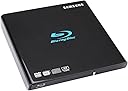
| ASIN | B00AO1XFM0 |
| Additional Features | Blu Ray Disc |
| Brand | Samsung |
| Cache Memory Installed Size | 4 |
| Cache Size | 4 |
| Color | Black |
| Customer Package Type | Box |
| Customer Reviews | 4.2 out of 5 stars 1,163 Reviews |
| Global Trade Identification Number | 00887276003504, 08806085256576 |
| Hardware Interface | USB 2.0 |
| Hardware Platform | PC |
| Item Part Number | SE-506BB/TSBD, SE506BBTSBD, se-506bb/tsbd |
| Item Weight | 1.25 Pounds |
| Manufacturer | Samsung |
| Mfr Part Number | 8806085256576 |
| Model Number | SE-506BB/TSBD |
| Operating System | Windows, macOS |
| Optical Storage Write Speed | 6 X |
| Special Feature | Blu Ray Disc |
| UPC | 887276003504 |
C**A
Great Lightweight External Blu-Ray Burner/Player
I originally bought this when I found dual layer DVD's to have insufficient space for burning a series of videos. Upon first use, I had three failed discs before trial and error had led me to pinpoint the software as the problem with incompatibility. The Samsung SE-506BB does come with software you can download to try, and see if you want to buy it (PowerDVD 10, Power2GO, Power Producer 5.5, and Power Backup 2.6), but I already had my own preference. Once I installed and opened up Nero 12 Platinum (Absolutely LOVE this program), I am fitting more on my blu-ray discs, having less errors, and noticing better quality. The Samsung SE-506BB/TSBD writes to disc with high quality. My Vaio runs Windows 7, 64bit, and had no problems with holding up for duration of several burning sessions I threw at the Samsung these last few days, while I perused the internet, and did my classwork. So the answer to the question "Can I multitask while writing to disc?" is absolutely. Is there a longer wait? Perhaps, but for me, it's because I haven't yet written anything to disc that has been under 6 hours long. It may take longer than writing to DVD, but this IS blu-ray, not just a dual layer DVD, so yes, it will take a bit longer. Honestly, I wouldn't want to speed through the process and end up with a low-quality rushed disc. I typically drop my speed when writing videos to disc anyway. High speed action scenes are reproduced extremely well. The quality, of course, is up to the person's software, preference, and video size being written to disc. For the price, this Samsung blu-ray burner exceeded my expectations. I have not tested the Samsung as a blu-ray player for my TV, but if your TV has USB connectors (like mine), it should connect, but I'm not sure how one would control the playback this way. I did test its playback on my computer, and the disc I burned, along with the one I already owned showed up just fine. The connection is a solitary USB/Micro USB cable, which basically means Blu-Ray writer to computer. So far, I have not yet had the opportunity to try this with BD-R DL, but with rewritable blu-ray discs, it works well. Also, this Samsung blu-ray writer/player doesn't give me a hassle about video conversion (AVI, MKV, MP4, etc), and handles whatever video type I import into Nero 12. Amazing little external blu-ray writer!
A**S
Excellent and easy to use external Blu-Ray Drive
What is included ------------------ Included with this purchase is the external drive, one usb to micro-usb cable, and trial versions for the following software: PowerDVD (for blu-ray disc playback), PowerProducer (DVD authoring), Power2Go (Data burning), InstantBurn (Packet writing), LabelPrint (Label designs), and PowerBackup (data archiving and backup). This software is bundled together on one disk, and is called the CyberLink Blu-ray Suite. Size of Blu-ray drive ----------------------- Dimensions: 145 x 19.5 x 145 mm Weight: 312g -- Very light, and very portable. Review -------- I have been using this drive for a couple days now, and couldn't be more pleased. It is extremely easy to use, as all you have to do is connect the usb cord from the drive to your computer. My computer (running Windows 7) recognized the drive immediately, and I was able to start using it. I then installed the trial software to see if I would be interested in any of the programs. I have been playing Blu-rays with PowerDVD, but there are many programs out there that you can download for free as well. It is also very easy to backup your collection via MakeMKV. Each of my backups has typically taken about 45 minutes (keeping full quality, but no menus). I have also tested it on Windows 8, and have experienced no issues. The drive is extremely portable because of its minimal weight and size, and surprisingly still feels pretty durable. The nice glossy finish on top also makes it an appealing piece of equipment. I would definitely recommend this blu-ray/dvd drive. UPDATE AS OF 3/23/2013 ---------------------- The drive is still working just as great as when I first picked it up back in January! Couldn't be happier at this point in time. UPDATE AS OF 10/22/2014 ---------------------- Just like the day I received it, I have had no issues. Still works perfectly, and couldn't be more pleased. UPDATE AS OF 08/12/2016 ---------------------- IT STILL WORKS!!! UPDATE AS OF 11/27/2018 ------------------------------- Still churning away. UPDATE AS OF 07/31/2020 -------------------------------- Can you believe it? I just pulled this thing out for the first time in a year or two and it still works like a champ.
J**R
Quality External Blu-Ray Burner
I bought this because I needed to reload the operating system on my father's ASUS Netbook which does not have a CD drive. I had been wanting a blu-ray burner for a while and figured that instead of buying a basic external CD drive I would spend the little extra money on this to have them both. The unit worked out of the box for DVD/CD reading and burning on the Windows XP, Windows 7 and Windows 8 computers I connected it to using the software already built into those computers. It also worked from the bios on the netbook to re-install the operating system. It was easy to connect and only required a single USB port and no external power sources. This was a nice feature as many devices require an extra power adapter or at least a second USB port to power. Installing the included Cyberlink Media Suite software on Windows 7 I was also able to play Blu-Ray discs but when loaded on Windows 8 it gave me an error when trying to play Blu-Ray media. I really can't complain too much though because it at least included SOME software while many other products don't come with software, and many of them come with the same software with the same issue. Some research on the internet found that it was the version of PowerDVD included with the bundle. A relatively inexpensive upgrade to the latest full version of the Cyberlink Media Suite bundle through a substantially discounted rate advertised in the software allowed me to get up and running with the Blu-Ray in Windows 8. It would have been nice if Cyberlink offered a fix as a free update to the included version of PowerDVD but since it came free with the drive I can't really complain too much. Pros: -Easy to connect -Wide compatibility -Single USB port -Stylish and compact Cons: -Free Windows 8 fix from Cyberlink would have been nice
J**N
Flawless "outboard" optical drive...
I have a 5 year old MacBook Pro which is still going strong. The optical drive works well, but I wanted Blu-Ray capability. So I bought this item. I downloaded and paid for MacGo Blu-Ray player (software) and voila my MBP is now a full-fledged Blu-Ray player -- which, incidentally, unlike my Denon dedicated BD player does not take 5 minutes to load the disc. It loads like a CD or DVD and nothing on my non-Retina screen has ever looked so good :) Some have said this item won't play BD's on a Mac. Absolutely not so -- BUT you need the software to make it work. Why they didn't include that on the enclosed disc, I can't imagine. Macs have no built in Blu-Ray capability so the 3rd party software is essential. Ripping a BD for backup takes about 4 times longer than a DVD and processing it to play on an Apple TV (for example) also takes about 4 times as long -- all of which makes sense since BD has up to 10 times as much data to process -- so I don't think I'll be doing THAT very often. That is not a fault of this drive but simply the nature of the HD format. Finally, some have noted that the drive was "flimsy". Well, I don't agree with THAT either. It "feels" just like a built in optical drive on a Dell or Toshiba (or HP) Laptop. I think it is well built for what it is and what it is intended to be. It is lightweight and it is good looking. I have used it on both my MBP and a MacMini that I also own. It really is Plug-and-Play (providing you have installed the proper BD software). For CD's or DVD's it is plug-and-play out of the box. AND if you use the "Burn Folder" feature of Mac OSX it will also burn a data disc -- out of the box. If you want to "author" an optical video disk (DVD or BD) you'll need Roxio Toast. I wish my car unit were BD capable. If it were I could put enough music on a single disk to drive thousands of miles. Bottom Line: This is a beautiful little drive that does exactly what it is supposed to do. Add the proper processing software to it and it is a complete CD/DVD/BD solution. If I were the owner of a Laptop without a built-in optical drive, this would be the drive of choice.
C**S
Works great on Mac, but does not play blu-rays. You will have to download additional software.
I'm using a Macbook Pro and Mac Pro (2008), both OSX 10.8. Sets up right out of the box. It plays DVD's very well, but if you want to play Blu-rays on your computer you will have to download additional software like Aurora or Macgo for $39. I use Toast to burn and Toast comes with a player. So if you use Toast keep that in mind. I heard that you cannot play Blu-ray movies with it on your TV, just Blu-rays that you author yourself, so keep that in mind if you're thinking of purchasing this instead of a blu-ray player. I did test it out and I wasn't able to play a blu-ray or DVD through the USB on my TV. I've read other reviews that said they burned iTunes movies and use hand break to burn a movie to a blu-ray disc. I have not been able to do this successfully. I had some problems burning a blu-ray disc from Adobe Encore. This has nothing to do with the device I have found. It has something to do with Encore. Just know that if you are using it with this program you will most likely have an error. What I did was upgraded my Toast software to burn Blu-Rays. I exported a Blu-ray folder from Encore and burned it in Toast. Works great. It's great at storing large media files for archiving since blu-rays have 25GB of space. It's about the thickness of a slim external hard drive. It's not very thick which is good. Works just from the USB, no additional cords needed. The body feels very durable and solid. Very good for dropping in your laptop bag for on the go use.
Z**N
Worked for a year, then turned into a brick. Also note; NOT REALLY MADE BY SAMSUNG; actually manufacturer is "TSSTODD"
I purchased this about 18 months ago. For the first year of minimal use, it worked great. I only made a few blu-ray discs -- went through one spindle of about 30 discs in a year, vacations, school plays, etc. Not heavy use. Last summer, I tried burning a blu-ray disc I'd edited in Adobe Premiere Elements 10, and burn after burn came out glitchy -- video would freeze randomly and repeatedly. The DVD I'd burned with the computer's internal DVD writer played back fine, so I'm sure the problem was not with the software. This spring, I tired burning a blu-ray disc of another video I'd edited. In Windows Explorer, the drive appears, but when I put in a blank disc, it prompts me to insert blank media. In Premiere, I've had a problem where I get one of two messages: Either the drive is not seen by the program at all and does not appear on my list of burners or it is recognized but says that Media is not present, when it is. I've called for support at Samsung. You should know that Samsung apparently does not manufacture nor support this product even though they put their log on it. Try finding it on the Samsung website. I chatted with their online support and was told to contact a third party called TSSTODD (The first TS stands for "Toshiba Samsung", the ODD for "Optical Disc Drive", though after my experience I can think of a more colorful interpretation of the abbreviation "TS"). TSSTODD's support was useless. I'd asked about drivers and firmware and was told there are no additional drivers for the product and firmware changes were minimal and should be avoided because they could turn your device into a brick. Since my device wasn't working, I figured I had nothing to lose, so I downloaded the firmware installer from the TSSTODD site. The installer window didn't even open properly, with text and the bottom cut of and not displayed on screen. I could not proceed after the initial message appeared. I compared it with the screen shot of the instructions from their site, and noticed that an OK button should have been appearing, but it was not. I used the Task Manager to stop the installer from running -- clicking the enter key did nothing. Since I also have an internal DVD drive, and that one is chosen by default, I was afraid that it would somehow try to install bad firmware to that drive. I'm attaching a screenshot of the dialog box that opened when I tried to run the firmware update. Note the sloppy job with the cut off text and missing any way to proceed. So, now I'm out $80, have a brick, and a dozen parents and their kids champing at the bit waiting for me to get blu-ray discs to them. Not a happy scene. Do yourselves a favor and avoid TSSTODD products at all costs! You'll need to be careful about this, because it's not as obvious who's manufacturing your products as it might seem.
A**R
Simple, reliable and convenient... But beware the price increase...
I bought this device 2 years ago for my dad. I previously had bought a rather bigger model for myself and the only reason for this purchase is to archive our kids' photos - videos and share them with the grandparents. So my dad would be able to play a large collection of recordings easily. My old LG is 3 times the size and operates with an external power adapter ( a rather early model). Compared to that one, this one is very convenient and takes less space. You don't need to bother with power cable and that is a plus too. However since this one gets the power and the data transmission through USB it is not as fast in recording. (I record the same disc in 20 min with the old one and around 30 min with this one) However if you only occasionally record like myself this difference is nothing. The play speed and reliability has no significant difference at all. The installation was hassle free and the operation was smooth. We have used this model as a player for most of the 2 years of ownership and occasionally as a recorder as well. There has been no problems so far and we have not wasted a single bluray disc during recordings. One criticism is the meaningless price increase between the time I purchased it ($89 as of November 2013) and the time I write this review ($109 as of march 2015) Since this item is a USB2.0 which is kind of getting out dated, I would expect a price drop rather than a price increase. In that case I suggest you shop around and consider other models but other than that, it is reliable and convenient...
J**R
It works great... except for a few quirks (Update)
I purchased this drive after the first (cheaper) one was DOA. I have not used the burning feature yet, as I am mostly using this to back up my blu-ray collection. I have a 5 year old iMac that is running the latest software and the drive recognizes every disc I have put in it (Blu-Ray, DVD, and CD). The drive will rip CDs and DVDs (for backup purposes) without any problems. It has trouble with the Blu Ray discs. In order to allow MakeMKV to work properly with this drive on my iMac, I have to unplug the device and restart my computer. Then it will work just fine to backup one Blu-Ray. I then have to restart the system again to backup another disc. So the device works when I follow the right steps, and only requires one USB cable for the data and power. Update: I've been using the product for several months now and it has been working great. Some new updates to software, like MakeMKV, have improved the performance of the drive. All discs seem to be recognized very well. I no longer need to restart my computer every time I load a Blu-Ray. It is still not perfect, but the performance is great, way faster than my internal drive. The burn feature is fast and works as it should. I have not tried the Blu-Ray burning function but DVDs and CDs are just fine. I now would recommend this product. Update 2: A few more months of use and I have had more problems reading all of my blu ray discs. The discs are new and scratch free and it appears the drive cannot draw enough power while connected to the USB drive alone, but there are no other ports to add power to this drive. I have since switched to the ASUS BluRay drive and I have had much greater reliability reading Blu Ray discs. The portability of the Samsung drive is great, but it is not always as reliable as I would have hoped. The ASUS drive is bulkier but has more power and quickly rips and burns my discs. I would still recommend this drive if you need portability, however reliability of a drive is more important to me so I would recommend a drive with a separate power supply than just USB.
K**7
Nothing like it
Great portable device for those who don't have dvd drive in their laptops. Plus this one is Blue ray and its easy to use. The form factor is the major thing for me and if the product is well made and serves it purpose then I am happy with it. I would recommend this to people who are on the move and like to keep things small and tidy. USB 2.0 connectivity is great and it does come handy in some situation.
R**F
Macht was er soll - Ideal fürs Heimkino - mit der Richtigen Software
Den Blu-ray Player nutze ich Hauptsächlich für das Rippen von Blu-ray Filmen auf meine NAS um diese dann wiederum mit meinem Panasonic DMP-BDT130 via DLNA abzuspielen. Eingesetzte Software gibt es im Netz ist MakeMKV zum Rippen und tsMuxeR zum Umwandeln das der Panasonic die Filme auch mit DTS HD Master Audio wieder geben kann. Will man die Filme auf der PS3 via DLNA wiedergeben sollte man nach dem Rippen zum Umwandeln mkv2vob verwenden da die PS3 meiner Erfahrung nach nicht mit tsMuxeR zurecht kommt und man so den Film zwar sehen kann aber ohne Ton. Im Netz gibt es massenhafte Fragen zu diesem Thema mit den Abenteuerlichsten Antworten. Zum Gerät selber kann ich nur sagen es kommt nackt wie ein Schwein daher, lediglich ein USB Kabel ist dabei. Funktioniert seit dem Kauf ohne Probleme und wird selbst von meinem 7 Jahren alten Laptop ohne Mucken erkannt. Gerät war ein Warenhouse Deal für um die 50 Euro ein Top Kauf.
D**S
Great Product for the price
I have been waiting for a Blu-ray player that would work on my Mac for a reasonable price. This unit is a little fragile compared to Lacie's drive but works really well. The only problem I had was no information came with the product about how to use it with my iMac. If they had simply written instructions about system requirements and that all you had to have at least Toast 8 and what to do next that would have been helpful. It does say on the box that it is Mac friendly. Anyway all I had to do was plug it into my Mac via USB, open Toast and drag my files into Toast and that was it . Burn speed was 2X which filled a 25Mb Blu-ray disk in around 20 min. So drag and drop and go and get yourself a coffee. My computer has 8 GB of RAM and still burning a disk slowed down processes for loading programs and working on my photography somewhat slower. The only way to open the tray after burning is to eject it from the desk top.
A**R
Buon prodotto, ma un po' troppo esigente in termini di alimentazione
Funziona bene, con risposta abbastanza veloce e ottima qualita' di riproduzione, installato con facilita' su diversi pc di casa. Non ancora provato come masterizzatore. Richiede *sempre* l'alimentazione con doppia USB (anche in lettura di normali DVD), altrimenti da' errore (assorbe molto piu' di un HD da 2Tb, che fa il suo dovere senza problemi attaccato a una sola porta USB). Il software in bundle e' vecchiotto e non troppo performante, ma e' difficile chiedere di piu' visto il prezzo.
K**Y
Good product
Never had a problem for last 6 years
Trustpilot
3 days ago
5 days ago