Buy anything from 5,000+ international stores. One checkout price. No surprise fees. Join 2M+ shoppers on Desertcart.
Desertcart purchases this item on your behalf and handles shipping, customs, and support to Morocco.
⌨️ Elevate your typing game with precision, power, and style!
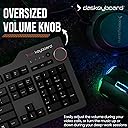
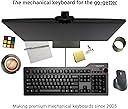
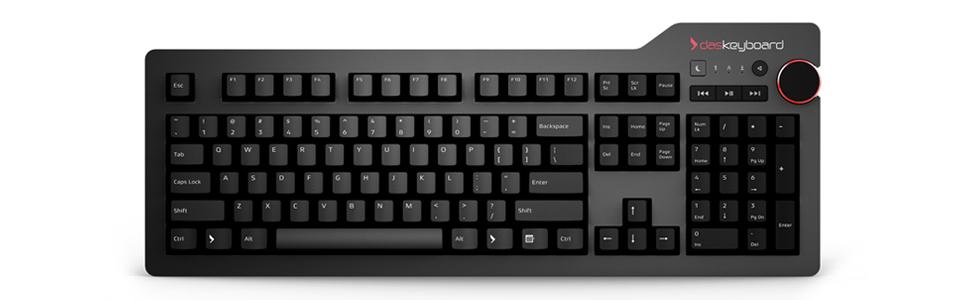
The Das Keyboard 4 Professional Clicky MX Blue is a premium mechanical keyboard featuring 104 German-engineered Cherry MX Blue switches for tactile and audible feedback. It boasts an anodized aluminum top panel for durability, an oversized volume knob with dedicated media controls, and a SuperSpeed USB 3.0 hub for fast data transfers. Designed for professionals and gamers, it includes a magnetic footbar that doubles as a ruler and offers N-key rollover for flawless input. Compatible with Mac OS X and equipped with a 6.5 ft cable, it combines high performance with sleek aesthetics.


| ASIN | B00JI2APZQ |
| Antenna Location | Gaming |
| Box Contents | USB Cable |
| Brand | Das Keyboard |
| Brand Name | Das Keyboard |
| Colour | Black |
| Compatible Devices | Laptop |
| Connectivity Technology | USB |
| Customer Reviews | 4.3 out of 5 stars 537 Reviews |
| Enclosure Material | Aluminium |
| External Testing Certification | Não aplicável |
| Global Trade Identification Number | 00855800001425 |
| Hand Orientation | Ambidextrous |
| Item Type Name | keyboard |
| Item Weight Unit of Measure | 1.18 kg |
| Keyboard Description | Gaming |
| Keyboard Layout | QWERTY |
| Manufacturer Part Number | DASK4MKPROCLI |
| Model Number | DASK4MKPROCLI |
| Number of Keys | 104 |
| Number of Sections | 4 |
| Power Source | usb |
| Product Features | Laser Projection |
| Recommended Uses For Product | Gaming |
| Special Feature | Laser Projection |
| Style Name | Modern |
| Switch Type | Tactile |
| Total USB 2.0 Ports | 2 |
| UPC | 855800001425 780746325017 |
S**S
Stay away from buying this overpriced piece of junk
do not expect any sort of longevity from this product. I have been using this keyboard for over a year and I found these issues with it over time: 1. its keys feel mushy, like you are typing on damp squib 2. volume knob easily comes of. its rubber felt moist and sticky. 3. some of its keys gets stuck on pressing and you require to wiggle it to get it up. 4. do not expect any warranty service by Das Keyboard in whole Indian subcontinent. 5. no software dashboard to create any macros, etc. no it is not really a professional keyboard.
T**M
Solid construction. Good keyboard.
I have never owned a mechanical keyboard before. This one seems great. This is day 1 and I am enjoying typing on it. I am a professional and I think this keyboard suits my just fine. I think the music controls are well constructed and positioned. MX Blue is loudish, but not too bad if you have your own office with the door open. I can see that if you shared an office you might want to try a quieter key such as MX brown, but it may not even be necessary to do that - it is just another form of background noise.
E**A
Tasti iniziano a sbiadire subito
Tastiera che fa il suo dovere e con pochissimi fronzoli. La qualità costruttiva è ottima, tranne che per i tasti. Dopo poco più di due mesi di utilizzo si vedono già i segni delle dita e la stampa inizia a sbiadire. Ciò dà fastidio visto il prezzo pagato, per il resto la consiglio
J**E
Best Mechanical Keyboard I've Owned
The following review is regarding my experience with the Das Keyboard Professional (w/ Cherry MX Blue switches), which I’ve owned for several months now. I also own the Cherry MX Brown version of the same keyboard. SPECIFICATIONS Cord Length: 6.5’ Top Panel Thickness: ~ 1 mm Top Panel Material: Anodized aluminum (matte), though feels similar to powder-coated finish BUILD QUALITY The build quality of this keyboard is its strongest attribute. It’s extremely solid – there is no flexing of the keyboard at all. The keyboard is also perfectly stable on my desk as I type. After using it daily for several months now, the keyboard looks brand new. There hasn’t been any fading of the text on the key cap labels, and the black finish of the key caps hasn’t changed either. While the top panel of this keyboard is made of a solid piece of metal, the bottom is plastic (though a pretty solid feeling plastic). I suppose if the bottom of the keyboard was also made of metal that may be better, though it is possible that the plastic bottom is more effective in absorbing vibrations. DESIGN & FEATURES This keyboard is very well designed. The non-flashy approach looks great to me, particularly compared to so many of the mechanical keyboards that look maybe a bit over the top. The font of the key-cap labels is traditional looking, which I prefer to the extra-large stylized font found on many gaming keyboards. The media keys are, in my experience, useful and well-placed. The inclusion of a dedicated “sleep” button is also very useful to me, and many other mechanical keyboards I looked at didn’t have one. In the Windows power settings, I set the sleep key to put my display into standby rather than put my computer to sleep. The volume knob is also useful to me, and I think the way in which it is placed (where it hangs over the right edge of the backplate slightly) makes it easy to adjust. The knob appears to be made of plastic, with a rubberized finish along the side and a red (looks like anodized) ring accenting the top. While I’d prefer to have the volume knob be entirely black, the red accent doesn’t stand out too much and I imagine some people would actually like it. The das keyboard logo is, in my opinion, cool and it looks good on the top-right of the backplate. Just under the logo are the blue indicator lights for num lock, caps lock, and scroll lock. The indicator lights do the job and look great from a normal typing position, though they do put out quite a bit of light straight up – in a dark room my ceiling is illuminated in blue light just above the keyboard (I keep num lock on always). The magnetic stand / ruler of this keyboard actually seems to work pretty well. It provides a nice even support across the entire keyboard, and I never have an issue with the keyboard sliding on my glass desk. I admit that I haven’t yet had a need to take the stand off and use it as a ruler, but maybe to some it would be more useful. The USB 3.0 hub (two ports) along the top right of the keyboard is very useful to me. I have my wireless mouse adapter plugged into one of them. These USB ports are an actual hub as opposed to a pass-through, so the keyboard only requires one port on the computer. Regarding the keyboard’s cord – it does seem to be attached to the keyboard securely, though it is pretty darn thick. It attaches right in the back-center of the keyboard. It is nice having an extra long cord – though for my particular setup I still need to use a USB extension cable with it. I would definitely prefer to have a cord that isn’t operantly attached. Also this keyboard doesn’t have a backlight, which hasn’t been an issue for me as my monitor provides enough light to illuminate the keyboard, but for the price a plain white backlight would still be a nice option to have. Additional features include NKRO (which does work – supposedly it is disabled by pressing shift + mute), and Das Keyboard claims this keyboard’s firmware can be updated (though not sure what could really be changed). This keyboard requires no software or drivers, which I definitely prefer compared to keyboards from many of their competitors (like Corsair, Logitech, Razer – all of which want you to have their own software always running). CHERRY MX BLUE VERSION I purchased the cherry MX Blue version, and this is the version that I have been using most the time since I bought it several months ago. I personally like the “crisp” feel of the blue switches, though I will admit that I worry about them being too loud at times. This worry led me to also purchase the same version of this keyboard with the brown switches. CHERRY MX BROWN VERSION I purchased the cherry MX Brown version of this keyboard as well, and I tried it off and on over the last few months, as well as exclusively for a few weeks. Well I did like many aspects of the brown switches; overall I have concluded that I prefer the blues. The brown switches were quieter than the blue switches, but I never got over the way they felt more “mushy” compared to the blue switches. PRICE So, I like the keyboard - so far, it’s the best of any mechanical keyboard I’ve owned. The price is steep, and if it perhaps had backlit keys the price would seem more reasonable. That being said, a keyboard like this should last a very long time, and I would recommend it all things considered. I would give it a 4.5 star rating if I could, but I feel that a five star rating is more appropriate than a four star one.
J**.
It's good...very good!
I'll admit that I'm rather new to the mechanical keyboard world. So far, I've only tried about three mechanical keyboards, but I must say this is definitely "the one", right off the bat. Build quality is great, key caps feel good and have a nice texture. The Cherry MX Blue switches feel super responsive, although I don't think this keyboard would be suitable for an open office type setup given the amount of sound the key switches make. I only really mention this as the name "professional" might imply this product is suitable for office use, but I really don't see that being possible with any keyboard that sports Cherry MX Blue key switches unless you have your own office or work in an area secluded from others. If you're somewhat unsure about the sound these things make, I'd recommend passing by a Canada Computers or a Best Buy as there is a good chance that they have a floor model on display that you can try out. The volume knob is very responsive and ticks as the volume increases, which I personally prefer to that linear feel. The two USB 3.0 ports located on the side of the keyboard are well positioned and convenient -- they are no longer placed on the side like the old model, meaning that there is no possibility that the attachments will obstruct your mouse movements. One thing to note, unlike most of the other mechanical keyboards I've owned, the cable to plug the keyboard into the computer is not detachable. The wire itself is also very thick, probably due to the two USB 3.0 ports. I've included a picture in the review which showcases the wire's attachment to the keyboard (just ignore the key caps, I switched the defaults caps for my own.) This is not an issue at all for me though, as the wire seems sturdy and unlikely to break. To be honest, besides being able to route the wire to different sides of the keyboard, I never understood why the detachable cable is such a selling point. Overall, this is a fantastic keyboard, one looking for a quality build need look no further!
J**J
Fanstastic keyboard
I was a bit scared that the keyboard will be too loud but fortunately it's not that bad (MX Blue), even my wife likes it. I'm using it with my rMBP 2012 and it works like a charm. I didn't have to install anything extra to get the media buttons and USB working. So if you are a programmer, you shouldn't get definitely one of these :)
Trustpilot
2 months ago
2 weeks ago