

Desertcart purchases this item on your behalf and handles shipping, customs, and support to Morocco.
🔄 Switch to the future of ultra-HD productivity!
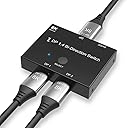
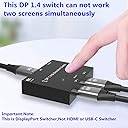
The CableDeconn DisplayPort 1.4 Switch & Splitter delivers ultra-high-definition 8K@30Hz and 4K@120Hz video with a blazing 32.4Gbps transfer rate. Designed for professionals, it supports bi-directional switching between two DP sources or displays, powered via USB for reliable plug-and-play operation. Compatible with all DP standards, this compact device streamlines multi-display setups with effortless toggling and crisp visuals.


| ASIN | B076ZKZLXT |
| Best Sellers Rank | 37,922 in Computers & Accessories ( See Top 100 in Computers & Accessories ) 161 in DisplayPort to HDMI Adapters |
| Brand | CableDeconn |
| Brand Name | CableDeconn |
| Cable Type | HDMI |
| Cable type | HDMI |
| Color | dp 1.4 switcher 2x1 |
| Colour | dp 1.4 switcher 2x1 |
| Compatible Devices | PC |
| Compatible devices | PC |
| Connector Type Used on Cable | DisplayPort |
| Connector type | DisplayPort |
| Customer Reviews | 3.9 out of 5 stars 1,562 Reviews |
| Manufacturer | CableDeconn |
| Manufacturer Part Number | CABLEDECONN |
| Model Number | E0303 |
| Number of Items | 1 |
| Number of Ports | 3 |
| Number of ports | 3 |
| UPC | 701385669379 |
| Unit Count | 1.0 count |
A**O
Easy of setup and use
It works great and seamless. I am able switch display input by tapping the button.
L**S
Power it correctly!
People complaining about this are not using a designated power socket (from the wall) to power this. I initially used a usb from pc to power it and often got the black screen for a few seconds. Once changed to a socket it’s been flawless. Easy to use and once setup it’s perfect. Use it to switch from sim rig which is 3 monitors, to desk which is one.
T**N
Doesn't do ultrawide 144Hz+ but seamless transition between 2 monitors
I have a sim rig next to my desk, and needed to switch between separate monitors. Works very well, however there is some flickering at 165Hz on one monitor so have had to scale back to 1440p ultrawide 120Hz and works fine. Just press the button and instant switch to the other. No more plugging in and out of cables, or changing display settings. For the price it's good, but hope to find one that works at a higher refresh rate
A**Y
Worked for 2 months before it starting flickering
Had this item for two months to connect my gaming monitor to my work laptop, and it worked just fine! Suddenly, when i switched it to use my gaming monitor from the laptop, it would start flickering numeorus times. Does this all the time now. I know the issue is not with the cables, as i've completely swapped them all around with new ones, same issue. Updates my monitor's firmware, same issue. Tried lowering the refresh rate of my monitor, 60hz is the lowest i can go. Same issue. I've since bought a second one, but again it does this straight away. I don't feel these can cope with 4k at 60hz, never mind 120hz.
M**A
With from Single to triples without unplugging a thing.. perfect
Highly recommend this product. I run a very high spec PC and wanted to find a way of switching from my simulator with triple screens, to my ultrawide LG monitor for when i want to play FPS games at my desk. With the push of one button i can do this without the need to unplug a single cable. If this is what you want to do, you hac=ve found the product you need. Zero drop in quality and so happy with this product. So i have numbered my DP cables as you see in the picture and the number one (output from GPU goes into the splitter as shown at the bottom...... the two top ones.. one goes to my ultrwide, the other to my triple screen setup.. To make the switch ( and this is the best bit ) with the PC powered OFF, i click the little button on the splitter... if output goes to the ultrawide... only the ultrawide fires up , even though the two other screens on triples are plugged in... To use triples... power PC off... hit the button on splitter to with output to triples... turn on... and just triples fire up.. Took me a while to find this item but so glad i did... hope this helps. See you on the intrawebs...
J**.
Does exactly what it says
I had a specific use case where I needed 2 PCs set up to 2 monitors on 1 desk. These devices work perfectly, essentially a HDMI swapper, just for Displayport. I purchased two of these, one for each monitor. These allowed me to seamlessly switch between PC 1 and PC 2 with just the click of the button on the device, and without me needing to repeatedly unplug and replug any other cables, or play around with the monitor source settings. Make sure your Displayport cables are of high quality to ensure you do not encounter any problems.
B**L
120hz is flakey and 140hz almost never works
I am a software engineer so have a Mac/Pc dual setup. I got this almost 2 years ago but about 6 months ago I started getting fuzziness from my PC side. I originally thought it was a bad cable but swapped it with another 1.4 DP cable and still got the same. I confirmed it wasn’t the PCs graphics card by then swapping which device went into which DP slot on the switcher. Weirdly enough if you left it about 5 mins it does seem to give a clear picture. But now 6 months later the picture never resolved. I had to change my Mac and PC down to 60hz and now the problem is gone. However, the reason I got this is because it said it supports 1.4 and 140hz so it’s not doing what I paid for.
B**F
ACTUALLY WORKS WITH 100hz and G-SYNC!!
Ive never left an amazon review but I know how tricky it can be to find good reviews for this kind of thing I currently switch between a MacBook Pro (For office / admin work) and a PC (For gaming / Music Production) and finding a decent displayport switch that supports G-Sync but ISN'T crazy expensive has proven difficult I run an ASUS ROG PG348Q Ultrawide monitor and I'm glad to say this unit actually works with 0 problems whatsoever! 100hz and Gsync I took no chances and ordered the same cable that many users here suggested - https://www.amazon.co.uk/gp/product/B07HL7RXKM/ref=ppx_yo_dt_b_asin_title_o07_s00?ie=UTF8&psc=1
D**O
De momento perfecto pero ojo, leer la reseña
Mi configuracion inicial era desde una 1080ti directo al DP del monitor 4K. Quería meter un mac mini tambien por DP asi que compré este adaptador y estuve probando sólo con la conexion de la 1080ti al adaptador y del adaptador al monitor 4K con un cable DP que tenia por ahi para usar con un portatil en un monitor 1080p. El resultado fatal, parpadeos continuos, se iba la imagen 1 seg y volvia e imposible jugar, asi que pensé en devolverlo pero antes hice un pedido de un cable DP 8K para renovar el viejo y ya de comprar pues de 8K aunque no necesite tanto. He probado con el cable de 8K y perfecto, ni un parpadeo con la 1080ti y desde el mac es un usbc a DP de 4K 60hz y tambien perfecto, ni un parpadeo. Con esto quiere decir que si os da problemas reviseis la calidad de los cables DP que usais, sobre todo del que conecta el adaptador al monitor.
H**H
No funciona, no emite señal. Parpadea.
El producto no funciona. La imagen parpadea un par de veces y después no emite señal. Imtenté conectar con diferentes cables pero no sirve. Lo compré para utilizar mi monitor tanto con mi PC personal como la mac del trabajo
T**M
Works as advertised. Was surprised it gave me the full 144Hz (at 1440p)
This was a good buy. I was a bit weary because display connections and the associated cable and signal properties can be pretty finicky at times, especially with powered equipment such as this. However, it works perfectly and switches back and forth as advertised, even providing me with the 144Hz my gaming rig outputs. Makes life just a bit easier, in stead of swapping inputs on the backside of the screen, I can now just press a button to switch display input, and another button to switch my mouse and keyboard back and forth as well (which is, of course, another device)
Q**U
Godny swej ceny
Wszystko działa jak powinno. Jest super.
N**O
Funktioniert wie erwartet
Nutze das Gerät, um bei meinem Minisforum UM890 Pro zwischen der internen GPU und dem externen Dock zu wechseln. Zwischen dem Switch und den GPUs nutze ich 50 cm kurze Display-Port Kabel. Funktioniert alles wie gewohnt mit 144 Hz, WQHD und HDR ohne Aussetzer oder Bildfehler. Wechsel dauert nur wenige Sekunden. Es sind leider die üblichen hellen blauen Status-LEDs verbaut, die kann man aber mit einem Stück Tönungsfolie etwas bändigen. Für andere Besitzer eines DEG1 von Minisforum ein kleiner Tipp: man kann den Switch wunderbar mit 2 bis 4 kleinen Neodym-Magneten an das Netzteil haften.
Trustpilot
2 weeks ago
1 month ago