Buy anything from 5,000+ international stores. One checkout price. No surprise fees. Join 2M+ shoppers on Desertcart.
Desertcart purchases this item on your behalf and handles shipping, customs, and support to Morocco.
⚡ Upgrade your data game with Vantec’s turbocharged USB 3.1 Gen II card!
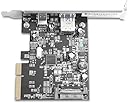
The Vantec 2-Port USB 3.1 Gen II PCIe Host Card (UGT-PC371AC) delivers ultra-fast 10Gbps data transfer speeds via one Type-A and one Type-C USB 3.1 Gen II port. Designed for PCIe x4 slots with a low-profile bracket, it supports plug-and-play on Windows 7-11 and latest Linux OS without drivers. Backward compatible and power-optimized, it’s the perfect upgrade for professionals demanding speed and versatility.
| ASIN | B013FDFGTI |
| Best Sellers Rank | #48 in Internal USB Port Cards |
| Brand | Vantec |
| Built-In Media | Item |
| Compatible Devices | Personal Computer |
| Customer Reviews | 4.2 out of 5 stars 276 Reviews |
| Global Trade Identification Number | 00844767020693 |
| Hardware Interface | USB 3.1 Type C |
| Item Dimensions L x W x H | 3.22"L x 2.75"W x 0.75"H |
| Item Weight | 0.26 Pounds |
| Manufacturer | Vantec |
| Mfr Part Number | UGT-PC371AC |
| Model Number | UGT-PC371AC |
| Operating System | Windows 7,8,10,11; Latest Linux OS |
| Product Dimensions | 3.22"L x 2.75"W x 0.75"H |
| Style | One USB 3.1 Gen2 (10G) Type A port (5V, 900mA), One USB 3.1 Gen2 (10G) USB C port (5V, 3A) |
| Style Name | One USB 3.1 Gen2 (10G) Type A port (5V, 900mA), One USB 3.1 Gen2 (10G) USB C port (5V, 3A) |
| UPC | 844767020693 |
| Unit Count | 1.0 Count |
T**Y
Worked immediately upon turning PC on.
Great product for the price. I was worried that this wouldn't work with the new Oculus Quest 2 and I either A) wouldn't be able to use it at all with the OC2, or B) it just wouldn't charge while playing. I'm glad I was wrong on both, it works just fine and it charges while playing thanks to the addition of a SATA power connector. It was extremely easy to install, I put it in an x16 slot and put the screw in and it was done. I didn't even have to install any drivers because I have windows 10. It comes with a driver CD, and if you don't have a CD drive it gives you instruction on where to download the drivers. Great product, would recommend!
F**6
It just works
Got this for a 12 year old AMD desktop running Windows 10 due to a need for more USB 3 ports. It took all of five minutes to install in a PCI-E slot, and Windows immediately installed drivers for it as soon as it booted up. One thing to note is that this requires a PCI-E X4 or larger slot, it will not fit into a small X1 slot. That was my main reason for getting this card, as my previous card was badly bottlenecked by the X1 PCI-E Gen 2 connection. This card performs very well, and the USB-C slot is a nice thing to have.
M**C
May be problematic with older systems
I installed this into an older Lenovo Thinkstation D30 Workstation Desktop, which in its time was a very powerful, dual Xeon processor system with a relatively large power supply. The system had a pre-existing PCIE USB 3.0 6-port card from Inatek, and several remaining empty PCIE slots. There is also an upgraded Nvidia 1080 video card present. After about 10 hours worth of effort I have gotten everything to work. Initially I had a lot of instability with the USB Ports on the system (those on this card and the ones on the old Inatek card as well). I also had a bunch of video-related problems with my multi-monitor setup ( 3 monitors, 2 of which are used all of the time). I should add that before this upgrade card was installed, I had zero problems with the computer and it was a very stable if complex setup. I won't go into detail because some of these problems were likely unique to my particular setup. During the trouble shooting process I installed and uninstalled many video drivers to test, changed cables and ports used for my monitors, moved the old USB card and this new one through the different available PCIE slots, reflashed/updated the bios, replaced the CMOS battery, changed various parameters in the bios, removed and reseated the video card, played around with USB drivers, and a lot of other things I won't bore you with. Everything now appears to work. My point in detailing this is that the logical buyer for this card is someone with an older system who doesn't have USB 3.1 gen 2 ports. I would not think of this as a simple plug and play solution to that issue. If you are comfortable with the innards of a PC, know how to troubleshoot Windows problems, and you don't mind investing what may be a lot of hours into this upgrade, then have at it. If your skills are limited to taking the side panel off of a desktop and putting a card in a slot, you may be in for more than you bargained for or can handle. It appears to be a good card, however don't view this as a plug and play upgrade as it may be considerably more challenging than that and you may run into problems you can't solve.
P**Y
Works great with 2019 Server with no driver download needed - Dell R620
Before I bought I verified the card would work in 2019 Server, it said I'd have to download a driver which was fine ... but I didn't have to. Installed the card in my Dell R620 and it recognized it immediately and now I can xfer files much faster than the slow builtin ports.
J**F
Does not comply with PCIe 2 standard as stated
UPDATE: I tried the Startech PEXUSB32EI and it worked in the same slot problem-free. It is based on the NEC/Renesas chipset uPD720202. It's not USB 3.1 Gen2 but it's UASP via USB 3.0 and IT WORKS! I purchased this card with the intent of picking up UASP support (external storage performance boost). I own a high-end DELL Desktop with a 7th Generation Intel chipset (the 10th is in production presently). My system has PCIe Gen 3 and Gen 2 slots which means the PCIe lanes are 8Gb/s and 5Gb/s respectively. Lanes are combined (in parallel) to have more bandwidth. Notation is typically an "x" which means "by." Hence, a "by 1" or 1 lane interconnect is referred to as x1. You also have x2, x4, x8, and x16. The PCIe spec differentiates between a physical card slot connector and the number of actual electrical lanes present. You can have a x16 slot with only x1 electrical connection. Lanes are a finite resource in system design. In desktop systems its common to have a x4 physical slot with x1 electrical connectivity. It falls under the logic 1 is better than none. The PCIe specification requires cards be able to negotiate for the number of lanes present and operate with the lanes available. Of course, this limits available bandwidth but something is better than nothing. This Vantec card uses an early ASmedia chip (1142) and it turns out (according to Vantec engineering via support) it does not work with less than x2 electrical lanes available. Therefore, THIS CARD WILL NOT WORK IN many PCs on the market which have a x4 slot with x1 electrical. I invested a lot of time troubleshooting and talking to Vantec support. While they were helpful, it is incorrect to say this card adheres to the PCIe specification 2. IT DOES NOT! Surveying the cards on the market for USB 3.1, it's clear many use the ASmedia chipset(s) and they too will not work in many PCs. Buyer beware! For the record, I tried another manufacturer's card with the ASmedia 3142 (2 generations later chipset) and the lane negotiation problem persists. In summary, ANY card (including this Vantec) based upon the mentioned ASMedia chipsets IS NOT compliant with PCIe specification 2 requiring PCIe lane negotiation.
A**R
Criminally underrated for the price point
Essentially 1/3 the price of any equivalent. My motherboard only has USB 3.0, and it's been having connectivity problems. I installed this and plugged in a USB-C to USB-A hub. Typically, USB-A hubs of more than 4 ports require a power adapter to be plugged in along with it, but a USB-C to USB-A hub can receive more power. Not to mention they tend to be more reliable. Even when I eventually get a new motherboard, this will be useful. Often when USB problems occur, we have to wonder if the problem is the motherboard. By having this installed, that possibility can be explored on the same computer. Additionally, I'll ensure my most important devices have their own dedicated ports away from the main 'cluster' on the back of the motherboard. Does not require any drivers on Windows 10, and you can safely discard the installation disk it comes with if you don't use Windows 7 at all anymore. I doubt any Linux distro would need drivers either since this device appears to use a standardized set, but I can't say for certain. Extremely happy with this product.
C**D
PSA - Check Your PCIe slot specs before installing
I was hoping to improve my Oculus Quest 2 link above the 2.4Gbs link I was getting on my PC's USB 3.0 slots. Installed very easily, used a Molex to SATA adapter for power, automatic driver install with Windows 10 64bit. I was disappointed when the USB test in the Oculus software stated "USB 3 recommended", showed me at USB 2.0 with only a 375k bandwidth. I used a x16 slot so thought I was good to go. Upon further investigation my Asus Prime H270 Plus MB spec shows "PCIe 3.0/2.0 x16 (max at x4 mode)" meaning max 2.0 when the other x16 is in use (which it is by my GPU). So, boxing it up and returning. :(
L**Y
Great for oculus Quest 2
So there I was with a new Oculus Quest 2 in hand. Hooked it up to my desktop pc, and only got a few hours of playtime before my headset died. So I got on Amazon and found this slim usb-c card and picked one up, since it looked to be a great price. Plopped that baby right in my pci-e slot and my headset now has infinite power while hooked to my desktop. Windows 10 (may 2020 update) detected the device and set it up without need of the driver CD. For those using slim cases, this card also includes a swappable faceplate for low profile pc's. For, reference, the card, I got had one USB-C port and one USB-A port, and is powered via a SATA power connector that attaches to the board for a constant power feed to usb devices. Highly recommend this for new quest 2 owners who have an existing usb-c port that doesn't feed enough power to keep the headset charged!
K**R
Read speeds 280MB/s - 325MB/s USB A and USB C respectively
Installed easily without a thought or care on Win10 system. Works out of the box. Tested speeds using Samsung T7 SSD (USB 3.2 Gen 2, so the bottleneck in speeds is sure to be this product being rated only at USB 3.1) onto a 2.5" A400 Kingston SSD. Copied over 10gigs of videos to be sure speeds weren't simply registering devices' built-in cache as would be the case transferring smaller files. Performed markedly better than USB 3.1 Gen 1, which transferred the same files at roughly. Based on the speeds I got, it'l likely an nvme ssd would go even faster on the USB-C connector since 320MB/s is roughly the limit of SATA SSD's. Considering my external ssd was as fast as my internal SSD I was fully satisfied not testing further. Great value, good product. Far beyond the needs of most home users and perfectly luxurious speeds for creative professionals with massive files to manage. Highly recommended.
A**0
Tarjeta pcie con puertos usb 3.1
Muchas gracias me llegó exactamente el día en que me dijeron, bien empacada y sin ningún golpe, estoy a punto de instalarla para ver que tal funciona. Ya la probé y funciona perfectamente bien. Muchas gracias.
D**S
Great solution for WMR headsets
My internal USB 3.0 header wasn't capable of providing sufficient power to my WMR VR headset, which caused me no end of headaches (and motion sickness to boot). I had tried another USB 3.0 host card which didn't work correctly. So after lots of research, I found this card which proported to provide the requisite 900mAh. I'm pleased to say that the card most certainly does provide the appropriate amount of power, and worked immediately with the Microsoft branded drivers in Windows 10. The USB-A port was a little tight when I first plugged something into it, but after a few cycles of plugging and unplugging something, it loosed up nicely. I can't say much in terms of transfer speed, as I have only used it for the headset. If you're looking for a USB 3 host card to make your PC compatible with WMR headsets, this would be my suggested item.
A**X
Works fine
didn't reach full speed on my old i7-3770 (3rd gen) but fine on NEW PC
D**D
All good
Works as expected
Trustpilot
5 days ago
1 week ago