We remain fully operational. Our teams are working around the clock to ensure your deliveries continue safely.

DOWNLOAD THE APP


Customer Services
Copyright © 2025 Desertcart Holdings Limited
DOWNLOAD THE APP
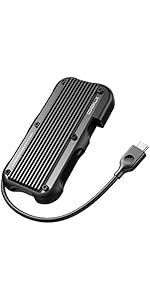
![Ineo M.2 NVMe (PCIe) SSD USB10Gbps Type-C Rugged Militarized Enclosure with a Solid Metal Case and Built-in Write Protection Switch (Picatinny Rail Style) [C2597-NVMe]](https://m.media-amazon.com/images/I/6190D+PbnnL.jpg)
🛡️ Lock it. Speed it. Own your data like a pro.
The Ineo M.2 NVMe SSD enclosure combines military-grade ruggedness with ultra-fast 10Gbps USB 3.2 Gen 2 connectivity. Featuring a solid metal case, a built-in write-protection switch for malware-proof read-only mode, and a silicone thermal pad for efficient cooling, it supports a wide range of M Key NVMe SSD sizes (2280 to 2230). Perfect for professionals demanding secure, high-speed portable storage with uncompromising durability.




| ASIN | B0827PB71G |
| Best Sellers Rank | #644 in Enclosures |
| Compatible Devices | Desktop, Laptop, Smartphone, Tablet |
| Connectivity Technology | USB |
| Customer Reviews | 4.2 4.2 out of 5 stars (128) |
| Data Transfer Rate | 10 Gigabits Per Second |
| Date First Available | December 2, 2019 |
| Department | Unisex |
| Hard Disk Form Factor | 22 Millimeters |
| Item Weight | 7.1 ounces |
| Item model number | C2597 |
| Manufacturer | ineo |
| Max Number of Supported Devices | 1 |
| Package Dimensions | 6.77 x 4.45 x 1.1 inches |
| UPC | 797716581601 |
H**C
Solid Enclosure
I've been using this for the last 9 months, and it's pretty good. I keep it on top of my PC, and under my desk. Sometimes, it falls off the PC (sometimes, that's my fault because I accidentally hit it with my feet) and so far, it has just kept on working. This is in sharp contrast to my earlier enclosure, which was plastic and would stop working (the SSD would slide out of it's socket) if it was just slightly touched. The installation was okay. Again, compared to the earlier enclosure, which was tool-less, it took longer, but this Ineo was much more secure, and screwing in two screws is not much of a hassle, considering I haven't had to look on the inside since I assembled it. I switched out the cable for a longer one but otherwise I like this the way it came.
G**D
The default cable is your friend
I am not ashamed to say that have bought 5 of these so far. The rugged aspect was secondary to the write protect switch. I will simply not accept any USB media for my computer if it doesn't have one. That is why I keep going back to this. The main reason for this review is give a heads up to everyone buying longer cables for it. and then commenting it is slow. I needed a little reach so I bought some 3, 6, and 10 feet cables. That was a huge mistake for me and taught me a valuable lesson. Not all USB C are made the same. I need to find out if they have longer ones that the short ones they include.. The first image is with the factory cable. The next two are the same case, computer, and drive, using different non-Ineo cables in SS+ ports. I broke one (definitely out of warranty) so I have see where I can get a replacement. I will deal with the short cable for such a massive improvement in the speed. I hope one day they come out with a case of the same quality and features that holds two.
S**L
GREAT!! Even for startup drives!
Works great! Using this as my boot drive on an older iMac and MAN it's cookin!
M**R
Sturdy, Hefty, and Rugged but Mine Was Defective
I bought this particular enclosure because of the write-protection switch on the front but, unfortunately, I never got a chance to use it. That's because while re-screwing the back panel of the drive in place, I noticed that one of the screw hole sockets was stripped, so I couldn't tighten the screw for that socket. I thought that I might be able to ignore that, but after I screwed the remaining 3 screws in and tried to insert the cable into the Type-C socket on the front panel, the side of the back panel with the stripped screw popped out. I considered returning it and ordering an identical one, but I decided that I didn't want to take a chance on ending up with another defective enclosure. On the positive side, I did like the sturdy-feel and helt of the enclosure. I don't think there would be any chance that an inserted SSD would be damaged from a fall or other mishap.
V**.
Excellent rugged aluminum enclosure!
I've been using this enclosure for years and was so impressed with its performance that I recently bought another one. When connected to a USB 3.2 Gen 2 port, it consistently delivers fast speeds. The build quality is exceptional, being a single piece of aluminum that provides excellent heat dissipation. Despite being tossed around in bags, desks, and drawers and dropped on floors, my previous enclosure has sustained little to no damage. In fact, it's more likely to damage whatever it hits due to its sharp edges and the fact that it's made of metal. The only minor issue I have is that removing an SSD from the enclosure usually requires removing both end covers and pushing the SSD out. However, given its overall quality, I would definitely buy this enclosure again.
J**D
Good quality and works perfectly
Worked perfectly. Good design. Snug fit with the thermal pad but that is a plus for heat transfer. This thing is HEAVY; much more than expected but that is not a negative for me.
C**N
Junk on delivery - unusable
After installation my drive is not recognized or useable in windows. Even using the disk management tool, the drive cannot be initialized with an error of 'incorrect Function'. This drive is trash, I do NOT recomend buying this junk!
C**F
Perfect solution to backup and restore SSD data
I bought this SSD enclosure for performing an SSD upgrade on my Lenovo laptop. Sadly, a Win 10 update killed the OS -- none of the tricks explained on the web would work to revive the boot sector -- leaving me to replace the SSD, restore data, and reinstall apps. But I was planning to accomplish the "brain transplant" anyway because the factory 250GB SSD was anemic for my use. I removed the old SSD from the laptop, inserted it into the enclosure, installed the new 2 TB SSD into the laptop, then reinstall Win 10, then restored data from the old SSD to the new SSD, and then reinstalled apps (which is still ongoing). Finally, I kept the old SSD in the enclosure. The enclosure worked perfectly with the old SSD to restore data to the new SSD and now its role is a backup drive. There was no sign of overheating, and data transfer rate was excellent. Definitely a keeper.
A**X
And I like it.
Trustpilot
3 days ago
1 month ago