Buy anything from 5,000+ international stores. One checkout price. No surprise fees. Join 2M+ shoppers on Desertcart.
Desertcart purchases this item on your behalf and handles shipping, customs, and support to Morocco.
👻 Embrace the ghostly efficiency of headless computing!
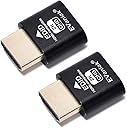
The EVanlak HDMI Dummy Plug is a premium aluminum headless display emulator that creates a virtual second screen at 1920x1080@60Hz. Ideal for remote access and cryptocurrency mining, this plug-and-play device tricks your GPU into thinking a monitor is connected, ensuring optimal performance without the need for additional hardware.


| ASIN | B07YKGGQTJ |
| Best Sellers Rank | #63 in DVI-HDMI Adapters |
| Brand | EVanlak |
| Color | E1080-1PC |
| Compatible Devices | PC |
| Connector Type | HDMI |
| Customer Reviews | 4.5 out of 5 stars 901 Reviews |
| Finish | Hdmi |
| Item Dimensions | 0.98 x 0.78 x 0.31 inches |
| Item Weight | 0.1 Grams |
| Item dimensions L x W x H | 0.98 x 0.78 x 0.31 inches |
| Manufacturer | EVanlak |
| Model Number | 1920*1080 |
| Number of Items | 1 |
| Number of Ports | 1 |
| Package Quantity | 1 |
| Power Plug Type | No Plug |
| Specific Uses For Product | Monitor,Monitor1920x1080 |
| UPC | 752498099454 |
| Unit Count | 1 Count |
D**C
It works!
This item works perfectly to solve a problem with my Benq GW2780 monitor that is not correctly detected at PC startup time.My conclusion is that my monitor must have a fault somewhere in the EDID negotiation electronics, which is a separate DDC link in the HDMI cable (using the I2C protocol).My monitor works fine once an HDMI video stream is being pumped out from my graphics card, but this only happens once the graphics card is satisfied that there is a valid HDMI sink connected,and the correct display format has been established.In my case the video format is: 1920x1080 @60Hz, and my graphics card is: NVIDIA GeForce RTX 2060.The EVanlak HDMI Dummy Plug does its job perfectly to convince my graphics card that there is a valid HDMI sink connected, then the GPU outputs a constant HDMI video stream thereafter.My use case:I insert the EVanlak HDMI Dummy Plug into my PC graphics card HDMI output socket when I first startup my PC.The dummy plug LED light goes blue, and my PC then proceeds to startup normally, without any VGA warning beeps from my motherboard!I wait for 30 seconds to be sure that Windows has fully started, then I remove the dummy plug and connect my Benq monitor which then shows a video image as normal.Problem solved!Thank you very much for resolving this electronics communication conundrum.(Benq refused to repair my monitor fault as my two year warranty period expired, even though I noticed and reported the fault within the first year!).
M**Y
Works as required and good value
I needed one of these as I was setting up a headless Ubuntu installation. To allow a remote desktop connection, the computer needed a monitor plugged in, as the remote session replicates what's on that monitor. I didn't want to use a monitor, as the device is tucked into a small cabinet. This handy little device tricks the computer into thinking a monitor is connected, thereby allowing me to remote to it without a physical monitor being attached.Bargain price, too.
Z**N
Works great for headless Mac Mini M1
I, for some bizarre reason, run a M1 Mac Mini as my home media server. Logging in via VNC was a bit wonky until I got this device, so now the Mini thinks it has a monitor plugged in. I can get a decent screen resolution in VNC now.
S**T
Plug and play
If you are looking at this, I assume you are trying to set up some kind of remote access where you need a display connected, such as sunshine/moonlight. I can confirm this works great for that purpose. I had my machine running with a hdmi monitor connection, simply unplugged the monitor and plugged this in and everything just continued to work.
W**E
Perfect for allowing remote access to AMT on vPro to work
Dell Optiplex 7050 with AMT - couldn't access the interface when no monitor was plugged in. "Get one of these thingies," somone says.By golly, they were right. Apparently this fools the GPU into thinking it should be doing something, which AMT needs? No idea, but it works.
D**H
Love it, works well for me
My intention was to use this so Linux can have a fake display, so I can play games with my monitors plugged into my intel graphics and use nvidia prime to make games use my nvidia card. I'll probably try out GPU passthrough too in the near future, though I haven't yet. I'm also using Intel graphics because, I'd also like to try Wayland, and nvidia sucks for Wayland. It seems to be working well for my use caseTo get it to work on boot without unplugging and replugging it in, I had to set my BIOS to use NVIDIA graphics, and then turn off my monitors connected to the Intel graphics. Then I had to wait about 10-15 seconds when I thought GRUB bootloader had loaded, and then pressed enter. Then my keyboard lights flashed off and on again, which is how I knew I'd done it.Then type in my password (I use sddm, so don't have to click anything), and then load up settings or a terminal and just use xrandr to set everything up. I'd suggest having it in your .bashrc, or however you like to start stuff
A**R
Works as intended (Tinkering needed for higher resolutions)
Very cheap and effective dummy HDMI plug. I use NVIDIA gamestreaming from my pc to a Shield TV pro and using this dummy port allows me to achieve this without an actual monitor connected and turned on.It cuts down on power usage and is convenient.Out of the box, windows will only detect it as 1080p 60Hz as the maximum resolution. To get higher resolutions, if you have an nvidia gpu, you have to set a custom resolution in nvidia control panel. After that restart pc and it should override that 1080p 60Hz limitation.
N**A
Not sure if it is actually recognised by a 2008 MacPro
I bought this to use a really old MacPro using screensharing hoping that it would display a 1920x1080 resolution screen area. Seems to be defaulting to 1280x1024. Suggests that the MacPro graphics card is not actually seeing it. Cheap enough to trial it though.
B**R
Works perfectly.
I have an old Dell that I use as a Plex server that is running Ubuntu Linux. I have been struggling with getting VNC remote access to work properly because there was a huge delay. I found a forum post that mentioned it being a video issue with the way Linux works and they suggested putting a HDMI dummy plug on it. This has solved all of my problems. I am now able to place the unit on a shelf with only power and network going to it and haven't had a single issue remotely connecting to it.
M**W
Unverzichtbar für Headless Server und Remote-Arbeiter!
Als IT-Profi und Heimserver-Enthusiast bin ich begeistert von den EVanlak HDMI Headless Display Emulatoren. Diese kleinen, aber mächtigen Geräte haben meine Remote-Arbeit und Server-Verwaltung revolutioniert. Hier sind die Gründe, warum ich sie jedem empfehle, der mit Headless-Systemen arbeitet:1. Zuverlässige Leistung:Diese Dummy Plugs simulieren zuverlässig einen angeschlossenen Monitor mit 1920x1080 Auflösung bei 60Hz. Meine Remote-Desktop-Verbindungen sind stabil und die Bildqualität ist hervorragend.2. Hochwertige Verarbeitung:Die Aluminiumgehäuse sind robust und sorgen für eine gute Wärmeableitung. Die Verarbeitung ist erstklassig und vermittelt ein Gefühl von Langlebigkeit.3. Plug-and-Play:Die Installation könnte nicht einfacher sein. Einfach einstecken und los geht's - keine zusätzliche Software oder Konfiguration erforderlich.4. Vielseitig einsetzbar:Ob für meinen Heimserver, Remote-Workstations oder sogar für Krypto-Mining-Rigs - diese Dummy Plugs funktionieren in verschiedensten Szenarien tadellos.5. Energieeffizient:Im Vergleich zum Anschließen eines echten Monitors sparen diese Plugs Energie und reduzieren die Wärmeentwicklung in meinem Serverraum.6. Kompatibilität:Sie funktionieren einwandfrei mit verschiedenen Betriebssystemen wie Windows, Linux und macOS. Ich hatte bisher keinerlei Kompatibilitätsprobleme.7. Platzsparend:In beengten Serverräumen oder Heimlaboren sind diese kompakten Plugs ideal, da sie keinen zusätzlichen Platz benötigen.8. 3er-Pack Vorteil:Das Set mit drei Stück ist perfekt für Multimonitor-Setups oder wenn man mehrere Geräte ausstatten möchte.9. Stabile Verbindung:Die Stecker sitzen fest in den HDMI-Ports und sorgen für eine zuverlässige Verbindung ohne Wackelkontakte.10. Kosteneffektiv:Im Vergleich zu echten Monitoren oder komplexeren Lösungen sind diese Dummy Plugs eine äußerst kostengünstige Option für Headless-Setups.Fazit:Die EVanlak HDMI Headless Display Emulatoren sind ein Muss für jeden, der mit Headless-Servern oder Remote-Desktops arbeitet. Sie lösen elegant das Problem der GPU-Erkennung und ermöglichen reibungslose Remote-Verbindungen ohne den Bedarf eines physischen Monitors.Seit ich diese Dummy Plugs verwende, konnte ich meine Arbeitsabläufe optimieren und die Verwaltung meiner Headless-Systeme vereinfachen. Die Bildqualität und Leistung sind beeindruckend, und die robuste Bauweise gibt mir das Vertrauen, dass sie lange halten werden.Ob Sie ein IT-Profi sind, der mehrere Server verwaltet, ein Heimanwender mit einem NAS-System oder ein Remote-Arbeiter, der auf leistungsstarke Workstations zugreifen muss - diese HDMI-Emulatoren werden Ihre Arbeit erheblich erleichtern.Für den Preis und die gebotene Leistung sind die EVanlak HDMI Plugs eine ausgezeichnete Investition. Sie haben meine Erwartungen übertroffen und ich kann sie ohne Einschränkung empfehlen. Ein unverzichtbares Werkzeug für jeden, der mit Headless-Systemen arbeitet!
T**U
Fais bien le jon
Je suis extrêmement satisfait de mon achat du dummy plug.Cet article a résolu un problème auquel je faisais face avec ma configuration informatique. La qualité de construction est bonne.Il s'insère parfaitement dans le port et fonctionne comme décrit, sans aucun problème de compatibilité.Grâce à ce dummy plug, j'ai pu simuler la présence d'un moniteur connecté à ma carte graphique, ce qui a résolu mes problèmes de détection et de performances. C'est un petit investissement qui a eu un impact énorme sur l'efficacité de mon système, et je le recommande vivement à tous ceux qui rencontrent des problèmes similaires.
F**A
Para los que no tenemos monitor conectado al PC
Tengo un mini PC sin monitor, al que accedo de manera remota y el formato y resolución de pantalla cambiaba haciendo imposible interactuar con él. UN amigo me habló de este producto y por ello me decidí a adquirir este producto.Al conectarlo a la clavija HDMI, emula y hace creer al PC que tiene un monitor conectado, evitando el cambio de resolución.Excelente relación calidad precio y perfecta funcionalidad.
B**R
Works as advertised
Works just fine, and most importantly showed up as a 1080p monitor as default which was important for my intended use of the device.
Trustpilot
2 months ago
1 week ago