We remain fully operational. Our teams are working around the clock to ensure your deliveries continue safely.

DOWNLOAD THE APP


Copyright © 2025 Desertcart Holdings Limited
DOWNLOAD THE APP
Buy anything from 5,000+ international stores. One checkout price. No surprise fees. Join 2M+ shoppers on Desertcart.
Desertcart purchases this item on your behalf and handles shipping, customs, and support to Morocco.
🔋 Power up your productivity, never miss a beat!
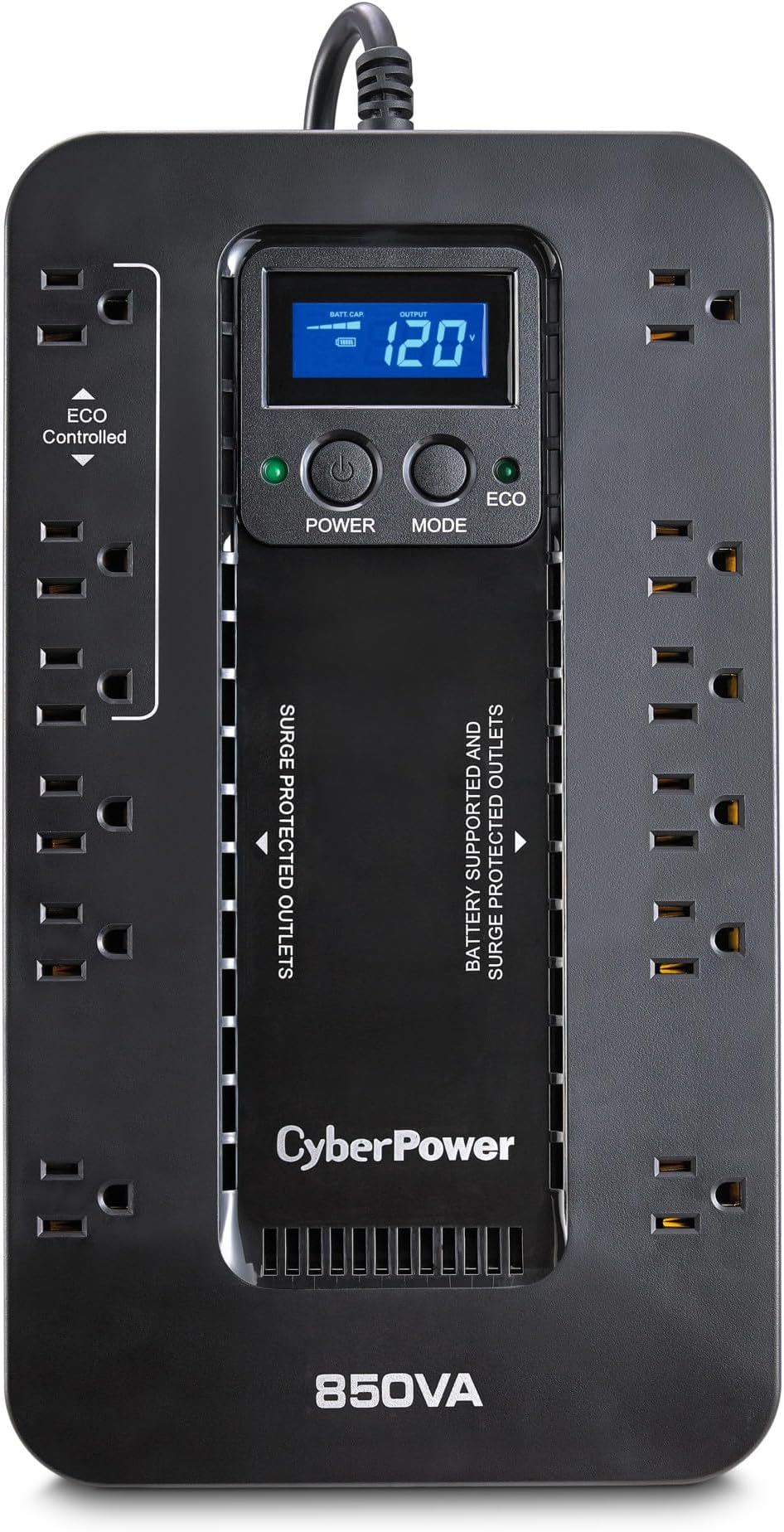
The CyberPower EC850LCD is a compact, UL-certified UPS delivering 850VA/510W of reliable battery backup and surge protection. Featuring 12 outlets with ECO Mode for energy efficiency, a multifunction LCD for real-time monitoring, and a 3-year warranty including battery replacement, it safeguards your workstations, networking gear, and entertainment systems during power interruptions while reducing energy costs.











| ASIN | B00DBAA696 |
| Amperage | 15 Amps |
| Battery Cell Type | Sealed Lead Acid |
| Best Sellers Rank | #6 in Computer Uninterruptible Power Supply Units |
| Brand | CyberPower |
| Color | Black |
| Connector Type | NEMA |
| Customer Reviews | 4.4 4.4 out of 5 stars (6,675) |
| EU Spare Part Availability Duration | 3 Years |
| Enclosure Material | Plastic |
| Form Factor | Compact |
| Input Voltage | 120 Volts |
| Item Dimensions | 12.2 x 7 x 3.1 inches |
| Item Dimensions D x W x H | 7"D x 12.2"W x 3.1"H |
| Item Weight | 7.7 Pounds |
| Lower Temperature Rating | 32 Degrees Fahrenheit |
| Manufacturer | CyberPower Systems |
| Maximum Power | 500 Watts |
| Mfr Part Number | EC850LCD |
| Model Number | EC850LCD |
| Number of Outlets | 12 |
| Output Current | 15 Amps |
| Output Voltage | 230 Volts (AC) |
| Output Wattage | 510 Watts |
| Power Plug Type | Type B - 3 pin (North American) |
| Runtime | 2 minutes |
| Specification Met | Energy Star |
| Surge Protection Rating | 526 Joules |
| UPC | 649532607600 |
| Unit Count | 1.0 Count |
| Upper Temperature Rating | 104 Degrees Fahrenheit |
| Voltage | 120 Volts |
| Warranty Description | 3 years |
| Wattage | 510 watts |
L**N
Excellent UPS Works Flawlessly During Power Outages
My go to for UPS supplies. I have several of these units protecting my most important electronics. I have used these extensively during power outages and I can say with confidence that they will not only protect your electronics, but also keep them running for a brief time. These are not meant to power your whole system for an extended amount of time. This is only so you can safely power down your devices. Another great feature of this device is that when the internal battery reaches its end of life, replacing it is extremely easy. It’s as simple as buying the battery and installing it with only two screws. I would give this CyberPower UPS five stars. It is so easy to use and I like the LCD screen too. Lots of features like overcurrent, undercurrent and voltage etc. protection. Super great price on these too. Unless you’re using a huge amount of wattage, you probably don’t need one of the bigger units. These handle my entire Uplift Desk and Mac mini and tons of other audio equipment Designed flat to easily lay on the floor. It’s also designed so the outlets are spaced apart which makes large plugs easier to use. It is also made to easily replace the battery which is much more difficult on the larger UPS. Hope this review helps you in your choice.
R**D
Good value, good service, highly recommend
Works great, good battery life, easy setup, too. You have the choice to hook it up to a computer through a USB port to control the software, but it's not required for it you to use it. Definitely good value for the cost.
J**Z
Re: UPDATED!!! Read last paragraph
****READ THE BOTTOM PARAGRAPH FIRST!!**** This units were plugged in for more than 4 months, they both were fully charge at 100%. Once the electricity went out due to the hurricane Milton, the battery pack never started to work after the power outage, I had to use a flashlight to upload the video below showing the unit not working as they advertised they supposed to work after an outage for 52 minutes! If you have electricity the unit will show 100% charge, once you get an outage, the units are dead right on the spot. I will update my review after the supplier responds to my emails and phone calls. Hopefully they make it right because I bought two (2) battery backups and paid a lot of money! *****UPDATE***** The supplier contacted me today 10/14/2024, after they look at both serial numbers of my two Battery Backups, they told me those two battery backups were BUILD / MADE in the early year 2023 NOT 2024. The supplier also said that AMAZON should of NEVER hold on their storages old battery backups because these batteries needs to be sold right away after they make them and if these batteries backups are sitting on a storage for so long the batteries eventually won’t work at all and I needed to do a disposal of both of them and the supplier is sending me two replacements battery backups at no cost this week. I ASK the supplier to please; A- Do not sent me any used one or any recycle ones and B- Do NOT sent me a new one that was made a while ago to please send me a new one made this month, this year model. The supplier agree and they even sent me an email as a receipt to dispose of the batteries. LAST UPDATE!!! Received two new batteries from the manufacture as they promised. All good and the date and year is 2024. ALL GOOD! Kudos to the manufacturer who took take of me as a new customer!!!
R**P
Does what it's supposed to...very well
Ordered this one to replace one ingot several years ago. Very good and reliable. It's nice to be able to shut down properly durring a power outage. It keeps my phone charger on too as well as my land line phone. A real need for emergencies.
A**N
Paid for itself after losing power
Was shocked how expensive and heavy backup batteries are! This brand came highly recommended by gaming friends. I forgot about it after installing, but after a bad storm and no power for 2 days it kept our Internet running for when we were home, and thankfully our security camera module worked as well. Didn't use the laptop during the outage so don't know how long the battery would have lasted running all of them. If you are working on your computer or have security cameras that need uninterrupted WiFi get you one of these
L**Y
CyberPower EC850LCD Ecologic Battery Backup I bought this small battery backup UPS in order to have uninterrupted power during a brownout or a short blackout, for my modem , router, mesh master node and file servers. Are all fairly low-powered devices so a small battery backup system like this can easily handle the wattage requirements for these networking equipment. I get a lot of brown outs throughout the year and every time that happens something funny goes on on my network. The reason I decided to get a UPS like this is because the recent brownout caused a TPlink access point to "fry" or get corrupted and it was very difficult to restore . A simple UPS like this going to save me a lot of time in the future. I love that it has a mini display that shows you the number of minutes left in the battery. Gives you a really good idea of the power utilization that's attached to the UPS. Works fantastic. And by the way, if you were to use this on a PC, it comes with a USB connection so that you can direct your PC to shut down in the event of the power outage. Personally, I don't use this functionality.
S**X
Compre este modelo después de que varias unidades economicas resultan insuficientes o terminaran muriendo rápidamente, y estoy muy contento con la compra. El diseño es muy practico ya que permite conectar multiples dispositivos con conectores "gordos" que de otra manera terminaría ocupando el espacio de otro enchufe, además permite conectarse a en equipo de cómputo para monitorización directa y no tener que depender de andar interpretando los pitidos cuando algo anda mal, soporta 6 dispositivos protegidos con bateria, y 6 con protección de voltaje, de los cuales 3 se pueden configurar en modo ECO de tal manera que se desactiven si tu PC de sobremesa (en caso de que tengas una) está apagada, optimizando mas el ahorro de Energía. Lo único negativo, es un problema que todos los UPS tienen en México, no tienen garantia por daño a equipos electrónicos, no los culpo, con nuestra "Empresa de Clase Mundial" yo tampoco me animaría a ofrecer este tipo de servicios, pero a final de cuentas es algo que merece comentarse.
C**S
Excelente produto, tengo 4 meses con el y me ha salvado innumerable ocasiones. Donde vivo es muy común que con cualquier lluvia se vaya la luz o se corte un instante, suficiente para apagarte la computadora. Tengo mi PC gamer con un monitor conectado al aparato y de todas las veces que me ha salvado de cortes de luz yo creo que ya se regresó la inversión. Completamente recomendado.
H**N
Solidly built, performs well under intense load. Gives me ample time to shut down my beefy gaming PC when power goes out.
D**A
De las mejores compras que pude hacer, se me ha ido la luz muy seguido en mi casa y aguanta como un campeón para tener internet, la computadora y cargar el teléfono por horas
Trustpilot
4 days ago
3 weeks ago