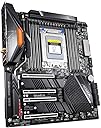
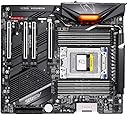
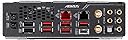
🔥 Master your multi-core empire with GIGABYTE TRX40 AORUS Master!
The GIGABYTE TRX40 AORUS Master motherboard is engineered for 3rd Gen AMD Ryzen Threadripper processors, featuring a premium 16+3 phase Infineon digital VRM with 70A power stages, advanced Fins-Array thermal design, and triple PCIe 4.0 x4 M.2 slots. It offers robust connectivity with Intel WiFi 6, dual LAN ports including 5GbE, and supports up to 512GB DDR4 RAM across 8 DIMMs. Designed for professional-grade workloads, it balances high performance, thermal efficiency, and future-proof expandability in an E-ATX form factor.


| Asin | B081JDLX48 |
| Best Sellers Rank | #1,339 in Computer Motherboards |
| Brand | GIGABYTE |
| Chipset Family | AMD TRX40 |
| Chipset Type | AMD TRX40 |
| Compatible Devices | Personal Computer |
| Compatible Processors | AMD 3rd Generation Ryzen |
| Customer Reviews | 3.9 3.9 out of 5 stars (97) 3.9 out of 5 stars |
| Global Trade Identification Number | 00889523020166 |
| Graphics Card Interface | PCI |
| Main Power Connector Type | 24-Pin |
| Manufacturer | GIGABYTE |
| Memory Clock Speed | 2133 MHz |
| Memory Slots Available | 8 |
| Memory Storage Capacity | 256 GB |
| Mfr Part Number | TRX40 AORUS MASTER |
| Model Name | TRX40 AORUS MASTER |
| Model Number | TRX40 AORUS MASTER |
| Number Of Ethernet Ports | 2 |
| Number Of Items | 1 |
| Number Of Packs | 1 |
| Number Of Ports | 10 |
| Platform | No Operating System |
| Processor Socket | Socket TR4 |
| Ram Memory Maximum Size | 512 GB |
| Ram Memory Technology | DDR4 |
| S Pdif Connector Type | Optical |
| System Bus Standard Supported | SATA 3 |
| Total Pcie Ports | 4 |
| Total Sata Ports | 6 |
| Total Usb Ports | 14 |
| Unit Count | 1 Count |
| Upc | 889523020166 |
| Usb 2 0 | 4 |
| Warranty Description | 3 |
User
Well designed motherboard
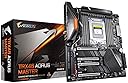
I like this motherboard. Its well laid out, and easy to build on. So far, I haven't had any stability issues (running stock, without any overclocking).Pros:1. 2x PCIEx16 slots which are far enough apart so that you can place your video card well below the CPU, keeping airflow neat2. Relatively quiet even though the motherboard has its own fan3. Heat sinks on M.2 slots work well and have their own conductive foam4. Power button on motherboard + LED codes make debugging easy at the start5. Ample connectors for everything (USB-C, front panel audio, AIOs, whatever)6. USB-C on back panel, and connectors for front panel7. Wild looking antenna for WiFi, but it seems to work well; comes with a magnetic pad to 'stick' to your caseCons/Gotchas:1. Logos can be a bit juvenile, but that's just a style thing2. Built-in AX200 wifi works great, but... Ubuntu 20+ picks it up without issue. On Debian (either stable/testing)- you'll need to manually add Intel provided .ucode files to /firmware.3. Easy to miss plastic film that needs to be taken off the bottom of the M2 heatsinks4. RAM locations may be tight given cooling solution for CPU (I'm using a Noctua NH-U-14S TR4 SP-3, which fits fine)
User
Decent workstation board for small business use
4 months of use so far with Noctua-cooled AMD 3970x threadripper and 256 GB RAM. Had transferred NVME sticks and HDD's from an x570 Aorus Master to this, and it worked fine after some driver updates and reboots. The only thing that gave me issues were a Sabrent NVME PCIe Gen 4 stick, which pretty much has limped along for almost a year and I'll probably never buy another Sabrent drive again.I do alot of CAD, meshing, and CFD work, and sometimes utilize all 32 cores and will occasionally page memory after chewing thru all 256 GB of RAM, and do this for days on end. Simple WD Black 1TB NVME Gen3 stick works well as a data drive. System uses a ton more electricity than the 'old' 3900/570 build. Given the Corsair 3600 memory is not ECC, this trx40 Gigabyte build is production stable and reliable, and definitely punches above it's weight class. Just wish it could handle more than 256 GB of RAM lol
User
Bad experience with a low-quality motherboard
The motherboard is not functioning well. I failed to install eight memory sticks, and it keeps asking me to remove slots in some positions. I now have six sticks, but the memory that shows in Windows still does not have the capacity that I installed.
User
EXCELLENT workstation motherboard
I used this in an all business (read: no flashy rgb lights) workstation using Threadripper 3960X with RTX3090 and 128GB RAM and I was very pleasantly surprised with this motherboard for something that is basically the opposite of a gaming PC. Passed POST on first boot, excellent built in heat sinks for NVMe PCIe 4.0 m.2 drives (I installed 2 drives totaling 12TB, and both worked perfectly). The only real weakness I could find with this board is they only put an Aquantia 5GBe network adapter on it when almost everything in this performance bracket is 10GBE today, and 5GBE is a very odd standard that very few Ethernet switches support, and I need to waste a PCI slot for a 10GBE adapter for something that should be on board. I understand they did it to justify the higher price of the TRX40 “extreme” version, but after lots of research, the general consensus is that this board is much more stable/reliable than any of their other TRX40 boards.
User
Great Motheboard !
Rock solid stability. Zero motherboard related crashes in 8 months.Runs 8 sticks of ram and a 3970X just fine.
User
E-ATX Gigabyte Trx40 Aorus Master Motherboard
Fast delivery to Malaysia. Custom clearance was very fast. Estimated import tax was calculated during checkout. Extra cost after tax was refunded automatically by Amazon. Well packaging, item received in good condition. The motherboard is functioning well.
User
Very nice automated features
Uncomplicated motherboard to work with. Very clear interface, easy to set up.Space-wise it's very well distributed. I like the M2 locks. Overall 10/10
User
Not impressed.
I understand motherboards are DOA sometimes. Why I’m rating this poorly is I am on my second board and it won’t work in a different way, and I can’t get any support from gigabyte. I’m about to box it up and try a different route. It’s very frustrating when you are completing a very expensive build and you can’t get anything to happen.
User
Me da miedo Probarla, llego empaquetada en pésimas condiciones
La verdad no sé si se abrió antes o algo así, por que la caja en la que llego estaba muy deteriorada, la placa se ve nueva y trae todos sus accesorios faltara Probarla, espero no tener problemas
User
Motherboard magnifique,
Motherboard magnifique,juste trop triste qu'il soit trop grand, pour mon boîtier. Et que mon processeur ne soit pas compatible.
User
The best motherboard ever. Asus must learn from gigabyte
This is the best motherboard. Its been 4 months using it with no worries at all. I will never buy any Asus product, specially Rog Zenith II extreme alpha Trx40. Asus makes one of the worst motherboard on the planet. But thanks alot gigabyte for saving me from asus. Asus have worst support. They wasted my 2 months of time in RMA. Thanks once again gigabye. Keep it up!
User
SE MURIO
Al mes y medio se murio, dejo de funcionar
User
Great mother board.
A great mother board, could have use a bit more explanation on certain connections. Works great in the new PC I built.
Trustpilot
1 week ago
1 month ago