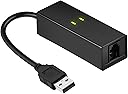
📠 Stay Connected, Stay Classic — The Ultimate USB Fax Modem for Modern Pros
The DriverGenius USB 2.0 Fax Modem (UM02) is a compact, plug-and-play external modem delivering up to 56Kbps dial-up internet and 14.4Kbps fax speeds. Compatible with Windows 10/8/7, MacOS Intel, and Linux, it supports a wide range of data and fax protocols (V.92, V.90, V.34, and more). Perfect for professionals who need reliable fax and dial-up access on demand, it comes with a 2-year warranty for dependable performance.


| ASIN | B00XW5QYWS |
| Brand | DriverGenius |
| Color | 56K USB Dial-up & Fax Modem (Black) |
| Compatible Devices | Laptop |
| Customer Reviews | 3.9 out of 5 stars 333 Reviews |
| Data Transfer Rate | 56 kilobits_per_second |
| Internet Service Provider | AT&T, Verizon, Local/Regional Telecom Companies |
| Internet service provider | AT&T, Verizon, Local/Regional Telecom Companies |
| Item Weight | 33 g |
| Manufacturer | Fly Kan Tech Co., Limited (H.K.) |
| Mfr Part Number | UM02 |
| Model Number | UM02 |
| Modem Type | Cable |
| Number of Ethernet Ports | 1 |
| Number of Ports | 1 |
R**S
Great Fax Modem
My Windows 7 fax modem would not be function on Win 10. I do not frequently need access to a fax but it is one of those it is one of those things that when you need it you need it! I ordered this item which arrived promptly, plugged in the USB connector ans access to a phone line and Win 10 did a plug and play and I ws sending faxes in less time than it took less time than it took me to write this review. It worked perfectly.
W**T
Good product & brand
Just plug n play, it automatically install the driver. No need to install the disk driver. Good product & brand. It works fine with my windows 10. I have Ooma line and it worked great. I have faxed 10 pages so far and working like it should.
S**.
Great cheap easy to use
Great cheap easy to use, for windows 10 users make sure you reboot after install of driver some apps don’t respond well until you reboot
J**G
says it works on win 11,
I have windows 11 pro. I have tried everything I know and this software WILL NOT load, install or even show up
A**R
works great for caller ID in linux
Got this working perfectly for caller ID in linux. Had to fiddle with the ncid init string, but once that matched the modem, it has worked flawlessly. This supports fax and voice mode as well, but I haven't tried those yet.
S**O
Works on Windows 7 for caller id, IF...
Modems have changed over the years. Once upon a time you'd plug it in, send it a few "AT" commands, and it was good to go. I'm not sure when that changed, but nowadays the modems I get seem to have a "feature" of ignoring initial AT commands while they go check for carrier. Once they prove there isn't any, then they are willing to accept AT commands - like the all important AT VCID=1 command, that turns on caller id detection. Caller Id is why I buy these things, and why I replace them when they inevitably burn out. So the trick I use now is to query them every few seconds with an ATE0 command, and on getting the first "OK" back - takes a while - then I send the enable for caller id and I'm ready to go. This device works when used that way, on Windows 7, so it gets 3 stars. There's no reason why modems can't be designed to handle AT commands right off the bat, so it doesn't get 5. How good it is as a modem I don't know. If I could spend 20$ for a device that only detected ring, caller id, and could be commanded to hang up the line, and could survive lightning storms, I'd never buy a real modem again.
G**O
5 (Maverick) according to the manufacturers information "Plug and play compatible for easy installation on Windows xp / 7 / 8
My experience with the V.TOP modem was not what I expected, as it's supposed to work with Mac OS10.9.5 (Maverick) according to the manufacturers information "Plug and play compatible for easy installation on Windows xp / 7 / 8.x, Mac OS 10.9 to 10.10.(Not for macOS 10.12-10.13, " I cross checked with other borrowed modems, so I know my system works. It shows in the Mac system report ('sees' it) but it will not transmit regardless of the myriad of Items I checked out including re-configuring. I give it 2 stars rather than 1 because of the excellent response from the seller. They sent me a second unit to try without requiring a return. It also would not fax, and they unhesitatingly refunded my purchase and did not require I return both modems. I bought a U.S. Robotics modem since, which works perfectly. I'd be interested in hearing from Maverick users who had success with the V.TOP modem.
R**Y
So Glad I Bought This
When I upgraded to Windows 11 a while back, my free fax software stopped working.I couldn't find a compatible free fax software. I figured I was doomed to pay a monthly fee for faxing software, which I rarely do. I occurred to me it might be my old external fax modem, so I took a chance and bought this. It is easy to install and now I can fax for free again!
F**D
Bon modem
Modem vraiment pas cher, très sympa pour créer un point d'accès 56k maintenant que la plupart des FAI ne le proposent plus. Vous pouvez aussi envoyer et recevoir des fax, ainsi qu'accéder aux serveurs Minitels amateurs (oui, ça existe encore !). Par contre, il n'est à priori pas possible de l'utiliser pour téléphoner, ce n'est pas un modem vocal. Enfin bon, il existe aujourd'hui des solutions plus efficaces. Il fonctionne de Windows XP (nécessite de modifier le pilote) à Windows 10. Sur les Windows récents, laisser le pilote par défaut sous peine de provoquer des bugs (cela explique l'étoile en moins sur la facilité d'installation). Fonctionne aussi sur Linux et sur Mac OS à condition de ne pas dépasser la version Sierra. Bref, un bel appareil qui ne vous ruinera pas et vous permettra de faire un bond "utile" vers le passé.
G**S
Five Stars
Excellent device worked perfect and came on time. I was happy with the purchase. I want to add that this item was for a laptop of my wife's and having it so it was portable and easy to carry was a big plus. Now all she needs is a phone line and she can fax right off her laptop when e-mailing is not an option. I looked at many different devices prior to this purchase, mostly trying to use the Ethernet port, but in the end this was far the easiest and most cost effective. I recommend this product and the company that makes it, as both were good to work with.
O**R
Unkomplizierter Faxversand
Das Modem wird beim Anschluss am USB 2.0 Port eines Win10-Computers automatisch als „Conexant USB CX93010 ACF Modem“ installiert und von „Windows-Fax und -Scan < Extras < Faxeinstellungen“ erkannt und kann dort konfiguriert werden. Das mitgelieferte 96 cm lange RJ11-Kabel mit 2 Westernstecker und den 4 mittleren Kontakten belegt (6P4C) habe ich nicht verwenden können, sondern durch ein TAE-N Modularkable mit den beiden mittleren Kontakten belegt (6P2C) ersetzt. Von diesem Kabel habe ich den RJ11-Stecker mit dem Modem verbunden und den TAE-N-Stecker mit der TAE-N-Buchse eines TAE-Verteilers, der mit dem analogen TAE Anschluss eines Speedport-Routers verbunden ist und an dessen TAE-F-Buchse außerdem noch eine analoge Basis eines DECT-Schnurlostelefons hängt. Die auf diese Weise über eine analoge TAE-Buchse eines Speedport-Routers am IP-Hausanschluss angescchlossenen Geräte (analoges USB-Modem und analoges Telefon) funktionieren jedes für sich ohne Probleme, sie können aber nicht gleichzeitig betrieben werden. Da ich Faxe nur versende und der Empfang über die Fax-Nummer meines E-Mail-Kontos läuft, habe ich den Eintrag für den analogen TAE-Port im Einstellungsmenü des Speedport-Routers unter der Rubrik „Telefonie < Telefonbuchsen < Angeschlossenes Gerät“ als Telefon belassen, denn ich benutze die für diesen Anschluss zugeteilte Nummer hauptsächlich als Telefon. Daher kann ich über die Funktionsfähigkeit des Faxempfangs dieses Modems kein Urteil abgeben, sondern nur über den Versand, der völlig problemlos direkt aus dem zu versendenden Dokument über das Druckermenü abläuft.
M**O
Fax usb pratico, minuscolo ed economico.
Costruzione abbastanza solida con buoni materiali. Va collegato ad un pc via usb ed alla linea telefonica (nel mio caso all'hub fibra di TIM fisso, 100 mega). Su W10, Inserito lo spinotto USB sembrava non succedere nulla. Non si è aperta alcuna finestra di dialogo per l'installazione. Ho inserito il minicd a corredo ma non erano presenti driver per W10. Aprendo la finestra della gestione hardware tuttavia il modem risultava presente ed attivo. Quindi con scan e fax di Windows ho provato ad inviare un fax. Inserito il numero del destinatario (800 numero verde) ed allegato un file pdf ho provato ad inviare. Si è aperta una finestra di dialogo che chiedeva luogo e numero di telefono da cui si inviava il fax. Ho riempito i campi, dato OK ed il fax è immediatamente andato in trasmissione. Come rilevato in altre recensioni non si ascoltano i classici suoni di un fax in partenza ma dall'applicazione si seguono perfettamente le fasi dell'invio. Al termine, cliccando su fax inviati, si ha una ricevuta virtuale con il contenuto inviato. Insomma tutto semplice, senza necessità di configurazioni ostiche e molto rapido. Prodotto consigliato a chi non voglia avere l'ingombro di un fax a telefono o di una multifunzione fax.
J**N
Great bit of kit
Great bit of kit, hrd to get the old tech working with the modern pc's..Works with Windows 10, Great company to deal with, they sent me a different modem to try as I had some difficulty's with the first one..pls note driver is all ready installed for win 10, no need to run the disk..(pretty sure that's why I couldn't get the first one to work)
Trustpilot
1 month ago
1 day ago