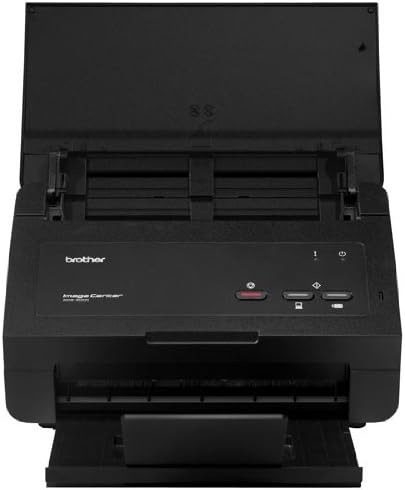
BrotherImageCenter ADS-2000 High Speed Document Scanner, Black
Product ID: 1147034
Details
- BrandBrother
- Color Depth24 bpp
- Connectivity TechnologyUSB
- Item Weight7.3 Pounds
- Model NameHigh-Speed
- Optical Sensor TechnologyCCD
Desertcart purchases this item on your behalf and handles shipping, customs, and support to Morocco.
BrotherImageCenter ADS-2000 High Speed Document Scanner, Black
| ASIN | B007TN1J2O |
| Best Sellers Rank | #370,385 in Office Products ( See Top 100 in Office Products ) #414 in Document Scanners |
| Customer Reviews | 3.2 3.2 out of 5 stars (521) |
| Date First Available | May 15, 2012 |
| Is Discontinued By Manufacturer | No |
| Item Weight | 7.3 pounds |
| Item model number | ADS2000 |
| Language | English |
| Manufacturer | Brother Printer |
| National Stock Number | 7025-01-623-4270 |
| Product Dimensions | 8.7 x 11.8 x 7.1 inches |
S**E
Better than the office industrial scanner...
In my business of drafting, reviewing, and marking up contracts, a good scanner is a must. So when I was given the option of working from home from time to time, I decided that investing in a good scanner would make this much easier. At first, our scanner/printer/fax all in one Cannon seemed like a good option, but ever since it started drawing a line half way through my documents, and often giving me an error (especially during an urgent review process), and taking its sweet time to scan, it became too frustrating not to purchase a dedicated scanner.After reading the reviews and finding out that this had a TWAIN driver, which directly scans into my Adobe Acrobat Professional software, it was a winner! Who needs more softwares in your computer?!?! Right out of the box, I did have a little hiccup trying to get the latest driver, yari yari yari, then popped the CD in, updated whatever needed updating, plug and went. Super fast (probably faster than the industrial $20k copier/scanner machine at the office since it scans both sides simultaneously), I didn't adjust a thing to it, it automatically detects the contents of the reverse side of the page and scans it. The problem is that if you have knicks and marks on back of a blank page, they will be detected - nothing that a good 'ole "DELETE" couldn't resolve, however.The machine is simple, super easy to use and for office purposes, it not only serves my purpose but it does it beautifully. I never thought I'd spend $300 on a scanner, since some people give out scanners for free... but this is a worthwhile investment. I absolutely love it so much I started scanning all kids of stuff - a little playing around with the new tech toys, I haven't done in a long time. I highly recommend this product, especially if you don't want to get a scanner that has its own software and conflicts with your Acrobat software; to me, a big deal because I just can't stand having to deal with two softwares and since I work from a work laptop, adding software to my computer is a big no-no and frowned upon. The worst part is when loading new software that slows down your laptop; it's so annoying! I don't have that problem, and I hook up my personal laptop, my work laptop, and my design Mac - works with all of them without a hitch! I LOVE it!---------------UPDATE: Sorry, I've been swamped with work lately, I can't write or update reviews. Someone asked about picture scanning (amazon emailed me the question). Yes, it scans pictures in color. I'm assuming, since my conversion sofrware makes the scanner scan directly to a PDF file, that other options would be available (I haven't had time to try those options), but the PDF scan, appears in color, if you scan a colored item. The image quality is very good, but if you're scanning an imperfect picture, it will pick up every detail, good or bad. I tested it when scanning a postcard, and the picture looked grainy, but upon closer inspection of the postcard, I realized those grains were part of the picture, not image quality issues with the scanner (I hope not, not many people buy $300 to $400 scanners). It scanned the picture super fast (same speed as the black and white, which is pretty darn good if you asked me). Note, if you do scan a picture and you receive the PDF, you can upload it into Illustrator or Photoshop to fix it/modify it or play around with it any way you want. This is more than I can ask for, or need.
J**P
Very fast, but poor quality scans
PROS: This machine is fast, easily matched the rated speed on both double and single sided scans. Fairly attractive design, and the top folds down and makes a very nice dust cover. Doesn't take up too much size on the desk. Quiet, easy enough to understand how to work it.CONS: UHHH, the purpose of a scanner is to scan. This thing blows when it comes to quality. Every page (front or back) of a document comes out with a jagged bold black line across the top. Doesn't matter what settings I use, the black line is there. Reminds you of the quality of the old fax and copy machines in the 90's where there was a distinct shadow around the edge of the paper when making a copy. I contacted Brother Support about the quality since that issue isn't addressed in the user's manual. They deny that it could leave a black line across the top of every page, try to blame my PC.Let's see, what else? The software suite doesn't work with Windows 8, which they do acknowledge on their website. They rely on the Windows driver which doesn't allow you to change any settings. Ironically, it doesn't allow you to scan either. Finally gave up after a couple of frustrating hours, put it on a Windows 7 machine, upon which I discovered the quality issues.For reference, I only scanned about 300 double-sided pages, so perhaps it will get better over time. However, I will not be the one to find out. Amazon saves the day once again with their generous return policy. Sent it back after a frustrating 2 hour session with Brother's Tech Non-Support Department. Now looking at the Epson...
X**R
Fast, Reliable, Full-Featured Sheet-Fed Scanner
At $259 (Amazon price at the time of this review) this scanner is a real bargain (I paid slightly more a few months ago here on Amazon, but even then it was a great deal!). It works equally well under Windows and OSX (did not test it with any Linux distribution). I have found it to be fast, reliable, and pretty much flawless (either 1- or 2-sided scanning). Brother's Control Center 4 handles the scanner's functions straight-forwardly (meaning I didn't find myself having to go to the documentation much at all to get the scanner to do what I wanted it to do in the way I wanted it). As I have other software to take care of post-scanning requirements I really haven't had the need to use the Brother-provided software suite. But a quick glance at what's provided yields a "thumbs up" if you're staring from scratch.You can scan to a computer or directly to a USB thumb drive. Speed of scanning to either depends on how fast your device works (slow computer or slow USB stick, slower scanning). If you need to scan to an encrypted volume you have to scan to computer via USB as there's no way to access an encrypted volume on a USB stick attached directly to the scanner.I also appreciate the scanner's form function: it folds up nicely into a compact little bundle so I can bring it back and forth from home office to work office without it feeling like a real burden. I also appreciate Brother including a heavy-ish duty USB cable.I have used this scanner daily for more almost six months and can count the number of jams or misfires on one hand (not counting the jams caused by operator error such as loading pages still stapled together, etc.). In the end, I like it.One final comment. Brother claims you can scan to an Android device via USB cable. I don't really need that function, but wanted to at least check it out. In the end, I couldn't get it to work (even after multiple internet searches and spending way too much time on the Brother support web page). If you have luck making this feature work I certainly would appreciate you letting me know how by posting a comment.
R**.
Excelente opción para escaneo rapido
Escáner muy bueno de alta velocidad, cómo se describe tiene alimentación automática de hasta 20 hojas, los detalles que debes tener en cuenta, a veces se atora cuando escanea hojas muy delgadas, especialmente si son varias, en algunos documentos con imagen impresa escanea ambos lados por lo que sí detecta un poco de tinta o sombras dejadas por un lado de la imagen, no lo asignará como hoja en blanco y se añadira al documento PDF escaneado. Por todo lo demás muy buen producto, recomiendo mucho esperar a ofertas ya que puede encontrarse hasta con un 40% de descuento.
D**G
it does work...
I am not a computer person so I hate complicated set up. This thing was very easy to set up and scans very well.Only problem I am having is scanning small receipts ( small thermal paper ) but it had little guiding envelop included in the box and I just have to use them, that was it little more step.Other than that this machine is great for the price I paid.I definitely recommend to any of my friends.
M**Z
NO CORRESPONDE A LO QUE SE ME ANUNCIÓ EN LA PUBLICIDAD Y ADEMÁS TIENE UNA FALLA Y NADIE ME DICE QUE HACER
TIENE UNA FALLA, Y UN SOFTWARE MUY POBRE, NO LO RECOMIENDO A NADIE, Y EL VENDEDOR NO ME AYUDA, OK
S**E
I forgot that I bought that. It fell apart ...
I forgot that I bought that. It fell apart very quickly and the scans were crooked. I threw it out.
D**S
Muy buen producto, uso diario aprox 20 a 50 paginas
Compramos este escáner para una oficina pequeña, tiene opción para escanear sólo una cara, ó ambas. Tiene muy buena calidad de imagen, buena velocidad, tarda entre 2 y 3 segundos por hoja (no varía la velocidad si es una o dos caras).Uno coloca un grupo de hojas y todas van a un sólo archivo. Si se quiere tener archivos separados, sólo hay que esperar aprox 5 segundos entre un grupo y el que sigue.Lo único que hay que poner atención es en acomodar bien el grupo de hojas para escanear, porque sino se pueden arrugar las hojas.
Trustpilot
3 weeks ago
3 days ago