



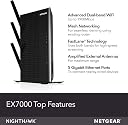

EX7000
Product ID: 11241689
Details
- Antenna TypeInternal
- BrandNETGEAR
- Colorblack
- Compatible DevicesPersonal
- Connectivity TechnologyEthernet Wi-Fi
- Frequency Band ClassDual-Band
⚡Up to 1900Mbps dual-band speed
📶2100 sq.ft coverage
🔗Connects 35 devices
🚀 Boost your WiFi game—never settle for slow or spotty again!
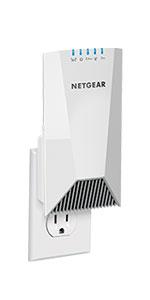
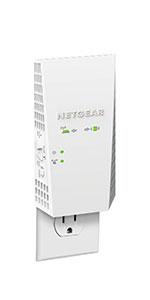
The NETGEAR EX7000 WiFi Mesh Range Extender dramatically expands your wireless coverage up to 2100 sq.ft, supporting up to 35 devices simultaneously. With dual-band AC1900 speeds reaching 1900Mbps and patented FastLane™ technology, it ensures seamless HD streaming and gaming. Featuring 5 Ethernet ports and smart mesh roaming, it integrates effortlessly with any router, delivering reliable, high-speed connectivity throughout your home or office.










| ASIN | B00R92CLD6 |
| Antenna Type | Internal |
| Best Sellers Rank | #465 in Repeaters |
| Brand | NETGEAR |
| Built-In Media | Quick start guide, WiFi Mesh Extender (EX7000-100NAS) |
| Color | black |
| Compatible Devices | Personal Computer |
| Connectivity Protocol | ethernet, wi-fi |
| Connectivity Range | 2100 square_feet |
| Connectivity Technology | Ethernet, Wi-Fi |
| Control Method | App |
| Controller Type | App Control |
| Coverage | up to 2100 square feet |
| Customer Reviews | 4.0 out of 5 stars 5,319 Reviews |
| Data Transfer Rate | 1900 megabits_per_second |
| Frequency | 5 GHz |
| Frequency Band Class | Dual-Band |
| Global Trade Identification Number | 00606449105582, 00606449105599 |
| Item Weight | 654 g |
| LAN Port Bandwidth | 1000 Mbps |
| Manufacturer | Netgear |
| Maximum Upstream Data Transfer Rate | 1900 megabits_per_second |
| Mfr Part Number | EX7000-100NAS |
| Model Name | EX7000 |
| Model Number | EX7000-100AUS |
| Number of Antennas | 3 |
| Number of Items | 1 |
| Number of Ports | 6 |
| Operating System | PC; Mac |
| Other Special Features of the Product | WPS |
| Router Firewall Security Level | basic |
| Router Network Type | wireless |
| Security Protocol | WiFi Protected Access® (WPA/WPA2-PSK) and WEP |
| Special Feature | WPS |
| UPC | 606449105582 |
| Unit Count | 1 Count |
| Voltage | 100240 volts |
| Warranty Description | 1 year warranty |
| Wi-Fi Generation | Wi-Fi 4 |
| Wireless Communication Standard | 802.11a/b/g/n |
| Wireless Compability | 802.11a/b/g/n |
J**J
Quality Product and Very Easy to Install and Use
I was looking for a quality range extender and the Nighhawk had good reviews on CNET. I wanted to by a Linksys extender but it was only an AC1200. (to my understanding the higher the AC the more data can flow through the network). I like to stay current on technology and try not to buy top of the line until they go on sale. The price was good and I needed a solution now or keep paying Verizon for cellphone data overages. My router = Linksys WRT1900AC. (top of the line early 2014) Install = easy, less than 5 minutes. Unwrap, add antennas, plug to power, press Wi-Fi Protected Setup™ (WPS) button on Range Extender and Press WPS button on Linksys router within 2 minutes. All green lights = ok to unplug and move. It will automatically create a network with same name as existing network and password and will add _2GEXT i.e."yournetwork"_2GEXT. You have to place the extender where there is a good signal strength and then it increases the range. I place mine upstairs and there are no dead spots in the house. I even get that signal downstairs at full strength. I've seen some negative reviews about extender not working, and it's most likely being placed too far from the router. You can't boost/extend a poor signal or your router needs to be upgraded also. Connectivity = connecting to iPhones and other devices very easy easy. The iPhone5 automatically found the _2GEXT network, but the iPhone6 had to select _2GEXT and input password. Performance = faster upload speed to my iPhone6. My games load quickly. Reliable, no rebooting/no disconnections. Pros: Easy of install. Easy of connectivity. Value = worth the upgrade Cons: none
A**E
Best thing I bought on Amazon in 12 months!!!!!
This extender REALLY works. I didn't get a free one to review I paid for it full price. I'm soooo glad I did! My old wifi modem kicked the bucket and the new one supplied by my internet provider just didn't have the same range as the old one. Suddenly my Smart TV, PS4 and streaming HD movies didn't work at all. I called the provider went back and forth they suggested an extender. I went to the local electronics shop and bought a fairly expensive $140 USD extender that turned out to be slow like a turtle dragging a anvil through sand against the wind.... I mean slow. I returned that got on Amazon and found a lot of mixed reviews on the Nighthawk. Reviews said it works, it doesn't, only works as access point, etc. Basically I powered it up followed the instructions and my Wife ran the settings took 5 minutes. Neither of us know anything about IT networking etc, we literally just read the quick instruction book. We turned on the fastlane and moved the device to our living room above our basement entertainment room. BOOM! High speed high definition back in business baby!! This thing rocks. Was worried I was going to have to run a cat5e cable to it or that it would be intermittent but all worries were pointless. My computer is fast, my tablet, PS4, Smart TV, phone, everything rocks now. Don't listen to all the whiners on here they have no idea what they are talking about or had a bad luck with a bad device. This thing changed everything for us. You do have to create a unique address for the device which again is easy. So you will have to re enter a new address in all your devices. So what? Now you have fast internet enough for HD streaming. We watched the fight scene on Star Wars Revenge of the Sith and looks good no funky crummy definition. Our modem is in one corner ground level of the house and our entertainment is in the basement in the opposite corner. Makes no difference at all. Hope this helps, just order the Nighthawk you will be soooo glad you did really. We were missing our shows, and unable to play games. Now its all back and faster than before.
P**L
Never buying Netgear equipment again
I’m a technical dude, working in video games and needed a fast reliable router that could cope with a demanding household during COVID. I’m streaming meetings all day, working with cloud services, have two teenage gamers in the house, plus wife is also working. I upgraded the whole network at the same time. I did a lot of research and ended up settling on Netgear Nighthawk equipment throughout. Big mistake, less than 6 months later I’m replacing all of it. At the same time I bought: Netgear CM1100 modem Netgear XR500 router Netgear EX7000 extender Netgear S8000 switch First issue was the modem. I have a gigabit line and initially we where able to get ~650mbps down. But after a few weeks the modem started requiring constant restarts. Eventually download speeds dropped to 0-30mbps. Resets didn’t help. I replaced the unit with a Motorola MB8600, has been rock solid ever since. The EX7000 has been useless as an extender since the day I first set it up. It constantly loses backhaul connection to the router, leaving all connected clients offline. I’ve tried it in several parts of the house, even in the same room with line of sight of the XR500. A restart would and it’d work for 24 hours, at best. In the end I wired the backhaul and ran it as an access point. The performance was poor, so eventually I just unplugged it. The XR500 hasn’t ever been a great performer, wireless speeds top about a 300mbps down and 30mbps up. At best. Even wire clients would rarely get over 500. It also needs to be restarted weekly. There are large parts of the house the signal can’t penetrate. And, as we’re getting ready of school to start, in need some parental controls. The Nighthawks don’t have any. Like at all. So I just about two weeks ago installed a Gryphon router. Immediate improvement. It’s faster, more reliable and has a way better admin setup. Wired I’m now getting 930mbps down, latency around 10ms and a health 40mbps up. Wireless clients around 650mbps. So far it’s been rock solid and has a way, way, way better admin interface. It’s also caught and blocked several bits of malware entering my network. The S8000 switch is fine, but expensive. I’ll keep it, but a cheaper box would have been just as good. So I’m done with Netgear. Hundreds of dollars wasted. Work was hard. I’m sending all of this junk to the charity shop. Never buying from Netgear again.
F**O
So far excellent!
Well there's 123 customer reviews... I will be the 124th. I installed the Extender today. Went relatively smoothly. I 'retired' a Linksys RE1000 extender. It served its useful life ( RIP). I am using this extender with a Netgrear R8000 Router ; combined they make a heck of in installation for the 2.4Ghz and 5Ghz range. On the Router side I also retired a Linksys EA4500 AND Linksys EA8500 MU MIMO . They were replaced with the Netgear R8000. So here' my assessment on this Extender ( Day 1 and I wll keep ya posted). 1. Install - relatively easy. A few bumps on trying to access the actual extender . Yet syncing the Router to the Extender via WPS push-button was straight forward. Note that you push it 2X times in the setup. Once for the 2.4Ghz band. Once that is set, then you go to the 5 GHz band IF your router transmits in that band - as mine does. So this connection worked as expected. WHy not a 5 star ? The cycling time to get back to the settings and move to the next stage was a bit slow .... But compared to what ? The other routers/extenders I have configured. The cycle times are acceptable but not 5 star ( maybe I am a bit of a whiner here ). 2. Bandwidth & speed connection to the router - EXCELLENT 5 star ( 8 stars if there could be such a rating). This is where this unit shines. My modest distance to the R8000 router is about 30 feet, but goes through about 3 walls from a line-of-sight point of view. 3.Config of the unit - easy , with allot of settings. 4. Look and feel ( if that is important) - definitely some nice industrial design lines, features and proper size for the performance. 5. I attached NAS ( network attached storage) via the 3.0 USB port. I am using the 'ol drag-n-drop method for files I wish to back up. I have not tested the ReadyShare backup utility as yet. 6. Price point - fit my budget for the ROI In performance I am getting. 7. What else can I say after 123 people weighed-in on the product ? Out of all the ~stuff~ on can talk about e.g. speeds & feeds, etc. , there is one question that marketing monkeys such as myself ask : Would you buy another one ? To that question , yes. That is the litmus paper test in many a product marketing departments..
G**T
Netgear Nighthawk stands up to the hype.
I hesitated purchasing this Extender as it was kind of expensive considering almost everyone else that reviewed it, got it for free from Netgear. However, I bit the bullet and decided to order it. I have Amazon Prime so two day shipping is free. Not only that but I ordered in on Friday and it arrived on Sunday. Amazon Prime is great. If you can afford it, and you purchase a lot of items on-line, you need to consider getting it. I've probably saved the cost just on the two day shipping. Not to mention the free movies I get to watch. Anyway, I installed the Extender this morning and agree that it was very simple to install. I don't have the WPS button on my router so I had to use the install wizard using my tablet. Attaching to the Extender was easy and setup was simple. Though I had to do it twice (messed up on the 5G side and had to reconfigure it. So I used the reset button and started over) it was fast and simple. Don't know that I have ever setup a router that easily. After setting it up I ran a few tests using the Netgear WiFi Analyzer. Neat app. The Extender stands up to the hype. It transmits a strong signal as well as enhances the wired connection with a 10/100/1000 connection. I own a Samsung Smart TV as well as a Samsung 3D Blu-ray player. Both are capable of Wifi connections. The TV signal was fantastic. I had a strong signal for the player but when I ran the Speedtest, it was really slow, so I connected the player to a wired connection. I needed a good connection in another part of the house where I have my exercise equipment but the router wasn't providing a very good signal. With the Nighthawk extender, that issue has been resolved. I am very pleased with this product. I would highly recommend it if you need a stronger wireless signal in your home. Just be sure to use a good security password and lock it down so your neighbors can't use your internet connection.
A**R
Netgear Has Institutionalized the Flaw
UPDATE: I left the below review of this item. Netgear again responded that I contact customer support providing the below link. I did. Netgear reached out to me and left me a telephone message with a direct dial phone number. (How civilized). I called. The Tech actually read my problem and treated me very courteously. He then took over my computer (with my permission), went into the router and changed the 5.4 band from automatically selecting a channel to a fixed manual channel 157. I had the same problem the next day. I rebooted and it has now worked correctly for over a week now with no problems or reboots. The Mbps for the 5GHz band is an outstanding 1300 (even better than the whopping 1170 previously reported). So, why did Netgear take over my computer? I could have changed the channel myself. All they had to do was tell me that there is a solution to my problem. What a waste of time and money. The happy ending is that now that this Extender is working it is everything I expected and needed. Moving from 1 start to 5 stars and no return. Like others, I have a similar problem although it manifests itself in a little different way. Almost every morning it appears that sometime during the night I have lost my connection to the Internet and even though I am reconnected I awake to find the 5.4 band light on the extender is red. Even though I have full internet connectivity, the light stays red. When I check the router using the very good Netgear Wifi Analytics app it shows the router sending out 100% signal strength and -39 dBM. The test shows 866 Mbps. When I use the very good Netgear wifi Genie is says that the Mbps from the Extender for the 5.4 channel is 59. If I reboot the Wi-Fi Range Extender the light turns green and the Genie now reports the Mbps at a whopping 1170. So I contact Netgrear technical support. I explain the problem and share when him the analytics. The technician does not listen to my problem, and has me do a full factory reboot and complete reinstall including the firmware update. Of course the unit is now working, it has been rebooted. At the end of the call I finally am able to communicate with the technician that the red light does not turn to green when full connectivity returns. The technician argues with me that when I you have full connectivity the light will be green and describes the Mbps levels that the colors (red, yellow and green) reflect. When he finally understands that my unit is not working, he advises me to call back after a few days to see if I still have the same problem after our factory reboot. Next morning, deja view all over again. I get a replacement from Amazon. BTW, what a civilized process Amazon has for exchanges. 5 stars for their process. I installed the new unit and it behaves exactly the same. While the Negear technician denied that my unit was flawed, when I took the Netgear customer satisfaction survey it had as one of the questions if you have any problems “I lost my connection to the Internet, and the WiFi Range Extender needed to be reset or rebooted”. Looks like Negear has institutionalized the problem in their survey. Unfortunately this unit too will be returned to Amazon. I am disappointed because when the Extender works, it is great. It is unreasonable to have to reboot everyday.
R**L
Finally worked with Asus RT-N66U 5GHz band after workaround for terrible indefinite reboot cycling
Finally worked with Asus RT-N66U 5GHz band after workaround for terrible indefinite reboot cycling I'm keeping my Netgear EX7000 but only 3 stars until they figure out how to resolve the problem below. I have an open support ticket with Netgear currently. Support is good and got a response within ~2 hours of opening my ticket. Netgear EX7000 is amazing though when it works flawlessly with my router. I'm hoping the content below helps other owners. There was a problem connecting my Asus RT-N66U 5GHz band to the Netgear EX7000. This is true even if the Asus RT-N66U router and EX7000 are just inches from each other. While I can connect my laptop directly to my Asus RT-N66U router 5GHz band, the EX7000 could not no matter what I do. The worst part is that if I try to configure my Asus RT-N66U 5GHz with the Netgear EX7000 Extender mode using both bands 2.4GHz and 5GHz, the Netgear would reboot to solid then blinking amber 2.4GHz, 5GHz, Device to Extender LED lights. The Netgear logo light will also blink with the amber lights. Then it would reboot again and will light up all LEDs to green for a few seconds then go back to the amber 2.4GHz, 5GHz, Device to Extender LED lights. It will cycle like this indefinitely. While it is cycling in this bad state, reset will not work consistently, WPS buttons do not work, I can't connect to Netgear EX7000's mywifiext.net wired or wifi. It would take me a couple of tries just to do a successful reset and can only confirm that the reset worked by turning off the EX7000, turn back on, and see if it will boot up with the Device to Extender LED lit green by itself. 2.4GHz and 5GHz are not lit green on a successful reset though (no lights at all). Most resets though just goes back to the bad state mentioned. The funny thing is if I just configure the Netgear EX7000 to just use my Asus 2.4GHz band, everything works fine. Configure with just 5GHz or with both then the bad behaving reboot cycle starts again. Just by luck, somehow I managed to configure both 2.4GHz and 5GHz. For some reason in one of my troubleshooting trials, it couldn't accept my WPA2-PSK password on 5GHz even though it was correct so I skipped it (it saved my 5GHz Extender config though). It rebooted and it showed that the EX7000 was connected to the Asus RT-N66U 2.4GHz band only and not 5GHz. No more bad behavior reboot cycle behavior. After a couple of hours I logged back into the Netgear EX7000 mywifiext.net, amazingly the 5GHz was finally getting extended and shows as connected! Perplexingly, the next day the 5GHz Extender was disconnected again. But with this, it gave me the idea to try changing channels. This led me to suspect my Asus RT-N66U as having some signal problems even though I can connect my laptop to the 5GHz SSID of the Asus RT-N66U router. [Solution] The solution was to change my Asus RT-N66U channel bandwidth from 20/40MHz to just 20MHz and the control channel to something my neighbors are not using or is not overlapped by other routers (from Auto to 36). I chose those numbers by using my Mac OSX native wifi scanner tool: http://osxdaily.com/2012/07/31/wi-fi-scanner-mac-os-x-mountain-lion/ Note: Just google "Windows Wifi Analyzer" for similar tools for Windows. It gave recommendations on the best control channels to use for my Asus RT-N66U router. I found that my neighborhood was saturated with so many router signals as well using my Android's phone Wifi Analyzer app. All channels were actually crowded. I scanned for the best channels near my Asus RT-N66U router and near the Netgear EX7000, then used the channel that is recommended or is in common in both locations. Previously if the control channel was set to Auto, it still picked a somewhat crowded channel. By manually setting the control channel to a less crowded one, the Netgear EX7000 finally connected to the Asus RT-N66U. This is probably the reason it just happened to work once for me intermittently since my Asus RT-N66U probably auto-switched to a control channel that was less likely overlapping with my neighbors'...at least that is my best guess. Finally, I can now use Fastlane mode with "Router > 5GHz > EX7000 > 2.4GHz > Devices" and all other modes that uses the 5GHz band as well with my Netgear EX7000. I have Comcast Xfinity Blast! 100Mbps/10Mbps. Late at night I can get 125Mbps/15Mbps ethernet wired to my ASUS RT-N66U router directly. With the Netgear EX7000 situated 50ft away through 3 walls, a laptop connected 20ft away from the Netgear EX7000 Fastlane also gives me 125Mbps/15Mbps. That is is pretty amazing! At that same distance connected to just the Asus RT-N66U wifi, I can only get speeds of 40Mbps/11Mbps even with new configured channel solution (I used to only get 12Mbps/8Mbps with bad channels). By the way do try different control channels. Choosing an optimal channel for my Asus RT-N66U router from let's say 48 to 36 changed my speeds from 40Mbps to 100Mbps in one room so do experiment with channels. [Still Unresolved Issue] Let us just say that my Asus RT-N66U router was using a crowded channel bandwidth and control channel, it still doesn't make sense on why the Netgear EX7000 would get in a bad state if it cannot connect to the router's 5GHz band due to channel bandwidth and control channel interference??? Configuring with 5GHz Extender makes it reboot with amber lights on 2.4GHz, 5GHz, Device to Extender LEDs then reboot. It will then cycle in this manner indefinitely. Note: The bad state condition occurs on both the original firmware and the latest firmware. Netgear I think you should add this test case: 1) Get a couple of popular named brand dual band routers and have them located in a grid comprised of 9 rooms (3x3) with walls in each room. 2) Each room should be sized 75ft by 75ft square or maybe even 100ft by 100ft. 3) Place each router in the middle of that 75 square foot room. This way each router's signal will overlap with each other just like in a real world scenario. 4) Configure each router to use Channel bandwidth 40MHz and all routers use the same channel like 165. Expand test cases by using Auto or 20/40MHz or explicitly set to a crowded channel. 5) Configure a single Netgear EX7000 at a chosen corner at each of the 75 square foot room. 6) See if you can reproduce the scenario above. Or better yet, do the testing at your own homes.
J**K
Great for long-distance (738 feet) direct line-of-sight boosting!
This is a very impressive piece of kit for the purpose I bought it for: a very long-range signal booster. I have the blessing (and curse) of living within sight of work (sitting on my back patio looking at it right now actually). My living room window has a 738 feet (according to Google Maps) obstruction-free view of the window of my office at work. Most of the professional reviews maxed out their testing range at 150 feet, which made me doubt that this booster would work for the purpose I intended, but I figured I would take a chance. The WiFi at work is atrocious, mine at home is pretty good (ASUS RT-AC68U, local cable internet provider that is pretty decent). Using my phone (2016 Google Pixel XL), and using the OOKLA Speedtest app I measured my performance. I moved my home router into the window at home prior to going to work. A single test was performed for each situation, since I didn't have the time or inclination to perform multiple tests. The differences were significant enough that broad conclusions can be reached without additional data. Also, it's a fairly cluttered area for network activity; I see 17 WiFi networks at this moment. At home, about 5 feet away from the router, my phone had a ping of 18 ms, download of 50.6 Mbps, and upload of 10.25 Mbps. I was able to see my home network with just my phone (barely), resulting in a ping of 86 ms, download 0.04 Mbps, upload of 0.27 Mbps. I was actually pretty impressed with that, considering the 738 feet and two panes of glass separating my phone from the router. However, the signal dropped as soon as I moved the phone out of direct line of sight (thick concrete block walls at work). Since those results were obviously inadequate, I hooked up the Nighthawk. The results were dramatic: 19 ms latency, 28.86 Mbps download, 10.78 upload. I tested the Nighthawk in several areas at work; it was generally consistent. The area covered by the new WiFi network was adequate. Hard to say exactly how large, since interior walls and work equipment was obstructing the signal in places. But definitely adequate for my purposes. So, to summarize, this is a great piece of gear if you have need to get a WiFi signal to an area 700 feet from your router. Unquestionably a 5-star purchase.
A**G
Excellent coverage and signal strength
I added this to my home network to extend the range. I have paired this with Netgear Nighthawk X6 router and together, I am getting coverage of over 2000 sq.feet. the extender is very stable and the signal strength is uniform. I have tested it in all corners of my house and there is no drop in signal. it is a bit pricey, so go for it if you need large areas to be covered only. This will do the job.
J**P
Great investment
It works fantastic, before we struggled with wifi into the bedrooms from the modem, now we get identical speeds throughout the home with multiple devices, easy set up too
P**Z
Buen producto
Me da buena señal a toda la casa y es muy simple su uso, estoy muy contento con este repetidor
M**N
Got it at right price, easily set up
This has worked wonders on my NETFLIX as it no longer stalls.
R**T
This is working excellent. A great product by Netgear
I have a netgear router which is placed in the 4th floor and I have placed nighhawk in the 2nd floor now the entire home is covered with wifi. This is working excellent. A great product by Netgear. Hats off Netgear, Hats of Amazon and Hats of the chat support of Amazon for recommending this product. You guys rock
Trustpilot
3 weeks ago
1 month ago