🚀 Elevate Your Setup: Unleash the Power of Connectivity!
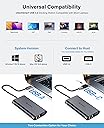
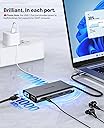
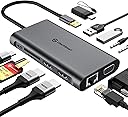
The UtechSmart 11 in 1 Triple Display Docking Station is a versatile and powerful solution for professionals seeking to enhance their workspace. With support for dual HDMI and VGA outputs, it allows for triple display setups, ensuring maximum productivity. Compatible with a wide range of devices, including MacBook and Windows laptops, this docking station features multiple USB ports, Ethernet, and audio connections, making it the ultimate hub for all your connectivity needs.


| ASIN | B07KYL58Q1 |
| Additional Features | Play, Plug |
| Best Sellers Rank | #19,143 in Electronics ( See Top 100 in Electronics ) #285 in Laptop Docking Stations |
| Brand | UtechSmart |
| Built-In Media | 1 * Travel Pouch, 1 * USB C Hub, 1 * User Manual |
| Color | Dark |
| Compatible Devices | MacBook Pro |
| Customer Reviews | 4.4 4.4 out of 5 stars (2,272) |
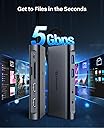
| Data Transfer Rate | 5 Gigabits Per Second |
| Enclosure Material | Plastic |
| Hardware Interface | Ethernet, HDMI, MicroSD, USB 2.0, USB 3.0, USB Type C, VGA |
| Item Dimensions L x W x H | 6.46"L x 4.06"W x 0.7"H |
| Item Type Name | USB C HUB |
| Item Weight | 3.5 Ounces |
| Manufacturer | UtechSmart Technology |
| Mfr Part Number | Hub10-in |
| Minimum Required Operating System Version | Windows 10 |
| Model Number | UCN3612 |
| Number of Ports | 8 |
| Operating System | Android, Chrome OS, Linux, Windows, macOS |
| Total Usb Ports | 4 |
| UPC | 639853843658 |
| Warranty Description | 18 Months Warranty by refund or replacement |
D**N
A True Laptop Dock to Connect your Laptop to Peripherals at Home
I purchased this dock to connect my laptop up to a home computer screen, speakers, Ethernet cable and some USB Devices. I have purchased these in the past and have for the most part been happy however they have always lacked one function or other until now. With this dock I can get sound out of my speakers, wired network connectivity and peripherals (even SD and TF Memory cards) in one device with one plug in! This is new ground for me so I am fairly happy and thrilled with this! **I did note that I had to plug it in and remove it a couple of times on one computer for the network adapter to connect. After that it worked every time. My other laptop worked perfectly first plug in. I tested the HDMI output to my TV. I even played a video from a flash drive on the USB C port of the dock with its video and sound coming out of the TV. One caveat here. You need to be familiar with your audio playback device settings in Windows to set that up. I had to specify that sound comes out the newly installed USB PNP Audio device and the picture and sound came out of my TV! The Ethernet cable attached and reported Gigabit speeds. I transferred data to a Gigabit attached computer with a network shared folder and the speed was perfect. I transferred data from a USB C drive to my laptops SSD drive and got blazing fast speeds that peaked at nearly 200MB/S though I could only photograph it at the 150MB/S I connected speakers to the audio plug on the dock. I set my default audio device to the USB PNP Audio Device and sound came out of my speakers. If I unplugged the dock the sound switched to internal speakers. I plugged the dock back in and sound switched back out to the speakers! Now that i have a way to connect two screens I will have to get a second one to give this a try. I will report back if I have any problems! All in all I think this will be a great dock for my laptop use at home and look forward to putting it through some paces and plugging less things in to get working at home!
E**.
Compatible with Win10 and Ubuntu 24 Linux. USB 3.0 is Fast!
This dock works perfectly with my HP Envy TouchSmart 17 laptop, even though this model was not listed as compatible. I am running two external 24-in HDMI monitors at 1080p, alongside the open laptop 17-in 1080p screen. All three screens are working together in Windows 'extend' mode. The screens operate smoothly for my daily use with spreadsheets, office documents and other. YouTube videos look great and play smoothly at 1080p. I am not a 'gamer' so I'm not sure how well the dock would support fast moving images on multiple screens, but the limit of this dock is 1080p, and gamers usually like better than 1080p. Again, YouTube videos look great. I should mention that one of my monitors is 1920x1200, and the dock supported this resolution perfectly on that monitor. I also have a Blu-ray disk burner plugged into the dock. The burner has its own power, but the dock has no problem keeping up with burning at the 6x speed of 27Megabytes per second. You must download the DisplayLink USB Graphics Software to use this dock. There are versions for both Windows and Linux. My laptop is set up with dual-boot, I am running Ubuntu 24 Linux. In Linux I had to load the DisplayLink software for Linux. I get the same smooth operation with the three screens working in 'extend' mode in Linux as I do in Windows. I am running Win10 and cannot update because MS says my laptop is too old (2015) to support Win11; something about a security feature of the newer processors, not a performance issue. However, with 16GB of RAM, 1TB SSD and the stock Core i7 processor, I am happy with Win10 performance. The dock has one USB C port, but the C port is for only for input power to the dock & devices. The C port does not recognize a device plugged into this port. I don’t use the C port at all; everything I have connected to the dock, including a Micro SD (TF) card I leave installed in the dock, are all powered from a single USB 3.0 port on my laptop. If I had one complaint, it would be that the USB 3.0 cord to the laptop is only about 12 inches long, it would allow me to better place the dock this cord was 18 inches long. Also, there are only two USB ports on this dock; I rather have four. However, one of my Dell monitors has a built-in 5-port USB hub, so not a real problem for me. It would be easy enough to plug in a USB 3.0 hub into the dock if more ports are needed. USB 3.0 operates at speeds up to 5Gbps, which is why this dock performs so well, even with cascaded USB 3.0 hubs. Video performance when plugged into a USB 2.0 port (0.48Gbps) would probably be poor.
J**G
Dual display supports only mirror on this fantastic and pretty reliable mini device.
I connect this device to my Lenovo ThinkPad T480. It provides a 1-cable connectivity at home, kind of like a dock for my dual monitor, mouse, lan and audio. I love it’s built and size. It’s ports placement are acceptable to me. I am not that particular about how it’s located. Few things I don’t really like: 1) dual display supports only mirror and not extended screen. Argh. I was expecting it to provide dual separate display and not a mirror between the hdmi and VGA. 2) the item gets really hot. Like really-really hot. I don’t recommend it for hours of usage. 2-4hrs are fine and pls turn off the mains after use if you utilize the power delivery of USB c. 3) the usb c cable is a tad short. Fair as it’s meant for traveling! So, I’d recommend that an optional item be added in the order so that others can buy a usb C extension cable.
D**E
Buon adattatore con doppia presa USB 3.0, 1x USB-C solo ricarica e HDMI fino a 4K @ 60Hz che era quello che cercavo, perché con meno di 60Hz davvero ti rompi gli occhi a lavorare. Lo uso ormai da mesi e va che è una meraviglia, tende a scaldare un po' quando ci attacchi HDMI, mouse e disco esterno tutti insieme. Avrei preferito un modello con una terza presa USB al posto del lettore SD e cavo un po' più lungo di qualche cm, ma va bene lo stesso. Consigliato
S**R
Perfekt für den Alltagsgebrauch am Computer !
A**1
This dongle seems very good so far. All of the ports work, and numerous different ports can be used at the same time. It is compatible with thunderbolt 3 as well as USB-C devices. This device works, as is probably evident in other reviews, so I will focus on some special things I noticed: I just wanted to make sure everyone knew about the way that the female USB-C port on the dongle works. If your device supports charging via USB-c (or thunderbolt 3), you can plug a power cord into it to charge your device while using the dongle. If your device does not support this, it will output power through the dongle's USB-c port so you can charge a phone or something else with it. Note that that port does not pass data through it (so no daisy-chaining dongles) but that was never advertised as one of its capabilities anyways. Overall, this power system works very well. The USB ports, headphone jack also work when I plug the dongle into my android phone, and will likely work with your android too, provided that your phone has a USB -c port rather than the older port whose name I forget. The vga/hdmi video output should work if your phone supports it (mine doesn't, and I can't test it). Plugging a phone into a router to get internet is a bit ridiculous, but that didn't stop me from testing it. Unfortunately, the ethernet doesn't work with my phone (works perfectly with laptop/desktop). I believe this is because android lacks support for ethernet, though I may be wrong. Also, though I never tested the card readers, they probably work with a phone as well. After these 2 things, everything else works as expected, earning this product a strong recommendation.
Z**A
EDIT: they reached out to me about my complain with the HDMI not working at my desired resolution and refresh rate as they advertised and they just gave me a full refund!! Don't even have to return it or anything basically got it for free Its perfect, except for the fact that when you plug in the HDMI, its either 4k at 30fps or HD at 60 and you cant pick It randomly picks what it wants without allowing your device to change the resolution/frame rate. Not 4k@60. So a bit of false advertising there And if the USB C port could just have data transfer support that wouldve been amazing. Just a cheap usb port has 480mbps. If bandwidth was low then atleast allow the data transfer on the charging port whenever HDMI isnt in use, or keyboard and mouse or something./SD,micro SD slots. Or simply add a headphone jack. Because people need this
B**Z
Compré primero 1 para la oficina y cómo me fue bien, compré otro para casa. Los tengo hace meses y funcionan muy bien. Estoy contenta.
ترست بايلوت
منذ أسبوع
منذ 3 أسابيع