Buy anything from 5,000+ international stores. One checkout price. No surprise fees. Join 2M+ shoppers on Desertcart.
Desertcart purchases this item on your behalf and handles shipping, customs, and support to Morocco.
🖨️ Print smarter, faster, greener — the pro’s choice for effortless productivity!
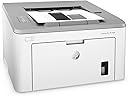
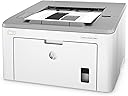
The HP LaserJet Pro M118dw is a compact, wireless monochrome laser printer designed for professionals and small teams. It delivers sharp 1200 dpi prints at speeds up to 30 pages per minute, with a generous 250-sheet input tray and automatic duplex printing to save time and paper. Featuring versatile connectivity options including Wi-Fi, Ethernet, Wi-Fi Direct, and voice control via Alexa, it supports mobile printing from apps like HP Smart and cloud services. The printer comes with a starter toner cartridge capable of printing 1,000 pages and a long-life imaging drum rated for 23,000 pages, backed by HP’s reliable support and energy-saving Auto-On/Auto-Off technology.


| ASIN | B07HB6NPP4 |
| Additional Printer Functions | All In One, Copy, Scan |
| B&W Pages per Minute | 30 ppm |
| Best Sellers Rank | #443,106 in Office Products ( See Top 100 in Office Products ) #629 in Laser Computer Printers |
| Brand | HP |
| Built-In Media | 4PA39A HP LaserJet Pro M118dw Printer, Getting Started Guide, HP LaserJet Black introductory toner cartridge (~1,000 pages), HP Original LaserJet Imaging Drum (~23,000 pages), Power Cord, Printer documentation., USB Cable |
| Color | White |
| Color Pages per Minute | 1 |
| Compatible Cartridge | HP 94A, HP 94X |
| Compatible Devices | Laptops, PC, Smartphones |
| Control Method | Voice |
| Controller Type | Amazon Alexa |
| Customer Reviews | 4.4 4.4 out of 5 stars (2,542) |
| Display Type | LED |
| Dual-sided printing | Yes |
| Duplex | Automatic |
| Global Trade Identification Number | 00192545923477 |
| Hardware Interface | USB 2.0 |
| Ink Color | black |
| Item Dimensions D x W x H | 14.6"D x 16"W x 8.8"H |
| Item Type Name | Laser Printer |
| Item Weight | 15 Pounds |
| Manufacturer | HP |
| Maximum Copies Per Run | 2000 |
| Maximum Copy Resolution Black and White | 1200 dpi |
| Maximum Copy Resolution Color | 1200 x 1200 dpi |
| Maximum Copy Speed Black and White | 30 ppm |
| Maximum Media Size | 8.5 x 14 inch |
| Maximum Print Resolution Black and White | 1200 dpi |
| Maximum Sheet Capacity | 250 |
| Model Name | 4PA39A#BGJ |
| Model Number | 4PA39A#BGJ |
| Model Series | 4PA39A |
| Number of Ethernet Ports | 1 |
| Number of Trays | 2 |
| Other Special Features of the Product | Auto-Duplex, Cloud print enabled, Compact design, Energy Star, Ethernet networking, HP auto-on/auto-off technology, LED control panel, Network-Ready, Optional HP high-yield cartridges |
| Output sheet capacity | 250 |
| Paper Size | 3 x 5 to 8.5 x 14, Letter, Legal, Envelope |
| Print media | Card stock, Envelopes, Glossy photo paper, Labels, Paper (plain) |
| Printer Connectivity Type | Ethernet, USB, Wi-Fi |
| Printer Output Type | Monochrome |
| Printer Type | Laser |
| Processor Count | 1 |
| Resolution | 1200 x 1200 |
| Scanner Type | Flatbed |
| Specific Uses For Product | Office |
| Total USB 2.0 Ports | 1 |
| Total Usb Ports | 1 |
| UPC | 192545923477 |
| Unit Count | 1.0 Count |
| Warranty Description | One-year limited warranty |
| Warranty Type | limited warranty |
| Wattage | 480 watts |
C**.
Great B&W printer, fast, user friendly, easy install, no hum.
I wanted a black and white printer only. I didn't need another scanner, just a printer that could do double-sided if I needed it to. It prints fast and clearly - I have had no problems with track marks like some others. Double-sided works great and is easily turned off if you don't need it. The paper tray holds a lot of paper. The toner that came with the printer lasts a long time. It is now telling me toner is low and even though toner is low, I just printed 270 pages no problem with the toner low (one-sided). I have had no experience with any kind of humming noise when it isn't printing - mine is totally silent when not printing. It's about as noisy as any printer when it's printing. It connects wirelessly and through Airprint for Apple which is great. The initial install was the easiest printer install I have ever done - took less than 5 minutes and I was up and running by going to the HP website (I don't have a disk drive to use so had to use the online version). I made sure to buy an extra toner at the time of purchasing this printer and I still haven't needed to use it and I have printed at least 600 pages, so I'm happy with the initial use toner cartridge because other printers have starter ink / cartridges that barely last at all. It's also a very compact size so it fits easily on my printer cart. 10/10 for this printer so far! (I will update if anything changes.)
A**E
Good, Basic Printer
I don't need to print in color, nor do I print in high volume. I just needed a basic monochrome laser printer with WIFI to replace an older office one without WIFI. I waited until now to write a review to spend time using it and see how holds up. As of this writing, it has performed flawlessly. Setup was easy and straightforward. The printer has not dropped its WIFI connection to my network once since I've installed it. Sleep mode is undefeatable, but I've never had a problem with it at all. In fact, this printer wakes from sleep and prints almost instantly. My expectations for the price point weren't very high when I bought this. So far, I'm pleasantly surprised by the function and build quality of this printer. I think it's a good buy for the money.
R**Y
Great Printer for the Price
This printer is only a tad over $100, yet it offers nearly 30ppm and duplexes. It also has built-in wireless AND hard-wired Ethernet, not to mention USB 2. It fires up fast, is quiet, and actually looks pretty nice, too. I've bought a ton of HP printers over the years. Fifteen years ago, a printer with these specs (actually, it wouldn't even have all these specs) was about $1,500. Print quality is good. I have it in my office and I'm very happy with it. Print cartridges are always going to be expensive, but this is one area where I recommend that people buy the brand. I've just had too many problems with off-brands: squeaking, inconsistent printing, smear marks, and on and on. It just isn't worth it. You're better off just buying the brand model, and then exercise a little care in what you print. Don't just rush to print every little thing: hold back a bit. You can "buy back" some of that brand cost with this approach. But as for this printer, this is an EASY, and I mean REALLY easy, Five Star item.
S**R
The most useless installation instructions I've ever experienced
If you want to install this as a wireless printer, throw away the instructions. The proper way, and maybe the only possible way, is to put the printer near a router. Connect the power cable. Press the power button to power on the printer. Get an ethernet cable and plug it into the router and printer. If you know how to find the IP address of the printer, browse to the IP address, and set up the wifi connection. An easy way to find the IP address of the printer is to install the "HP Smart" app on Android or iOS. It will find the printer and display the IP address. The app doesn't do anything else. Browse to the IP address and set up the wifi connection. Once the router SSID and password are set up on the printer, you can unplug the ethernet. Once the wireless icon becomes steadily lit, you are connected to the network. Any computer can find the printer, including Chromebooks. Following the instructions on the different OS to complete any installation. Chromebooks support this printer directly, not only the about to become obsolete cloud print. All you need to do is to enter the brand and model to complete the installation. I cringe always at the instructions of the unpronounceable electronics brands. The HP instructions that come with the printer rise to the next few levels. The HP Smart app is a decoy to confuse the hell out of you. It doesn't install anything or does anything. You can't see anything if your printer isn't connected to your network already. There is a wifi access point at the printer. You can set up your phone or computer to connect to the printer SSID. But you can't do anything except for going offline, print, and then go back online. Who the hell needs that? But then it probably isn't enabled by default. To enable it you need to connect the printer to your network first, but then after that, you don't need to enable it anymore. A lot of dubious apps will make use of the access point, ask for your wifi router password, and then finish the wireless setup. But HP won't go that low because that's a security risk. It's purely a time-waster. If you have Windows or Mac, you can just plug it into the USB and maybe do the setup there. But then you don't need a wireless printer. You can download software to complete installing the printer but by the time you have found the website and completed the download, you could have completed everything my way. It's plug and play if you plug the printer into a Chromebook, but you have to carry the printer with the Chromebook. That's mobile printing for HP. You can't set up the printer via the Chromebook. For this model without and UI and screen, you cannot connect to your wifi with a standalone printer. You can print out the status of the printer but not using the "i" button as instructed. It's the button with a page of words. I was so desperate when I tried the WPS button on my router the 1st time in my life to try to connect the printer. It doesn't work. So that's why I never use the WPS feature. The language of the manual is perfect. The paper and print quality is perfect. The icons and pictures are clear and nice. Everything else is useless.
M**I
Very excellent printer and I recommend it It's a great choice
A**E
received item fast ! works great
ترست بايلوت
منذ 4 أيام
منذ 3 أسابيع