Buy anything from 5,000+ international stores. One checkout price. No surprise fees. Join 2M+ shoppers on Desertcart.
Desertcart purchases this item on your behalf and handles shipping, customs, and support to Morocco.
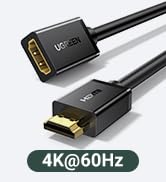
desertcart.co.jp: UGREEN HDMI Capture Board, Compatible with Switch, 4K@60Hz, Type C & USB, 1080P@30Hz, Capture, Game Recording, Video Recording, Live Distribution, Compatible with iPad OS17, Mac, Windows, Linux : Computers Review: 古いノートpcをサブモニタにするため購入しました。説明書にもあるOBSを使って実現してます。仕事用なので反応速度の悪さはガマンしてます。 Review: Switchの映像をiPadで出して遊ぶ目的で購入しました。 結論から言うと、この価格帯ではかなり満足度が高いです。 iPad(OS17)にType-Cで直接接続し、HDMIでSwitchをつなぐだけで、特別な設定やドライバーは不要でした。 映像は1080pで安定しており、音ズレや大きな遅延も感じません。 OBSを使って録画・配信テストもしましたが、フレーム落ちもほとんどなく、映像の滑らかさは十分です。 本体も金属製でしっかりした作り。熱を持ちやすいキャプチャーボードの中では、発熱が少なく安心して長時間使用できました。 軽量でケーブルの取り回しも楽なので、出先やiPadを使った簡易配信環境にも向いています。 唯一気になったのは、録画解像度が1080p止まりな点。 「4K入力対応」とはあるものの、録画自体はフルHDまでなので、4K配信を考えている人は注意が必要です。 ただし、Switchや通常の配信用途では十分すぎるクオリティだと思います。 総合的に見て、コスパの良い万能キャプチャーボードです。 ゲーム実況の入門や、iPadを活用したモバイル配信にはかなりおすすめできます。


| ASIN | B0BGMYPBF4 |
| Amazon Bestseller | #1,167 in Computers ( See Top 100 in Computers ) #53 in Computer Cable Adapters |
| Brand | UGREEN |
| Color | space gray |
| Compatible Devices | Tablet |
| Connector Type | HDMI |
| Country of Origin | China |
| Customer Reviews | 4.0 4.0 out of 5 stars (1,557) |
| External Testing Certification | 177202201739 |
| Global Trade Identification Number | 06957303841899 |
| Item Dimensions | 17 x 85 x 145 mm |
| Item Weight | 0.04 Kilograms |
| Manufacturer | Ugreen Group Limited |
| Mfr Part Number | 40189 |
| Model Number | 40189 |
| Number of Items | 1 |
| Number of Ports | 1 |
| Package Quantity | 1 |
| Specific Uses For Product | By projecting gaming screens such as PS5, Switch, and mobile phones to your PC, you can record and live broadcast from your PC |
| Unit Count | 1.0 Count |
| Warranty Description | 2 Year Limited Warranty |
A**ー
古いノートpcをサブモニタにするため購入しました。説明書にもあるOBSを使って実現してます。仕事用なので反応速度の悪さはガマンしてます。
E**N
Switchの映像をiPadで出して遊ぶ目的で購入しました。 結論から言うと、この価格帯ではかなり満足度が高いです。 iPad(OS17)にType-Cで直接接続し、HDMIでSwitchをつなぐだけで、特別な設定やドライバーは不要でした。 映像は1080pで安定しており、音ズレや大きな遅延も感じません。 OBSを使って録画・配信テストもしましたが、フレーム落ちもほとんどなく、映像の滑らかさは十分です。 本体も金属製でしっかりした作り。熱を持ちやすいキャプチャーボードの中では、発熱が少なく安心して長時間使用できました。 軽量でケーブルの取り回しも楽なので、出先やiPadを使った簡易配信環境にも向いています。 唯一気になったのは、録画解像度が1080p止まりな点。 「4K入力対応」とはあるものの、録画自体はフルHDまでなので、4K配信を考えている人は注意が必要です。 ただし、Switchや通常の配信用途では十分すぎるクオリティだと思います。 総合的に見て、コスパの良い万能キャプチャーボードです。 ゲーム実況の入門や、iPadを活用したモバイル配信にはかなりおすすめできます。
ぽ**こ
iPadを外付けディスプレイとして使うために買いました。 iPad側にアプリを入れて、それを起動することでモニタの代わりにはなりました。 キャプチャアダプタが分かる刻印が欲しい、HDMI変換アダプタと外観だけでは区別がつかないので。 あとはもう少しサイズが小さければいいなと思う。
影**者
オンライン会議でカメラ画面の代わりに別PCの画面をHDMIで出し、このキャプチャボードでキャプチャしたものをカメラで送出すれば操作説明にも使うことができます。
眉**子
プレゼンの途中などにスマホ画面などを共有したくて購入 このサイズなのでガジェットポーチの中に常駐できます
K**O
こちらの商品はNintendo Switch2で利用可能でした といってもSwitch2のプレイ動画をキャプチャーしたのではなく、 こちらの製品を組み合わせることでSwitch2にHDMI出力に対応したスマホ(iPhone16 Pro)の画面をカメラの入力として使用できました。 Switch2はUSB接続カメラの対応をうたっており、純正カメラやサードパーティ製のカメラが発売されています。 UVC対応のキャプチャー機器であれば使用可能かと思いきや、手元に持っていた4K60P対応のキャプチャーデバイスを接続しても認識せず、 また、UVC接続機能のあるミラーレスカメラについても反応しませんでした。 仕様をいろいろと調べている方もおり、その情報によるとSwitch2が受け付ける解像度等が限られており、 すべてのデバイスが使えるわけではなく、限られた解像度しか受け付けないのではないかと結論づけられていました。 HORIのパックンフラワーカメラのスペックシートが640×480 30fpsであり、 その帯域なら受け付ける可能性が高く、高い製品ではなく逆に安価なキャプチャー製品の場合は受け付ける可能性が高いとのことでした。 試しに購入してみたところこちらの製品はSwitch2の設定画面やソフト側からUSBカメラとして認識していることを確認しました。 ただ、おそらく640×480の解像度として認識されており、そこそこ荒い映像になっています。 純正カメラは1080p出力対応でソフトによっては超広角でゲームで4人プレイヤーの全身の認識ができていることから、 低解像度の640×480しか受け付けないとは考えにくく純正とサードパーティで入力帯域に制限を設けている可能性が考えられます。 HDMIであればカメラでもスマホでも使用可能なので実写映像の代わりにスマホから出力したキャラクターなどをSwitch2に表示させたい場合などの活用も可能かと思います。 動作検証については2025年7月13日現在の情報 試したソフト:Nintendo Switch2のひみつ展
A**N
残念ながら上手く映像が映りません。ある日突然先代のキャプチャーボードの調子が悪くなってPCも新たなものに替えたのでこちらを購入しましたが、上手く映像が映りません。返品の回収待ちです。
は**と
SwitchとiPadを繋げるのに購入。使い方も簡単だし、良好です。愛用してます!
K**S
Works great. Fine quality, no problems at all, plug and play
P**D
In short, I love this thing and leave it plugged into my computer, with or without a cam on the end. I use it, through OBS (under Linux no less), to record screencasts, with g00gle meet, even with the blasted zoom app. I set it for motion JPEG, 1920x1080 at 30fps for these things. My OBS setup would get confused about what is what when I played around with the 2 webcams etc But leaving this into the USB port all the time, and simply having the camera on or off works great--the OBS config is nice and stable, and when there's no camera signal the capture dongle shoots out the classic colour bars, as shown in second image. Trying to tweak contrast or brightness or anything like that in the OBS source interface is not a good idea--use your camera for that stuff and just feed in the signal you want: you have more control and it's better anyway. About the lag... All the USB capture cards I've used have some lag, that can be a pain to sync if you've got a distinct cam and mic. However, this capture card is on par or better in than the others I've used and I have found that the best solution is to hook up the mic to the big camera, and use the camera HDMI cable to bring in both image and sound. If your cam doesn't let you do that, you can still use OBS to add some delay to the audio and sync it manually, but I've found that tricky to get right, and that the lag isn't always exactly the same, so if you can feed sound from the cam, do that. So: I wish these things didn't have such lag (sometimes it feels like a good half second) but I think this is a USB thing more than a capture card thing, and this specific item is now my (almost daily) workhorse for getting audiovideo into my computron.
A**A
Doesn't work with PS4 And it's 30 fps ( was written on the article tho that's on me , but I don't understand why the 60fps is written in big )
N**O
Amazing entry level capture card. I was able to do some streaming of my PS5 with this and im very happy. It supports both USB-A and USB-C ports so it should work amazingly on any computer.
S**N
Great product, convenient size and works well.
Trustpilot
1 week ago
2 weeks ago