Buy anything from 5,000+ international stores. One checkout price. No surprise fees. Join 2M+ shoppers on Desertcart.
Desertcart purchases this item on your behalf and handles shipping, customs, and support to Morocco.
🚀 Power your data universe with speed and scale!
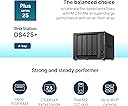
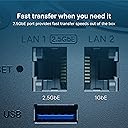
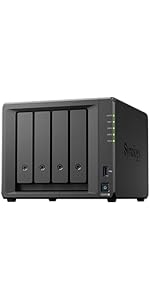
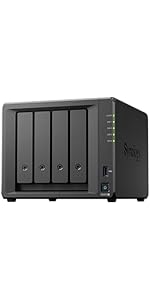
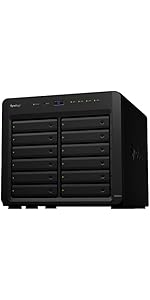
The Synology 4-Bay DiskStation DS425+ is a compact, high-performance NAS designed for professionals seeking reliable, scalable storage. Featuring 4 hot-swappable bays supporting up to 80TB, built-in 2.5GbE networking for rapid data transfers up to 281 MB/s, and Synology’s intuitive DSM software, it offers seamless multi-platform access, robust data protection, and a 3-year hardware warranty—making it the ultimate all-in-one solution for backup, synchronization, and surveillance.


| ASIN | B0F895RV3K |
| Best Sellers Rank | #6 in Network Attached Storage (NAS) Devices |
| Brand | Synology |
| Color | Black |
| Compatible Devices | Android, Desktop, Laptop, Server, iPhone |
| Customer Reviews | 4.2 out of 5 stars 64 Reviews |
| Enclosure Material | Metal, Plastic |
| Is Assembly Required | Yes |
| Item Dimensions D x W x H | 8.78"D x 7.83"W x 6.54"H |
| Item Weight | 2180 Grams |
| Manufacturer | Synology |
| Material | Metal, Plastic |
| Mfr Part Number | DS425+ |
| Model Number | DS425+ |
| Mounting Type | Tabletop |
| Product Dimensions | 8.78"D x 7.83"W x 6.54"H |
| Size | 166 mm x 199 mm x 223 mm |
| Storage Volume | 80 TB |
| UPC | 846504005994 |
| Unit Count | 1.0 Count |
| Warranty Description | 3 |
A**.
Really good storage system, like Drobo many years ago.
We really like this NAS box. We purchased with Synology drives. Pretty similar price to other similar drives. I like the idea of installing apps on the drive but I have not yet. Currently have 2 desktops and 2 laptops PCs to the NAS. Really simple to setup, create a user and connect then point backup to that drive. It seems fairly quick but truthfully backups only happened off hours so we don't notice it much. We haven't filled it yet but now thinking maybe we should have gotten larger drives?
T**S
3x-10x upgrade from my DS416Play
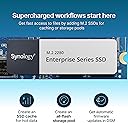
Migrated from 11 yr old synology 416Play, wow what an upgrade. Highly recommend getting the extra 6GB memory DRAMM and also the SSD (for read cache). Note that synology no longer restricts drives to their brand only, I have 4 Seagate Iron Horse 20TB drives. Performance is just insane, a 3x-10x improvement particularly for synology photos and media server, but also for index/search. A few things to note, it takes time to migrate 12 TB (my old synology). Given the 416Play only has 1GB/S ethernet my faster network meant nothing so 120MB transfer speeds are typical. The migration timeline was quite a bit longer than I anticipated. 1.5 days for disk parity check (you can run concurrently w/ migration), 2.5 days for migration assistant to complete. Migration assistant made the move flawless, but THE MOST IMPORTANT thing to know is that when you migrate the credentials you initially set up for admin on the NEW drive go away and you must log in with your OLD CREDENTIALS. this is the one thing I wish they documented better. My SSD is a Samsung 990, and this was not on the compatability list, but a quick change to the compatability check fixed this. It required an SSH into the server and a quick command to turn off compatibility check. That may not be something your confortable with then buy the synology brand SSD.
D**G
Best NAS for Remote backup
Synology DS425+, Very good build quality, with 4 hot-swap removable bays for Hard disks. Tested with Seagate Ironwolf Pro 22TB hard disks, they work out of the box. This is a near identical design to DS920+. with 2 M.2 NvME Drives for fast caching. It runs Synology DSM, has very low RAM usage. With just 2 GB base RAM on this model, system only uses 30-33% RAM when doing SHR (RAID) sectors rebuilt. I purchased this product while Amazon was on discount, so it's ~25% cheaper than it's original price. This is the perfect NAS for Remote / Offiste backup. For heavy use, i would recommend DS920+.
M**N
Dependable Powerhouse with a Catch
The Synology DiskStation delivers exactly what you'd expect from a top-tier NAS: reliable performance, intuitive setup, and a stellar suite of software options. From seamless file sharing to powerful backup tools and media streaming apps, its ecosystem feels both robust and user-friendly. Ideal for home users and small offices alike. The DiskStation Manager (DSM) operating system deserves special praise. It’s sleek, responsive, and packed with features that make storage management feel almost elegant. App integration is strong, with options for surveillance, virtual machines, and cloud syncing that rival full-scale servers. However, there’s one notable caveat: hard drive compatibility. You're locked into using Synology-branded drives. While these drives are optimized for performance and integration, it limits flexibility for users who may already have high-quality third-party HDDs. I have 2 Seagate IronWolf Pro, 16 TB, Enterprise NAS Internal HDD –CMR 3.5 Inch, SATA 6 Gb/s, 7,200 RPM, 256 MB Cache for RAID Network Attached Storage, and they do not get picked up. If you're okay with that trade-off, the DiskStation remains one of the best NAS solutions out there. Once they update to clarify that they do not support other drives, I will give them a 5 star.
G**M
FORMERLY...5 out of 5 (with an *) - NOW 1/5
UPDATE 2: Synology is now supporting third party drives in DSM 7.3. That's good. However, transcoding restrictions are still in place for the 2025 Intel NAS models. With the latest HD policy change the Synology 925+ should be considered over the 425+ for its very nominal price difference. The 925+ has more base memory and memory expandability, a much better processor and an expansion options. Given the continued transcoding crippling by Synology on the Intel 225+ and the 425+, and the minor price difference between the 925+ and the 425+, it's really difficult to recommend the 425+ at all. The biggest benefit of the 2025 Intel models over the Ryzen models was the built-in transcoding which no longer is possible given Synology's new restrictions which were not clearly public at launch. A really unfair change by Synology to early adopters of the 225+ and the 425+. Synology claims they informed consumers with a vague 2024 announcement regarding restricting transcoding at some point in time. As mentioned at launch in 2025, however, there was no mention of the loss of this core feature and the change being implemented for the Intel models which many purchased for the multimedia transcoding for remote access benefits in particular. There are non-supported workarounds for the transcoding issue, but use at your own risk. Hopefully Synology will reconsider as they did with the HD policy. What a disappointment from a Company that once valued their loyal consumer base. Until then, unless your budget is really restricted, go for the 925+ (to remain in the still wonderful Synology Ecosystem) or seriously consider a non Synology option. UPDATE: just reduced to 1 Stars as I found out Synology also restricts this model"s ability to transcode on Plex to save license fees. Required drives disabled on DSM. Confirmed with my contact with customer support. Don't buy. Either upgrade to the 925+ or look elsewhere . I recently upgraded to the DS 425+ from a Synology DS 224+. Along with this upgrade, I added 4GB of RAM and a pair of 400 GB NVME drives configured as a storage pool for Synology Photos and Plex and some other packages which benefit greatly from installation on the NVME drives (media still residing on the HDD's). Regarding Plex, this processor supports transcoding which is rare now for a Synology NAS. I also migrated a pair of 12 TB Synology Drives (competively priced) to this NAS. Synology has caused quite an uproar (deservedly so) by requiring their HDs, RAM and NVME drives to only be Synology branded for 2025 models. Along with this constraint, you are greeted with a 5+ year old CPU, but at least now a 2.5 GB Ethernet connection upgrade (essentially the only upgrade from the 423+). Frustrating too is that this 2025 model did not increase built in RAM from 2GB to 4GB, which would have at least maxed-out the RAM with the 4GB upgrade to the 8GB total which is the technical max of the included CPU. Yes, along with this frustration too is a premium price (especially for the RAM and NVME - outrageously expensive, but server quality) compared to the competition (informed readers are now screaming out loud UGREEN and other brands for their far superior technical internals and freedom from non-Synology branded upgrades). Yet, despite all of this, without hesitation, this is a 5/5 product for me. Why? This is because Synology DSM is rock solid and home to numerous mature, stable and we'll-designed included Apps (e.g. Active Backup for Business). Despite underwhelming hardware, the system is fluid, reliable and incredibly efficient and and fine tuned. The "whole really is greater than the sun of its parts" when you deploy a Synology NAS in their ecosystem. Moreover, if there are issues, Synology support is very responsive and excellent. If you're one wanting to tinker with your NAS, test out some VM's, push your system to the max or have non Synology Drives you want to use, this product is NOT for you. If, however, you can tolerate the Synology price premium and want a mature, refined and truly enjoyable experience with solid performance (my primary goal) and have an understanding of it's limitations, this is a wonderful product. As said in the title, 5 out of 5, but with that asterix.
R**A
Easy to setup
Was easy to setup and get it running. I got this to stop paying for cloud storage for my files and photo library. Synology has dedicated apps for photos and drive which makes it easy to access from anywhere.
K**.
Great product, work as described.
E**B
Great features, solid unit
Pretty great features, active backup for 365, cloning from other units, C2 integration. Great low cost tier3 backup. The only drawback is using synology-branded drives, luckily the synology 16TB drives (rebranded Toshiba) were cheaper than any other 16TB drives. Probably sacrificed features, and less warranty that seagate/WD. Was able to use third party RAM without issue. Unless you need 2.5gbe (I do), consider the DS423+. Same CPU, features, no drive lock-in.
G**D
Best in the market
Synology just have the best NAS OS
H**H
amazing product overall
amazing product love it just wow
S**A
最新には注意
423では他社HDD認識したんですが 425ではsynologyしか認識しなかった
K**J
Excellent software, legacy hardware
The Synology DS425+ continues to deliver the kind of polished, reliable NAS experience that Synology is known for, but not without a few caveats. At the heart of the experience is DSM (DiskStation Manager), which remains one of the best NAS operating systems available today. Its clean interface, app ecosystem, and stability make everything feel simple . Whether you're a beginner or someone running a more advanced homelab setup, DSM strikes a good balance between ease of use and powerful functionality. Features like Hyper Backup, and built-in monitoring tools make it incredibly versatile and dependable for both personal and small business use. Performance-wise, the DS425+ holds up well for typical workloads like file serving , and backups. It’s efficient, quiet, and integrates smoothly into an existing network setup.i would NOT recommend using any NAS as a plex server, though synology hardware is older than the competition from ugreen or asustor. Having said that, as a NAS this device shines for storage, backup and access control. However, one of the biggest downsides is Synology’s increasingly restrictive hardware compatibility particularly with NVMe drives. The system does not fully support non-Synology NVMe SSDs for storage pools, limiting them primarily to cache use (and even then, with warnings or restrictions). This feels unnecessarily restrictive, especially for users who want flexibility in choosing cost-effective or higher-performance third-party drives. For a device in this price range, this lack of openness can be frustrating. Overall, the DS425+ is a strong performer with best-in-class software, but loses points due to Synology’s tightening ecosystem controls and dated hardware. If you’re already invested in Synology and value DSM’s polish, it’s an easy recommendation but power users who prioritize hardware freedom may want to think twice.
M**W
Quality local backup solution with polished interface + app universe
I bought this one and did my research about Synology. Bought for a home backup solution. I am satisfied and happy to have bought drives before they went through the roof. This is the "+" version you might have heard some pushback on. If not, the corporation *tried* to lock down the drives to its own ones. Classic. They relented: you can use non-synology drives. I bought two 16TB Ironwolf Pro. The machine reminds you the drives are not on a compatibility list. So what. It's fine. But you should be using proper NAS drives. Which, because data centers, getting ridiculous. I haven't tried a non synology nvme drive. That might not work. YMMV. Don't complain to me. The setup is easy enough. I found the installation of the drives easy. The plastic key thing feels like easy to strip / damage. Go slow. You'll want gigabit ethernet and a UPS too. So you might need to do a lot of pre-work. The initial uploading is slow. You'll want to use ethernet cables where possible. There is an app store ("package manager"). This NAS has options for things like photos or plex or tailscale or pdf viewers etc. I back my mac up via time machine to this box.
Trustpilot
2 weeks ago
1 month ago