
قم بتنزيل التطبيق


معلومات عنا
حقوق الطبع والنشر © 2024 Desertcart Holdings Limited
قم بتنزيل التطبيق


🚀 Upgrade your MacBook’s speed and storage — don’t get left behind!
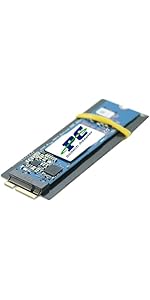
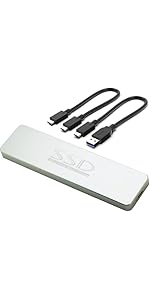
The Sintech NGFF M.2 NVMe SSD Adapter Card enables 2013-2015 MacBook users to replace their proprietary SSD with high-performance M.2 PCIe NVMe SSDs. Featuring a slim 3mm profile and a protective black film cover, it supports a wide range of popular SSD models including Samsung 960 EVO, Intel 600P, and Adata SX700. Designed for a precise fit and stable installation, this adapter revives older MacBooks with modern storage speeds and capacities, backed by an easy-to-follow installation guide to ensure a smooth upgrade experience.






| ASIN | B07FYY3H5F |
| Best Sellers Rank | 19,641 in Computers & Accessories ( See Top 100 in Computers & Accessories ) 17 in Computer Memory Card Adapters |
| Guaranteed software updates until | unknown |
| Item model number | ST-NGFF2013 |
| Manufacturer | Sintech Electronic |
| Product Dimensions | 2.54 x 0.1 x 0.03 cm; 10 g |
S**R
Good quality, converts Apple's own propriety SSD socket to allow M2 NVMe SSD's instead.
Upgrading and restoring a Mid 2014 Apple MacBook Pro. Before starting any such upgrading its important to get an understanding of the issues with Apple hardware and upgrading, is very important! I purchased this brand of adaptor card (Based on the excellent advice, gained from off related forums on the internet!) and purchased a 2TB NVMe SSD along with the other bits required and replaced the lot in an afternoon. Once all is installed, you will boot into recovery mode to create the required Partition Map on the NVMe SSD, In my case, I then installed macOS Big Sur via a bootable memory stick. Following up directly with restoring the system from my TimeMachine Backup on an external drive. Once completed, I now have my old machine now fully ship-shape and with a faster SSD with double the capacity. I understand there are cheaper adaptors out there, but this one has the backing of many others that have used them in this particular role. So I paid their price and happily I have had no issues with its fitting, or any compatibility issues. I own a Mid 2014 15" Retina MacBook Pro (11.3) that had been "Maxed Out" (2.8GHz Quad Core Intel i7, 16GB DDR, NVIDIA GeForce GT 750M 2GB & 1TB SSD). So it is still, a relatively capable machine and it even has 2 x USB, 2 x Thunderbolt 2 / DisplayPorts, an HDMI and even an SD card-reader. While, admittedly they are not the latest or greatest in data speeds, they at least, exist on it (Which can't be said for many of the later, Apple MacBooks (The new M1Pro/Max based models has just re-introduced them, at long last!). But then looking at the cost of upgrading to the latest model machine, which are great. But the price is just jaw dropping, to say the least! But also the total lack of any future internal upgrade path (Such as to internal memory or even the SSD, means you can't even improve on these two components after purchase! (Which is a real concern, as my machines original SSD is wearing out (SSD's have a finite, re-write limit)! So, I then looked at what I actually really needed, not just what I wanted! So as the original 1TB Apple SSD was fast reaching it's lifetime limit, so this was imperative (This, doesn't seem to hold great, for the longevity of these new MacBooks with their irreplaceable SSD's)! But otherwise, all I really needed was, yet another new battery (The Apple warranty replaced one, had recently, rapidly expanded (Much faster than any pregnancy!) and had forced open the laptops base cover, pushing out several of the screws!). Some new rubber feet and a full set of replacements for the cover screws (Apple's authorised repairers, had unbeknown to me until now, had previously mangled them all, making them impossible to remove without damaging them further and rendering them, useless. Oh, also a new 85W mains adaptor (The plug wiring was nearly through on the existing unit!). So for around £350, I now have a fully smartened up machine with a much larger (and faster) SSD, that ultimately looks very nearly, as good as the new model. It took me a whole afternoon, but all in all, I am impressed with my handiwork. In that: 1. It works, 2. It all went swimmingly (Due to doing a bit of online research in the first place, helped massively!). The MacBook Pro is now working well & is far better, than I expected! It will, I hope, give me an extra year or two, before I ultimately have to take the plunge and invest in a new machine. BTW: While also inside the machine, I also discovered that the display screen's lead to motherboard plug, was damaged! So I have also had to replace the whole lead and that also meant getting a new screen hinge cover, luckily both were inexpensive, but could have potentially, fried the machine! I also took the opportunity to clean out all the accumulated dust and also replaced the CPU & GPU heatsinks paste with new... NOTE: Before all the above, all previous work been undertaken by an Apple appointed, authorised repair workshop! The last work they undertook installing a complete new screen, including keyboard, trackpad & battery, while it was still under warranty! I had never even taken the cover of the machine, until now. So take what you will from that and the discoveries made! Just who else can you trust, but for yourselves?
R**M
Great product! Use this if you want a M.2 SSD in your Macbook
Purchased this after making the mistake of ordering a supposedly equivalent alternative - the alternative product wasn't recognised in my Mac and hours were wasted troubleshooting. The Sintech product worked immediately and the Macbook was upgraded to a 1TB SSD in less time than I spent troubleshooting the previous product.
M**E
It works perfectly
Next Day delivery as promised. I paired this Sintech adapter with a Samsung 980 Pro Nvme M2 blade and slotted it into a 2014 MacBook Pro - it just worked. I now have 1TB storage instead of the 256GB Original. The adaptor came with instructions advising firmly inserting both the blade into the adaptor and then the adaptor into the SSD slot in the computer - don't be timid! The combination fits perfectly when inserted properly. For Macs, make sure you have a bootable USB installer ready to add the OS. I am very pleased. This laptop has an extended lease of life which is environmentally friendly.
M**N
Offers simple upgrade of MacBook Pro 2014 original SSD to m2 nvme
MacBook Pro 2014 15". Still had plenty of life, but 512GB SSD was developing issues. Bought a 512GB M2 NVME, paired it with this converter, and was able to easily replace the original SSD. The converter provides a firm fit between the new SSD and the motherboard... and the result is the perfect length. I had no issue re-insalling macosx on the new SSD. I would have given it five stars if it wasn't so expensive compared to alternatives. But this one had so many positive reviews that I decided to play it safe and go with somethng well reviewed.
A**W
Perfect fit
The adapter worked perfectly, and enabled a Samsung 970 EVO Plus 1 TB PCIe NVMe card to be used in my A1502 MacBook Pro (Retina, 13-inch, Mid 2014), replacing the original SSD which was reporting SMART EOL. Very much faster than the original SSD, as well as twice the capacity. I also noticed MacOS 10.14 Mojave is claiming to run TRIM on the card at startup, although I don't know for sure if this really goes through all the driver layers to the NVMe card itself, even though the card supports TRIM. The only issue is MacOS has no power management support for NVMe cards, so it runs the card at full power, and the thermal management of this MBP doesn't take into account the SSD temperature, so it can get hot. Not a big issue for me as I normally run on the power adapter anyway. If this matters to you, you could look for a lower power NVMe card or maybe a SATA M.2 card (not something I've tried, but possibly more similar to the original card).
C**2
Top bit of kit
I was a bit worried before I bought this. The negative reviews about kernel panics and blank screens resuming from sleep had me feeling a bit trepid. Cloned the original Apple 128GB SSD in a 2014 MBP to a new WD Blue SN550 with the aid of a NVMe to USB3 adapter. The original drive already had a clean install of Catalina on it. APFS formatted. Shutdown and fitted the Sintech adapter to the WD and installed in the MBP. Booted up and found the Apple logo took about 7-9 seconds to appear after power on as mentioned by others. So shut down and carried out a PRAM reset. Amazingly, as you can see in the video attached, the delay is gone! It boots up nice and quick. Next was to test resume from sleep. So PMSET shows SleepDelay is set to the default 10800 seconds. This means whilst on battery, the machine will hibernate after 3 hours of sleep. So I put it to sleep at 2:30pm by closing the lid with the charger unplugged. It was playing a YouTube video at the time. At 6pm I opened the lid expecting a blank screen. To my surprise it awoke instantly and resumed playing the video exactly where it left off. Pretty pleased with it so far. I'll update this review if anything different happens. Note, this is the new version where the socket contacts are covered at the back so didn't have to cover them with tape or anything.
R**Y
It works perfectly 😁.
This works perfectly on a MacBook Air 2015 if you want to upgrade your SSD from the OEM Apple drive, went from 128GB to 2TB, perfect.
A**R
Macbook early-mid 2015
I got my 13-inch MacBook pro retina in late 2016, just before the newer touch bar model came out. It had 125GB of SSD and needless to say this needed to be bigger, especially as a photographer and videographer. The hard drive options were pretty expensive ranging from 200-350£ for a 1TB SSD replacement, but, I found out you can use other SSD models and this adapter instead. I bought this along with a "Crucial P1 500 GB CT500P1SSD8 Internal Solid State Drive-up to 1900 MB/s (3D NAND, NVMe, PCIe, M.2)" and put them inside. They work amazingly, a few random shutdowns initially (you need to make sure you have a full backup and a way to reinstall OS off of a USB or SD). I've had it working for almost half a year now with 4x the storage and higher speeds than the original for much cheaper than other options. Great price and an awesome way to upgrade! Hope this helps
ترست بايلوت
منذ 3 أسابيع
منذ شهر