
قم بتنزيل التطبيق


معلومات عنا
حقوق الطبع والنشر © 2024 Desertcart Holdings Limited
قم بتنزيل التطبيق




📲 Elevate your smart home game—one remote, endless control!
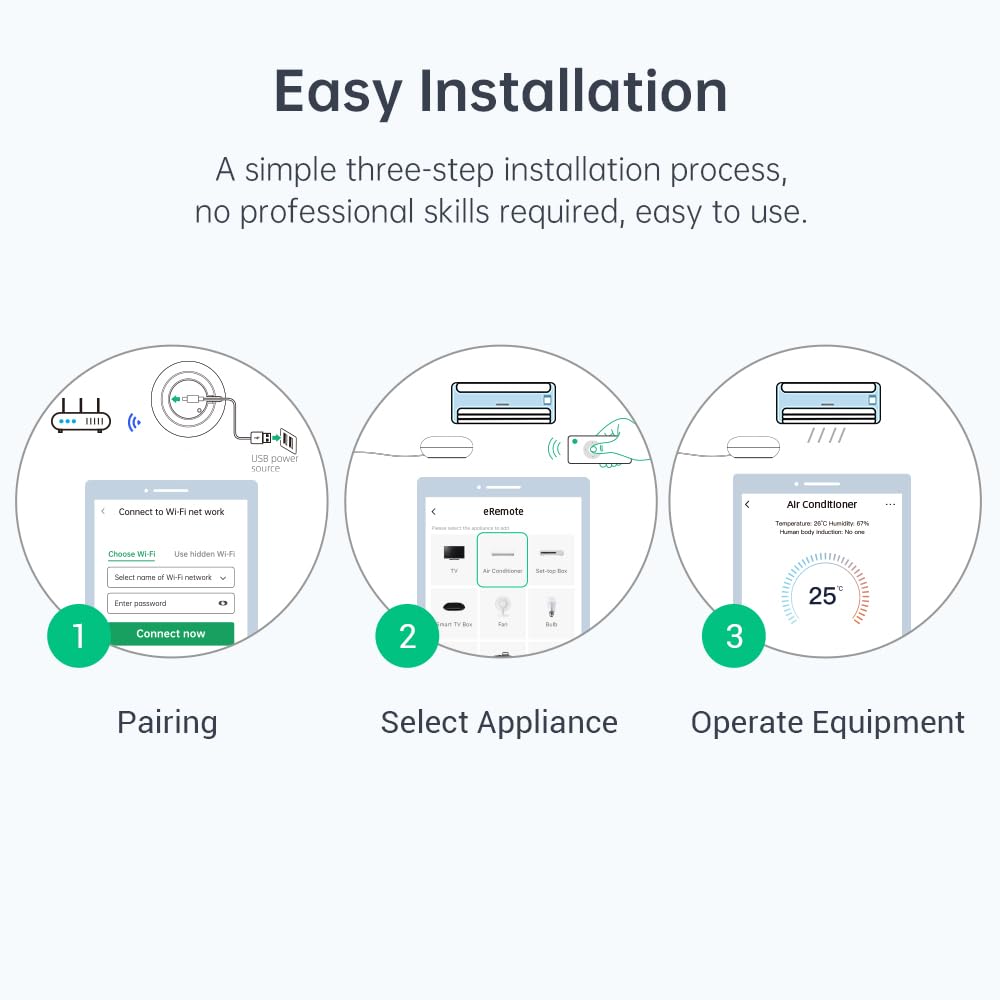
The eRemote HA is a compact, Wi-Fi-enabled universal IR remote that supports over 500,000 devices from 22 categories. It integrates seamlessly with Alexa, Google Home, and Home Assistant via MQTT, enabling advanced automation and voice control. With cloud-updatable firmware and IR code learning, it adapts to new devices effortlessly. Its 12-meter IR range and easy setup make it the ultimate smart home appliance manager for professionals seeking streamlined control and reliability.


| ASIN | B0F18PN651 |
| Best Sellers Rank | 25,981 in DIY & Tools ( See Top 100 in DIY & Tools ) 14 in Home Automation Hubs & Controllers |
| Guaranteed software updates until | unknown |
| Item model number | eRemote HA |
| Manufacturer | LinknLink |
| Product Dimensions | 6 x 6 x 2.5 cm; 82 g |
J**S
Better than Sensibo Air
So far this product has been great. It was slighly confusing to set up as i thought it needed to be on my phones bluetooth but i figured it out and quickly bought and installed another one for another room. Super quick reactions from the app compared to the Sensibo air i tried first. It works each time ive tried and the Sensibo was intermittent which was disappointing. This is also a lot smaller, compact and looks better than the sensibo units. It might have slightly less features but reliability is a must!
J**O
MQTT works out of the box
I found this does work out of the box to talk to an MQTT broker. Bought in Oct 2025, mine arrived with the latest firmware of v61318. The device is nice and neat and does not require any faff to get it to work with Home Assistant. The firmware onboard allows setting up a connection to an MQTT broker and then when adding devices you choose if they are exposed in the App (+ cloud) only or if local MQTT control is also wanted. This does mean setting up the MQTT connection first is a good idea. It worked for a Samsung TV and a Mitsubishi ZEN Air Conditioning unit. Some device types such as 'thermostat' are in beta and do not give the option of MQTT yet. I was quite surprised by the level of polish in the Android app (though it does crash on the properties screen of sub devices and doesn't deduplicate SSIDs found from different Wifi APs) and the manual was pretty well written. The device is a nice shape and size with a nice channel for the provided USB-C power cable (USB-A on other end for standard 5V) to enter the device. I paid £15.74 for it and compared to the price of devices in this category albeit years ago, I think it is worth it. The extra vs buying a generic Tuya device is paying for the MQTT support in the firmware and I think it's worth it for that. Actually generic Tuya devices appear about the same price if bought via Amazon Prime anyhow. MQTT once setup allows local control, and avoids the cloud. An account with Linknlink is required however to configure the device in the first place. I've been burned in the bast by buying smarthome devices where the cloud servers for the devices were all switched off and my devices were bricked as a result, so local control is generally something worth having. Also it means if your broadband goes down, you can still control all your devices. I am happy with this device and I somehow managed to buy the best one for my needs without researching properly, so that was a bonus.
M**N
Totally reliable in Home Assistant over MQTT
Works perfectly with Home Assistant via the MQTT protocol. It was a little fiddly to get it set up, but once I stopped trying to use the device picker and went to a custom setup it worked first time. I should really take a star off for that, but it gains it back for its complete reliability. Zero dropouts and zero misfires and because it is using MQTT it is 100% local for me.
A**S
Not perfect
Bit of a mixed bag. I wanted this to control my basic Mitsubishi AC. First problem i had was that in the app none of the options for AC would work as they are all designed for more advanced units. What isn’t obvious, or explained anywhere, is that you need to choose thermostat instead and not AC as your device. Once done that worked fine. Next issue. You can set up automations in the app. While i can manually control the AC just fine the automations wont work. As a workaround i am using Siri. Ultimately i want to use Home Assistant to control the AC using MQTT. You need to manually update the firmware to do this. The online manual in the app provides a link to the firmware but it continually fails to work. Instead i went to the Linknlink website and found a different firmware that worked first time. Overall a bit frustrating and not a polished product experience. Probably better suited to someone happy to spend a few hours getting it to work.
N**R
smart tech knowled is needed but you would not have purchased if not savvy
I wont go into this too much as there is alot this device can do. Love its IR blasting and it can remote control so many different devices. Quality is solid and minimalistic but remember it needs power etc. I found it easy to use and easy to set up but your milage may vary. Its size is small and very cheap in price for what it does.
J**J
Frustration on Demand
The set-up instructions for this device are almost impenetrable. When you finally download their app on your phone it is almost impossible to get your account created. The app keeps asking for your location, says it's saving it and then you stop making any progress at all stuck on the location page. After you've entered your location for the fifth time it tells you to turn on your Bluetooth (which, in my case, was already on). It doesn't use it when you have it on. After several minutes of going round the "turn Bluetooth on" loop it suddenly pairs with your phone. Now your problems really start unless you know the precise model number of the device you want to control. If you don't it offers the option to try out IR configs. You start with Option 1 and, for my TV, there were 17 further configs to try. After unsuccessfully testing the first seven (it's quite a fiddly button pressing action) it wanted me to type it an obscured number to prove I was human. I did that and then it insisted I did it again and again after every third config offered failed. I think I managed to get some remote control of the TV but it's much easier just to get up and turn it on and off myself. What could be a great device has been turned into an engine of pure frustration due the appalling app. If you want to waste several hours of your life and have your blood pressure get dangerously high this would be a good buy. Otherwise avoid it.
M**K
Great smart remote with Home Assistant integration
Great little device! Integrated really well with Home Assistant via MQTT. App is easy to use, with a good library of devices ) and their IR data). Additionally fires through to HA for use with dashboards and automations. I'm going to buy some more!
C**N
Installazione molto facile ed ottima compatibilità con tantissimi dispositivi. Io l’ho preso per un condizionatore Mitsubishi, configurarlo è stato facilissimo ed a distanza di un anno fa benissimo il suo dovere.
C**D
This LinknLink Wifi based universal remote is a solid little device used to enable automation or wifi-remote capabilities for IR in a single room. The device plugs in to any standard USB port for power, and with the app (via store or side-load) enables the owner to emulate most device IR remotes via an app on the phone. With added firmware (in beta, from the developer website) one can set this device up to use MQTT and connect to Home Assistant, or any MQTT based system, to enable output automation. For HA: I will note that the process for enabling HA/MQTT this is not exactly straight forward. One first needs to go to the manufacturers site to download the firmware used to enable MQTT functionality. It's not shipped with this functionality out of box. You want to do this as step 1, as anything learned prior to that is lost during the flashing process. There is also a limitation that the device will only handle locally emulating about 8 remotes. The software says "one of each type: TV, DVD, VCR, Fan/AC, etc", but in reality, you can manually program and rename any of the devices, so it's not quite that limited. The programing model database they have available is slightly problematic. The app lists several manufacturers and often has 2 or 3 generic versions for remotes of the given manufacturer and device type. But getting to them and testing them is not intuitive until you've done it once or twice. Testing them one at a time can lead to picking the wrong one, or none actually working, at which point it drops into the standard "learning mode" for the category. Sometimes you want to do that though, as jumping directly to self-learn doesn't always enable all the keys a remote for the device of that type should have. (eg. For a TV remote, it may not expose play/pause, even for a smart TV. Where if you choose a smart TV and "test" a version of it, it them presents them for learning.) This is an app limitation, which I hope they correct in the future by allowing users to choose the device style/button layout for the remote being learned. The training mode is rather simple. The app places the puck in training mode, and presents a remote with greyed buttons. You then press the button in the app, and when prompted press the button on the remote while aimed at the puck. It will then give you a button in the app to press to test playback to verify the code works with the given device. Once learned, the button on the virtual remote is enabled, and a sub-device button is created in the MQTT configuration output. Unfortunately there does not appear to be a way to initiate training mode from HA at this point. Something I hope they also consider. For the HA backend: Each remote shows up as a scene switch, with multiple sub-device buttons. Pressing said button initiates an MQTT request to the device to initiate the pulse. HA sees this as an output only device, and there is no way to watch for input IR that I can see. For this to work properly, the device must remain plugged in, connected via wifi to the MQTT server, and be close enough that the IR burst is visible to the device(s) in question (about 4m). The device does NOT need to have full internet access, so a localized IOT LAN is fine. The app used to program the IR device prefers to have internet access when setting up the device, but after a timeout delay it does allow program mode without it. The manufacturer has various versions of firmware to download for their devices, and copies of the apps in APK format for android to enable side-load if desired. This is great, since it means you can archive these items for local use, making the item not rendered useless in the event the manufacturers servers go away.
A**W
I use this with Home Assistant. One thing to note: a while back, you needed a custom integration from github to use these with home assistant. That system is a little clunky, but I liked it since you could store as many codes in HA as you wanted, and send those codes to as many blasters as you wanted without re-training. These new units ship with an "eRemote HA" firmware that supports home assistant out of the box, but with some limitations that I think don't work for me (only one device of each "type" max!) and anyway, a way that doesn't work the same as my current setup. I had to roll back the firmware to an earlier version as mentioned on linknlink's website if you search for that (look for "Rollback eRemote HA to eRemote"). Anyway, all of that is a little clunky but I'm using it in a way not supported directly by the manufacturer, so eh. The main point of my review is to point out that my alternative is ESPHome-based IR blasters, and this is WAY more effective than those - it seems to cast a much wider/more uniform IR illumination that catches way more end-devices in my room than my custom ESPHome devices, so I'm pleased.
T**N
Sehr gute Integration in Home Assistent
S**S
Seems to be quite solid for my use case. I have a Mitsubishi Air Con in a bedroom I wanted to control. I have been able to setup the basic functionality and expose this air con to my Home Assistant install. The App does not have a remote code for my aircon so the app was forced to map all buttons on the remote individually, while this does work I would not recommend this process as it takes quite a while. If the app allowed the upload of my configuration into a central database so we could get access to more devices without having to map every key on a remote would make this and ideal device. The simple conclusion is that while it does work in Home Assistant, I am not sure I trust it on a long term basis...
ترست بايلوت
منذ 4 أيام
منذ أسبوعين