We remain fully operational. Our teams are working around the clock to ensure your deliveries continue safely.

قم بتنزيل التطبيق


معلومات عنا
حقوق الطبع والنشر © 2024 Desertcart Holdings Limited
قم بتنزيل التطبيق
Buy anything from 5,000+ international stores. One checkout price. No surprise fees. Join 2M+ shoppers on Desertcart.
Desertcart purchases this item on your behalf and handles shipping, customs, and support to Morocco.
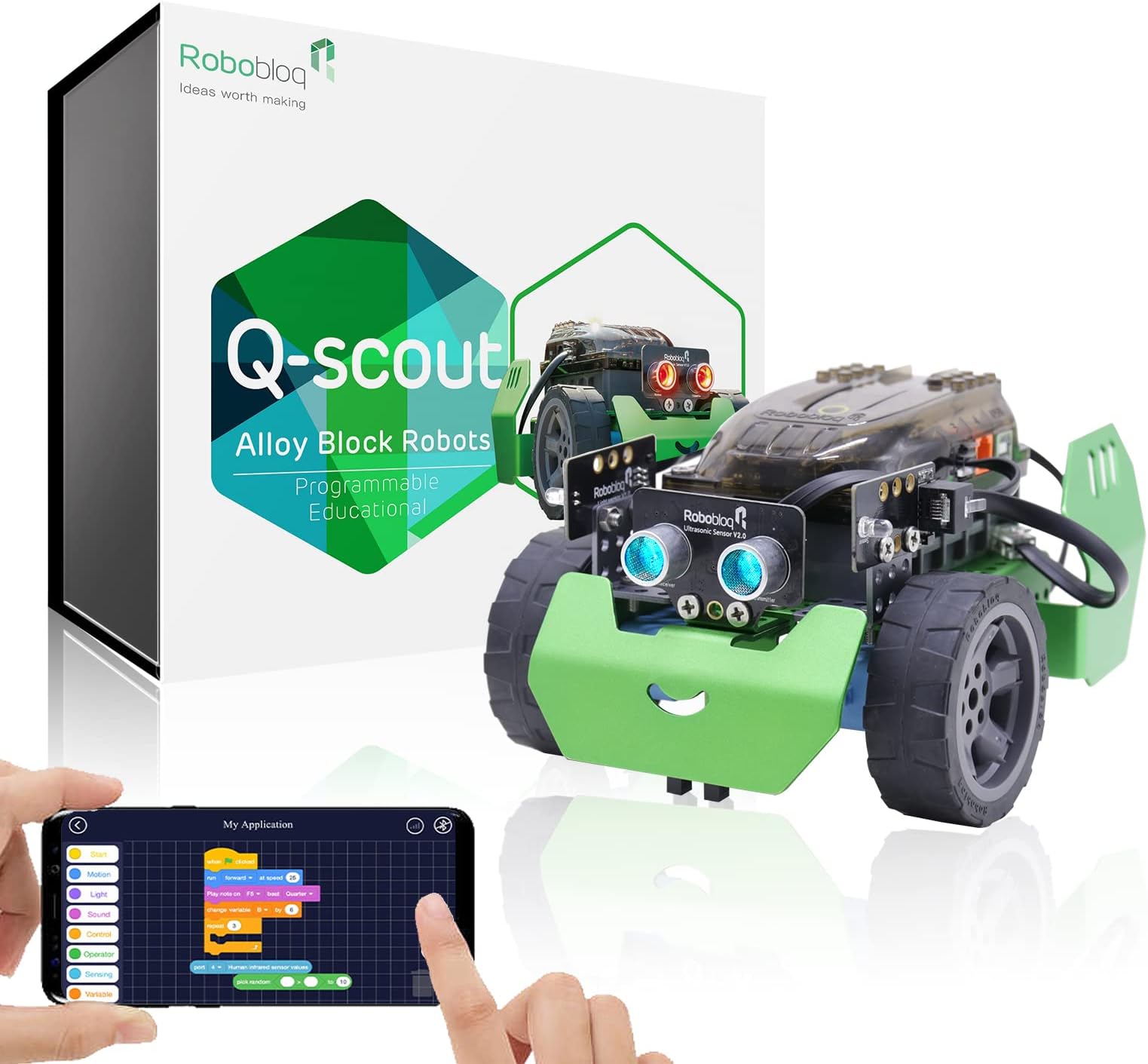
🤖 Unlock the future coder in your kid with Q-Scout — where play meets programming!
Robobloq Q-Scout is a robust STEM robot kit designed for kids 8-12 to learn coding, electronics, and robotics. It supports beginner-friendly Scratch programming and advances to Arduino and Python, featuring four interactive modes and durable materials for indoor/outdoor use. Easy to assemble with 3D instructions, it encourages creativity, logical thinking, and parent-child engagement, making it an ideal educational gift.


| ASIN | B07BFMYTC4 |
| Age Range Description | Kid |
| Battery Description | AA |
| Best Sellers Rank | #409,134 in Toys & Games ( See Top 100 in Toys & Games ) #3,777 in Educational Science Kits |
| Brand Name | Robobloq |
| Customer Reviews | 4.4 4.4 out of 5 stars (318) |
| Educational Objective | Coding Skills, Creative, Logical Thinking |
| Global Trade Identification Number | 06971452730019 |
| Is Assembly Required | Yes |
| Item Dimensions | 9.13 x 4.92 x 7.48 inches |
| Item Weight | 0.93 Pounds |
| Manufacturer | Robobloq |
| Manufacturer Maximum Age (MONTHS) | 1440.0 |
| Manufacturer Minimum Age (MONTHS) | 96.0 |
| Manufacturer Part Number | 10110002 |
| Material Type | ABS, Metal, Polycarbonate, Rubber |
| Model Number | 10110002 |
| Size | Medium |
| Theme | Robot |
M**N
Easy to build and learn programming
I'm a computer engineer so this review comes form that perspective. For me the build was too easy and would have enjoyed something more complicated. Once I figured out that the instructions are in the app (why is that fact not included in the package?) and installed it on my tablet then it is very easy to build just by following the pictures. After assembling I installed the Windows app on my computer in order to program. The help section of that app linked to all the documentation and beginning tutorial (why is this not in the main interface?). What made me giddy was that you can program using simple drag and drop functions and then click an icon to display the code in Python. Freakin Python!!! This then becomes a drag and drop Python tutorial. How cool is that. So overall well worth the money for the easiest way to learn robotics and Python with the only draw back being that finding the instructions is non-intuitive. The instructions have all been created and are easy to follow, they just don't hand them to you, you have to find them yourself.
J**O
Great product! Great value!
This is an awesome little robot! It is built sturdy and was relatively easy to assemble for my 8 year old to assemble with a little direction. Once it is assembled it is ready to go without any setup. Just turn on the app and connect with Bluetooth. The app is really user friendly and kids can start programming immediately. With the beginner and intermediate programming mode it will provide years of integrated learning play. They also have great customer service and really backup there product. I would highly recommend this little robot!
C**N
Pretty easy to assemble, fun to use, instructions need editing, a bit difficult to control live.
Easy assembly, solid construction, extra screws included. Easy bluetooth connection to iPad, everything seems to work great out of the box. Easy mode scratch programming seems to be easy, my 5 year old has already programmed light patterns and "dance moves" in the programming section. Negatives: Instructions are not clear - missing words and some descriptions. The left and right drive motors are very slightly different speeds, so the robot pulls to the left when supposed to be going straight. I'm sure this can be adjusted, but there is essentially no documentation. Same for the ultrasonic sensor - it works in obstacle avoidance mode, but trying to get it to work in the scratch programming mode is not happening. As part of the testing, when I put it in obstacle avoidance mode, the ultrasonic sensor needs to be plugged into input 3, but the default for the scratch programming mode is port 2, which seems odd. I didn't see in the documentation did it say what the "2" in the light controller programming block meant, so it took a bit of frustration to figure it out. However, I do need to do a firmware update, so hopefully that will help out. UPDATE: firmware update bricked the control part (Arduino based?), a replacement is on the way. Responsiveness in "live" bluetooth control from the iPad is pretty laggy, and is somewhat frustrating to the 5 year old. Despite these minor issues, the boy is still running around playing with it all day, so that's a net positive.
C**W
Great gift purchase
Easy to assemble. Instructions in the included instructions booklet was hard to read but if you download the app, it has easier to read and follow instructions. It was very easy for my son to immediately use the app to control the bot and begin “programming” the bot. I’m looking forward to him progressing and learning the python code behind the block coding. Fantastic buy! I will buy the expansion packs and other bot projects for my kids!
K**M
So many projects
Bought this as a gift and she plays with it all the time. There are so many different projects that can be completed. Great beginner set.
J**N
Lots of positives, two negative.
We had fun putting it together, we had fun playing with it for a bit. He is about 8 so it’s a little over his age rating but I figured it’s still a remote control car and there is a node like programming ability for it. But in the advertisement/description it said there was learning to program challenges, and I can’t find any in the app I may be looking in the wrong place but that kinda sucks that we haven’t found them. And it runs on 6 AA’s which kinda sucks a large rechargable battery would have made a lot more sense I think.
E**G
Educational and fun
Just had an opportunity to try this with my kid over the long MLK weekend. This item brought on a refreshing surprise of educational and fun all rolled into one. I let my kids set it up and put together by themselves and helped with any questions they had. They did this with no issues and they love how the app works with something they just put together. What a great way to spend a cold afternoon and hopefully this can ignite my 8 year olds interest into programming. I read other reviews about the battery before buying and got some rechargeables ahead of time. Great educational toy!
S**.
Functional product if you get one that works, poor customer service
This robot quality is pretty good for the price. We had no issues with assembly and eventual functionality. The reason for the mediocre rating is that the first one that was ordered would not power up. We thought it was because of a defective power plug or receptacle on the controller board, as the plug would not insert fully into the hole. We contacted the seller as instructed by their in-box instructions and received an immediate automated reply stating that they would contact us within one business day. After waiting for 5 business days and receiving no response, we returned the product to Amazon and got a replacement. The power plug of the second unit also did not insert fully, however it did power up and works as advertised. We still have not heard from the manufacturer. It's either plain old poor customer service or they're swamped with complaints of defective products. Either way its not a good sign.
M**K
Ea un buen juguete pero creo que esta algo elevado en precio
D**H
جميييييييل 🥰
H**I
بصراحة غالي جداا ولايستحق الشراء نصيحة من مجرب...انتبهو
ترست بايلوت
منذ شهرين
منذ شهر