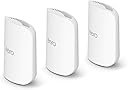
🚀 Elevate your Wi-Fi game with the future-proof eero Pro 7 — speed, coverage, and security in one sleek package!
The Amazon eero Pro 7 tri-band mesh Wi-Fi 7 router 3-pack delivers ultra-fast internet speeds up to 5 Gbps, expansive coverage up to 6,000 sq. ft., and supports over 600 devices simultaneously. Featuring Qualcomm’s Dragonwing N7 chipset, tri-band radios, and patented TrueMesh software, it ensures seamless connectivity with advanced security options and smart home integration, backed by a 3-year warranty.
| Wifi standards | Wi-Fi 7 (IEEE 802.11a/b/g/n/ac/ax/be) |
| Number of radios | 3; tri-band |
| Supported channels | 2.4 GHz: 20, 40 MHz 5 GHz: 20, 40, 80, 160, 240 MHz 6 GHz: 20, 40, 80, 160, 320 MHz |
| MIMO | 2x2/2x2/2x2 MU/SU-MIMO |
| Spatial streams | 6 |
| Channel width | 20, 40, 80, 160, 240, 320 MHz |
| Network security and services | WPA3 and WPA2 wireless encryption |
| Other Wi-Fi features | Support for IPv4, IPv6, UPnP, DHCP reservations, and port forwarding. WAN compatibility: DHCP, static IP, PPPoE, and internet VLAN tagging |
| BE rating | BE10800 |
| Automatic Channel Selection | Yes |
| Band steering | Yes |
| Device/profile pause | Yes |
| Easy password sharing for guest and home network | Yes |
| Smart home hub | Yes |
| Thread | OpenThread |
| Bluetooth | Bluetooth Low Energy 5.0 |
| Zigbee | Yes (as a controller only) |
| Works with Alexa | Yes |
| Matter | Yes (as a controller only) |
| Antenna | 2x2 2.4 GHz 2x2 5 GHz 2x2 6 GHz |
| Frequency bands | ISM (2.4-2.484 GHz) U-NII-1 (5.15-5.25 GHz) U-NII-2A (5.25-5.35 GHz) U-NII-2C (5.47-5.725 GHz) U-NII-3 (5.725-5.85 GHz) U-NII-5 (5.925-6.425 GHz) U-NII-6 (6.425-6.525 GHz) U-NII-7 (6.525-6.875 GHz) U-NII-8 (6.875-7.125 GHz) |
| Types of modulation | OFDM (2.4 GHz, 5 GHz, 6 GHz) DSSS (2.4 GHz only) |
| Ethernet | Two auto-sensing 5 Gigabit Ethernet ports, 1 USB-C port |
| Processor | 1.5 GHz quad-core processor |
| Memory | 1024 MB |
| Storage | 4 GB flash storage |
| Size | Width 5.77 in. (146.6 mm) Height 7.10 in. (180.4 mm) Depth 3.10 in. (78.7 mm) |
| Operating temperature | 32°F-104°F (0˚C-40˚C) |
| Electrical requirement | 100-240V AC, 50/60 Hz |
| AC supply | 27W USB-C power adapter |
| OS support for eero app | iOS/Android app |
| Subscription | New customers are eligible to access eero Plus free for 30 days. Learn more about eero Plus. |
| Required for setup | Supported iOS or Android device and internet service (with cable, DSL, or fiber ONT modem, if required). See eero setup requirements. |
| Warranty and service | 3-year limited warranty. For warranty info, privacy policy, terms of service, trial and subscription terms, and more, visit eero.com/legal. |
| Included in the box | 1-pack: one eero Pro 7 router, one 27W USB-C power adapter, and one CAT6a Ethernet cable. 2-pack: two eero Pro 7 routers, two 27W USB-C power adapters, and one CAT6a Ethernet cable. 3-pack: three eero Pro 7 routers, three 27W USB-C power adapters, and one CAT6a Ethernet cable. |
| Software security updates | Learn more about software security updates. |
| Legal disclaimer | Works with Alexa not available in all countries. eero Pro 7 and services, including eero subscription services, are subject to the disclaimers found at eero.com/disclaimers *Additional services each require a separate subscription. †Actual size and weight may vary by manufacturing process. ‡Insurance details: Insurance Benefits under the policy are issued and covered by Lloyd’s, under a master group policy issued in the name of Cyberscout Limited, Sontiq Inc. and all subsidiaries for the benefit of members. For policy terms, explanation of benefits and exclusions view the “Summary of Benefits.” for $1Million USD Plans or $2Million USD Plans. “Family” plan insurance will cover the primary account holder and his or her household residents. |
| Chipset | Qualcomm DragonwingTM N7 Platform |
J**C
“Internet So Fast Even My Plants Load Instantly”
The Amazon eero Pro 7 (2‑pack) is basically the warp drive of home Wi‑Fi. Setup was shockingly easy — the app walks you through everything like a buddy who actually knows what they’re talking about. Coverage easily blankets our space (up to ~4,000 sq ft), and I haven’t found a dead zone yet. Even the fridge gets online now (probably streaming its own content). Speeds are ridiculous — solid support for plans up to 5 Gbps, and real‑world performance is impressively stable whether I’m streaming 4K, gaming, or pretending to work in five different rooms at once. I’ve never seen so many devices connected without the network throwing a tantrum. The tri‑band Wi‑Fi 7 boost really shows — low latency, fast throughput, and rock‑solid connections even when the kids are doin’ whatever they do online. Mesh roaming is seamless; I walk around the house, and the signal just doesn’t quit. In short: strong coverage, blazing speeds, idiot‑proof setup, and dependable performance. Five stars. My router just got promoted to household superhero. 🚀📶
R**T
Easy install, monster speed upgrade, great app and on sale - perfect!
11/25 update - A few bugs have popped up. One change I had to make to get my Bluesound Node X music streamer app to work was to move the RJ-45 Ethernet cable that feeds the Node X from my Fios modem to the Eero modem on the open RJ45 Ethernet input on the back of the Eero node next to my Fios modem. The Bluos app would not connect because it thought the Node X was on another network, different from my iPhone 16 pro. When I moved the Ethernet cable, the Node X appeared in the Eero device list. The next day, my audio system and Sony TV also appeared because they are connected to the same Ethernet cable as the Node X through a Netgear Ethernet powered splitter. Existing devices keep popping up as new almost daily as the Eero nodes recognize the signals and devices. Original review - The easiest Wi-Fi upgrade I've ever installed! I was semi-dreading the arrival of the Eero system because no matter what product I have ever installed Wi-Fi hardware related, something always goes wrong. Not in this case - total compatibility, flawless and simple setup. I had the entire system including 3 Eero nodes connected to my Fios 1GB modem and the Eero app in less than 30 minutes. The Eero node connected to my Fios router/modem even automatically shut down the laggy Fios Wi-Fi from that older Fios device, no action required on my part. Cool! The nodes are hefty - they have some weight to them, and they are smaller than I thought they would be - about 1/2+ the size of my legacy Fios router/modem. See the photos of an Eero node next to my mini garbage can sized Fios modem/router. All the Wi-Fi "dead spots" from my Fios router are now gone and I have full Wi-Fi access everywhere in my home and my attached garage. When I rebooted my Windows 11 laptop it immediately recognized the new security protocols in the Eero nodes versus the Fios modem. I have almost 1gb up and 1gb down with Eero - with the previous FiOS WIFI, it was 1/3 to 1/2 lower - very laggy. Not anymore! All my Ring cameras, music streamers, Apple phones and every other Wi-Fi device connected without incident and run much faster, especially my laptops. There is a QR code in the box for downloading the Eero app which connects with the 3 nodes. There are 3 power cords and 1 RJ 45 cable to connect one of the 3 nodes to your main modem in the Eero box. The Eero app is terrific, it located my nodes fast and approved their locations quickly. I used Chat GPT as a primer before I started connecting devices and it helped speed things up because I knew what to look for and not look for in the setup. I'm very tech savvy; an audio nut & I can hook up almost anything audio or computer related. But I'm still semi-shocked at how easy setup was, how much better my Wi-Fi signal is compared to the Fios modem because something ALWAYS goes wrong. This is quality mesh system and a BIG upgrade especially for $150 off on a recent sale. I would definitely recommend the Eero 7 Pro mesh system with 1gb Fios internet speed because the Fios gear is wasting up to half that speed with its inefficiencies plus the dangers of its outdated security protocols. Hope this helps!
C**S
Best There Is
Best wireless router I've ever owned! It's pricey but sometimes you get what you pay for. This is one of those items where shelling out a little more is worth it and for future proofing (buy once cry once). The subscription to enable parental and security features is worth it for me. No one accessing my network can get on sites they shouldn't be whether it's a malicious site that can compromise devices/network or accessing adult content. I get notifications when devices join the network, ensuring there are no rogue devices. Wireless speeds are way above my internet speed with MVO turned on. I also like the option of adding additional nodes, if needed in the future, to expand coverage. The pro version with the 6-Ghz radio is the way to go for best bang for the buck (in my opinion). The software ensures devices are on the optimal radio(s) and there's no need for creating separate 2.4/5/6 networks. This isn't your old school standard wireless router. You're paying for high-end HW and SW with this. I also like the smart home features these devices have (e.g. thread, zigbee, etc.). If you have smart home devices these help with compatibility and coverage. The app is very intuitive and makes setup seamless.
ترست بايلوت
منذ 3 أسابيع
منذ أسبوعين