
قم بتنزيل التطبيق


معلومات عنا
حقوق الطبع والنشر © 2024 Desertcart Holdings Limited
قم بتنزيل التطبيق

🚀 Elevate your workspace & play with zero-lag 4K extension!
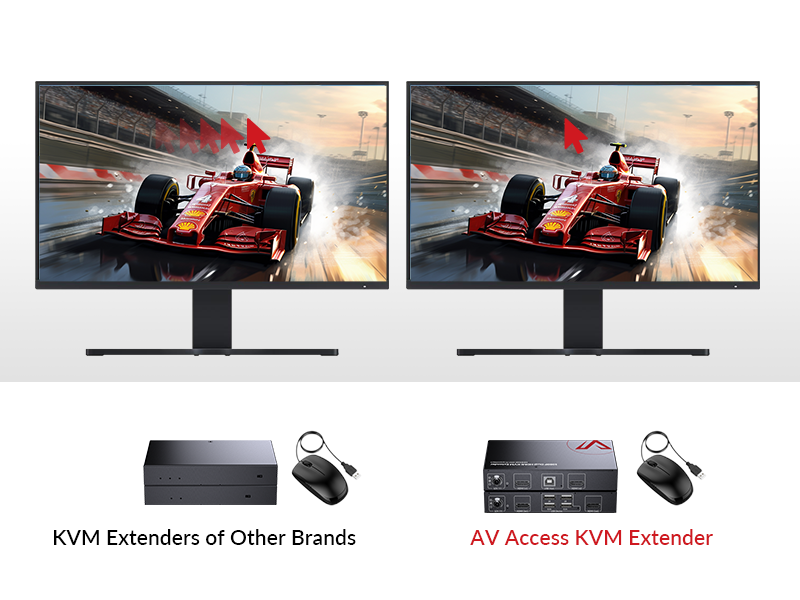
The AV Access 4K HDMI KVM Extender delivers ultra-high-definition 4K@30Hz and smooth 1080P@120Hz video over a single Cat5e/6 cable up to 120 meters. Featuring zero latency and 3 USB 2.0 ports, it enables seamless remote control of PCs and peripherals, making it ideal for gamers, professionals, and educational environments seeking reliable, plug-and-play AV extension.









| ASIN | B0DRF8S2L5 |
| Best Sellers Rank | 21,605 in Computers & Accessories ( See Top 100 in Computers & Accessories ) 71 in KVM Switches |
| Guaranteed software updates until | unknown |
| Manufacturer | AV ACCESS |
| Manufacturer reference | 4KEX120-KVM |
| Product Dimensions | 21 x 2.5 x 9.02 cm; 920 g |
T**Z
Exactly the solution I was looking for
I was looking for a way that I could have the same display from my PC HDMI go to my main monitor in my game room to the TV in my bedroom! I have this device hooked up to a HDMI splitter and then a CAT 6 cable running through the loft space into the bedroom wall and out behind the TV. I have a wireless mouse and keyboard and have the keyboard 2.4Ghz receiver plugged into the receiving end of this device since I use a wired keyboard at my desk and the wireless mouse is plugged into my pc and has very good range. The value for money is impeccable! The quality is excellent and it’s very easy to install, although to get it looking tidy and neat (for instance having the cable run through the ceiling into the loft and through the wall) it can get tricky if you have never done anything like that before! It’s the perfect solution though and works flawlessly! I am getting high fps (around 200 @1080p) which is plenty for me when I’m on a tv anyway and basically zero latency which is perfect for playing WoW in bed.
N**O
Brilliant - Zero latency and works on a switch with solid reliability.
I work at an audio post production facility and needed a solution to run some high res displays with no compromise on sync. These boxes have been perfect. I've currently got about 4 pairs running in different rooms some at 2560x1440 and others at 1080p. All have been extremely reliable with no issues at all. No drop offs, no sync issues. USB is solid as well. I'd highly recommend these despite there being slightly cheaper products. These are perfect.
J**R
Excellent Performance and Reliable
I don't usually leave reviews, but decided to for this product because it's a minefield knowing which KVMs are suitable for low latency applications. This one is excellent, as long as you have a dedicated run of Cat6 cable, isolated from the rest of your network. I use it to access my desktop at the other side of the house from my TV in the living room. This includes streaming, gaming and web browsing. It works well with wireless periperals (xbox controller, mouse, keyboard) and is very responsive. The PC can be woken from sleep by tapping a key on the keyboard in the living room. 1080p @ 60htz works well. I've used 4k @ 30htz too and it's good. The distance between the PC and the TV is about 30m and I'm getting no percievable lag - gaming feels exactly like it does on a monitor plugged directly into the PC (I'm not a competitive gamer though). Have found it to be very reliable - if it doesn't work it's usually been an issue with the PC being shut down or windows not liking different scren resolutions on monitor vs TV. Highly recommend.
A**.
it doesn't work on network over multiple switch
when connecting the devices over one single switch works fine but doesn't work over a network with multiple switch.
L**P
Works very well, clear, latency free image!
Bought this after having issues with a different HDMI USB Ethernet KVM, so far it's been working very well. The image is clean and the response time seems great, can't even tell the difference to having my PC directly connected. I use it with a racing simulator setup, which I have connected to my computer outputting 1080p/120hz. I did have to disable HDMI Deep Colour on my TV to get an image, after contacting support they told me it's because their unit doesn't support 4K/60hz only 30hz, which is stated in this description. I use 2 of the USB's for my steering wheel and pedals with a powered USB hub in the 3rd port, which I connect a wireless Keyboard and a USB wireless headset. I haven't experienced any issues after hours of use. My only issue with the device is that after using it and turning off the receiver end my PC still stays connected to the HDMI output so I have to unplug the HDMI to my graphics card for it to go back to the Display port which my monitor uses. Not a big deal though.
A**S
No lag kvm, works brilliantly
I needed a kvm to control a remote pc that runs our home automation. I decided to run a dedicated network cable between the tx and rx units. The result is amazing. There is zero lag from my key presses to what appears on my monitor, mouse control is equally lagless. It worked straight out of the box, no configuration needed. I would recommend running a network cable between the two units rather than using your lan for the best result.
M**Y
Good, simple, easy to install and use
Good, simple device to use. Quality could be better
C**Y
Easy to use plug and play
This is a very well made extender as you would expect from the price tag (£162), which I think it is a decent price but still an expensive piece of kit. The extender comes with a transmitter and a receiver, if you are doing a single extension then all you need to do is to plug in the HDMI cable and the USB cable from your computer to the transmitter, connect the transmitter and the receiver using a fast ethernet cable (CAT5 or above), then you got your USB ports on the receiver where you can plug your keyboard, mouse or whatever you want to control your computer. Both the transmitter and the receiver come with individual power adaptor that has 3pin UK plug or Europe plug converters. This extender allows me to take one ethernet cable up to my bedroom TV and I have full control of my PC downstairs on my TV. As if I was having a PC next to me but using a different my TV as monitor which is very handy to watch movies and even do a bit of gaming on the bed. In terms of performance, I have not noticed any latency. At 4K quality this can only run 30fps which is not so smooth but most games or videos I watch online do not need the full frame rate so it is enough for me. I don't have a HDMI splitter, therefore each time I go back to my PC downstairs I will need to unplug the HDMI cable and plug it back into the monitor downstairs, which is a bit of a pain. It could do with a HDMI out in the transmitter too so that I dont have to source my own splitter. Overall, this is a very simple solution to 'remotely' control your computer. It has a dip switch so it can form part of the one-to-many or many-to-many connections. The size of this is a lot smaller than the earlier generations KVM extender. It is not cheap but definitely very useful if it suits your need.
G**K
Funciona muy bien pero si piensas en conectar 4k mejor ve a por uno que sea 60hz que es un poco más de dinero
W**S
Goed product, werkt naar behoren. Relatief lelijk 'Waiting for signal' scherm wanneer de computer net is uitgezet, gaat weg na enkele seconden. Werkt goed
G**E
I purchased this set to replace a failing wireless HDMI transmitter I’ve used for years. Having been in the Commercial AV business for decades when I was younger and using Crestron and AMX HDBaseT systems, I was skeptical of such a simple inexpensive single wire system. With that in mind, I’m writing this review from the perspective of someone who has seen plenty of cheap HDMI extenders that were not HDCP capable/compliant wreaking havoc in distributed audio video systems. At this price, I thought why not give it a try. The setup: These devices were used to extend the (IP scaled) 4K UHD HDMI output of a Denon AVR-x2400 series AV receiver operating as an HDMI switch for 5 separate devices; Apple TV, DirecTV (Genie 75/500), Chromecast, WD HD Stream Plus, and a Samsung 3D Blu-Ray. These components are installed in my homes centralized distribution rack which sits ~15 linear feet downstairs from the Sharp Aquos Quattro display upstairs. This translates to ~40 feet of overall cable length due to the way it was run. I was pleasantly surprised at how easy this was to install. Even the most novice of users will find there is not much need for the instructions. I did find the instructions useful to decipher the 4 front panel lights. The transmitter and power supply sit at the distribution point connected to a simple field terminated Cat5e cable (meaning I ran and terminated it myself which also means it’s not “certified” Cat5e). The output of the Denon AV receiver is connected to the transmitter using a cheap 3 foot HDMI cable. NOTE: I mention the quality of these cables and terminations because many of the HDBaseT devices I’ve seen require some expensive or exotic deep color HDMI cables, a certified shielded Cat5 (or better) cable, and are intolerant to any line noise. I installed this in less than 15 minutes in the dark with the use of my Wife’s craft scissors, a couple of RJ45 connectors and a crimp tool that’s more rust these days than actual tool. If these devices work as well as they do for me given the redneck engineered 3 beer deep installation, even the most technically deficient (this would be most people’s mother) person can make this work EASILY. But I digress... I’ve fed the IR output of the HDMI transmitter into an IR distribution block that is being used to repeat infrared signals to ALL the aforementioned devices in the rack, a second zone amplifier and a CD player. It works perfectly using a male 1/8th” stereo to make 1/8” stereo connector (I originally used a mono to mono cable which worked, but none of the other 3 IR receivers in my house would function). This was an absolute requirement due to the distributed system being downstairs in a closet. The wireless predecessor was intermittently sending IR signals and would drop out completely in some situations. The receiver is mounted behind the TV in a manner that allows me to still monitor the front panel lights (just in case!). The IR receiver is attached to the front of the display and is nearly invisible to the untrained eye (its very unobtrusive compared to most - if utilitarian is your thing). The receiver is powered by the built-in Power Over Ethernet (PoE) supplied from the transmitter (downstairs). This is a HUGE benefit lending itself to the ease of overall installation. Although I didn’t try it, the single power supply can provide PoE to either the receiver or transmitter depending on which device is more available to be plugged into power. That means options and time saving. The picture is flawless. There is zero jitter or noise in the distributed signal. Native 4K programming as well as the IP scaled 2160 30hz signals are no problem for these little inexpensive gems. I was pleasantly surprised to find that this system also supports the audio return channel (ARC) of the Sharp display. Likewise, the AnyNet and Aquos Link functions work perfectly (this is basically remote control over HDMI - Google it). Given the single cable design and inexpensive nature of this purchase, I was not expecting the return path functionality to work, but there it was. One less remote control to mess with. WIN!! Overall, this system works perfectly and as advertised. I highly recommend them!
A**W
Dans mon cas, je l'utilise pour relier mon PC à ma télé (LG OLED C2), en utilisant un des port USB pour un clavier sans fil bluetooth. Je n'utilise pas de routeur entre les 2 boitiers. J'ai une bonne image en 4k et la limitation des 30Hz n'est pas percéptible pour les vidéeos sur youtube et autre service de streaming. Je n'ai pas testé le mode 1080p@120Hz en jeu. J'ai rencontré les problème suivant : _ Le signal ne passait pas (LED Signal qui clignotte) lorsque des boitier CPL étaient utilisés, sûrement à cause de la bande passante trop faible (même les modèle avec 2000Mbps de débit théorique). _ La connexion USB était instable (déconnexion intempestive) lorsque le boitier émetteur était relié à un port USB3. Le problème a été résolut en le branchant sur un port USB2. Le support du constructeur "AV Access" est très réactif, via leur ChatBot sur leur site internet. J'ai eu un conseillé réel en moins d'une minute, et pour les questions plus poussées, il fait appel à un technicien. Le seul inconvénient, c'est que le support se fait en anglais.
D**G
Worked fine until the power supply died after three months.
ترست بايلوت
منذ أسبوعين
منذ أسبوعين