Buy anything from 5,000+ international stores. One checkout price. No surprise fees. Join 2M+ shoppers on Desertcart.
Desertcart purchases this item on your behalf and handles shipping, customs, and support to Morocco.
🎯 Master your media kingdom with SofaBaton U2 — control redefined.
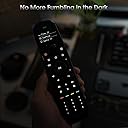
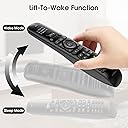
The SofaBaton U2 Universal Remote consolidates control of up to 15 devices into one ergonomic, backlit remote featuring an upgraded scroll wheel and app-based smart setup. Compatible with over 500,000 devices across 6,000+ brands, it supports both infrared and Bluetooth connectivity with a powerful 35-foot IR range. Custom macros enable multi-device commands on a single button, while the raise-to-wake OLED display and backlit keys ensure usability in any lighting. Designed for millennials seeking streamlined, tech-savvy home entertainment management, the U2 offers a modern, flexible alternative to cluttered remote collections.


| ASIN | B0DRP8MJ87 |
| Additional Features | Backlit, Digital Display, Ergonomic, Pre Programmed, Universal |
| Battery Type | AAA Alkaline |
| Best Sellers Rank | #6,411 in Electronics ( See Top 100 in Electronics ) #298 in Remote Controls (Electronics) |
| Brand | SofaBaton |
| Color | Black |
| Compatible Devices | DVD/Blu-ray Player, Home Theater, Projector, Set Top Box, Television |
| Connectivity Technology | Bluetooth, Infrared |
| Controller Type | Button Control |
| Customer Reviews | 3.7 out of 5 stars 210 Reviews |
| Item Weight | 0.31 Kilograms |
| Manufacturer | SofaBaton |
| Max Number of Supported Devices | 15 |
| Maximum Number of Supported Devices | 15 |
| Maximum Range | 35 Feet |
| Mfr Part Number | U2 |
| Model Name | SofaBaton U2 Universal Remote |
| Model Number | U2 |
| Number of Batteries | 2 AAA batteries required. (included) |
| Special Feature | Backlit, Digital Display, Ergonomic, Pre Programmed , Universal |
| UPC | 741421609891 |
| Unit Count | 1.0 Count |
| Warranty Description | 1 Year |
D**T
Impressive capability without complexity
As a former harmony enthusiast, when that company was eaten by Logitech and failed to update their product, I was pretty pessimistic about the future of universal remotes. For years, I just went back to having multiple remotes and with the advent of HDMI control. It wasn’t that bad however, whenever I wanted to change the settings of the picture or sound, which I do quite a bit, I was back to remote flipping. I honestly didn’t think a general universal remote could come close to what Harmony did so. I waited and waited. And then came the ultra expensive options (yikes). I knew that as good as those were, the amount of time would take to program them and set them up was going to be exhausting. I started to see positive reviews on sofa batons U1 so when the U2 came out, I still waited but eventually I just picked one up. With the improved back lighting and standard AA batteries, I knew they were on the right track. It only took me one session to get everything set up. My initial thought was “no activities”!? But I realized there was macros, and you could assign any button to any device Overriding any function on a set of custom remotes, which is honestly better in some ways and, more important, simpler. It’s really up to you to decide how you want to use things. One thing I will recommend is Define one button cross all devices (I use the input button) to use as a “fix it button” that will reapply the proper inputs and your preferred sound mode in case things get messed up or don’t complete. I was able to do that and many more things, even with the simpler architecture of the SofaBaton. As far as device button database is exhaustive, but fairly easy to search and find your devices as long as you know the model numbers. The remote supports infrared, unfortunately many devices nowadays use some form of RF and this just isn’t supported also with Bluetooth now becoming a standard in remote control that can make things a little bit difficult. So it will depend on how many of your devices use traditional infrared control, but I was able to get Apple TV working with Bluetooth and all my other devices through infrared very well As far as improvements, it would be nice to back up not only your device buttons, but your macros and everything but at least they have a backup function in case you need to reset the remote. But without the macros being saved, it seems kind of half solution. The only other improvement I could think of would be Support for a wider range, remote control like the aforementioned RF remotes and more than one blue Ray remote. That’s probably a bit too much to ask for and such as a simple device. But as far as infrared controls, it really seems complete and I couldn’t think of any major improvements.
M**N
Sony TV Owners - Don't Buy This Product
This product is, on the surface, very nice. It has a Bluetooth connected App on your iPhone for setup, a display that actually tells you what mode it is in when you pick it up, feels well made and is feature rich. Then why did I return it to Amazon for a refund? I have a TV, a TIVO Over The Air DVR and a multi-channel amplifier for surround sound. The TV talks to the Amplifier over the HDMI port, so it passes on the Volume control settings and switches modes seamlessly, between TIVO and it's internal streaming services. We were using just two remotes, the supplied TIVO one to watch regular TV channels, and a second for the TV itself, which we only picked up and used when we decided we wanted to Netflix or Amazon something. Then I rediscovered DVDs and my tidy world fell apart. We found streaming services were coming with a lot of constraints and shows we wanted to watch were now 'sublet' by other companies you have to sign up for additional monthly fees to watch. But, we also found Amazon sold DVDs containing entire series of shows at very reasonable prices. No contracts, no bleeding down our bank accounts month by month. Purchase and Done. Except to do this we now had to use the DVD remote to play DVDs and the Amplifier Remote to switch between the TIVO box and the DVD box. This is too complex. I bought the SofaBaton remote to solve this and was immediately enamored by it. To program it via the iPhone App you can actually choose the model number of your specific Sony TV and it finds the best code set. Gone was the challenge of paging through the instruction book to find the TVs section, then the Sony TV codes, only to discover there are 25 different codes for Sony TVs and you have to try each one at a time to determine which one comes closest to emulating ALL the keys on the original remote. I love this new concept of App programming, it was way overdue. So I chose my TV, my DVD player, my Amplifier. This was so neat! Except when I started using it. For some reason the SofaBaton remote handles powering the Sony TV poorly. It sends out repeat codes to the TV. When I switched off the TV with my SofaBaton the TV went off. Then barely two seconds later it turned back on again. This is the most stressful thing you can do to a piece of electronics. Power it down, and then power it back up before the electronics has had time to discharge fully and reset properly. It offers the greatest chance of breaking the electronics because it is caught in an intermediary state that is undefined. I lost and expensive TV due to a power brownout a few years back, that is a very similar stress event. It did it twice, and I was releived my TV was still operational after the ordeal. I didn't try it again. After calming down, I figured the remote is good but for this one flaw and tried to use its' Learning Feature to teach it how to behave properly by using the reliable remote that came with the Sony TV. So I successfully taught the Power Button for the TV on the SofaBaton and tried it again. And got the same stressful result. That was extremely frustrating and a real rookie mistake by SofaBaton that forced me to return the remote to Amazon for a full refund. Thank you Amazon for having a good return policy for defective products. If you don't have a Sony TV this is probably a very good remote, which is why I didn't give it just one star. This remote has a lot of potential. Just not in my house....
L**M
Universal All In One easy set up.
Was accumulating remotes. Needed an all-in-one universal type remote. Ordered it to give it a try. Works perfectly so far for the bedroom setup with one tiny hiccup. The TV, an Insignia NS-L32Q-10A is not the the database. Would not have been an issue as you could teach this remote from the old one, unless of course the old remote buttons are inoperative. The work around was to use the NS-L42Q-10A which is a 42 inch versus a 32 inch which I have. Works perfectly as it is the same model family. Will be setting this remote up, as a trial, in the living room and if works then will be ordering another one for that room. Easy to set up, easy to use.
D**R
Horrible option for those coming from Harmony/Logitech remotes
What a joke. I returned this junk in record time. In addition to the mention requirement of setting up an account (that was with me), they require you to have your phone on with location. Not general, but EXACT location. What possible reason would they need that info?! They blatantly (probably because the have to) tell you that they will sell this data to third parties. Unreal. The remote itself is not the replacement you want if you come from harmony remotes. Harmony makes it so easy to setup your situation. not here. No way to download software to your computer. Nope, complex setup via yet ANOTHER app for you phone. I returned mine and am going with another option, not sofabatron. No real easy option to hit a button and have everything setup for you. You have to do macros that won't be labeled on your remote. "Activities" on the harmony remote. Basically, this is just a bunch of remotes in one remote and you have to turn on everything yourself one by and one and set your inputs. F-
S**R
Some pros, lots of cons....you get what you pay for with this remote
Pros and cons with this successor to the good 'ole days when Logitech Harmony dominated this universal remote world. Pros: • Clean button layout and connectivity to SOME devices • This model is very inexpensive Cons: • The app is LOUSY and has a 2.4 App Store rating....I'm a Day1 iPhone user and can't remember having to be forced to use an app with such a low rating...the ratings don't lie ! • The devices display is wildly dim and hard to see in even a moderately lit room • Macros/Activities have to be connected to a single device, which is not intuitive to many less tech savvy users like family members...I had to create a how-to for my spouse and kids • Unlike the Harmony app/system, there are no remote codes for anything like AV receivers (e.g. Yamaha) for higher end users who need more options besides some simple soundbar etc BUT it was easy to manually configure/'learn' the commands from my AV receive that I needed • The macros are not 'smart' meaning if one of the controlled devices are already on, things get wonky immediately I'm curious if the next model up (twice the price) solves any of these issues...it works, but it's kind of meh if you're used to a much more dynamic and annoyance free experience.
Z**S
From 4 remotes to 1 in 5-10 minutes!
I’m very impressed with how easy it was to configure this remote for a new LG C5 TV (IR), Bose Sound Bar (IR), Apple TV (BT) and Amazon Fire Stick (BT). I inserted the 2 included AA batteries, downloaded the SofaBaton app and followed the app prompts. Within 5-10 minutes I had all of the above working without reading any instructions or watching any videos. Everything just worked from the get go with the exception of one minor issue with the Fire Stick configuration. Initially, I had to switch to TV mode to adjust the volume for that device. I had the SofaBaton remote learn the volumes up and down from the Fire Stick remote. Problem solved. The only additional info I needed was the exact model number for my TV and sound bar, and the knowledge that Apple TV and Amazon Fire Stick communicate with remotes via Bluetooth rather than IR. My goal when researching universal remotes was to find something that intuitively worked with all my devices, was backlit, and had rechargeable batteries. This Sofabaton U2 remote ticked those boxes with the exception of the rechargeable batteries. I’ll just use rechargeable batteries with a separate external charger. The raise-to-wake feature is a really nice bonus! I tried several other universal remotes before I found the U2, but those other remotes wouldn’t work with my LG TV, which wouldn’t pair with them. The build quality of the U2 remote appears to be excellent. It feels really good in the hand and has a good selection of buttons. It’s an impressive device.
J**M
Universal remote for IR use only.
U2 uses only Infrared interactions with TV, Cable box, Roku, and AV receiver. It was inconsistent in controlling equipment after set-up. The remote equipment data base at Sofabaton did not include info on the equipment I own, so I had to force U2 to learn directly from the equipment remote, which did not always work. I spent 2 weeks, ans bought two IR extenders trying to makew it work. I am giving up and returning it to Amazon.
B**Y
Is it as good as my Harmony One?
I have been using a Logitech Harmony One for years but it has finally worn out. Because Logitech no longer makes remotes I ordered the Sofabaton U2 backlit as a replacement. Is it as good as the Harmony One? No, but it’s quite good. I downloaded the app and got busy. Once you understand the app it is very easy to program the remote. But for those not tech savvy this may be difficult. I have programmed mine to operate a Samsung TV and soundbar. Also a Blu-ray player and my Duraflame electric fireplace. It took some tweaking but everything works. I was surprised my TV was not in their database but I got it working perfectly. For me this was a very good replacement for the Harmony One. Update: I love this remote! Once you learn to program it it is a great replacement for the Harmony. I would definitely buy it again. UPDATE: I love this remote.
Trustpilot
1 month ago
1 month ago