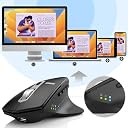
🖱️ Elevate your workspace—comfort, control, and connectivity in one sleek package!
The Arteck MD172 is a rechargeable, ergonomic wireless mouse designed for right-hand use, featuring silent clicks and the ability to connect simultaneously to three devices via USB-A, USB-C, and Bluetooth. Compatible with Windows, Mac, iPadOS, and Android, it offers up to 4 months of battery life per charge and includes dual nano receivers stored conveniently in the mouse.


| ASIN | B0BKL8VT9M |
| Additional Features | Ergonomic Design, Large Hand, Rechargeable, Wireless USB-A USB-C Bluetooth |
| Antenna Location | Office |
| Are Batteries Included | Yes |
| Are Batteries Required | Yes |
| Battery Average Life | 4 months |
| Best Sellers Rank | #63,748 in Computers ( See Top 100 in Computers ) #1,832 in Computer Mice |
| Brand | Arteck |
| Built-In Media | USB-A Receiver, USB-C Receiver, USB Charging Cable |
| Button Quantity | 6 |
| Color | Black |
| Compatible Devices | Personal Computer, PC, Laptop, Tablet, Mac, iPad |
| Connectivity Technology | USB-C Wireless, Bluetooth, USB-A Wireless |
| Customer Reviews | 4.5 4.5 out of 5 stars (807) |
| Enclosure Material | Plastic |
| Hand Orientation | Right |
| Hardware Platform | Laptop, Personal Computer |
| Item Dimensions L x W | 12.4L x 8.4W centimeters |
| Item Weight | 0.21 Kilograms |
| Manufacturer | Arteck |
| Model Name | Computer Mice |
| Model Number | MD172 |
| Mouse Maximum Sensitivity | 2400 Dots per Inch |
| Movement Detection | Optical |
| Number of Batteries | 1 AAA batteries required. (included) |
| Operating System | Windows 11, Windows 7 |
| Power Source | Battery Powered,Corded Electric,Rechargeable |
| Range | 33 feet |
| Style Name | Modern |
| Theme | Modern |
| Unit Count | 1.0 Count |
B**I
Not useful
Not useful
J**Y
Coming from the Logitech G502 this mouse is much more comfortable. I always found the low profile, elongated shape of the G502 on the small side with part of my palm constantly scraping the mouse mat. For this price tag there is no fancy stuff like programming mouse buttons without a third-party app. The Arteck does have two side buttons though, and the mouse wheel may be tilted right (but not left). Was also surprised how silent microswitches were! No annoying clicking noises like with a standard mouse. The mouse has a quality, cozy feel to it. Responsive and accurate, with a button at the top that cycles between 5 different DPIs i.e. sensitivities from very slow to very fast. Bluetooth is built-in, but the underside also houses two USB dongles (USB-A and USB-C). Power button is found just above the sensor, however the mouse does have auto-off if not used for a short time. Pressing the left or right mouse button wakes it which is fantastic. There is an LED indicator and a button on the side to switch between bluetooth and the two USB states. Battery is built-in which isn't what I'd normally prefer but at least the mouse isn't bulky or heavy because of this. You'll find a USB-C charger cable inside the box. Charging port is centered at the front, so you can use the mouse wired while it's charging.
L**M
Found this mouse by accident. Every day I use the MX Master 3 which is the KING of mice, IMO- this mouse -for a fraction of the price- feels and performs surprisingly well in comparison. In the hand, they feel very similar- the MX is more weighted and a bit better build quality. But for the price, the ARTECK holds its own. The only major function the ARTECK is missing is a side scroll function. (The mouse wheel has a feel like it would side scroll when pushed side to side- but sadly it doesn't.) If it feels like its sliding funny on a surface, make sure you take off the 3 plastic protection covers on the bottom! Connection options are solid- USB-A, USB-C via dongles stored in the base, and Bluetooth. So you can use 3 different devices via those options at once, switching between them. Only one BT device can be connected at a time, but with PCs, just holding down the BT button pops up a nearly instant connection prompt in Windows- you can easily switch between multiple BT enabled PCs. Connecting to Android was seamless as well. Several levels of DPI to select from will get you the feel you prefer. SOFTWARE- don't let the lack of mouse software for the ARTECK discourage you. You can use readily available mouse software for Mac or PC to assign the buttons function, both globally and application specific. For Mac, I recommend SteerMouse. It recognizes as "Device" and you can assign the middle click wheel button and two side buttons to do anything you like. Unfortunately, SteerMouse isn't free. For Windows, get the absolutely excellent (and free!) X-Mouse Button Control. The ARTECK uses Middle-click and Buttons 4 and 5. You can assign globally or application specifically. For example, I use this mouse in Adobe Premiere to call up frequently used shortcuts. Everywhere else it just does the global forward/back. Using either of these on Mac and PC I was able to make the ARTECK perform for my needs almost as good as the MX Master 3- the only major function missing is side-scroll. This is a pretty big mouse, so if you have small hands you may not like it. If you're used to a mouse like the MX-M3 or have wanted one but balk at paying so much for a mouse- the ARTECK is an absolute NO BRAINER! For this price you're getting a really good mouse.
M**O
Usando e parece ser bom, continuo fazendo o texte.
S**A
Pros: + Glides smoothly and responds well on either the desk surface or a mouse pad + Great connectivity. Having the USB-C and USB-A option means I can seamlessly switch between my laptop and PC. The Bluetooth option is a good backup in case I am using my laptop and either forgot the USB-C dongle at home or need the port for something else. + Battery life is good and it's rechargeable! Beats buying new batteries regularly + I like that Arteck has a 2 year warranty just in case + The extra buttons for going to the next page/last page when web browsing are convenient + I appreciate the thumb rest + Good price Cons/Extra things to consider - It sleeps due to inactivity, which is good for the battery. But it wakes up with a left-click, which registers and might have unintended consequences (e.g. closing or opening a program) depending on where your cursor is on the screen. - Seems to be designed for larger hands - Once the battery degrades (as all batteries do), you probably have to replace the mouse - Due to asymmetric design, it's not ideal for left handed users
L**Y
I recently purchased a mouse and keyboard combo from Arteck and was very impressed with it, so I decided to purchase another product from them as I needed a wireless mouse for my laptop. The mouse I required had to have multiple ways of connecting to a computer or laptop, in particular a usb c receiver and bluetooth (I try to stay away from dongle town where possible). The mouse can also be connected to a pc using a usb a receiver. This mouse ticked all of those boxes. Please note I am writing a day one review, so the only thing I cannot comment on is battery life thus far. However, what I can say is, just buy it! Fantastic product for a steal of a price, £18 at the time of writing the review. Build quality is excellent and represents products that are charged for much more. The mouse is weighted well and feels comfortable to maneuver. As mentioned above, it can be connected in 4 ways! It has a usb a receiver, a usb c receiver, bluetooth connectivity and the option to wire it in with usb c. It really is plug and play. The mouse is silent but provides good tactile feedback through clicks and the scroll wheel. There is a dpi button on top with different presets if you need the mouse to be more or less sensitive. There are 3 LED's on the side which you can cycle through via a button so you know how the mouse is connected to a device i.e. bluetooth or usb a. I literally cannot think of any negatives and am shocked that this mouse is this cheap. I've gone through much more expensive products, but for the price, you can't beat it!
ترست بايلوت
منذ شهر
منذ أسبوع