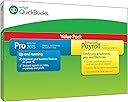


📈 Elevate your small business accounting game with QuickBooks Pro — where efficiency meets control!
QuickBooks Pro Small Business Accounting Software with Enhanced Payroll 2015 offers an easy-to-use, integrated solution for managing finances and payroll. Featuring one-click reporting and a 1-year prepaid Enhanced Payroll subscription, it’s designed to save time and simplify tax filing for small businesses. Trusted by millions and backed by Intuit’s industry expertise, this software is ideal for businesses with fewer than 10 employees seeking reliable, cost-effective accounting tools.
| ASIN | B00MCLG0UY |
| Customer Reviews | 3.6 3.6 out of 5 stars (184) |
| Date First Available | September 22, 2014 |
| Is Discontinued By Manufacturer | No |
| Item model number | 424340 |
| Manufacturer | Intuit |
| Product Dimensions | 11 x 0.75 x 7.75 inches; 8 ounces |
T**H
Decent product for the price
I use this product as a small business owner that also does bookkeeping for a half dozen small businesses on the side. I end up purchasing this every year just for the Enhanced Payroll subscription...going on 8 years now. Intuit is the 800 lb gorilla in the industry. There are lots of other options and wannabe's but few have the ubiquity, quality, and versatility--all for a reasonable price. Is it perfect? No. Is it garbage? Absolutely not. Most of the negative reviews seem to be people frustrated that a better or easier or cheaper alternative isn't readily available. Of course I wish I could still find it for less than $100 like only a few years ago, but that ship has sailed. For what it offers, it's a decent product. On the rare occasion I need to interact with customer service, it is frustrating. I have had 2-3 positive interaction over the past few years but most suffer from long wait times, transferring to other departments to resolve multiple issues, etc. If you can avoid needing customer service, the product is a decent value compared to alternatives. Pros: Reliably interfaces with outside applications and parties. Reporting customization and simplicity has improved. For my small business (less than 10 employees), the monthly fees for direct deposit payroll are reasonable. Keep in mind that for larger companies (50+ employees), the direct deposit fees quickly get expensive. Cons: My biggest irritation with QuickBooks is the limited number of institutions that allow for free electronic data download. Most credit unions allow for importing into QuickBooks without an additional fee. Most banks charge $20-40 PER MONTH if you want to download transactions electronically. VERY FRUSTRATING. I don't know if Intuit assesses a fee on the banks who are then marking it up for their customers, but it is ridiculous. Oddly enough, Quicken downloads (an Intuit consumer product) are almost always free. I'll just keep dreaming that this will get fixed. Until then, I'll keep steering my business clients to use credit unions or manually enter data so they can save a little cash. I have to cancel my auto-renewal every year to avoid Intuit's exorbitant renewal fee--it is always cheaper to purchase a new copy.
R**Y
Five stars
I read all the negative reviews lately on this product and hesitated buying after using quickbooks for the last 18 years. Went ahead and purchased this morning, Downloaded and installed without any problems. Called Intuit to activate the payroll, spent about 15 minutes on the phone with a very helpful lady. Activated the payroll with no issues, did have to update my credit card due to different charge date. Already knew about the $2.00 per month per employee charge as had to do that with 2014 version. It still comes out cheaper than buying the old enhanced payroll for more than 3 employees when you only have 4 or 5 employees.
S**1
Their customer service isn't all that bad. I've called them twice to get my software ...
Their customer service isn't all that bad. I've called them twice to get my software working properly and was connected to a live person within 3-4 minutes on a Friday. The reps are not based in the US but they speak English just fine. Do allow a fair amount of hold time while the reps get issues resolved. I kept getting a server error from Intuit when entering my credit card info to activate the payroll and the rep wasn't having any luck either. Total time spent on the phone was over an hour to get the old payroll cancelled and the new payroll activated. The Quickbooks Pro 2015 portion upgraded from the 2014 flawlessly from the CD. The only problem I had was with the enhanced payroll. A couple of comments if you are upgrading from a previous version of Quickbooks payroll by buying this software (instead of paying Intuit's much higher auto-renew fee): (1) If you have activated payroll before, you need to delete the service key before you can activate the new payroll subscription. If you have direct deposit activated, Quickbooks will not let you delete the old service key. You will need to get one of their reps to deactivate the direct deposit first. Then you can delete the old service key and start fresh. Quickbooks will not give you a way to install a new payroll subscription until you do this. (2) A lot of people complain about the payroll auto renew but you can call Intuit and opt out of the auto renew. Also you can cancel your subscription before your auto renew date. Intuit provides the following instructions to cancel: Option1: Cancel your payroll service in QuickBooks: Go to Employees menu> My Payroll Service> Account/Billing Info. Sign in using your Intuit Account login. The Account Maintenance page will open. In the Service Information section, click the Cancel link. Proceed with the process to cancel your payroll service. Yes, the fees are annoying. You can pay only one employee without surcharges but any more will cost you $2/month. And having to pay $289 for a new payroll subscription annually (versus the $400+ auto renew rate) isn't fun. But the software runs well and I can pay my employee after entering her hours and the taxes and deductions all automatically calculate and then I also pay the tax withholding by clicking a few buttons all through Quickbooks. All those pesky federal and state forms, taxes and unemployment, W-2s, print out from Quickbooks with the numbers filled in. What you pay for here is convenience. Is my time running weekly payroll and filing a plethora of quarterly and annual forms worth $289? I say yes.
M**K
Great product, just costs more with every required upgrade
Installed seamlessly with my QB Pro 2012. It actually boots up faster. I like the new look. I wish the icon buttons could be color coded for easier recognition. The light blue over the dark blue buttons blend together too much. It took about 15 minutes to locate everything that I needed to be operational again. I am not completely sure what the exact costs will end up being for the payroll portion. I assume that there will be the yearly charge and then the additional monthly charge per employee, I wish there wasn't such a push to find ways to increase revenues for Intuit but it is still a very solid product.
ترست بايلوت
منذ شهرين
منذ شهرين