Buy anything from 5,000+ international stores. One checkout price. No surprise fees. Join 2M+ shoppers on Desertcart.
Desertcart purchases this item on your behalf and handles shipping, customs, and support to Morocco.
🚀 Elevate your workspace — type, scroll, and switch like a pro!
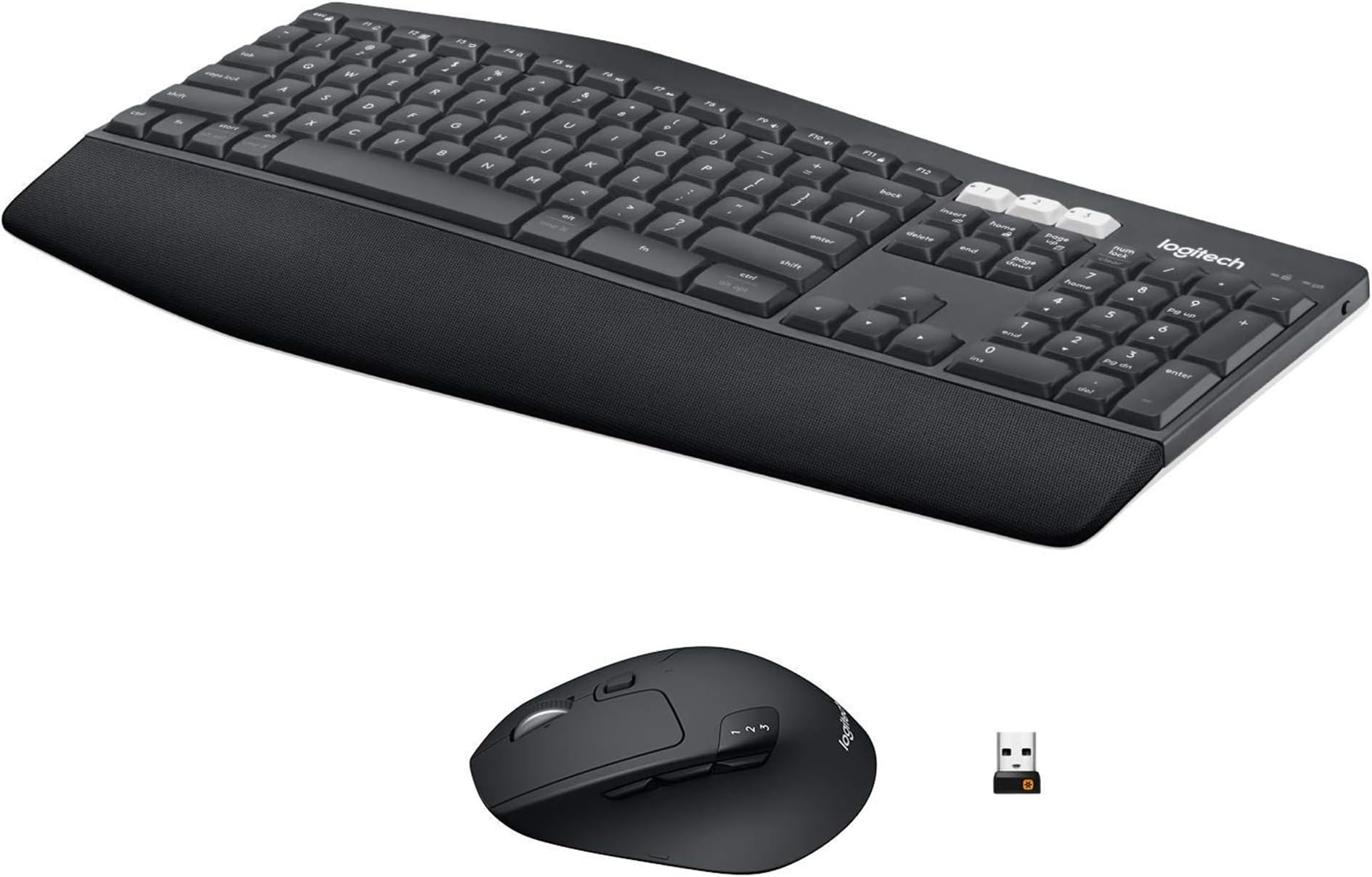
The MK850 Performance Wireless Keyboard and Mouse Combo by Logitech offers a full-size ergonomic keyboard with cushioned palm rest and concave keys, paired with a contoured right-handed mouse featuring a hyper-fast scroll wheel. Designed for professionals juggling multiple devices, it supports seamless switching and pairing across up to three devices via Bluetooth or USB receiver. Enhanced by Logitech DuoLink software, this combo enables custom workflows and smarter navigation. With ultra-long battery life and compatibility across Windows, macOS, and ChromeOS, it’s built for productivity and comfort in any modern workspace.


| ASIN | B0D2X9NM1V |
| Antenna Location | Office |
| Are Batteries Required | Yes |
| Best Sellers Rank | #15 in Computer Keyboard & Mouse Combos |
| Brand | Logitech |
| Color | Graphite |
| Compatible Devices | Laptop, Personal Computer |
| Compatible Operating System Family | Windows |
| Connectivity Technology | Radio Frequency , Usb |
| Customer Reviews | 4.2 out of 5 stars 645 Reviews |
| EU Spare Part Availability Duration | 7 Years |
| Hand Orientation | Right |
| Item Weight | 30.56 Grams |
| Keyboard Description | Membrane |
| Keyboard Layout | QWERTY |
| Manufacturer | Logitech |
| Mfr Part Number | 920-013269 |
| Minimum Required Operating System Version | ChromeOs 134, Windows 10 |
| Model Number | 920-013269 |
| Movement Detection | Optical |
| Number of Batteries | 1 Nonstandard Battery batteries required. (included) |
| Operating System | Chrome OS, Linux kernel 2.6+ USB port, Windows: 10 or later, macOS: 10.15 or later |
| Other Special Features of the Product | Wireless, Ergonomic Design, Rechargeable |
| Power Source | Battery Powered |
| Special Feature | Wireless, Ergonomic Design, Rechargeable |
| UPC | 097855200020 |
| Unit Count | 1.0 Count |
| Warranty Description | 1Year Limited Hardware Warranty |
J**L
Good product
Great combo, all my employees have switched to this. Comfy, good battery life, and never have issues with them.
M**.
Great choice for toggling back/forth between multiple devices!
Great quality, 100% recommend. Best feature is smooth transitioning between 3 paired devices (laptops) by simply clicking the designated program number (1,2 or 3).
R**R
Excellent design, functionality, can use on up to 3 devices at 1 time
This is a comfortable keyboard with the perfect cupped area on each key which will make you a speed typer and all the function buttons are easy to find and use. Wish it had backlit keyboard, The Mouse is a dream - No hand cramps and you can scroll through pages quickly with you mouse's roller - fastest one I've ever had -- I use it at work for 10-14 hour days no hand cramping. BONUS: use the keyboard and mouse on up to 3 different devices ie; Laptop, IPad and Phone to send a text etc just set them up. Worth the $ ,
G**S
Buyer beware
Read the reviews and like an idiot I still purchased. The key board is DOA. Replaced battery, tried both Bluetooth and usb connection. Downloaded Logitech app nothing worked. The mouse works but the center wheel has no tention and free spins.
D**.
Not as you would expect, but read my review
I have had a love-hate relationship with Logitech combo Keyboard and Mouse kits. I'm stretching it to even give this kit 4 stars. Use the unifying USB plug and don't setup as a bluetooth device. I have had this kit for 2 weeks and every single day there have been more than two dozen times I have wanted to launch my super-deluxe mouse off the top of a 20 story building. Brand new Lenovo P3 computer and this brand new wireless keyboard and mouse, and I have been screaming at the mouse all day, every day for 2 weeks. Mouse scrolling 1 page at a time, even though all settings are set to 1 line at a time. You can't move the mouse with precision, it lags or just goes away for a few seconds then comes back. Uninstalled and reinstalled - HORRIBLE. Finally, after two weeks, I downloaded the Unifying drivers, plugged in the USB dongle and FINALLY!!!! I have a mouse that works. I noticed that every few seconds, in my Windows 11 Pro Bluetooth settings window, the dang mouse would disconnect and reconnect 20 times in a minute. For testing I still have my keyboard connected via bluetooth and so far it is holding up well, but NEVER, Ever, ever, never, connect this nice- but garbage mouse via Bluetooth. You know, it seems to be typical of Logitech. I have never had a wireless combo set where eventually the keyboard and mouse become projectiles across my office. But at least when I want to scroll down with the mouse wheel, it does move down instead of scrolling down will scroll down, then up then down again like a different name-brand manufacturer's wireless mouse does. Oh that really bothers me. So I typically don't do lengthy reviews, but what a garbage mouse when you connect via bluetooth (with all drivers up to date), just save yourself the frustration and use the Unifying usb dongle to at least connect the mouse. It works perfectly as advertised and I am now, finally, able to enjoy this wonderful combo set (but I'm keeping the wired mouse close by for a while).
B**.
Take your time syncing up. It’s worth it!
My work is so much more efficient!!!
S**E
Pretty good
Nice set up coming from a laptop. Still getting use to the keyboard but its comfortable and the mouse is amazing
J**.
These keyboards and mice have great range.
After three tries, I finally found a seller that actually sent a NEW product instead of used. Beware of sellers selling used items as new. This seller ships new as advertised.
A**.
Quality and response
This combo is incredible, keys are very smooth and mouse very precise. Made the mistake of buying knock off before and just wasted my 60$. Price really worth it for the quality.
D**A
Distribución de teclas en inglés
Excelente equipo. Compré esta versión que trae el teclado en inglés de USA.
I**A
Can't beat at this price
This set is more or less what I was looking for and the right cost to value ratio in my eyes. I do enjoy quality electronics and office supplies so my first thought was to buy the MX keys S + MX master 3S but it just didn't make sense to pay over X3 as much for standard computer equipment, despite its obviously superior design and build. This set is still nicer than the cheaper ones and although it is still plastic all around, seems to be slightly thicker and of higher quality. The switches on both mouse and keyboard make it easy to switch control between my desktop and laptop without the mess of an extra set. The keyboard is as convenient as any other keyboard. It does have an attached wrist support which is nice and easy to clean but too bad that it can't be separated. The mouse is more impressive and has 3 customizable buttons, lateral scroll wheel control + physical scroll adjustment button. I did set it up but can't say I've used any of those features so far. Design wise not much to write home about, I liked the white touches on the switch buttons and underside of both keyboard and mouse (although you don't see it if you don't lift it). I would have liked more multimedia controls on the keyboard. One pet peeve: I preferred my previous keyboards layout for the windows key. The ctrl FN start and alt buttons here are all the same size and textually labeled for both PC and Mac, but I actually appreciated a bigger windows button with the windows logo on it which most keyboards seem to have (not just the Microsoft ones). Takes me a microsecond longer to spot it but time accumulates. All in all this set is probably good enough for 90% of users.
A**O
Good keyboard + mouse set for home office.
This is the second set that I bought for my wife this time. Works well, I like that you ca switch between 3 different PCs directly from the keyboard or mouse.
M**E
Seems good for the price.
The mouse and keyboard seem decent for the price. It's nice that there's a caplock + num lock light on the keyboard (my old one was missing that feature, and I found it really annoying after a while). Mouse has a nice weight to it and feels nice to hold. The keyboard feels good to type on. Still getting used to the slight curve to it though, but I'm sure I will get used to it (more muscle memory issues from my old keyboard than anything). Ordered an extra USB tongle so I can hook my MAC up to it as well (you can press a button to jump to another computer), so that might save me some desk space and stopping me looking like an idiot using the wrong mouse to control the computer.
Trustpilot
1 month ago
2 weeks ago