


Buy anything from 5,000+ international stores. One checkout price. No surprise fees. Join 2M+ shoppers on Desertcart.
Desertcart purchases this item on your behalf and handles shipping, customs, and support to Morocco.
🖨️ Effortless wireless printing for the connected professional
The LK300W Wireless Print Server enables sharing of up to 3 USB printers over a local wireless network with a simple 2-step setup. Compatible with most major printer brands and protocols (RAW, IPP), it enhances office productivity by eliminating physical connections while ensuring secure LAN printing. Ideal for professionals seeking streamlined, multi-printer management without complex installation.


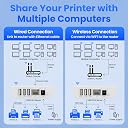


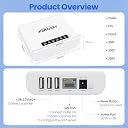
| Best Sellers Rank | #3 in Computer Networking Print Servers |
| Customer Reviews | 3.7 out of 5 stars 99 Reviews |
O**S
Works great and easy setup
Yay! I have an older laserjet that does not have wireless connections, so now I have one less long USB cord to mess with! I wish that I had bought this years ago. It was super easy to setup and I've not had any issues using it.
A**R
Garbage
Worked great for about 2 months. After that, it started losing connection to my network atleast twice a week. I then have to go through the steps to connect it again to my network. Its a POS.
C**T
Tech support not the best, but if it detects and configures the printers correctly, it works great.
This installed easily after you downloaded the correct software, and detected the printers. The only issue I had is that it detected my mono laser printer as a color printer and there was no way to change it. I deleted the printer from the device, reinstalled and it still configured it as the incorrect printer. I have a Canon color ink jet printer and it was configured correctly but the lexmark E260D was not.
C**.
It works!
Setup can be unclear but once it’s set, it works perfectly. Buying a second one for another use.
S**N
Great unit!
This print server works great in my Windows 11 environment! It brought my old HP Laserjet 1320 USB printer into the modern era of WIFI printing. PS: After I wrote this review, the company was nice enough to advise me how to use this product for MAC computers as well. Although the quick installation tool is not yet available for Macs like it is for Windows, I was able to successfully install this print server on my Mac book Pro using the manual method suggested by the company and which is also shown in the instruction manual.
L**A
Missing idems
I have no power cord
D**.
Don't waste your money
Don't waste your time, You will have to pay for a license after you install it. It is not a seem less install either
B**R
It Works.....Finally!!!
Revised: Started working once I added it to my WIFI. But spent 2-3 hours trying to figure it out. Ugh! Works great. Worth the money for the 3 devices that you can connect.
H**E
使えますよ
まあ使えましたね 中華でちょっと怪しげではあったものの現状ブラザーのレーザーがWIFIで使用できてます。ただし設定には多少のネットワークの知識が必要かもしれません あくまでポン付けのUSB機器ではないので
U**3
今となっては貴重な使えるプリントサーバー
今となっては貴重なプリントサーバー。標準でLANポートがあるものが大半だけれど、デフォルトで2ポートあるものとかはまず無いし、オプションで用意されていても古いものだと廃盤になってたりするので、まだ需要はあるかと。 複合機、Ricoh MP C2503がまさにそうで、LANポートは一つあるものの、別なネットワークでもルータ越えせずにそのまま2つのネットワークで使いたくて、レビューとメーカーページを参照した上で入手。 結果、メーカーからDownload した設定アプリではプリントまで行かず(苦笑)。 知らない人ならここで「ダメじゃん」と諦めるところだろうけれど、プリントサーバーにログインしたあと、固定IPを設定。その固定IPを使って昔ながらの方法(TCP/IP)で設定していき、Genericと進めていくと途中からRicoh C2503を見つけてくれて、予め用意していたRicohのドライバーを選択し設定していったら、無事使えるようになりました。 メーカーのアプリでダメでも手動で自身で設定すればOKなのだけれど、それなりのスキルも必要だったりはします。が、Wi-FiでもEthernetでも使えて、いざとなれば固定IPで手動で設定とか汎用性があり、使える可能性が高いと思います。 5ポートのHubぐらいのコンパクトさもいいと思います。 【追記】 安定して使えるのがわかったのと、他メーカーの同様のより安価なモノは(レビュー読んでると)ちょっと不安なのと、これが無くなると困るので、予備でひとつ追加しました。
D**C
Amazing Product
This is amazing product. Allowed my old USB printers to be connected to my network in no time. I am really happy with this product. Installation was easy and user friendly.
か**う
現実的に使える製品だったよ
プリントサーバーは、今となっては必ずしも必要な製品ではないかも知れません。プリンターを複数台のPCで使うなど、オフィスではよく使いますね。本製品は、私がここ1年で複数買ったプリントサーバーで、唯一正常に使えたものです。それだけでもお勧めです。 他に、無線LANに接続することで、スマートホンでもプリントさせることも出来ます。但し、専用アプリケーションは有料でした。
M**.
上位互換品LK100EWのほうが手堅いかも
スキャナGTS650は動きませんでした(このサーバーがスキャナを認識しているところまでは確認したが、PCから認識や操作ができない)。双方向通信を要求しないプリンタ専用、あるいはプリンタを(コントロールパネル等で)双方向をオフにして使うっぽいです(後日追記:双方向通信には対応しているかもしれないです)。無駄買いをしたくない方、スキャナやメーカー専用ドライバを使いたい方は、双方向を銘打っているものやUSBデバイスサーバー(これの上位互換品100EW等)のほうが手堅いかと....。こういう検証は面白いんですけどお金かかりますね...。
Trustpilot
1 month ago
2 weeks ago